
Retevis RM01P
Retevis RM01P Marine Radio Instruction Manual
Model: RM01P
Introduction
The Retevis RM01P handheld marine radio is designed for reliable communication in marine environments. Its lightweight and compact design, combined with features like IP67 waterproofing, vibration water draining, and floating capability, ensure durability and ease of use. This manual provides essential information for setting up, operating, and maintaining your RM01P marine radio.
Product Overview and Package Contents
The Retevis RM01P marine radio comes with the following components:
- RM01P Marine Walkie Talkie (1 unit)
- Battery (1 unit)
- Car Charger (1 unit)
- Belt Clip (1 unit)
- Manual (1 unit)
- Adapter (1 unit)
- Type-C Charging Cable (1 unit)
- Lanyard (1 unit)

Key Features
- Lightweight and Portable: Designed for easy carrying and single-hand operation, weighing approximately 136g.

Image: A person holding the lightweight Retevis RM01P marine radio, highlighting its compact size and portability with dimensions shown. - IP67 Waterproof and Floating: Withstands immersion in 1 meter of water for 30 minutes and floats if dropped, ensuring retrievability.

Image: The Retevis RM01P marine radio floating in water, demonstrating its IP67 waterproof rating and floating design, with icons for floating, IP67, and vibration water draining. - 1750mAh High-Capacity Battery: Provides approximately 15 hours of continuous use and 66 hours of standby time.

Image: The Retevis RM01P marine radio displaying its 1750mAh battery capacity, with indicators for 15 hours work time and 66 hours standby time, and a close-up of the Type-C charging port. - Type-C Charging: Convenient and versatile charging via a Type-C port.
- NOAA Weather Channels: Access to 10 NOAA channels for real-time weather alerts and maritime safety.

Image: The Retevis RM01P marine radio displaying weather icons, indicating its 10 NOAA weather channels feature for real-time alerts. - 88 Global Channels & CH16 Emergency: Provides a wide range of communication channels, including a dedicated CH16 for distress calls.
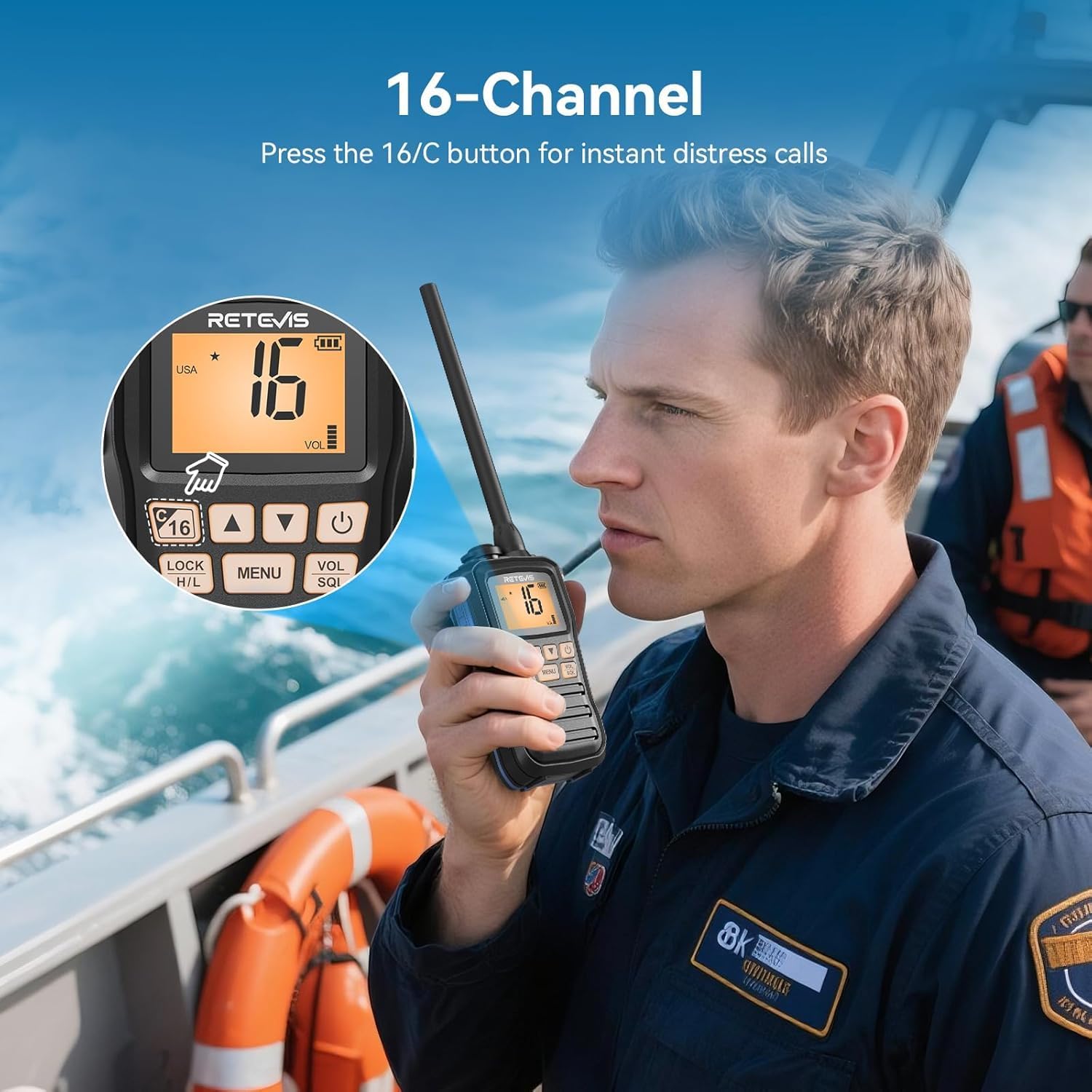
Image: A person pressing the '16/C' button on the Retevis RM01P marine radio, illustrating the quick access to the emergency channel 16. - Dual/Triple Watch: Allows simultaneous monitoring of the current channel, CH16, and a call channel.
- Vibration Water Draining: A function to expel water from the speaker and microphone grille, maintaining clear communication.
Setup
1. Battery Installation
- Ensure the radio is powered off.
- Locate the battery compartment cover on the back of the radio.
- Open the cover and insert the provided 1750mAh battery, ensuring the contacts align correctly.
- Close the battery compartment cover securely until it clicks into place.
2. Charging the Battery
Before first use, fully charge the battery.
- Connect the Type-C charging cable to the radio's Type-C port.
- Connect the other end of the cable to the provided adapter or car charger.
- Plug the adapter into a standard wall outlet or the car charger into your vehicle's 12V socket.
- The charging indicator on the radio will show the charging status. Once fully charged, disconnect the charger.
3. Attaching Accessories
- Belt Clip: Align the belt clip with the designated slots on the back of the radio and slide it down until it locks.
- Lanyard: Thread the lanyard through the loop on the top or side of the radio for secure carrying.
Operating Instructions

1. Power On/Off
- To power on, press and hold the Power button until the LCD screen illuminates.
- To power off, press and hold the Power button again until the screen turns off.
2. Channel Selection
- Use the Up/Down arrow buttons to navigate through the available channels (1-88).
- Emergency Channel 16: Press the dedicated 16/C button for immediate access to Channel 16 for distress calls. Press it again to return to the previous working channel.
3. Transmitting and Receiving
- To transmit, press and hold the PTT (Push-To-Talk) button on the side of the radio. Speak clearly into the microphone.
- Release the PTT button to stop transmitting and return to receive mode.
4. Volume and Squelch Adjustment
- Use the VOL/SQL button to adjust the volume.
- The squelch level can also be adjusted via the menu to filter out weak signals or background noise. Refer to the menu section for detailed instructions.
5. High/Low Power Selection
- Press the LOCK H/L button to toggle between High (H) and Low (L) transmission power. High power is for longer distances, while low power conserves battery.
6. Dual/Triple Watch Function
- Activate Dual/Triple Watch through the radio's menu. This feature allows you to monitor your current working channel while also scanning Channel 16 and/or a designated call channel for activity.
7. NOAA Weather Channels
- Access the 10 NOAA weather channels via the menu to receive real-time weather forecasts and alerts. This is crucial for maritime safety.
8. Vibration Water Draining
- If water enters the speaker or microphone, activate the vibration water draining function (usually found in the menu or by a specific button combination) to expel the water and restore clear audio.
Maintenance
1. Cleaning
- Wipe the radio with a soft, damp cloth. Do not use harsh chemicals or abrasive cleaners.
- Ensure the Type-C port cover is securely closed when not charging to maintain waterproofing.
2. Water Draining
- After exposure to water, especially saltwater, rinse the radio with fresh water and then activate the vibration water draining function to clear any remaining water from the speaker and microphone.
3. Battery Care
- Avoid fully discharging the battery frequently.
- Store the radio and battery in a cool, dry place when not in use for extended periods.
- Do not expose the battery to extreme temperatures.
Troubleshooting
| Problem | Possible Cause | Solution |
|---|---|---|
| Radio does not power on. | Battery is low or not installed correctly. | Charge the battery. Ensure the battery is correctly inserted and the compartment cover is secure. |
| Cannot transmit or receive. | Incorrect channel selected, squelch too high, or out of range. | Verify channel selection. Adjust squelch level. Move closer to the other radio or base station. Check if the PTT button is functioning. |
| Poor audio quality or distorted sound. | Water in speaker/microphone, low battery, or interference. | Use the vibration water draining function. Charge the battery. Move away from sources of electrical interference. |
| Radio floats but does not transmit after being in water. | Water may have temporarily affected internal components or speaker/mic. | Perform water draining. Allow the radio to dry completely. If issues persist, contact support. |
Specifications
| Feature | Detail |
|---|---|
| Model Number | RM01P |
| Brand | Retevis |
| Waterproof Rating | IP67 (Submersible up to 1m for 30min) |
| Special Features | Floating, NOAA Weather Channels, Vibration Water Draining |
| Number of Channels | 88 Global Channels |
| Frequency Range | 156.025-157.425 MHz |
| Battery Capacity | 1750mAh |
| Battery Life (Continuous Use) | Approx. 15 hours |
| Battery Life (Standby) | Approx. 66 hours |
| Charging Port | Type-C |
| Item Weight | 13 Grams |
| Parcel Dimensions | 22.4 x 19.8 x 7.2 cm |
| Included Components | Radio, Battery, Car Charger, Belt Clip, Manual, Adapter, Type-C Cable, Lanyard |
Warranty and Support
Warranty Information
Retevis provides a 2-year warranty for the radio body and a 1-year warranty for accessories. A 30-day no-reason return policy is also offered.
Beyond the warranty period, maintenance services are available, with buyers responsible for associated costs.
Customer Support
For any inquiries or support needs, please contact Retevis customer service on Amazon. Responses are typically provided within 12 hours.
Related documentsRM01P


Ask a question about this manual
Ask about setup, troubleshooting, compatibility, parts, safety, or missing instructions. Manuals+ will review the question and use this page’s manual context to help answer it.