
1. Introduction
Thank you for choosing the PowerUrus R100 Portable Power Station. This device is designed to provide reliable power for various applications, from outdoor adventures to home emergencies. It features a high-capacity LiFePO4 battery, multiple output ports, and advanced safety protections. Please read this manual carefully before use to ensure safe and optimal operation.
2. Product Features
- High Capacity: 89.6Wh (3.2V, 28000mAh) LiFePO4 battery for extended power supply.
- Versatile Outputs: Equipped with 1 AC outlet (100W continuous, 200W peak), 2 USB-A QC 3.0 (18W each), 1 USB-C PD (100W), 1 USB-C PD (30W), and 1 DC 5521 (12V, 5A, 60W max) port.
- Multiple Charging Options: Supports solar panel charging, car charging, and PD 65W fast charging.
- Advanced Safety: Built-in Battery Management System (BMS) provides protection against over-voltage, over-current, over-charge, over-temperature, over-discharge, and short circuits.
- Compact and Portable: Lightweight design (1.15 kg) with an ergonomic handle for easy transport. Dimensions: 16.5 x 10 x 8.5 cm.
- Integrated LED Light: Features a bright LED light with 2 brightness levels and 2 modes (including SOS) for emergency situations.

Image: The PowerUrus R100 Portable Power Station connected to multiple devices, illustrating its 89.6Wh battery capacity and various output ports including USB-C PD, USB-A QC 3.0, AC, and DC. It shows a laptop, smartphone, and other small electronics being charged simultaneously.

Image: A visual representation of the PowerUrus R100's multiple output capabilities, listing various compatible devices such as TVs, laptops, projectors, radios, CPAP machines, drones, tablets, phones, mini-fans, routers, and car accessories.
3. Setup and Initial Use
3.1 Unpacking
Carefully remove the power station and all accessories from the packaging. Inspect for any damage. If any components are missing or damaged, contact customer support.
3.2 Initial Charging
Before first use, fully charge the power station. Connect the provided Type-C charging cable to a compatible PD 65W charger (not included) and plug it into the USB-C (IN/OUT) port. The LCD display will show the charging status.
3.3 Powering On/Off
- To Power On: Press and hold the DC POWER button or AC POWER button for 3 seconds. The LCD display will illuminate.
- To Power Off: Press and hold the DC POWER button or AC POWER button for 3 seconds. The respective output will turn off. To turn off the entire unit, ensure all outputs are off and the display is dark.
4. Operating Instructions
4.1 Using AC Output
Press and hold the 'AC POWER' button for 3 seconds to activate the AC outlet. Plug your device into the AC output socket. The LCD display will show the AC output icon. Ensure your device's power consumption does not exceed 100W (200W peak).
4.2 Using DC Output
Press and hold the 'DC POWER' button for 3 seconds to activate the DC output ports (USB-A, USB-C, and DC 5521). Plug your devices into the appropriate ports. The LCD display will show the DC output icon.
4.3 Using the LED Light
Press the 'LED Switch Button' (located on the side) once to turn on the LED light. Press again to cycle through brightness levels (High, Medium) and modes (Strobe, SOS). Press and hold to turn off the LED light.

Image: The PowerUrus R100 demonstrating its bright LED light with various modes including High, Medium, Strobe, and SOS, indicating its utility for emergency lighting.
5. Charging Methods
The PowerUrus R100 offers flexible charging options:
- PD 65W Fast Charging: Use a compatible PD 65W charger (not included) with the USB-C (IN/OUT) port for a full charge in approximately 1.5 hours.
- Solar Panel Charging: Connect a solar panel (up to 40W, not included) to the DC Input Port. Charging time is approximately 2.4 hours under optimal sunlight.
- Car Charging: Use the provided 12V cigarette lighter adapter with the DC Input Port. Charging time is approximately 2.4 hours.

Image: The PowerUrus R100 illustrating its three recharging methods: solar panel charging (2.4 hours, 40W max), car charging (2.4 hours, 40W max), and PD 65W fast charging (1.5 hours, 65W max). Note that the solar panel, 12V car adapter, and PD 65W charger are not included.
6. Safety and Protection
The PowerUrus R100 is equipped with a robust Battery Management System (BMS) to ensure safe operation and protect both the device and connected electronics. Key protections include:
- Over Load Protection
- Overcharge Protection
- Over-voltage Protection
- Over-discharge Protection
- Short Circuit Protection
- Over-current Protection
- Over-temperature Protection
In case of a short circuit or overload, the power station will automatically shut down to prevent damage.
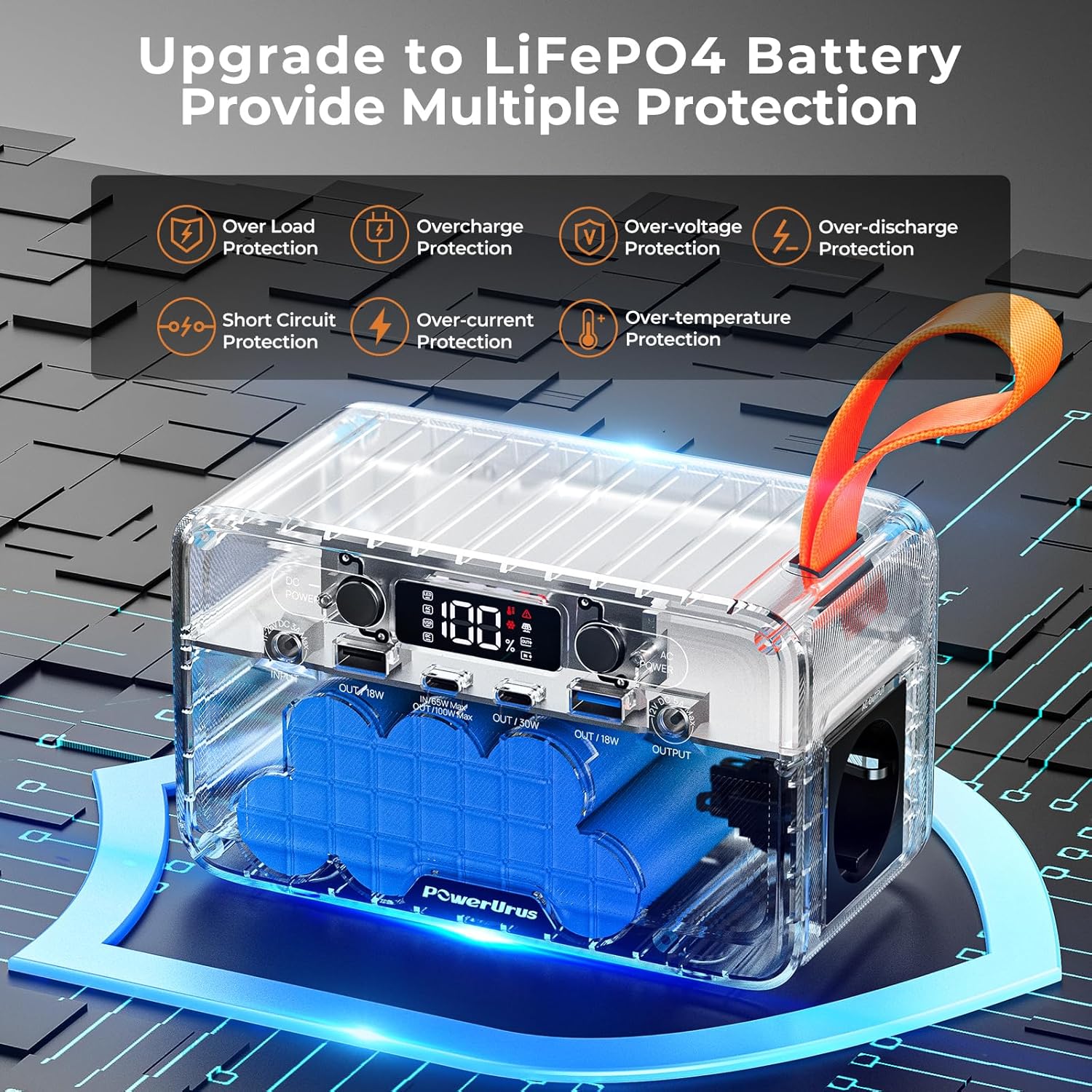
Image: An X-ray view of the PowerUrus R100, highlighting its internal LiFePO4 battery and the various protection mechanisms provided by its Battery Management System (BMS), such as over-load, overcharge, over-voltage, over-discharge, short circuit, over-current, and over-temperature protection.
7. LED Display Indicators
The LCD display provides real-time information about the power station's status:
| Indicator | Description |
|---|---|
| Power Percentage | Current battery charge level. |
| LED Indicator | Indicates LED light status. |
| AC Indicator | Indicates AC output is active. |
| USB Indicator | Indicates USB output is active. |
| DC Indicator | Indicates DC output is active. |
| Overheating Warning | Flashes if the unit is overheating. |
| Malfunction Reminder | Indicates a system error. |
| Solar Charging Indicator | Indicates charging via solar panel. |
| Output Indicator | Shows total output power. |
| Input Indicator | Shows total input power. |
| Low Temps Warning | Flashes if operating in low temperatures. |

Image: A detailed view of the PowerUrus R100's front panel, labeling all input/output ports (DC Input, USB-A, USB-C, DC Output, AC Output) and explaining the various indicators on the LCD display, including power percentage, warnings, and charging/output status.
8. What's Included
The PowerUrus R100 package includes the following items:
- 1 x PowerUrus 89.6Wh Portable Power Station
- 1 x 100W Type-C Charging Cable
- 1 x 12V Output Cigarette Lighter Adapter
- 1 x DC-DC 5521 Conversion Cable
- 1 x 3-in-1 USB Charging Cable
- 1 x User Manual
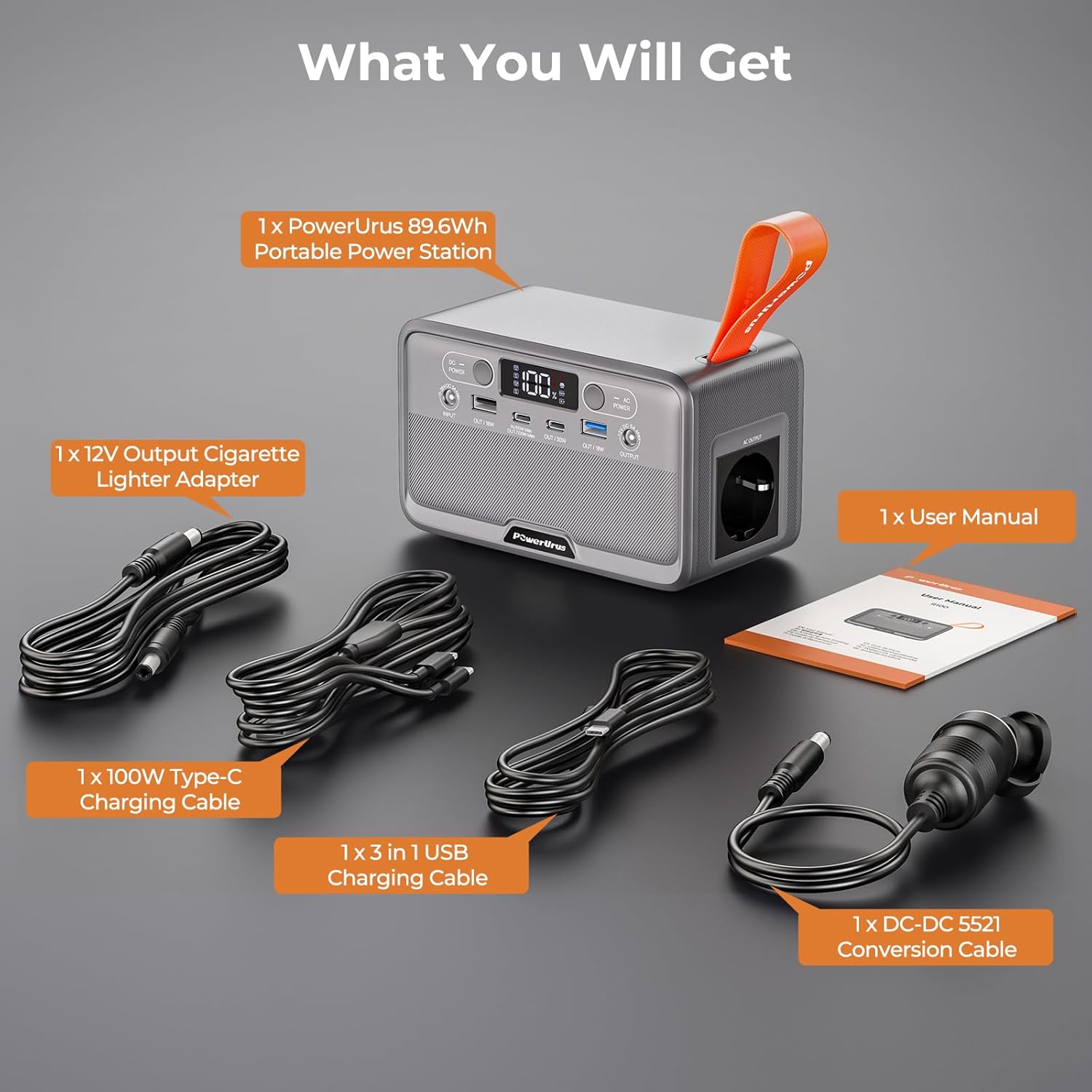
Image: A clear display of all items included in the PowerUrus R100 package: the portable power station, a 100W Type-C charging cable, a 12V cigarette lighter adapter, a DC-DC 5521 conversion cable, a 3-in-1 USB charging cable, and the user manual.
9. Specifications
| Feature | Specification |
|---|---|
| Model | R100 |
| Battery Type | LiFePO4 |
| Capacity | 89.6 Wh (28000 mAh, 3.2V) |
| Product Dimensions (L x W x H) | 16.5 x 10 x 8.5 cm |
| Product Weight | 1.15 kg |
| AC Output | 220-240V (100W continuous, 200W peak) |
| USB-A QC 3.0 Output | 2 x 18W |
| USB-C PD Output | 1 x 100W, 1 x 30W |
| DC 5521 Output | 12V, 5A, 60W Max |
| PD 65W USB-C Input | 4.7-20.5V/3.25A 65W Max |
| Solar Panel Input | 11-26V DC 3A Max (40W) |
| LED Light | Adjustable 2W LED flashlight |
| Operating Temperature | -10°C to 45°C |
| Compatible Devices | LED lamps, Laptops, Small appliances, Smartphones, Tablets |

Image: The PowerUrus R100 being held, showcasing its compact and portable design. The image highlights its dimensions (16.5cm x 10cm x 8.5cm) and weight (1.15 kg / 2.54 lbs), emphasizing its ease of transport.
10. Maintenance
- Storage: Store the power station in a cool, dry place away from direct sunlight and extreme temperatures.
- Charging: For optimal battery life, fully charge the unit every 3-6 months, even if not in use.
- Cleaning: Use a soft, dry cloth to clean the exterior. Do not use abrasive cleaners or immerse in water.
- Avoid Impact: Protect the device from drops and strong impacts.
11. Troubleshooting
- Unit Not Turning On: Ensure the battery is charged. Press and hold the power button for 3 seconds.
- No Output Power: Check if the specific output (AC/DC) is activated. Ensure the device connected does not exceed the power station's output limits.
- Charging Issues: Verify that the charging cable and adapter are correctly connected and functional. Ensure the solar panel is receiving adequate sunlight.
- Overheating Warning: If the overheating warning appears, disconnect all devices and allow the unit to cool down in a well-ventilated area.
If problems persist, please contact PowerUrus customer support.
12. Warranty and Support
PowerUrus is committed to providing high-quality products and excellent customer service. Your R100 Portable Power Station comes with:
- 24-Hour Response: Quick assistance for any inquiries.
- 30-Day Return/Exchange: Hassle-free returns or exchanges within 30 days of purchase.
- 18-Month Free Replacement: Enjoy an 18-month warranty for free replacements due to manufacturing defects.
- Lifetime After-Sales Service: Dedicated support for all customers throughout the product's lifespan.
For further assistance, please visit the official PowerUrus website or contact our customer support team.