
1. Important Safety Information
Please read all instructions carefully before operating this dehumidifier. Retain this manual for future reference. Failure to follow these instructions may result in electric shock, fire, or serious injury.
- Always connect the dehumidifier to a properly grounded electrical outlet.
- Do not operate the unit with a damaged power cord or plug. If the cord is damaged, it must be replaced by the manufacturer or a qualified service agent.
- Do not block the air intake or exhaust vents. Maintain at least 8 inches (20 cm) of clearance around the unit.
- Do not use the dehumidifier in areas where flammable liquids or gases are stored.
- Ensure the unit is placed on a stable, level surface to prevent tipping.
- Unplug the unit before cleaning, performing maintenance, or moving it.
- This appliance is not intended for use by persons (including children) with reduced physical, sensory or mental capabilities, or lack of experience and knowledge, unless they have been given supervision or instruction concerning use of the appliance by a person responsible for their safety.
2. Product Overview
The COSTWAY 124 PPD Commercial Dehumidifier is designed for efficient humidity control in large areas up to 1,300 sq.ft. It features a robust design suitable for various applications including crawl spaces, basements, warehouses, and construction sites.
Key Features:
- High-Efficiency Dehumidification: Removes up to 124 PPD (pints per day) at 95°F, 90% RH, with an adjustable humidity range of 20% to 90%.
- Remote Wired Control: Features a smart control panel with an LED display and a 32.8 ft external connection cable for convenient wall mounting.
- Multiple Operating Modes: Includes Auto mode, Continuous Drying mode, and Quiet Sleep mode.
- 24-Hour Timer: Allows for scheduled operation.
- User-Friendly Functions: Auto defrost, memory restart, and a removable, washable mesh filter.
- Flexible Drainage: Supports gravity drainage with an included 9.8 ft hose or external pump drainage (pump not included).
- Compact and Versatile Installation: Can be used freestanding or hung, with adjustable leveling feet for uneven surfaces.
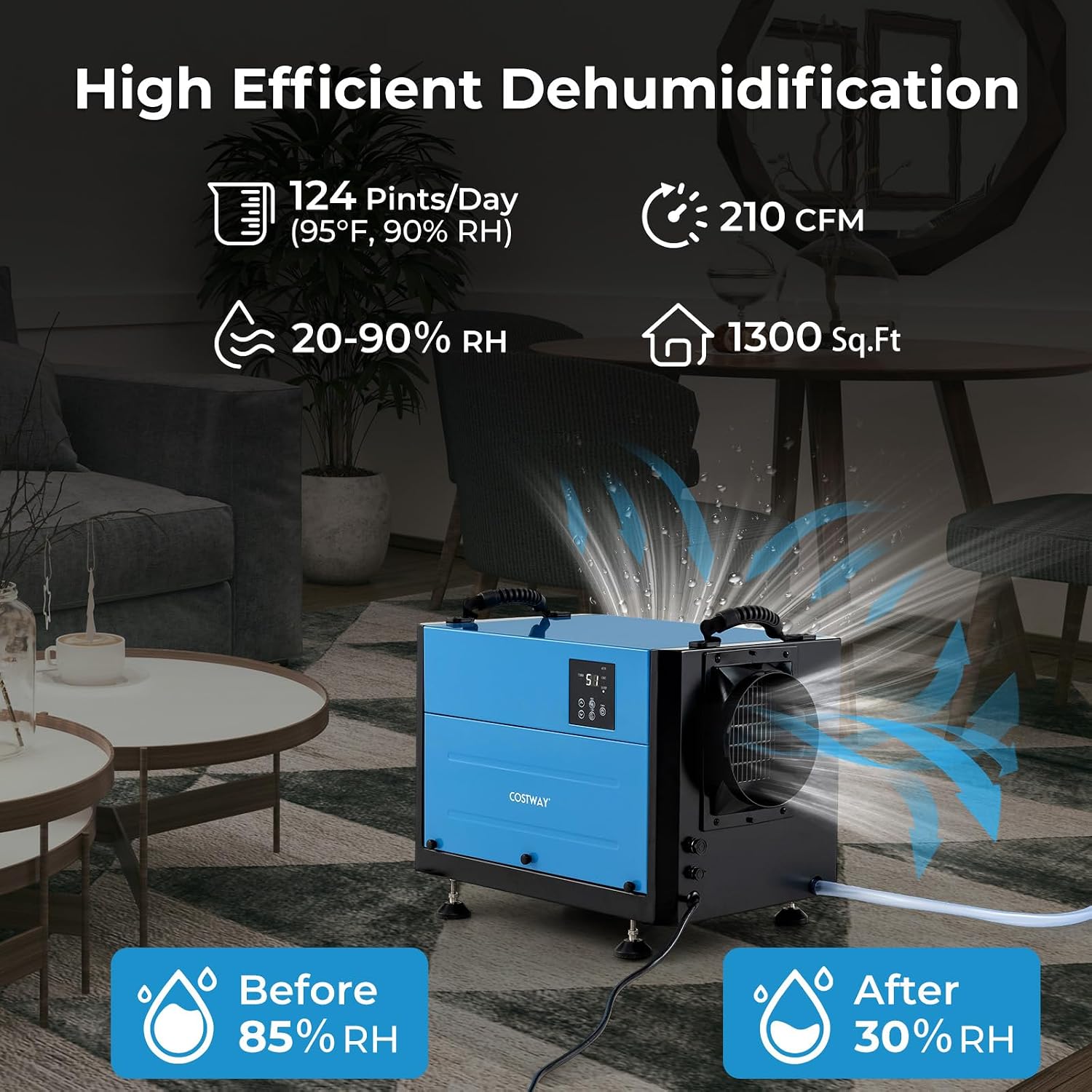
Image: The dehumidifier effectively reduces humidity from 85% RH to 30% RH in a 1300 sq.ft area, extracting 124 pints per day with an airflow of 210 CFM.
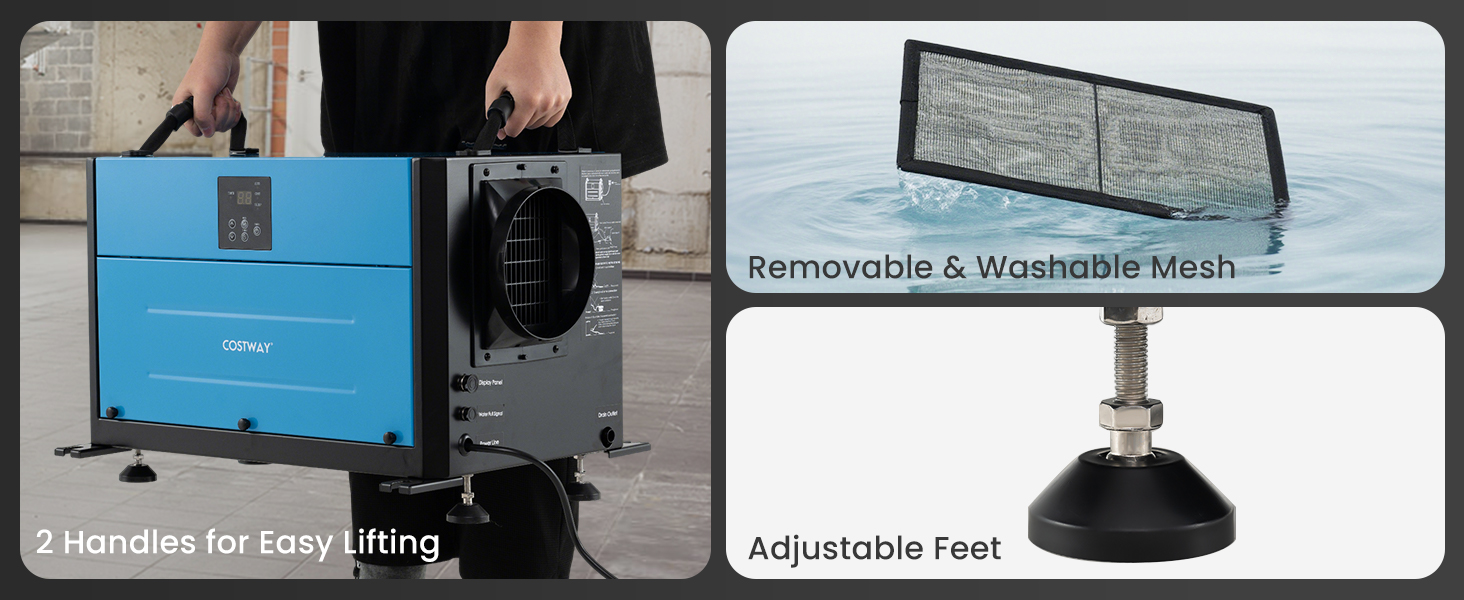
Image: User-friendly design elements include portable handles for easy transport, a removable and washable mesh filter for simple maintenance, and four adjustable leveling feet for stability on various surfaces.
3. Setup and Installation
Unpacking and Placement:
- Carefully remove the dehumidifier from its packaging.
- Place the unit on a firm, level surface. Ensure there is at least 8 inches (20 cm) of space around all sides for proper airflow.
- Adjust the leveling feet as needed to ensure the unit is stable and level, which is crucial for effective drainage.
Drainage Options:
The dehumidifier offers two primary drainage methods:
- Gravity Drainage: Connect the included 9.8 ft drain hose to the drainage outlet on the unit. Ensure the hose is sloped downwards to allow water to drain continuously into a suitable floor drain or container.
- External Pump Drainage: For situations requiring water to be pumped upwards or over longer distances, an external condensate pump (not included) can be connected to the external pump signal cable interface. Follow the pump manufacturer's instructions for installation.

Image: The dehumidifier supports both pump drainage (external pump required) and gravity drainage using the provided 9.8 ft hose, offering flexibility for water removal.
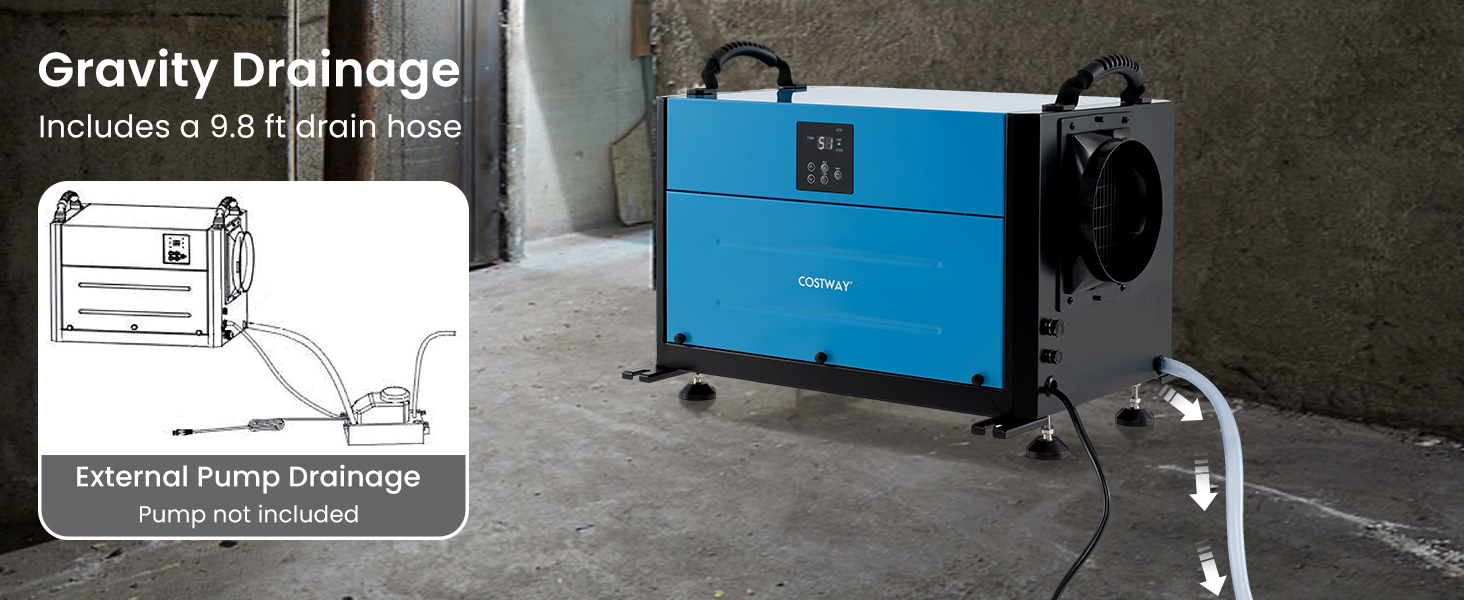
Image: Detailed view of the gravity drainage connection with the 9.8 ft hose and the external pump drainage option, highlighting the flexibility in water disposal.
Remote Wired Control Panel Installation:
The wired control panel can be mounted on a wall up to 32.8 ft away from the main unit for convenient access. Connect the external connection cable from the control panel to the designated port on the dehumidifier.

Image: The wired control panel, easily mounted to a wall, provides convenient operation of the dehumidifier from a distance using its 32.8 ft external connection cable.
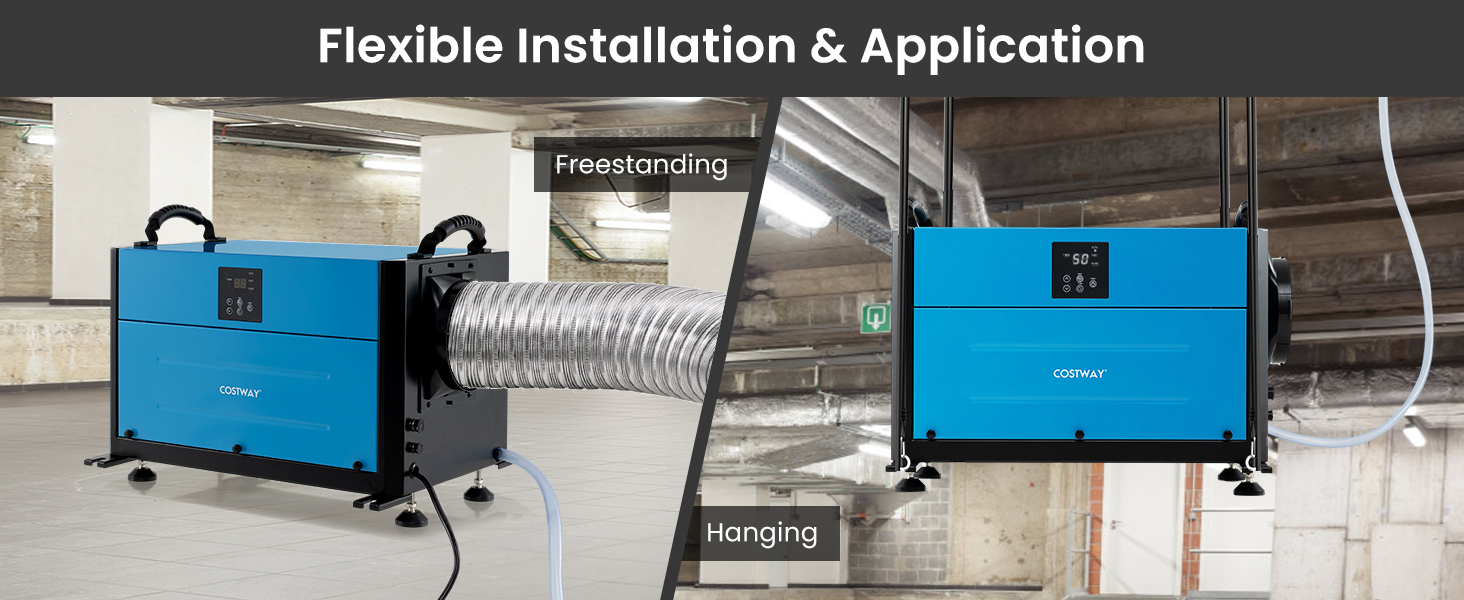
Image: The dehumidifier offers flexible installation, allowing it to be used freestanding on its adjustable feet or hung from a ceiling for optimal space utilization.
4. Operating Instructions
Control Panel Functions:
The control panel features an LED display and several buttons for operation:
- Power Button: Turns the unit on or off.
- Mode Button: Cycles through operating modes: Auto, Continuous, and Sleep.
- Timer Button: Sets the 24-hour timer for delayed start or stop.
- Up/Down Arrows: Adjust humidity settings (in Auto mode) or timer duration.
- LED Display: Shows current humidity, set humidity, or timer settings.
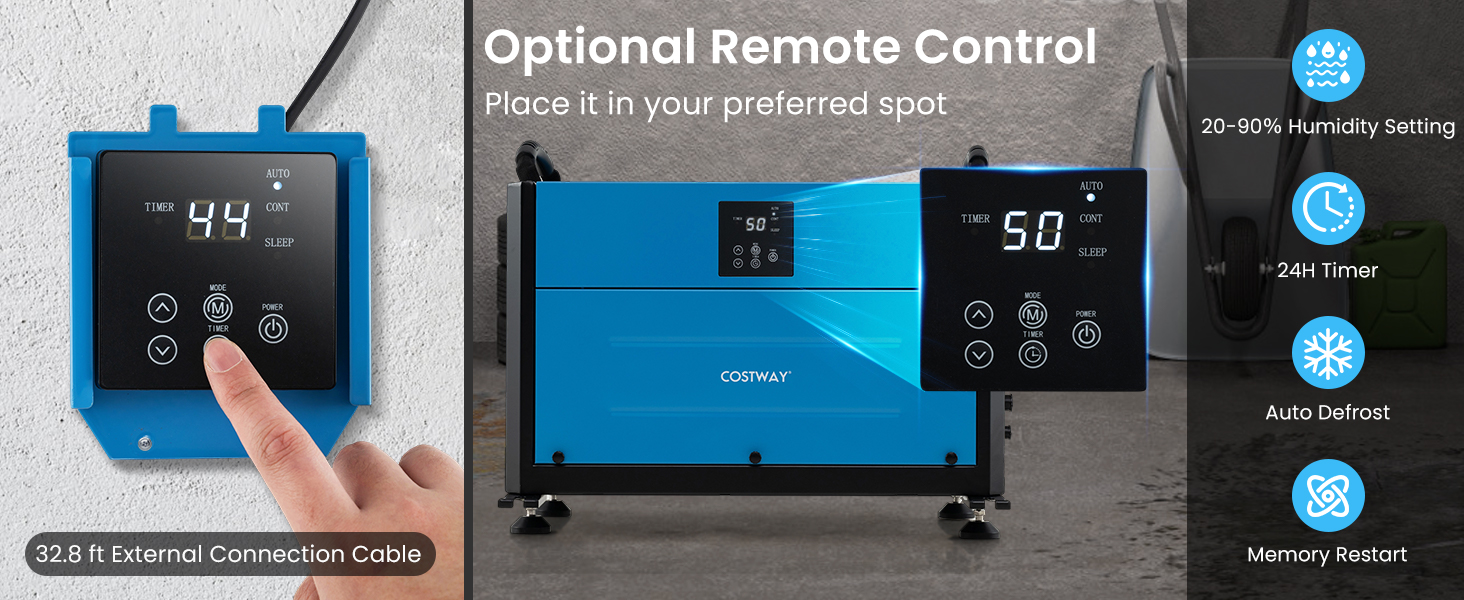
Image: The main unit's control panel and the optional remote control panel display current humidity, timer settings, and allow selection of 3 modes, 24H timer, auto defrost, and memory restart functions.
Operating Modes:
- Auto Mode: The unit will automatically turn on or off to maintain the set humidity level. Use the Up/Down arrows to set your desired humidity (20%-90% RH).
- Continuous Drying Mode: The unit will operate continuously, regardless of the ambient humidity, until manually turned off. This mode is ideal for rapid drying.
- Quiet Sleep Mode: The unit operates at a lower fan speed to reduce noise, suitable for environments where quiet operation is preferred.
Timer Function:
Press the Timer button to set a delay for the unit to turn on or off. Use the Up/Down arrows to adjust the desired time in hours (1-24 hours). The timer will count down, and the unit will perform the programmed action once the time expires.
Special Functions:
- Auto Defrost: If frost builds up on the evaporator coils, the unit will automatically enter defrost mode to melt the frost, ensuring efficient operation.
- Memory Restart: In case of a power outage, the unit will automatically restart with the last settings once power is restored.
5. Maintenance
Regular maintenance ensures optimal performance and extends the lifespan of your dehumidifier.
Cleaning the Air Filter:
The dehumidifier is equipped with a removable and washable mesh filter. It is recommended to clean the filter every two weeks or more frequently depending on usage and air quality.
- Unplug the dehumidifier from the power outlet.
- Locate the filter access panel (typically on the side or rear of the unit).
- Carefully remove the mesh filter.
- Wash the filter with warm, soapy water. Rinse thoroughly and allow it to air dry completely before reinserting. Do not use a dishwasher or harsh chemicals.
- Reinsert the dry filter and close the access panel.
Cleaning the Unit Exterior:
- Wipe the exterior of the unit with a soft, damp cloth.
- Do not use abrasive cleaners, waxes, or solvents, as these can damage the surface.
Storage:
- If storing the unit for an extended period, ensure it is clean and dry.
- Drain any remaining water from the unit and hose.
- Wrap the power cord and store the unit in a cool, dry place, away from direct sunlight and extreme temperatures.
6. Troubleshooting
Before contacting customer service, please refer to the following troubleshooting guide for common issues.
| Problem | Possible Cause | Solution |
|---|---|---|
| Unit does not turn on. | No power supply. Power cord not securely plugged in. Unit is in defrost mode. | Check power outlet and circuit breaker. Ensure power cord is fully inserted. Wait for defrost cycle to complete (indicator light may be on). |
| No water collected or insufficient dehumidification. | Humidity setting is too high. Air filter is clogged. Room temperature is too low. Unit size is too small for the area. Doors/windows are open. | Lower the desired humidity setting. Clean the air filter. Dehumidifiers are less effective below 41°F (5°C). Ensure unit capacity matches room size. Close all doors and windows in the area. |
| Unit is noisy. | Unit is not level. Air filter is dirty. Obstruction in fan. | Adjust leveling feet to ensure stability. Clean the air filter. Check for and remove any obstructions. |
| Water leaks from the unit. | Drain hose is improperly connected or clogged. Unit is not level. | Check drain hose connection and ensure it is not kinked or blocked. Ensure the unit is level for proper gravity drainage. |
| Remote control not responding. | Cable connection issue. | Ensure the 32.8 ft external connection cable is securely plugged into both the remote panel and the main unit. |
If the problem persists after trying these solutions, please contact COSTWAY customer support.
7. Specifications
Detailed technical specifications for the COSTWAY 124 PPD Commercial Dehumidifier.

Image: A comprehensive table outlining the dehumidifier's specifications, including power supply, dehumidification capacity at various conditions, airflow rate, and physical dimensions.
| Specification | Value |
|---|---|
| Brand | COSTWAY |
| Model Name | Commercial Dehumidifier |
| Dehumidification Capacity (95°F, 90% RH) | 124 Pints/Day |
| Dehumidification Capacity (86°F, 80% RH) | 110 Pints/Day |
| Dehumidification Capacity (80°F, 60% RH) | 60 Pints/Day |
| Dehumidification Capacity (65°F, 60% RH) | 42 Pints/Day |
| Power Supply | 115V/60Hz |
| Rated Input Current | 5A |
| Max Input Current | 5.9A |
| Max Coverage Area | 1300 Sq.Ft |
| Airflow Rate | 210 CFM |
| Drain Hose Length | 9.8 ft |
| Power Cord Length | 9.2 ft |
| Net Weight | 68.5 lbs |
| Product Dimensions (L x W x H) | 20.5" x 14" x 14" |
| Material | Sheet Metal, ABS |
| Special Features | Remote Wired Control; Hanging Installation |

Image: The physical dimensions of the dehumidifier are 20.5 inches in length, 14 inches in width, and 14 inches in height, making it suitable for various spaces.
8. Warranty and Support
This product is manufactured by COSTWAY. For warranty information, technical support, or service inquiries, please refer to the warranty card included with your purchase or contact COSTWAY customer service directly.
You can also visit the official COSTWAY store for more information and support resources: COSTWAY Store


