
Introduction
Thank you for choosing the EnHomee Queen Size Bed Frame. This bed frame is designed to provide a sturdy and functional sleeping solution with integrated storage, LED lighting, and a convenient charging station. This manual contains important information regarding the assembly, operation, maintenance, and safety of your new bed frame. Please read it thoroughly before beginning assembly and retain it for future reference.
Safety Information
For your safety and to prevent damage to the product, please adhere to the following guidelines:
- Do not exceed the maximum weight capacity of 1100 pounds.
- Exercise caution when handling metal components during assembly to avoid injury from sharp edges.
- Ensure all screws and fasteners are securely tightened before use. Periodically check and re-tighten as necessary.
- Keep small parts away from children during assembly to prevent choking hazards.
- Do not jump on the bed frame.
- Place the bed frame on a level surface.
Package Contents
Verify that all components listed below are present before beginning assembly. All parts, hardware, and tools are pre-sorted and labeled for convenience.
- Headboard (with integrated charging station and LED strip light)
- Bed Frame Side Rails
- Footboard
- Metal Slats (12 reinforced)
- Support Legs (9 heavy-duty)
- Storage Drawers (4 rolling drawers)
- Assembly Hardware (screws, bolts, washers, Allen wrench)
- Installation Manual

Image: Overview of the Queen size bed frame with key dimensions and 1100 LBS load bearing capacity indicated.
Setup and Assembly Instructions
Assembly of the EnHomee Queen Size Bed Frame is designed to be straightforward. It is recommended to have two people for assembly. Follow the step-by-step illustrated instructions provided in the included installation manual. No box spring is required for this platform bed frame.
General Assembly Steps:
- Unpack all components and verify against the package contents list.
- Assemble the headboard structure, ensuring the charging station and LED strip are correctly positioned.
- Attach the side rails to the headboard and footboard.
- Install the reinforced metal slats onto the frame. Ensure the EVA mute strips are properly placed to prevent noise.
- Attach the heavy-duty support legs to the frame.
- Assemble the four rolling storage drawers and slide them into place under the bed frame.
- Place your Queen size mattress directly onto the slats.
Video: Detailed assembly guide for the EnHomee Queen Bed Frame with 4 Drawers and Headboard. This video demonstrates the step-by-step process of putting together the bed frame, including the headboard, side rails, slats, and storage drawers.

Image: The bed frame showcasing its four large, rolling storage drawers, ideal for organizing bedding, clothing, and other items.

Image: Detail of one of the under-bed storage drawers, highlighting its smooth-rolling wheels for easy access.
Operating Instructions
LED Lighting System:
The integrated LED lights in the headboard offer 20 color options and various modes. Control the lighting using the provided remote control or a compatible smartphone application. Refer to the specific instructions included with the LED light kit for pairing and advanced features.
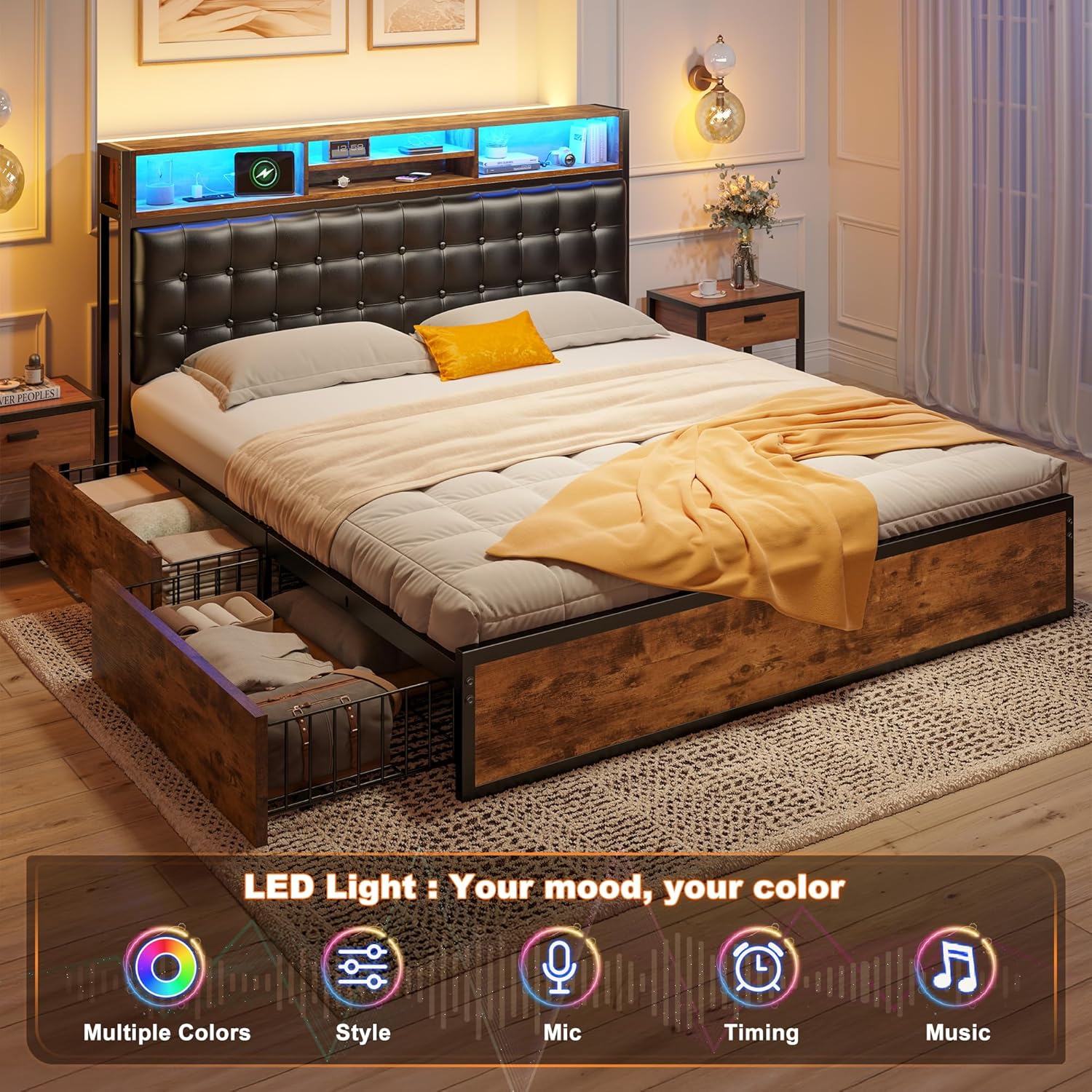
Image: The bed frame with its headboard LED lights active, displaying a blue hue, demonstrating the customizable lighting feature.
Charging Station:
The headboard features a built-in charging station with 1 Type-C port, 1 USB-A port, and 2 AC outlets. To use, ensure the bed frame is plugged into a standard wall outlet. Connect your devices to the appropriate ports for charging. The 2-tier headboard shelf provides convenient space for placing devices and other items.

Image: A detailed view of the headboard's integrated charging station, showing the Type-C, USB-A, and AC outlets, along with the illuminated LED strip.
Storage Drawers:
The four under-bed storage drawers are equipped with smooth-rolling wheels for easy access. Simply pull the drawers out to store or retrieve items. Push them back gently until they are fully under the bed frame.
Maintenance
To maintain the appearance and longevity of your EnHomee bed frame:
- Cleaning: Wipe the bed frame surfaces with a dry cloth. Avoid abrasive cleaners or harsh chemicals that may damage the finish.
- Fasteners: Periodically check all screws and bolts to ensure they remain tight. Re-tighten if any looseness is detected.
- LED Lights: If the LED lights malfunction, refer to the specific troubleshooting section in the LED light kit manual or contact customer support.
- Charging Station: Ensure the charging station is kept dry and free from dust. Do not overload the outlets.
Troubleshooting
If you encounter issues with your bed frame, refer to the following common solutions:
| Problem | Possible Cause | Solution |
|---|---|---|
| Bed frame is squeaking or making noise. | Loose fasteners; missing or displaced EVA mute strips. | Ensure all screws and bolts are tightened. Check that EVA mute strips are correctly positioned between metal slats. |
| LED lights are not working. | Power connection issue; remote control battery low; LED strip damage. | Check power connection to the LED strip. Replace remote control batteries. Refer to the LED light kit manual for further troubleshooting or contact support. |
| Charging station is not providing power. | Bed frame not plugged in; power strip switch off; device cable issue. | Ensure the bed frame's power cord is securely plugged into a functional wall outlet. Check if the charging station's power switch (if present) is on. Try a different charging cable or device. |
| Storage drawers do not slide smoothly. | Obstruction; damaged wheels. | Check for any objects obstructing the drawer's path. Inspect drawer wheels for damage or debris. |
Specifications
| Feature | Detail |
|---|---|
| Model Number | 55SCWBFUSB4BRQXHT |
| Size | Queen (U.S. Standard) |
| Product Dimensions (L x W x H) | 86.5" x 61.8" x 43.3" |
| Material | Metal frame, Wooden headboard shelves, Upholstered headboard |
| Weight Capacity | 1100 lbs |
| Number of Drawers | 4 |
| Charging Station | 1 Type-C port, 1 USB-A port, 2 AC outlets |
| LED Lighting | 20-color options, remote/app control |
| Noise Reduction | EVA mute strips on slats |
| Box Spring Required | No |
| Product Weight | 108 pounds |
| Care Instructions | Wipe with Dry Cloth |
Warranty and Support
For warranty information or technical support, please refer to the documentation included with your purchase or contact EnHomee customer service directly. Keep your purchase receipt and model number handy for faster service.
EnHomee Customer Service: Please visit the official EnHomee website or refer to your purchase platform for contact details.

