
Hogokids HG1049
HOGOKIDS Aquarium Booknook Building Set with Lights - Instruction Manual
Model: HG1049 | Brand: Hogokids
1. Important Safety Information
WARNING: CHOKING HAZARD - Small Parts. Not for children under 3 years.
- This building set contains many small parts. Keep all components out of reach of young children to prevent choking.
- Adult supervision is recommended during assembly, especially for younger builders.
- Do not ingest any parts.
- Dispose of packaging materials properly.
2. Product Overview
The HOGOKIDS Aquarium Booknook Building Set with Lights (Model HG1049) is an intricate construction kit designed to create a detailed miniature aquarium scene that functions as a decorative booknook. This set includes 1088 plastic pieces, allowing for the assembly of a multi-level marine environment featuring various sea creatures, arctic animals, and integrated lighting elements. The finished model is designed to fit seamlessly on a bookshelf, offering both an engaging building experience and a unique display piece.

Image 2.1: The HOGOKIDS Aquarium Booknook Building Set, showcasing the packaging and the completed model in both its compact, closed form and its expansive, open display.
The set promotes construction skills, hand-eye coordination, and team-building skills, making it suitable for individuals aged 6 years and up. It features a dynamic design that can be displayed open to reveal the full aquarium scene or closed to resemble a decorative book. Integrated lights enhance the visual appeal, especially in low-light conditions, and certain elements within the scene are designed to move, adding an interactive dimension to the display.
3. Package Contents
Upon opening the package, verify that all components are present. The HOGOKIDS Aquarium Booknook Building Set includes:
- Approximately 1088 plastic building pieces.
- Detailed instruction manual for assembly.
- Lighting components (LEDs and wiring).
- Any specialized moving parts or decorative elements.

Image 3.1: An illustration detailing the dimensions of the assembled booknook and showcasing some of the individual building pieces, including various marine life figures.
If any pieces are missing or damaged, please refer to the "Support and Contact Information" section for assistance.
4. Setup and Assembly Instructions
Assembly of the HOGOKIDS Aquarium Booknook requires careful attention to the provided instruction manual. Follow these general steps:
- Preparation: Unpack all components and organize them by color, shape, or type as suggested in the instruction manual. Ensure you have a clean, well-lit workspace.
- Follow the Manual: Refer to the step-by-step building guide included in your package. Each step will illustrate which pieces to use and how to connect them. Pay close attention to the orientation of pieces.
- Base Construction: Begin by building the base structure of the booknook, which will form the foundation for the entire scene.
- Layered Building: The booknook is designed with multiple levels and sections. Construct each section as instructed, gradually adding details and structural elements.
- Integrating Lights: The lighting components are integrated during specific steps. Carefully follow the wiring diagrams to ensure correct placement and connection of the LEDs. Avoid forcing connections.
- Adding Details: Attach the various sea creatures, coral, and other decorative elements to bring the aquarium scene to life.
- Moving Parts: Assemble any interactive or moving features according to the instructions. Ensure they operate smoothly before proceeding.
- Final Assembly: Connect the main sections of the booknook to complete the overall structure.
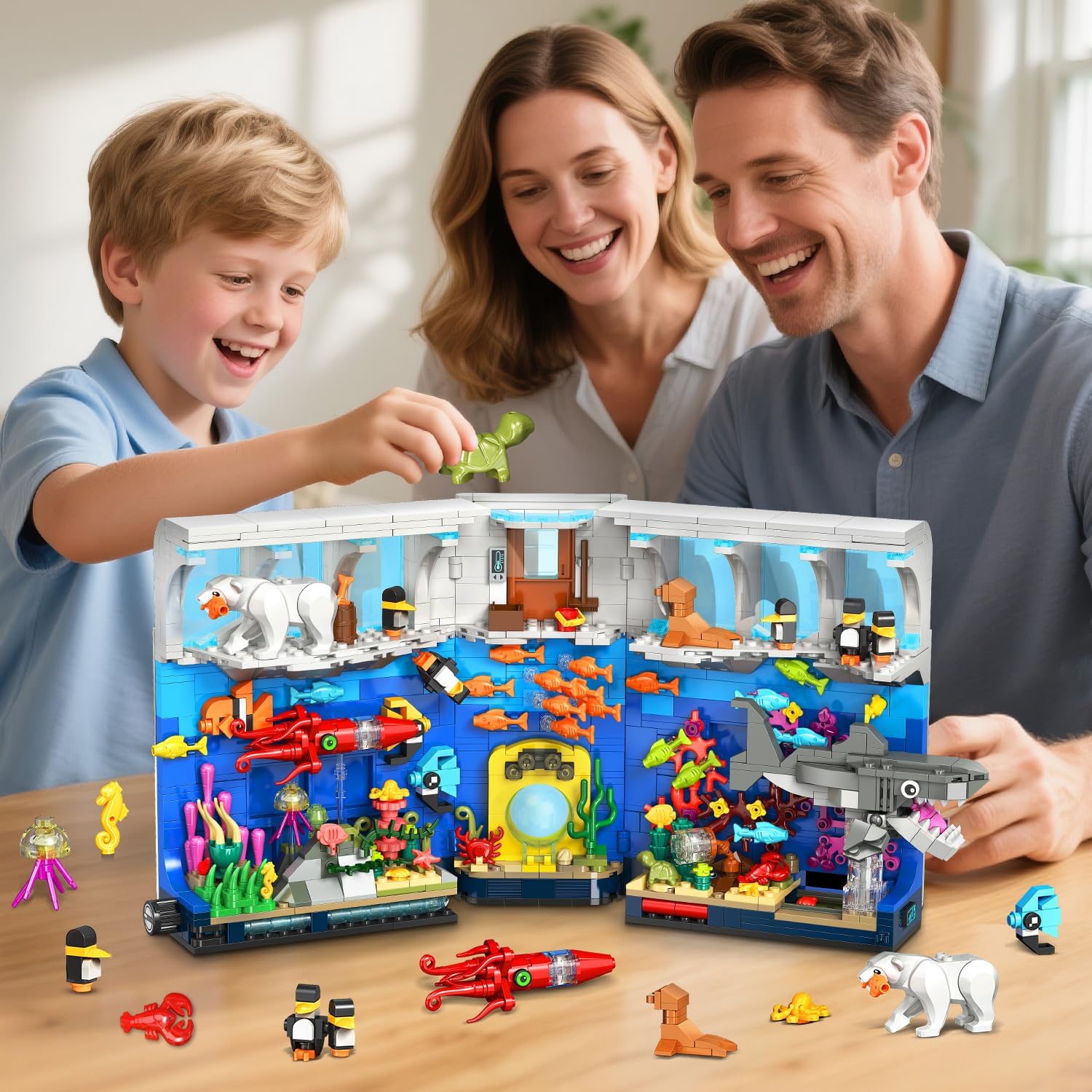
Image 4.1: Illustrates the assembly process, with individuals collaborating to construct the booknook, highlighting the detailed nature of the build.

Image 4.2: Provides detailed views of various sections within the booknook, including the polar ice cap area with a polar bear and penguins, and the vibrant underwater coral reefs with fish and other marine creatures.
5. Operating Instructions
Once assembled, the HOGOKIDS Aquarium Booknook offers both visual display and interactive features.
5.1. Activating the Lights
The booknook is equipped with integrated LED lights to illuminate the aquarium scene. Locate the power source or battery compartment (if applicable, though the product specifications indicate no batteries are required, suggesting a USB or external power source). Connect the power source as indicated in the assembly manual. A switch or button will typically be present to turn the lights on and off.

Image 5.1: The assembled booknook with its internal lights activated, creating a luminous display that enhances the underwater theme, shown placed among books.
5.2. Engaging Moving Features
This set includes interactive elements. As mentioned in the product description, there is a moving feature where a side button can be used to animate the shark area. Locate the designated button or lever on the side of the booknook. Activating this mechanism will cause the shark or related elements to move, adding dynamic action to the display.

Image 5.2: A detailed view illustrating the various interactive elements within the booknook, such as the mechanism for the shark's movement and other rotatable marine organisms, indicating their dynamic capabilities.
6. Maintenance
To ensure the longevity and appearance of your HOGOKIDS Aquarium Booknook, follow these simple maintenance guidelines:
- Cleaning: Dust the model regularly with a soft, dry cloth or a soft brush. For more stubborn dirt, lightly dampen a cloth with water (do not use harsh chemicals or abrasive cleaners).
- Storage: When not on display, store the booknook in a cool, dry place away from direct sunlight to prevent discoloration or warping of plastic parts.
- Handling: Handle the assembled model with care to avoid accidental detachment of pieces.
7. Troubleshooting
If you encounter any issues with your HOGOKIDS Aquarium Booknook, consider the following:
- Missing Pieces: If you discover a missing piece during assembly, double-check the packaging and all areas of your workspace. If still missing, contact customer support (see Section 10) with the specific part number or description from the instruction manual.
- Lights Not Working:
- Ensure the power source is correctly connected and functioning.
- Verify all wiring connections within the model are secure as per the instruction manual.
- Check if the light switch is in the "ON" position.
- Moving Parts Not Functioning:
- Ensure all gears and connecting pieces for the moving mechanism are correctly assembled and not obstructed.
- Verify that the activation button or lever is fully engaged.
- Loose Connections: If parts are not holding together securely, ensure they are pressed firmly into place. Refer to the instruction manual to confirm correct piece usage and orientation.
8. Specifications
| Feature | Detail |
|---|---|
| Brand | Hogokids |
| Model Number | HG1049 |
| Number of Pieces | 1088 |
| Material Type | Plastic |
| Assembly Required | Yes |
| Batteries Required | No (Power for lights likely via USB or integrated mechanism) |
| Recommended Age | 6 years and up |
| Educational Objectives | Construction Skills, Hand-Eye Coordination, Team Building Skills |
| Product Dimensions (assembled) | Approx. 38 cm (W) x 19.5 cm (H) x 10-16 cm (D); 1.65 kg |
| Special Features | Integrated LED Lights, Interactive Moving Elements, Booknook Design |
9. Warranty Information
Specific warranty details for the HOGOKIDS Aquarium Booknook Building Set with Lights are not provided in the available product information. Please refer to the product packaging or the retailer's website for any applicable warranty terms and conditions.
10. Support and Contact Information
For technical support, missing parts, or other inquiries regarding your HOGOKIDS Aquarium Booknook Building Set, please refer to the contact information provided on the product packaging or the official Hogokids website. You may also contact the retailer from whom the product was purchased for assistance.
Ask a question about this manual
Ask about setup, troubleshooting, compatibility, parts, safety, or missing instructions. Manuals+ will review the question and use this page’s manual context to help answer it.