
Introduction
Thank you for purchasing the Gueray KC-606 Portable CD Player. This device combines classic CD playback with modern features such as Bluetooth 5.0 (transmit and receive), FM radio, USB playback, and AUX input. Its portable design and built-in rechargeable battery make it suitable for various environments, from home to outdoor activities. This manual provides essential information for safe and effective use of your CD player.

Image: Front view of the Gueray KC-606 Portable CD Player, showcasing its compact design with a CD visible through the transparent cover and a retractable handle.
Safety Information
- Do not expose the device to rain, moisture, or extreme temperatures.
- Avoid disassembling or modifying the device. Refer all servicing to qualified personnel.
- Keep the device away from strong magnetic fields.
- Use only the provided power adapter and cables to prevent damage.
- Ensure proper ventilation when operating the device.
- Do not block the speaker grilles.
Package Contents
Please check that all items are present in the package:
- Gueray KC-606 Portable CD Player
- Remote Control
- AC Power Adapter
- Type-C Power Cable
- AUX Audio Cable
- Instruction Manual (Japanese)
Product Overview
Familiarize yourself with the components and controls of your Gueray KC-606 CD Player.
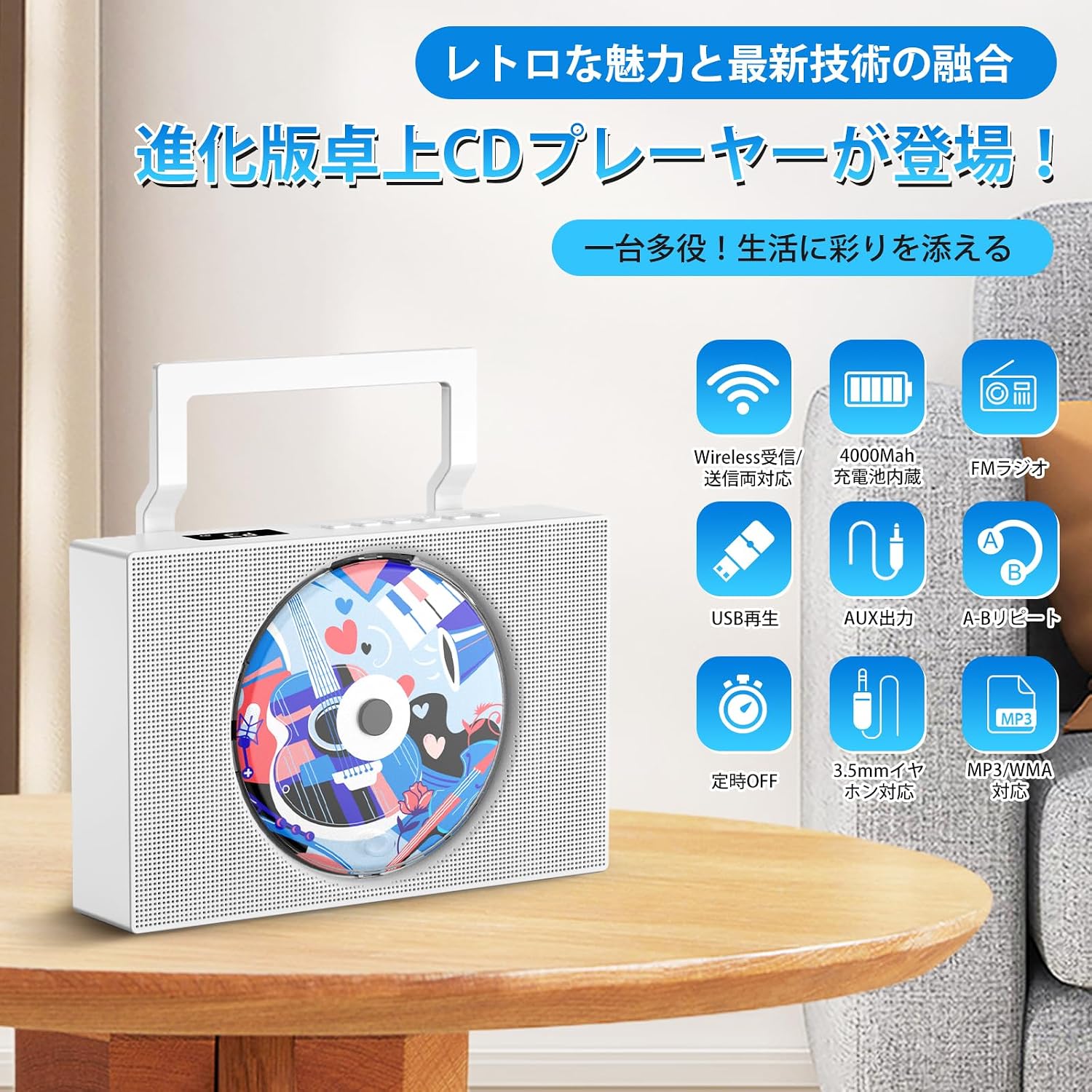
Image: The Gueray KC-606 CD Player with icons highlighting its key features: Wireless (Bluetooth), 4000mAh rechargeable battery, FM Radio, USB Playback, AUX Input, A-B Repeat, Sleep Timer, 3.5mm Headphone Jack, and MP3/WMA compatibility.
Controls and Ports:
- Power Button: Turns the device on/off.
- Mode Button: Switches between CD, Bluetooth, FM, USB, and AUX modes.
- Play/Pause Button: Starts or pauses playback.
- Previous/Next Track Buttons: Skips tracks or tunes FM radio frequencies.
- Volume Control: Adjusts the audio output level.
- Repeat Button: Cycles through repeat modes (single track, all tracks, A-B repeat).
- USB Port: For USB flash drive playback (FAT16/FAT32, up to 32GB).
- AUX Input: 3.5mm jack for connecting external audio devices.
- 3.5mm Headphone Jack: For private listening.
- Type-C Charging Port: For charging the internal battery.
- Display Screen: Shows current mode, track number, time, and FM frequency.
Setup
1. Charging the Device
The Gueray KC-606 features a built-in 4000mAh rechargeable battery, allowing for portable use. Before first use, fully charge the device.
- Connect the provided Type-C power cable to the Type-C charging port on the side of the CD player.
- Connect the other end of the Type-C cable to the AC power adapter, then plug the adapter into a wall outlet.
- The charging indicator will illuminate. A full charge takes approximately 5 hours and provides 3-4 hours of continuous playback.

Image: A close-up view of the side of the Gueray KC-606 CD Player, highlighting the Type-C charging port and USB port for external connections.
2. Powering On/Off
Press and hold the Power button on the device or remote control to turn the unit on or off.
3. Inserting a CD
- Gently lift the transparent dust cover on the front of the player.
- Place the CD onto the spindle with the label side facing you. Ensure the CD is securely seated.
- Close the dust cover.
Operating Instructions
1. CD Playback Mode
- Insert a CD as described in the Setup section.
- Press the 'Mode' button until 'CD' appears on the display.
- The CD will begin playing automatically. Use the Play/Pause, Previous/Next, and Volume buttons to control playback.
2. Bluetooth Mode (Receive & Transmit)
The device supports Bluetooth 5.0 for both receiving and transmitting audio.
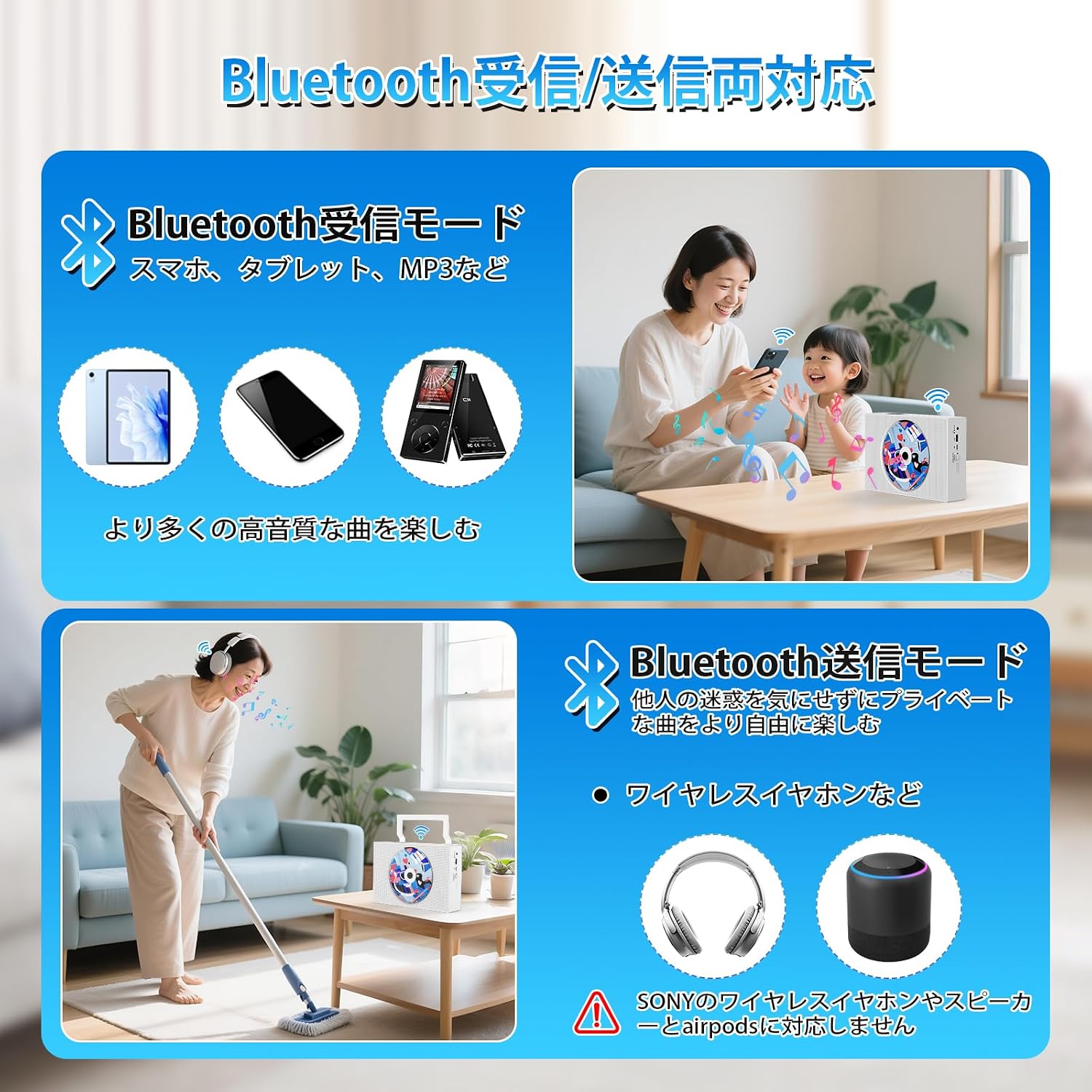
Image: A visual representation of the Gueray KC-606 CD Player's Bluetooth capabilities, illustrating both receiving audio from smartphones/tablets and transmitting audio to wireless headphones/speakers.
Bluetooth Receive Mode:
Allows the CD player to act as a Bluetooth speaker for your smartphone or tablet.
- Press the 'Mode' button until 'BT' appears on the display. The device will enter pairing mode.
- On your smartphone or tablet, enable Bluetooth and search for 'Gueray KC-606'.
- Select the device to pair. Once connected, you can play audio from your smartphone/tablet through the CD player's speakers.
Bluetooth Transmit Mode:
Allows the CD player to send audio from a CD, USB, or AUX input to Bluetooth headphones or speakers.
- Ensure your Bluetooth headphones or speaker are in pairing mode.
- While in CD, USB, or AUX mode, press and hold the 'Bluetooth' button on the device or remote control. The device will search for nearby Bluetooth receiving devices.
- Once connected, audio will be transmitted to your Bluetooth headphones or speaker.
3. FM Radio Mode
Tune into your favorite FM radio stations.

Image: The Gueray KC-606 CD Player in an outdoor setting, illustrating its FM radio function with a frequency range of 76.0MHz to 108.0MHz.
- Press the 'Mode' button until 'FM' appears on the display.
- Use the Previous/Next Track buttons to manually tune the frequency.
- To auto-scan and save stations, press and hold the Play/Pause button. The player will scan and store available stations.
4. USB Playback Mode
Play MP3/WMA audio files from a USB flash drive.
- Insert a USB flash drive (formatted as FAT16/FAT32, up to 32GB) into the USB port.
- Press the 'Mode' button until 'USB' appears on the display.
- The player will automatically detect and play compatible audio files.
5. AUX Input Mode
Connect external audio devices using the AUX cable.

Image: The Gueray KC-606 CD Player connected to an external audio device via an AUX cable, demonstrating its AUX input capability.
- Connect one end of the provided AUX audio cable to the AUX input port on the CD player.
- Connect the other end to the audio output of your external device (e.g., smartphone, MP3 player).
- Press the 'Mode' button until 'AUX' appears on the display.
- Control playback from your external device.
6. Repeat and A-B Repeat Functions
These functions are useful for language learning or repeated listening.

Image: A visual guide to the repeat functions of the Gueray KC-606 CD Player, including single track repeat, all track repeat, A-B segment repeat, and random playback.
- Repeat (Single/All): During CD or USB playback, press the 'Repeat' button to cycle through repeat modes: repeat one track, repeat all tracks, or turn repeat off.
- A-B Repeat: During CD or USB playback, press the 'A-B' button at the desired starting point (A) and again at the desired ending point (B). The section between A and B will loop. Press 'A-B' again to cancel.
7. Sleep Timer Function
The sleep timer allows the player to automatically turn off after a set period.
- Press the 'Sleep' button on the remote control.
- Repeatedly press the 'Sleep' button to cycle through available timer settings (e.g., 30, 60, 90, 120, 180 minutes).
- The device will automatically power off after the selected time.
8. Headphone Use
For private listening, connect 3.5mm headphones to the headphone jack on the side of the device.
Maintenance
- Cleaning: Use a soft, dry cloth to clean the exterior of the device. For stubborn dirt, slightly dampen the cloth with water. Do not use abrasive cleaners or solvents.
- CD Care: Handle CDs by their edges. Clean CDs with a soft, lint-free cloth, wiping from the center outwards.
- Storage: When not in use for extended periods, store the device in a cool, dry place away from direct sunlight and dust.
- Battery: To prolong battery life, charge the device regularly, even if not in frequent use. Avoid fully discharging the battery for long periods.
Troubleshooting
| Problem | Possible Cause | Solution |
|---|---|---|
| Device does not power on. | Battery is depleted or power cable is not connected. | Charge the device using the provided Type-C cable and AC adapter. Ensure the power button is pressed correctly. |
| CD does not play or skips. | CD is dirty, scratched, or inserted incorrectly. Device is in the wrong mode. | Clean the CD. Reinsert the CD correctly. Ensure the device is in 'CD' mode. |
| No sound from speakers. | Volume is too low or muted. Headphones are connected. | Increase the volume. Disconnect headphones if you want sound from speakers. |
| Bluetooth pairing fails. | Device is not in pairing mode. Bluetooth device is too far or already connected to another device. | Ensure the CD player is in Bluetooth pairing mode. Move devices closer. Disconnect from other devices. |
| USB playback not working. | USB format is incompatible (not FAT16/FAT32) or capacity exceeds 32GB. Files are not MP3/WMA. | Ensure USB is FAT16/FAT32 and within 32GB. Check file formats. |
| FM radio reception is poor. | Weak signal or interference. | Adjust the device's position. Extend the antenna if available (internal for this model). Try auto-scanning again. |
Specifications
| Feature | Detail |
|---|---|
| Brand | Gueray |
| Model Number | KC-606 |
| Color | White |
| Connectivity Technology | AUX, Bluetooth, USB (FAT16/FAT32, up to 32GB) |
| Supported Audio Formats | CD, CD-R, CD-RW, MP3, WMA |
| Bluetooth Version | 5.0 (Receive & Transmit) |
| FM Radio Frequency | 76.0MHz - 108.0MHz |
| Battery Capacity | 4000mAh |
| Charging Port | Type-C |
| Speaker Output | 3W Dual Speakers |
| Headphone Jack | 3.5mm |
Warranty and Support
The Gueray KC-606 Portable CD Player comes with a 1-year warranty from the date of purchase. This warranty covers manufacturing defects and workmanship under normal use. It does not cover damage caused by misuse, accidents, unauthorized modifications, or natural disasters.
For technical support, warranty claims, or any questions regarding your product, please contact Gueray customer service through the retailer where you purchased the device. Please have your purchase receipt and model number (KC-606) ready when contacting support.
