
Introduction
This manual provides essential information for the safe and effective operation, assembly, and maintenance of your FYC Q23L Walking Treadmill. Please read this manual thoroughly before using the product and retain it for future reference. This treadmill is designed with features specifically beneficial for seniors, including extended handrails and a knee-friendly running deck.
Safety Instructions
Your safety is paramount. Adhere to all warnings and instructions to prevent injury or damage to the equipment.
- Consult a Physician: Before starting any exercise program, especially if you have pre-existing health conditions, consult your doctor.
- Placement: Place the treadmill on a flat, stable surface with at least 2 feet (0.6 meters) of clear space around it.
- Power Connection: Connect the treadmill to a properly grounded outlet. Do not use extension cords or adapters.
- Safety Key: Always attach the safety key clip to your clothing before starting the treadmill. In case of an emergency or if you fall, the safety key will detach, immediately stopping the machine.
- Handrails: Utilize the extended handrails for balance and support, particularly when starting, stopping, or adjusting speed.
- Footwear: Always wear appropriate athletic footwear while using the treadmill.
- Children and Pets: Keep children and pets away from the treadmill at all times, especially when it is in operation.
- Weight Limit: Do not exceed the maximum user weight capacity of 300 lbs (approximately 136 kg).
- Emergency Stop: Familiarize yourself with the emergency stop button and the safety key mechanism.
- Knee Protection: The treadmill features a six-layer thick running belt and 8 double-spring shock-absorbing footpads designed to reduce knee impact.

Figure 1: Safety Features. This image highlights the red safety key and the long, extended handrails, crucial for user stability and emergency stops on the FYC Q23L treadmill.
Product Overview
The FYC Q23L Walking Treadmill is designed for comfortable and safe exercise, particularly for seniors. It features a robust carbon steel frame, a powerful 3 HP motor, and a speed range of 0.5 to 7.5 mph (0 to 12 km/h).

Figure 2: FYC Q23L Treadmill in Use. An individual is shown walking on the treadmill, demonstrating the use of the extended handrails for support.
Key Features:
- Knee-Friendly Design: Six-layer thick running belt and 8 double-spring shock-absorbing footpads to minimize joint impact.
- Enhanced Safety: Low-profile running platform, full-size extended handrails, and a magnetic safety key for immediate power cut-off.
- User-Friendly Interface: Backlit LED display with large, readable fonts and intuitive buttons for easy operation.
- Heart Rate Monitoring: Integrated sensor to track your heart rate during workouts.
- App Connectivity: Compatible with the Fit Show app for simulated scenarios, virtual tracks, and exercise data tracking.
- Family-Oriented: Includes 12 preset workout modes suitable for various fitness levels.
- Portable Design: Equipped with mobile rollers for easy repositioning.

Figure 3: Protection Design. This image details the shock-absorbing components and multi-layer running belt designed to protect users' knees during exercise.

Figure 4: Performance Specifications. This graphic illustrates the treadmill's maximum load capacity, motor power, and speed range, highlighting its robust construction.
Setup and Assembly
The FYC Q23L treadmill requires some assembly. It is designed for quick setup, typically within ten minutes, with clear instructions provided. It is recommended to have two people for assembly due to the size and weight of the unit.
Assembly Steps (General):
- Unpack: Carefully remove all components from the packaging. Place them on a clean, flat surface.
- Base Stabilization: Ensure the treadmill base is stable and level.
- Attach Uprights: Secure the upright support bars to the main base.
- Install Console: Mount the control console onto the uprights, ensuring all cables are properly connected.
- Secure Handrails: Attach the extended handrails firmly to the uprights.
- Final Checks: Double-check all bolts and screws to ensure they are tightened.
Refer to the included user manual for detailed, step-by-step assembly instructions and diagrams.
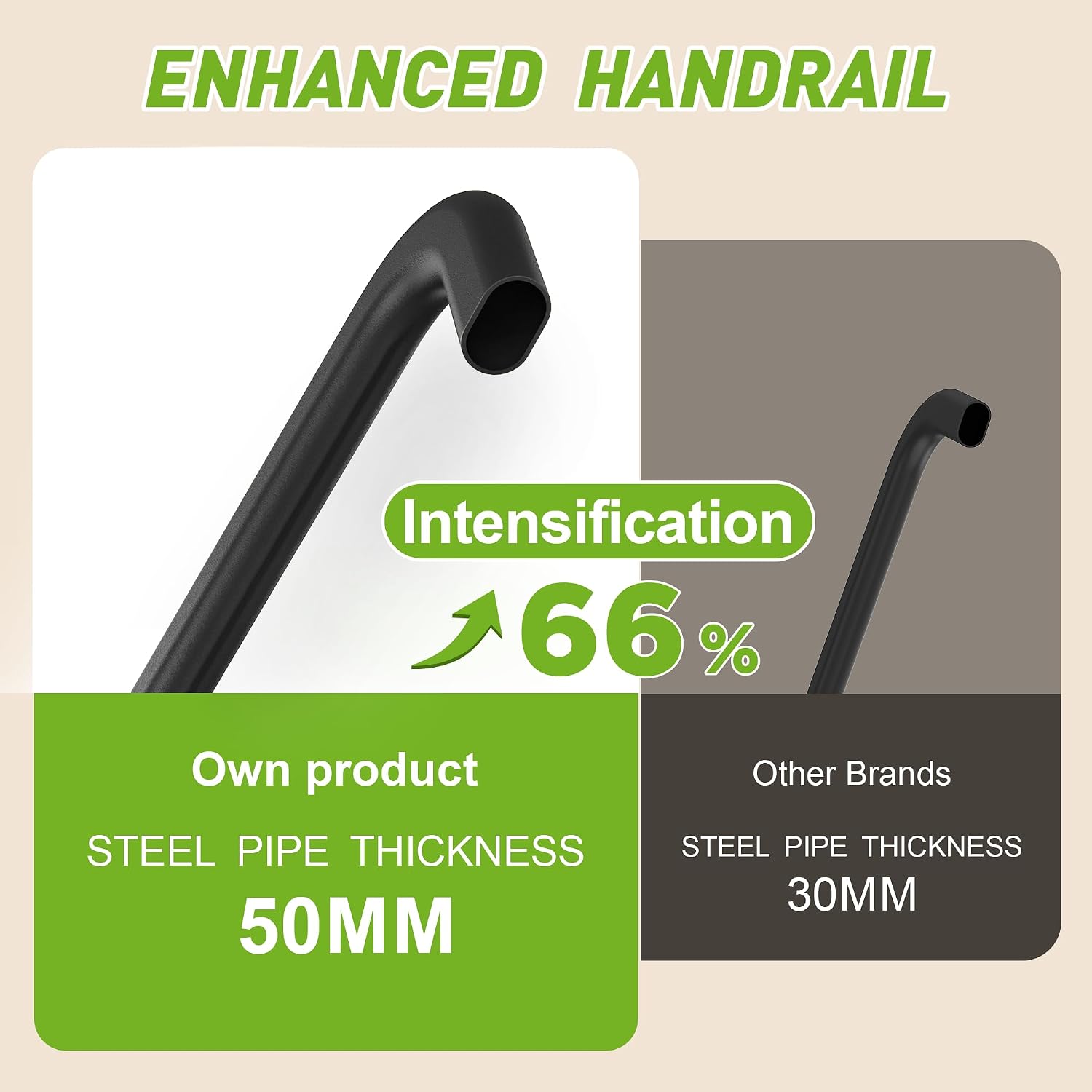
Figure 5: Enhanced Handrail Construction. This image highlights the robust 50mm steel pipe thickness of the FYC Q23L handrails, providing superior stability compared to thinner alternatives.
Operating Instructions
The FYC Q23L treadmill features an intuitive control panel designed for ease of use.
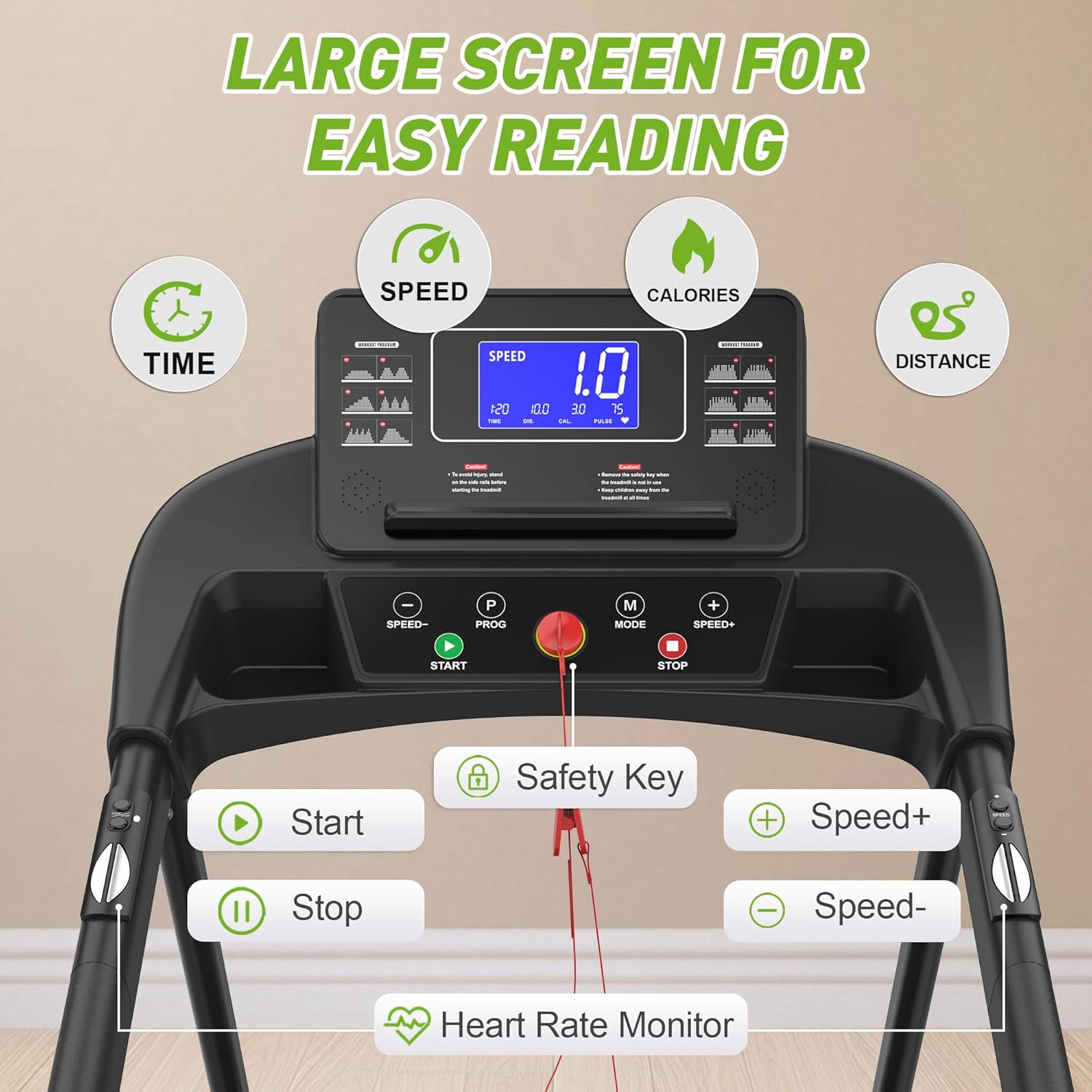
Figure 6: Control Panel. This image displays the treadmill's control panel, featuring a large, easy-to-read LED screen and clearly labeled buttons for operation.
Basic Operation:
- Power On: Plug the treadmill into a grounded electrical outlet. The display will illuminate.
- Attach Safety Key: Clip the red safety key to your clothing and insert the magnetic end into the designated slot on the console. The treadmill will not operate without the safety key in place.
- Start Workout: Press the START button. The treadmill will begin at a low speed (e.g., 0.5 mph) after a short countdown.
- Adjust Speed: Use the SPEED+ and SPEED- buttons to increase or decrease your walking speed. The speed range is 0.5 to 7.5 mph.
- Select Program: Press the PROG button to cycle through the 12 preset workout programs. Each program offers different speed variations.
- Change Mode: Use the MODE button to switch between display modes (e.g., time, distance, calories, heart rate).
- Heart Rate Monitoring: Grip the heart rate sensors on the handrails to display your current heart rate on the screen.
- Stop Workout: Press the STOP button to gradually bring the treadmill to a halt. For an emergency stop, pull the safety key.

Figure 7: Heart Rate Sensor Usage. This image demonstrates how to use the integrated heart rate sensors on the treadmill's handrails to monitor your pulse during exercise.
Using the Fit Show App:
Enhance your workout experience by connecting your treadmill to the Fit Show application (optional).
- Download App: Download the "Fit Show" app from your device's app store.
- Connect: Enable Bluetooth on your device and open the Fit Show app. Follow the in-app instructions to connect to your FYC Q23L treadmill.
- Explore Features: The app offers simulated running scenarios (e.g., forest, beach), virtual tracks, and records your exercise data (steps, heart rate, calories burned, duration).
- Track Progress: Review generated reports to monitor your fitness progress over time.

Figure 8: Large Running Area. This image illustrates the generous dimensions of the treadmill's running belt, providing ample space for comfortable walking.
Maintenance
Regular maintenance ensures the longevity and optimal performance of your treadmill.
- Cleaning: Wipe down the treadmill surfaces, including the console and handrails, with a damp cloth after each use. Avoid abrasive cleaners.
- Belt Lubrication: Periodically lubricate the running belt according to the instructions in the full user manual (typically every few months, depending on usage). This reduces friction and extends belt life.
- Belt Tension and Alignment: Check the running belt for proper tension and alignment. Adjust if necessary, following the detailed instructions in the complete manual.
- Inspect for Wear: Regularly inspect the running belt, motor cover, and other components for any signs of wear, damage, or loose parts. Tighten any loose bolts or screws.
- Power Off: Always unplug the treadmill from the power outlet before performing any cleaning or maintenance.
Troubleshooting
If you encounter issues with your FYC Q23L treadmill, refer to the following common troubleshooting steps:
| Problem | Possible Cause | Solution |
|---|---|---|
| Treadmill does not power on. | Not plugged in; power switch off; circuit breaker tripped. | Ensure power cord is securely plugged in. Check the power switch on the treadmill. Reset the household circuit breaker if necessary. |
| Treadmill starts but belt does not move. | Safety key not properly inserted. | Ensure the safety key is fully and correctly inserted into its slot on the console. |
| Belt slips or hesitates during use. | Running belt needs lubrication or adjustment. | Refer to the maintenance section for belt lubrication and tension adjustment. |
| Unusual noises from the treadmill. | Loose components; motor issue; belt friction. | Inspect for any loose bolts or screws and tighten them. Lubricate the belt if needed. If the noise persists, contact customer support. |
If these steps do not resolve the issue, please contact FYC customer support.
Specifications
| Feature | Detail |
|---|---|
| Brand | FYC |
| Model Number | Q23L |
| Color | Black |
| Display Type | LED |
| Frame Material | Carbon Steel |
| Motor Power | 3 Horsepower (HP) |
| Metrics Displayed | Calories Burned, Distance, Heart Rate, Time, Speed |
| Number of Programs | 12 |
| Power Source | Corded Electric |
| Special Features | Shock Absorber, Timer, Heart Rate Monitor, Portable, Heavy Duty |
| Speed Range | 0 to 12 km/h (0 to 7.5 mph) |
| Product Dimensions (L x W x H) | 128.27 x 66.04 x 19.3 cm (50.5 x 26 x 7.6 inches) |
| Item Weight | 29.94 kg (66 lbs) |
| Maximum User Weight | 300 lbs |
| Assembly Required | Yes |
Warranty and Support
FYC is committed to customer satisfaction, especially for our senior users.
- Warranty: The FYC Q23L Walking Treadmill comes with a two-year quality warranty.
- Customer Support: Our dedicated customer service team is available 6 days a week, 24 hours a day, to assist you with any questions or issues.
- Contact Information: For support, please refer to the contact details provided on the FYC official website or your purchase documentation.
Video Resources
No official product videos from the seller were found for embedding in this manual.


