
Introduction
Thank you for choosing the Tribesigns F2276 Industrial Console Table. This manual provides essential information for the safe assembly, operation, and maintenance of your new furniture. Please read these instructions carefully before beginning assembly and retain them for future reference.
Safety Information
- Assemble with caution.
- Keep all small parts and packaging materials out of reach of children.
- Ensure all connections are securely tightened before use. Periodically check and re-tighten as necessary.
- Do not overload the shelves. Refer to the 'Specifications' section for weight capacity.
- Place the table on a flat, stable surface to prevent tipping.
- Utilize the provided anti-tip kit to secure the table to a wall, especially if children or pets are present.

Image: Anti-Tip Kit. This kit helps secure the console table to the wall, preventing accidental tipping.
Package Contents
Before assembly, verify that all components are present and undamaged. If any parts are missing or damaged, please contact customer support.
- Top Panel (1)
- Base Panel (1)
- Circular Metal Frame Sections (various)
- Shelf Panels (multiple)
- Assembly Hardware (screws, bolts, nuts, washers)
- Adjustable Foot Pads (4)
- Anti-Tip Kit (1)
- Assembly Tool (e.g., Allen wrench)
- Instruction Manual (this document)
Setup and Assembly Instructions
Follow these steps carefully for proper assembly. It is recommended to assemble the table on a soft, clean surface to prevent scratches.
- Unpack Components: Carefully remove all parts from the packaging. Lay them out and identify each component using the provided parts list.
- Assemble the Circular Frame: Connect the various sections of the circular metal frame according to the diagrams. Ensure all screws are finger-tightened initially.
- Attach Shelf Panels: Insert the shelf panels into their designated slots within the circular frame. Secure them with the appropriate hardware.
- Attach Top and Base Panels: Secure the top panel to the upper part of the circular frame and the base panel to the bottom.
- Tighten All Connections: Once all parts are in place, systematically tighten all screws and bolts using the provided tool. Do not overtighten.
- Install Adjustable Foot Pads: Screw the adjustable foot pads into the bottom of the base panel. Adjust them to ensure the table is level and stable on your floor.
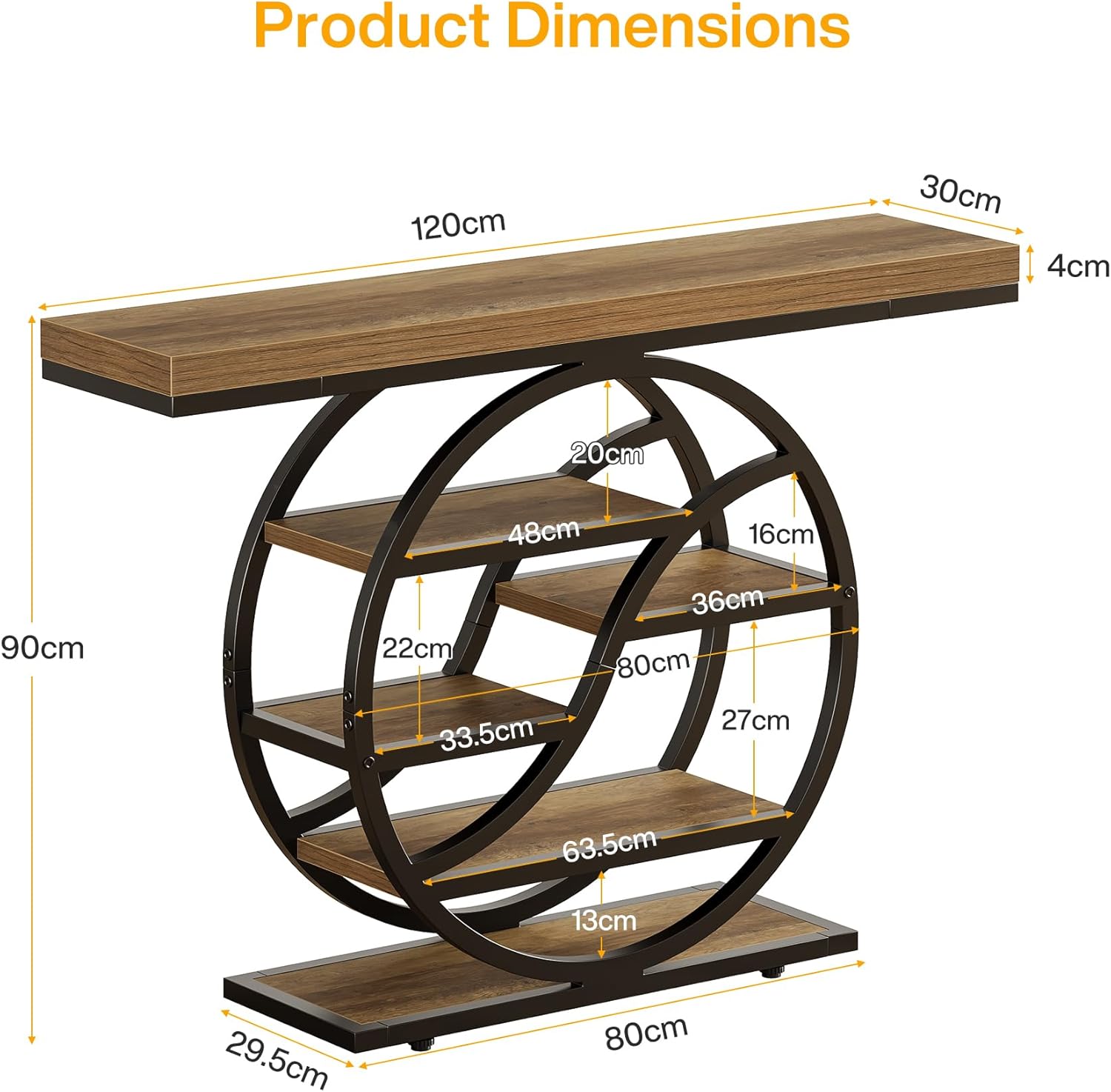
Image: Product Dimensions. This diagram illustrates the overall dimensions and internal shelf measurements of the console table.

Image: Adjustable Foot Pads. These pads can be rotated to level the table on uneven surfaces.
Operating Instructions
The Tribesigns F2276 Console Table is designed for versatile use in various settings:
- Hallway/Entryway: Use the top surface for keys, mail, or decorative items. The shelves can store small bags, shoes, or display ornaments.
- Living Room: Position behind a sofa as a sofa table to hold lamps, drinks, or remote controls. The tiered shelves offer space for books, magazines, or decorative accents.
- Display Unit: Showcase collectibles, plants, or framed photos on its multiple tiers.
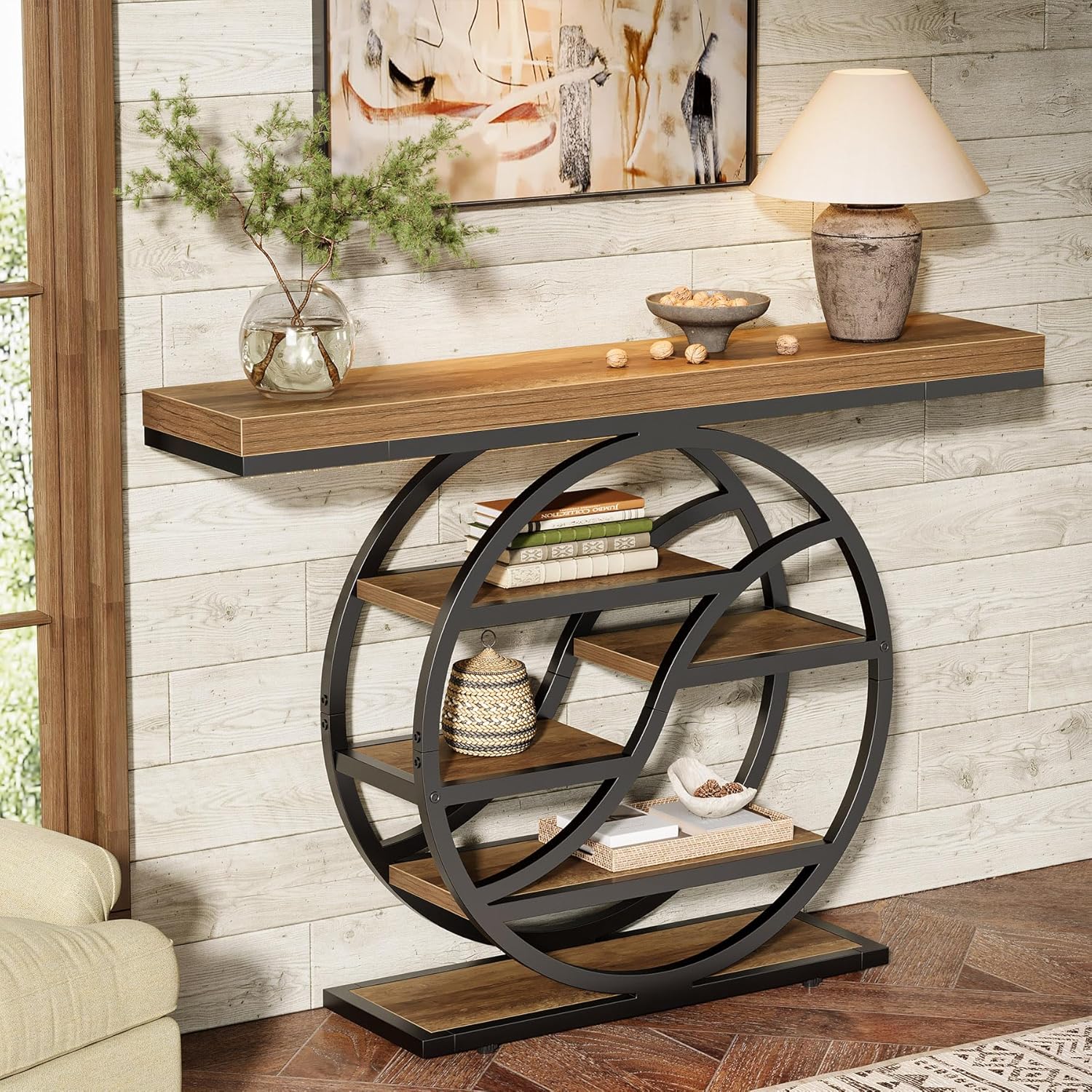
Image: Console table in a living room. Demonstrates the table's use for displaying decorative items and books.

Image: Console table behind a sofa. Shows the table's function as a sofa table, providing extra surface and storage.
Maintenance
To ensure the longevity and appearance of your console table, follow these maintenance guidelines:
- Cleaning: Wipe surfaces with a soft, damp cloth. Avoid harsh chemicals or abrasive cleaners, which can damage the finish.
- Spills: Promptly clean up any spills to prevent staining, especially on the engineered wood surfaces. The tabletop is designed to be water-resistant.
- Protection: Use coasters under drinks and placemats under hot items to protect the tabletop.
- Inspection: Periodically check all screws and connections to ensure they remain tight. Re-tighten if necessary.
- Avoid Direct Sunlight: Prolonged exposure to direct sunlight can cause fading or warping of wood materials.

Image: Tabletop Features. Highlights the water-resistant, scratch-resistant, and easy-to-clean properties of the table surface.
Troubleshooting
| Problem | Possible Cause | Solution |
|---|---|---|
| Table is wobbly | Uneven floor or loose connections | Adjust the foot pads until the table is stable. Check and tighten all screws and bolts. |
| Parts do not fit together | Incorrect orientation or wrong parts | Review the assembly diagrams carefully. Ensure you are using the correct parts for each step. Do not force parts together. |
| Missing hardware | Packaging error | Contact customer support with your product model and a description of the missing parts. |
Specifications
- Brand: Tribesigns
- Model Number: F2276
- Color: Brown
- Dimensions (L x W x H): 120 cm x 30 cm x 88 cm (47.2 x 11.8 x 34.6 inches)
- Material: Engineered Wood, Metal Frame
- Item Weight: 19.5 Kilograms (43 lbs)
- Maximum Weight Recommendation: 100 Kilograms (220 lbs)
- Features: Easy Assembly, 6-Tier Storage, Adjustable Foot Pads, Anti-Tip Kit, Water-Resistant, Scratch-Resistant, Easy to Clean
Warranty and Support
Information regarding specific warranty terms and conditions for the Tribesigns F2276 Industrial Console Table is not explicitly provided in the product details. For warranty claims, missing parts, or technical assistance, please contact the seller or Tribesigns customer support directly through their official website or the platform where the product was purchased.
Please have your purchase details and model number (F2276) ready when contacting support.


