
Product Overview
The CFIAI PB-09 40000mAh Portable Charger Power Bank is designed to provide reliable and fast charging for a variety of electronic devices. It features built-in charging cables for both iOS and Type-C devices, along with additional USB-A output ports, allowing for simultaneous charging of multiple devices. The power bank includes a digital display to show the remaining battery percentage and incorporates multiple safety protection features.
Key Features:
- Integrated iOS and Type-C charging cables.
- 22.5W fast charging capability.
- 40000mAh high-capacity battery.
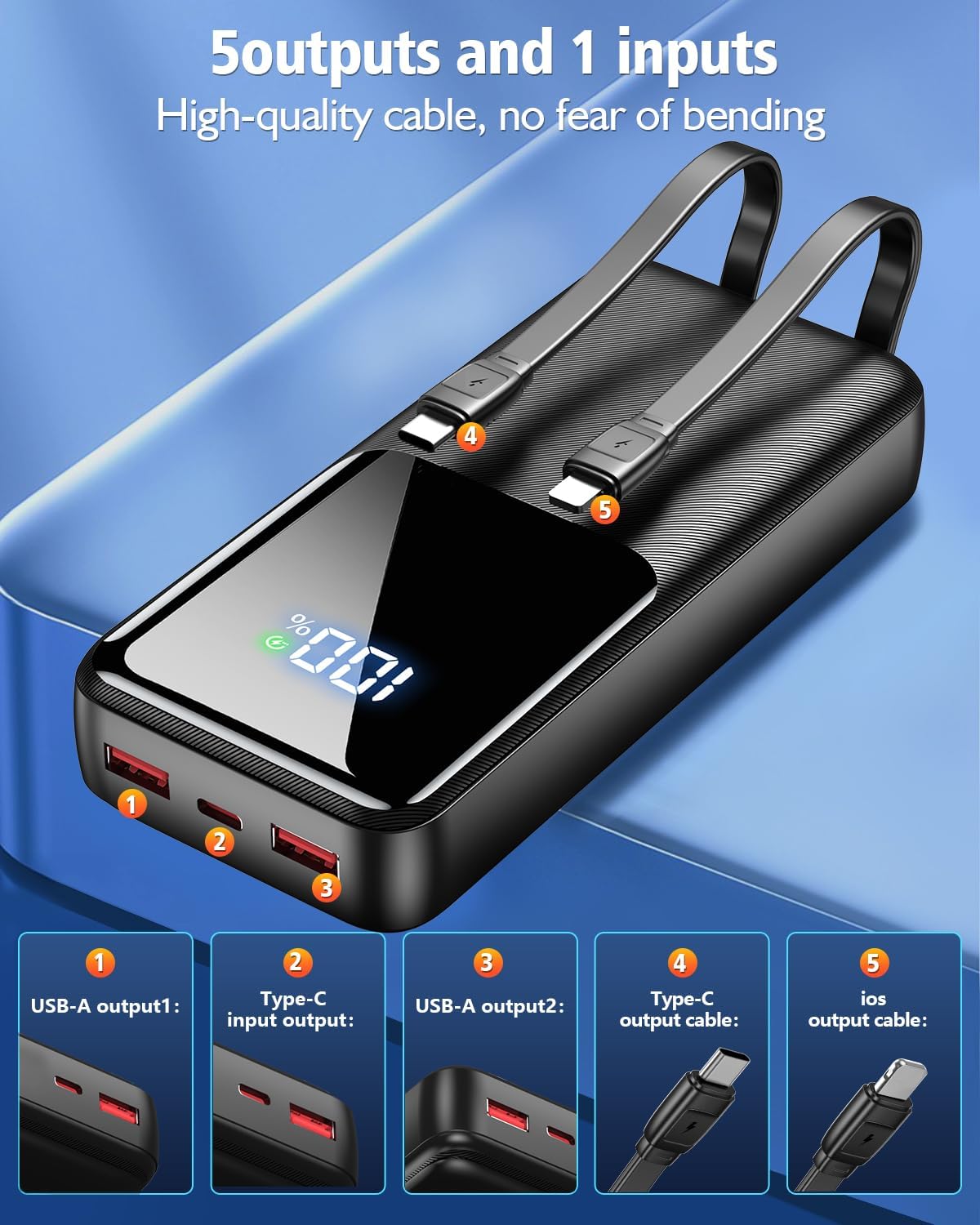
- Five outputs (1*USB C cable, 1*iOS cable, 2*USB A ports, 1*USB C port) and one Type-C input for recharging.
- Digital LED display for accurate battery percentage.
- Multi-protect safety system against over-charge, over-voltage, over-current, and short circuit.
- Compact and portable design.
Package Contents
Upon opening the package, verify that all items are present:
- 1 x CFIAI PB-09 40000mAh Portable Charger Power Bank
- 1 x Type-C USB Charging Cable (for recharging the power bank)
- 1 x User Manual (this document)
Setup and Initial Charging
Before first use, it is recommended to fully charge your CFIAI PB-09 Power Bank.
- Connect to Power Source: Use the provided Type-C USB charging cable to connect the power bank's Type-C input port to a compatible USB wall adapter (not included) or a computer's USB port.
- Monitor Charging Status: The digital LED display on the power bank will show the charging progress, indicating the battery percentage.
- Full Charge Indication: The display will show "100%" when the power bank is fully charged. Disconnect the power bank from the power source once fully charged.
Note: The power bank can be recharged via its Type-C input port. It takes approximately 7 hours for a full recharge using a suitable adapter.

Operating Instructions
The CFIAI PB-09 Power Bank offers multiple ways to charge your devices.
Charging Devices Using Built-in Cables
- Identify Cable Type: The power bank has two built-in cables: one with an iOS connector and one with a Type-C connector.
- Connect Device: Gently pull out the appropriate built-in cable and connect it to your device's charging port.
- Initiate Charging: The power bank will automatically begin charging your device. The digital display will show the remaining battery percentage.
- Disconnect: Once your device is charged, disconnect the cable and carefully return it to its storage slot on the power bank.


Charging Devices Using USB Ports
In addition to the built-in cables, the power bank features two USB-A output ports and one Type-C input/output port.
- Connect Your Cable: Plug your device's charging cable (USB-A to device, or Type-C to device) into the corresponding output port on the power bank.
- Initiate Charging: The power bank will automatically detect the connected device and begin charging.
- Simultaneous Charging: The power bank supports charging up to five devices simultaneously (using both built-in cables and all available ports).


Maintenance
- Keep the power bank away from extreme temperatures, direct sunlight, and liquids.
- Do not disassemble or attempt to repair the device yourself.
- Clean the power bank with a soft, dry cloth. Avoid using harsh chemicals or abrasive materials.
- Store the power bank in a cool, dry place when not in use.
- For optimal battery life, fully charge the power bank at least once every three months if not used regularly.
Troubleshooting
- Power bank not charging:
- Ensure the charging cable is securely connected to both the power bank's Type-C input and the wall adapter/power source. Verify the wall adapter is functioning correctly.
- Device not charging from power bank:
- Check if the power bank has sufficient charge (refer to the digital display). Ensure the charging cable (built-in or external) is properly connected to both the power bank and your device. Try a different cable or port.
- Slow charging:
- Ensure you are using a fast-charging compatible cable and adapter for optimal speed. Charging multiple devices simultaneously may reduce individual charging speeds.
- Digital display not working:
- Press the power button once to activate the display. If it remains off, the power bank might be completely discharged or require service.
Specifications
| Feature | Detail |
|---|---|
| Model Number | PB-09 |
| Battery Capacity | 40000mAh |
| Product Dimensions | 5.9 x 2.6 x 0.7 inches (14.7 x 6.53 x 3 cm) |
| Item Weight | 15.2 ounces (424.6g) |
| Input (Type-C) | 20W (for recharging power bank) |
| Output (Built-in Type-C Cable) | 22.5W Max |
| Output (Built-in iOS Cable) | PD20W Max |
| Output (USB-A Ports) | 5V 3A |
| Special Features | Built-in Cables, Digital Display, 22.5W QC4.0 Fast Charging, Multi-device Charging, Slim Size |

Safety Information
The CFIAI PB-09 Power Bank is equipped with an intelligent safety protection system to ensure safe operation for both the power bank and your devices.
- Over-charge Protection: Prevents the battery from being overcharged.
- Over-voltage Protection: Safeguards against excessive voltage input.
- Over-current Protection: Protects against excessive current flow.
- Short Circuit Protection: Automatically cuts off power in case of a short circuit.
- Over-discharge Protection: Prevents the battery from being fully depleted.
- Recovery Protection: Ensures safe recovery after protection events.
Important Safety Warnings:
- Do not expose the power bank to fire or water.
- Avoid dropping or subjecting the power bank to strong impacts.
- Keep out of reach of children.
- Do not use the power bank if it is damaged or swollen.
- Airline Travel Note: Due to its high capacity (40000mAh), this power bank may NOT be allowed in airline carry-on or checked luggage. Always check with your airline's regulations before traveling.

Warranty and Support
CFIAI provides a worry-free 3-month guarantee for this product. Additionally, 7-day/24-hour friendly customer service is available to assist you with any issues or questions.
If you encounter any problems, please contact our customer service team. We aim to resolve all inquiries within 12 hours.

Product Videos
CFIAI Portable Charger Power Bank with Built-in Cables
Video: An official product video from Misty US (Seller) demonstrating the features and usage of the CFIAI Portable Charger Power Bank, including its built-in cables and multi-device charging capabilities.
