
1. Introduction
Thank you for choosing the TKENPRO Solar Wireless Outdoor Security Camera. This camera is designed to provide reliable outdoor surveillance with advanced features including 2K color night vision, 24/7 continuous recording, AI-powered auto-tracking, and robust IP65 weatherproofing. Powered by a high-capacity battery and an 8W solar panel, it offers uninterrupted performance. This manual will guide you through the setup, operation, and maintenance of your device to ensure optimal security for your property.
2. Package Contents
Please verify that all items listed below are included in your package. If any items are missing or damaged, please contact customer support.
- TKENPRO Solar Wireless Outdoor Security Camera
- Solar Panel (8W)
- Mounting Bracket and Screws
- USB Charging Cable
- User Manual
- 32GB Micro SD Card (pre-installed or included separately)
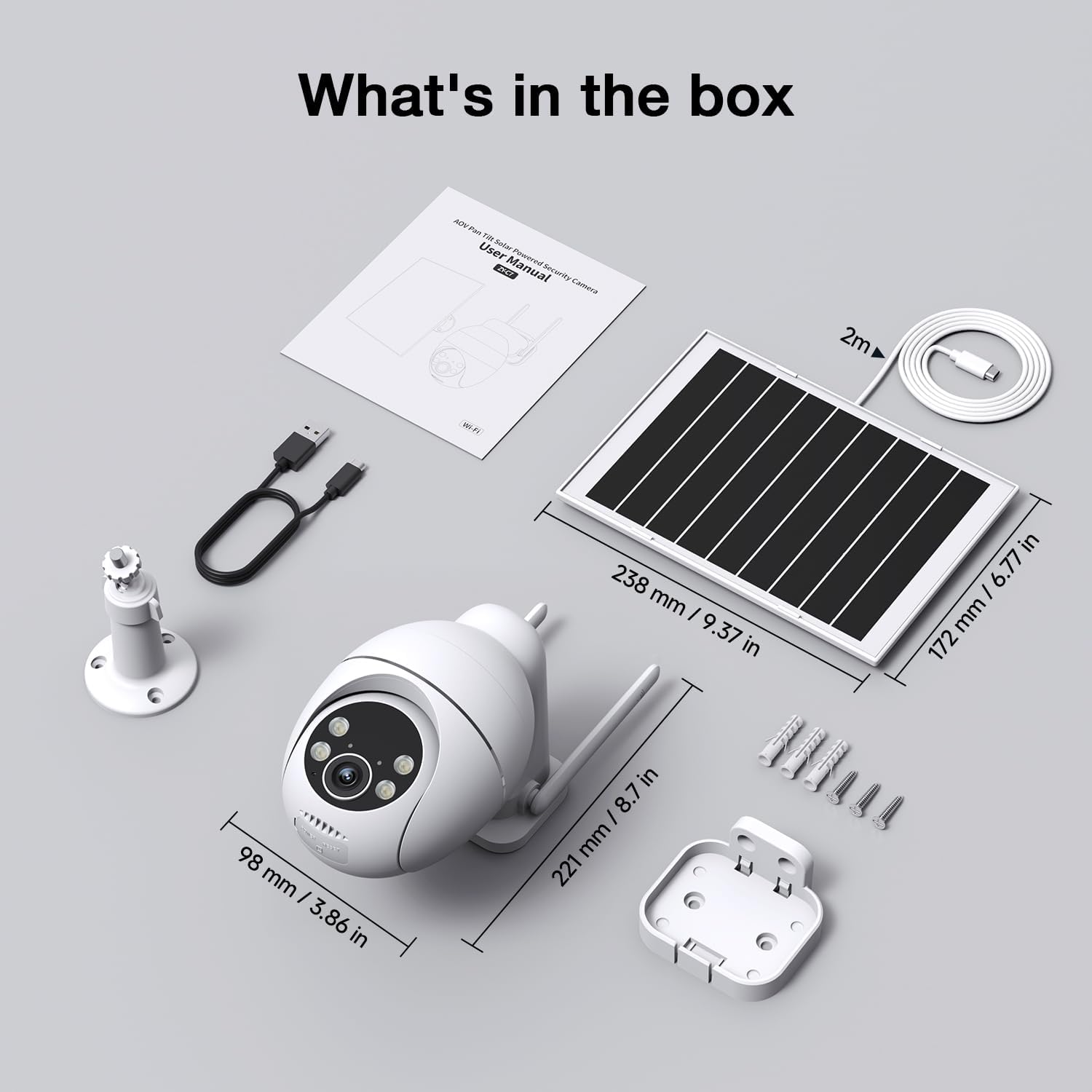
Image: All components included in the TKENPRO Solar Wireless Outdoor Security Camera package, laid out for clear identification.
3. Setup Guide
3.1 Initial Charging
Before installation, fully charge the camera using the provided USB cable. Connect the cable to the camera's charging port and a standard 5V/2A USB power adapter (not included). The charging indicator light will show the charging status.
3.2 App Installation and Account Registration
Download the 'CloudEdge' app from your smartphone's app store (iOS or Android). Follow the in-app instructions to register a new account or log in if you already have one.
3.3 Wi-Fi Connection
Ensure your phone is connected to a 2.4GHz Wi-Fi network. The camera does not support 5GHz Wi-Fi. Open the CloudEdge app, tap 'Add Device', and follow the on-screen prompts to connect your camera to your Wi-Fi network. This typically involves scanning a QR code displayed on your phone with the camera lens.

Image: Illustration of the camera connecting to a 2.4GHz Wi-Fi network and the physical installation process.
3.4 Mounting the Camera and Solar Panel
Choose a mounting location that provides a clear view of the area you wish to monitor and receives ample sunlight for the solar panel. The camera is IP65 weatherproof, suitable for outdoor use.
- Secure the camera mounting bracket to a wall or eave using the provided screws.
- Attach the camera to the bracket, ensuring it is firmly in place.
- Mount the solar panel in a location that maximizes direct sunlight exposure throughout the day.
- Connect the solar panel cable to the camera's charging port.

Image: Step-by-step visual guide for installing the camera and solar panel on an outdoor wall.
4. Operating Instructions
4.1 Live View and Pan/Tilt Control
Open the CloudEdge app to access the live view from your camera. You can pan (355°) and tilt (90°) the camera remotely using the controls within the app to adjust the viewing angle.

Image: The camera's pan and tilt functionality, demonstrating its 360-degree viewing capability.
4.2 24/7 Recording and Smart Switching
The TKENPRO camera features 24/7 continuous recording. It utilizes smart switching: recording at a low frame rate when no activity is detected to conserve power, and automatically switching to a high frame rate upon motion detection to capture details clearly.

Image: A visual representation of the camera's 24/7 recording capability, highlighting its ability to capture continuous footage throughout the day and night.
4.3 AI Smart Detection and Auto-Tracking
The camera is equipped with AI detection for distinguishing between people and vehicles, reducing false alarms. It offers an extended detection range of up to 98 feet. When motion is detected, the camera can automatically track the subject. You will receive instant alerts on your smartphone.
Note on Auto-Tracking: The camera's auto-tracking feature is designed to follow detected motion for a short duration (approximately 6 seconds) before returning to its preset position. For continuous tracking beyond this period, manual control via the app is required.

Image: An overhead view illustrating the camera's impressive 98-foot motion detection range.

Image: Visual representation of the camera's AI detection identifying a person and triggering an alert, alongside auto-tracking functionality.
4.4 2K Color Night Vision
The camera provides 2K full-color night vision, allowing you to see clear, detailed images even in low-light conditions. It also supports traditional IR night vision.

Image: Comparison of 2K full-color night vision and standard IR night vision, demonstrating enhanced clarity in low-light conditions.
4.5 Two-Way Audio
Utilize the built-in microphone and speaker to communicate with visitors or deter intruders directly through the app.
4.6 Preset Points
Set up to 6 preset points within the app. This allows you to quickly navigate the camera to specific areas of interest with a single tap, or to define activity zones for monitoring.

Image: The mobile application interface displaying options to set and select up to 6 preset camera viewing points.
4.7 Storage Options
The camera supports local storage via a Micro SD card (32GB included, expandable up to 512GB). It uses H.265 video compression to save up to 75% more storage space compared to older formats. Optional cloud storage is also available for additional backup and AI analysis features.

Image: A visual explanation of the camera's flexible storage solutions, including local SD card and optional cloud services, emphasizing storage efficiency.
4.8 Video Sharing
The CloudEdge app allows you to share access to your camera's live feed and recorded videos with family members or trusted individuals.

Image: Illustration of the video sharing feature, enabling multiple users to view the camera feed.
5. Maintenance
5.1 Cleaning
Regularly clean the camera lens and solar panel with a soft, damp cloth to ensure clear image quality and efficient solar charging. Avoid using harsh chemicals.
5.2 Battery Care
The integrated 8W solar panel is designed to keep the camera charged year-round. Ensure the solar panel is free from obstructions like leaves or snow to maintain optimal charging performance. The IP65 rating ensures durability in various weather conditions.

Image: The camera and solar panel shown in various weather conditions, highlighting its IP65 weatherproof design.
5.3 Firmware Updates
Check the CloudEdge app periodically for available firmware updates. Keeping your camera's firmware up-to-date ensures the latest features, security enhancements, and bug fixes.
6. Troubleshooting
| Problem | Possible Cause | Solution |
|---|---|---|
| Camera won't connect to Wi-Fi | Incorrect Wi-Fi password; 5GHz network used; camera too far from router. | Ensure correct 2.4GHz Wi-Fi password. Move camera closer to router. Reset camera and try pairing again. |
| No recording or alerts | Motion detection off; SD card full/faulty; cloud storage expired; poor Wi-Fi signal. | Check app settings for motion detection. Format or replace SD card. Renew cloud subscription. Improve Wi-Fi signal. |
| Poor night vision quality | Lens obstruction; IR lights blocked; insufficient ambient light for color night vision. | Clean the camera lens. Ensure no objects are blocking the IR lights. Ensure sufficient ambient light for color night vision, or switch to IR mode. |
| Solar panel not charging | Insufficient sunlight; panel dirty; cable disconnected. | Relocate panel for more direct sunlight. Clean the solar panel surface. Check cable connection. |
| Auto-tracking stops prematurely | This is expected behavior; auto-tracking follows for approximately 6 seconds then returns to preset. | For extended tracking, manually control the camera via the app after an alert. |
7. Specifications
| Feature | Detail |
|---|---|
| Brand | TKENPRO |
| Recommended Uses | Outdoor Security |
| Connectivity Technology | 2.4GHz Wi-Fi |
| Special Features | 24/7 Continuous Recording, 8W Solar Panel, Adjustable, 2K Color Night Vision, Auto-Tracking, IP65 Weatherproof |
| Indoor/Outdoor Usage | Outdoor |
| Compatible Devices | iOS, Android |
| Controller Type | App Control |
| Color | White |
| Video Capture Resolution | 2K |
| Photo Sensor Technology | CMOS |
| Power Source | Solar Powered |
| Night Vision Range | 98 Feet |
8. Customer Support
For any questions, technical assistance, or warranty inquiries regarding your TKENPRO Solar Wireless Outdoor Security Camera, please contact our customer support team. Refer to the product packaging or the CloudEdge app for specific contact information.