
1. Introduction and Overview
This manual provides detailed instructions for the assembly, operation, and maintenance of your Bellemave Full Size Wood Gaming Loft Bed with Desk. Please read all instructions carefully before assembly and use to ensure safe and proper functionality of the product.
The Bellemave Full Size Wood Gaming Loft Bed is designed to optimize space, offering a comfortable sleeping area above a dedicated gaming desk, multi-storage shelves, and integrated features like a charging station and RGB lighting. Its robust wood construction ensures stability and durability.

2. Safety Information
WARNING: Failure to follow these safety instructions may result in serious injury or property damage.
- Do not load more than 551 lbs (250 kg) on the bed.
- Do not load more than 110 lbs (50 kg) on the desk.
- Ensure proper assembly of all components to avoid instability. Regularly check all bolts and connections to ensure they remain tight.
- Keep children away from the assembly area until the bed is fully assembled.
- Use only the mattress size specified for this bed.
- Do not allow horseplay on or under the bed.
- Always use the ladder for access to the upper bunk.
3. Product Features
The Bellemave Full Size Wood Gaming Loft Bed is equipped with several features designed for convenience and an enhanced user experience:
- Solid Wood Frame: Constructed from durable wood for stability and longevity.
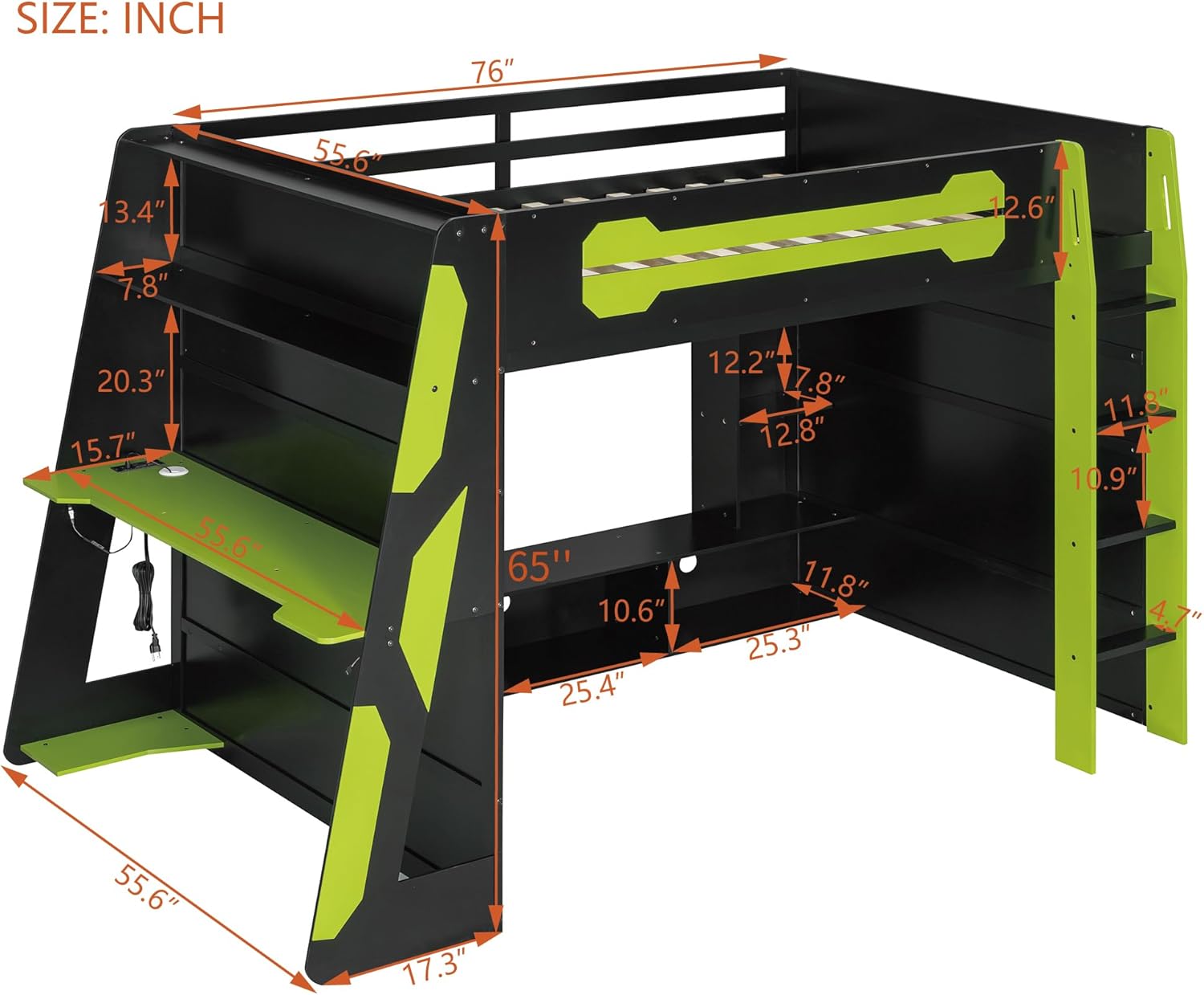
- Integrated Gaming Desk: A side-mounted desk provides space for a computer, monitor, and peripherals.
- Multi-Storage Shelves: Built-in shelves offer ample space for books, gaming consoles, and other items.
- Charging Station: Includes power outlets and USB ports for convenient device charging.
- RGB Light Strips: Integrated lighting under the side table to create an immersive atmosphere.
- Underbed Console Shelf: Dedicated space for gaming consoles or media devices.

4. Setup and Assembly
Assembly of the Bellemave Full Size Wood Gaming Loft Bed requires careful attention to detail. Detailed instructions are included with your product. Please ensure you have all parts before beginning assembly.
- Unpacking: Your loft bed may arrive in two separate packages, which might not arrive simultaneously. Please wait for all packages before starting assembly.
- Tools Required: Refer to the included assembly guide for a list of necessary tools.
- Assembly Steps: Follow the step-by-step diagrams and instructions provided in the separate assembly manual. It is recommended to have at least two adults for assembly.
- Component Identification: Each part is labeled. Match the labels to the diagrams in the assembly guide.
- Ladder Installation: Securely attach the ladder as per the instructions.

5. Operating Instructions
Once assembled, your Bellemave Gaming Loft Bed is ready for use. Here’s how to operate its key features:
- Using the Desk: Place your computer, monitor, and other gaming peripherals on the integrated desk. The console shelf underneath can house gaming consoles or other media devices.
- Charging Station: The built-in charging station provides convenient access to power. Plug your devices into the AC outlets or USB ports as needed.

- RGB Lighting: The RGB light strips are located under the side table. Connect them to a power source and use the provided controller (if applicable) to change colors and lighting modes.

6. Maintenance
Proper maintenance will extend the life and appearance of your loft bed:
- Cleaning: Wipe surfaces with a soft, damp cloth. Avoid harsh chemicals or abrasive cleaners that may damage the finish.
- Hardware Check: Periodically check all screws, bolts, and connections to ensure they are tight. Re-tighten if necessary to maintain structural integrity.
- Weight Limits: Adhere strictly to the stated weight limits for the bed (551 lbs) and desk (110 lbs) to prevent damage and ensure safety.
- Environmental Conditions: Avoid exposing the bed to extreme temperatures or humidity, which can affect wood integrity.
7. Troubleshooting
If you encounter any issues with your Bellemave Gaming Loft Bed, consider the following:
- Instability/Wobbling: Ensure all assembly hardware is securely tightened. Check that the bed is placed on a level surface.
- RGB Lights Not Working: Verify that the light strip is properly connected to its power source and that the power outlet is functional. Check the controller for battery issues or proper settings.
- Charging Station Not Working: Confirm that the charging station is plugged into a live power outlet. Test with different devices and cables.
- Missing Parts: If you find any parts missing during assembly, please contact customer support immediately.
For further assistance, please refer to the support section below.
8. Specifications
| Feature | Detail |
|---|---|
| Brand | Bellemave |
| Model Number | Full Size Wood Gaming Loft Bed |
| Size | Full |
| Product Dimensions | 93.3"L x 55.6"W x 65"H |
| Material | Wood |
| Color | Green |
| Finish Type | Brushed |
| Item Weight | 52.5 pounds |
| Max Bed Weight Capacity | 551 lbs |
| Max Desk Weight Capacity | 110 lbs |
| Assembly Required | Yes |
| Included Components | Guardrails |
| Compatible Mattress Size | Full |
| UPC | 197793821391 |
9. Official Product Video
10. Warranty and Support
Bellemave products are designed for quality and durability. For any problems encountered during installation or use, please contact our customer support team.
- Returns: This product is eligible for 90-day easy returns. Please refer to your purchase platform for specific return policies.
- Customer Support: For assistance with assembly, missing parts, or any other product-related inquiries, you can contact us via email at US-VC@bellemavehome.com.