
YNF300-2T
Instruction Manual
YNF300-2T External Rotor Axial Fan
Model: YNF300-2T | Brand: Generic
1. Introduction
This manual provides essential information for the safe and efficient operation, installation, and maintenance of the YNF300-2T External Rotor Axial Fan. Please read this manual thoroughly before installation or operation to ensure proper use and to prevent damage to the product or injury to personnel.
The YNF300-2T is a 3-wire AC220V, 0.56A, 150W low noise and energy-saving external rotor axial fan designed for various industrial and scientific applications requiring efficient air circulation.
2. Safety Information
Always observe the following safety precautions to reduce the risk of fire, electric shock, or injury.
- Electrical Safety: Ensure the power supply matches the fan's specifications (AC220V). Disconnect power before installation, maintenance, or troubleshooting. All electrical connections should be performed by a qualified electrician in accordance with local and national electrical codes.
- Installation: Mount the fan securely to prevent vibration and accidental detachment. Ensure adequate clearance around the fan for proper airflow and to prevent obstruction of moving parts.
- Operation: Do not insert fingers or any objects into the fan blades while the fan is operating or connected to power. Keep children and pets away from the fan during operation.
- Maintenance: Only perform maintenance when the fan is completely powered off and disconnected from the power source. Use appropriate personal protective equipment (PPE).
- Environment: Do not operate the fan in environments with excessive dust, moisture, or corrosive gases unless specifically designed for such conditions.
3. Package Contents
Upon unpacking, please verify that all items listed below are present and undamaged. If any items are missing or damaged, contact your supplier immediately.
- YNF300-2T External Rotor Axial Fan (1 unit)
- Note: Shipped as shown in the picture, no other accessories are included.
4. Product Overview
The YNF300-2T axial fan features a robust design for efficient air movement. Below are images illustrating the fan's appearance and key dimensions.
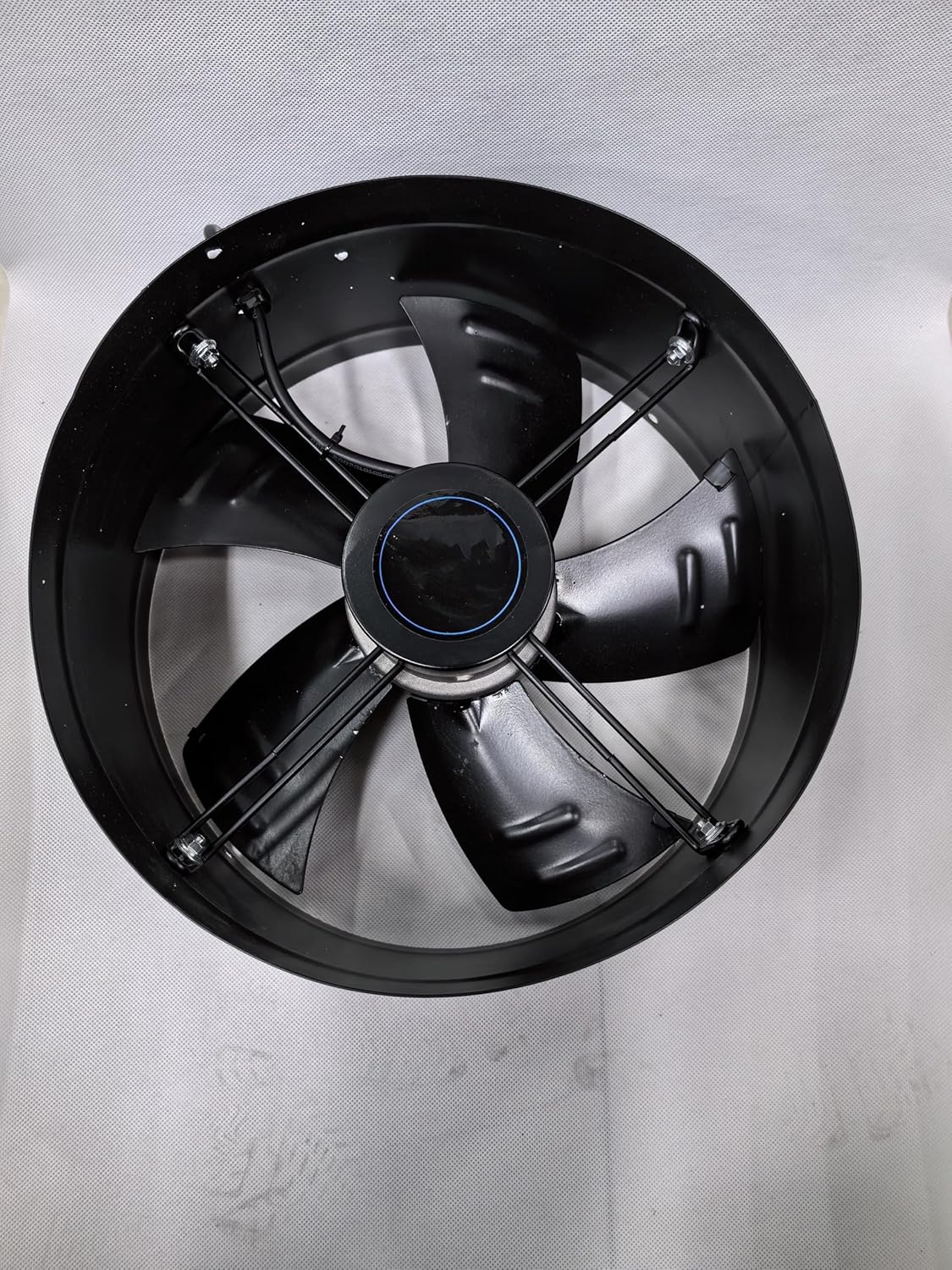
Figure 4.1: Top-down view of the YNF300-2T axial fan, highlighting the fan blades and the circular housing.

Figure 4.2: Angled view of the YNF300-2T axial fan, showing the motor assembly and the attached power cable.

Figure 4.3: Side profile of the fan, demonstrating its depth with a measuring tape for reference.

Figure 4.4: Top-down view of the fan, showing its overall diameter with a measuring tape for reference.

Figure 4.5: Product label displaying technical specifications of the YNF300-2T fan.
5. Specifications
| Attribute | Value |
|---|---|
| Model | YNF300-2T |
| Brand | Generic |
| Power Connector Type | 3-Pin |
| Voltage | 220 Volts AC |
| Wattage | 150 watts |
| Current | 0.56 Amps |
| Cooling Method | Air |
| Compatible Devices | Inverter |
| Noise Level | 55 dB |
| Maximum Rotational Speed | 2600 RPM |
| Country of Origin | China |
| ASIN | B0FB9148ZG |
| UPC | 702408921900 |
6. Setup and Installation
Proper installation is crucial for the fan's performance and longevity. It is recommended that installation be performed by a qualified professional.
- Unpacking: Carefully remove the fan from its packaging. Inspect for any visible damage.
- Mounting Location: Choose a stable and secure location that can support the fan's weight and withstand any vibrations. Ensure adequate space for airflow and maintenance access.
- Mounting: Secure the fan using appropriate fasteners through the mounting holes on the fan's housing. Ensure the fan is level and firmly attached to prevent excessive vibration or noise.
- Electrical Connection:
- Ensure the main power supply is disconnected before making any electrical connections.
- Connect the fan's 3-wire cable to a compatible AC220V power source. Refer to local electrical codes for proper wiring. Typically, these wires are Live, Neutral, and Ground. If unsure, consult a qualified electrician.
- Verify all connections are secure and insulated to prevent short circuits.
- Pre-Operation Check: Before restoring power, double-check all connections and ensure there are no obstructions around the fan blades.
7. Operation
The YNF300-2T axial fan is designed for continuous operation once properly installed and connected to power.
- Power On: Restore power to the fan's circuit. The fan should begin operating immediately.
- Monitoring: Observe the fan during its initial operation for any unusual noises, vibrations, or signs of malfunction.
- Power Off: To stop the fan, disconnect power from its circuit.
8. Maintenance
Regular maintenance helps ensure the longevity and optimal performance of your fan.
- Power Disconnection: Always disconnect the fan from the power supply before performing any maintenance.
- Cleaning:
- Periodically clean the fan blades and housing to remove dust and debris. Accumulated dust can reduce efficiency and cause overheating.
- Use a soft cloth, brush, or compressed air. Do not use abrasive cleaners or solvents that could damage the fan's finish or components.
- Inspection:
- Check for any loose screws or mounting hardware and tighten as necessary.
- Inspect the power cable for any signs of wear, cuts, or damage. Replace if necessary.
- Listen for any unusual noises during operation that might indicate bearing wear or other mechanical issues.
- Lubrication: This fan features an external rotor design, and typically, the bearings are sealed and do not require lubrication. Refer to manufacturer specifications if unsure.
9. Troubleshooting
If you encounter issues with your YNF300-2T fan, refer to the following table for common problems and their solutions.
| Problem | Possible Cause | Solution |
|---|---|---|
| Fan does not start | No power supply Loose electrical connections Motor fault | Check power source and circuit breaker Verify all wiring connections are secure (ensure power is off) Contact qualified technician for motor inspection/replacement |
| Excessive noise or vibration | Loose mounting Debris in fan blades Worn bearings Unbalanced blades | Tighten mounting hardware Clean fan blades and housing (power off) Contact qualified technician for bearing replacement Inspect blades for damage or imbalance |
| Reduced airflow | Blocked intake/exhaust Dirty fan blades | Clear any obstructions Clean fan blades and housing (power off) |
| Overheating | Insufficient ventilation Motor overload Dirty fan | Ensure adequate airflow around the fan Verify fan is used within specified load limits Clean fan blades and housing (power off) |
If the problem persists after attempting these solutions, please contact customer support or a qualified service technician.
10. Warranty and Support
This product is manufactured by Generic. For specific warranty terms and conditions, please refer to the documentation provided at the time of purchase or contact your retailer. General support inquiries can be directed to the point of purchase.
For technical assistance or service, please have your product model (YNF300-2T) and ASIN (B0FB9148ZG) ready when contacting support.
Related documentsYNF300-2T


Ask a question about this manual
Ask about setup, troubleshooting, compatibility, parts, safety, or missing instructions. Manuals+ will review the question and use this page’s manual context to help answer it.