
1. Product Overview
The HOTLIGH Rechargeable Work Light with Stand is a versatile lighting solution designed for various environments, from workshops to outdoor adventures. It features a powerful 5000-lumen output, adjustable light modes, and a long-lasting 10000mAh battery that can also function as a power bank.

Figure 1: HOTLIGH Rechargeable Work Light with Stand, showing the light head and tripod.
2. Package Contents
Ensure all items are present in the package:
- A camping light
- A tripod
- USB charging cable
- User Manual
3. Setup Instructions
3.1 Assembling the Tripod
- Remove the tripod base from its packaging.
- Press the 'PUSH' button located at the bottom of the tripod to release and extend the legs. Ensure the legs are fully spread for stability.
- Extend the telescopic pole to your desired height. Secure it by twisting the locking mechanisms on each section.
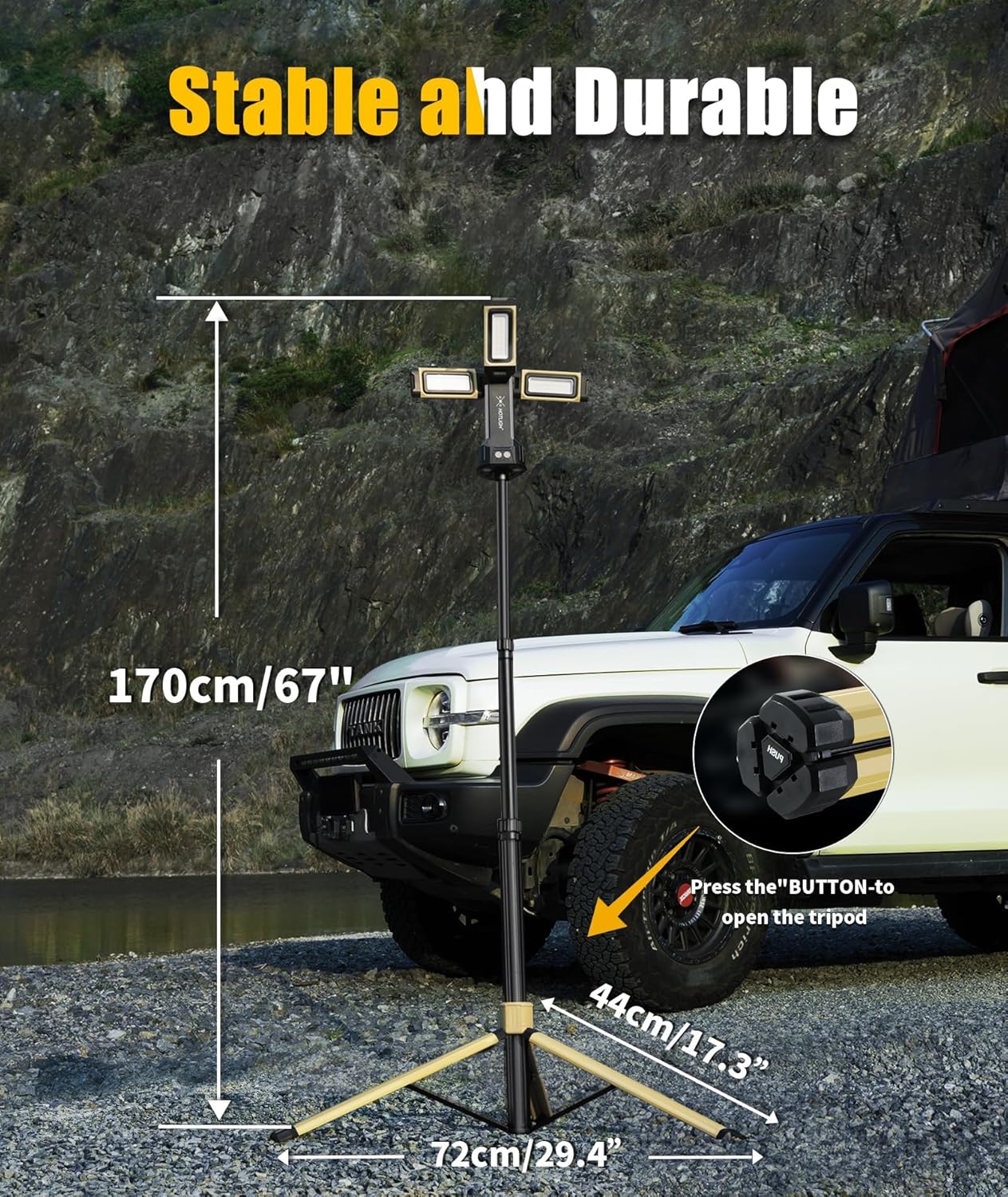
Figure 2: The tripod showing its dimensions and the 'PUSH' button for leg extension.
3.2 Attaching the Light Head
- Align the light head with the top of the extended tripod pole.
- Gently push the light head onto the pole until it clicks securely into place.

Figure 3: The light head attached to the tripod with panels unfolded.
3.3 Adjusting Light Panels
The light features three foldable panels that can be rotated:
- The main light panel can rotate 180° vertically.
- The two side panels can rotate 270° horizontally.
Adjust the panels to direct light as needed for your workspace or area.

Figure 4: Illustration of the 180° vertical and 270° horizontal rotation capabilities of the light panels.
4. Operating Instructions
4.1 Power On/Off and Brightness Adjustment
Locate the power button on the light head. Press it once to turn on the light. Subsequent presses will cycle through the three brightness levels (1200, 2500, and 5000 lumens). Press and hold the button to turn off the light.
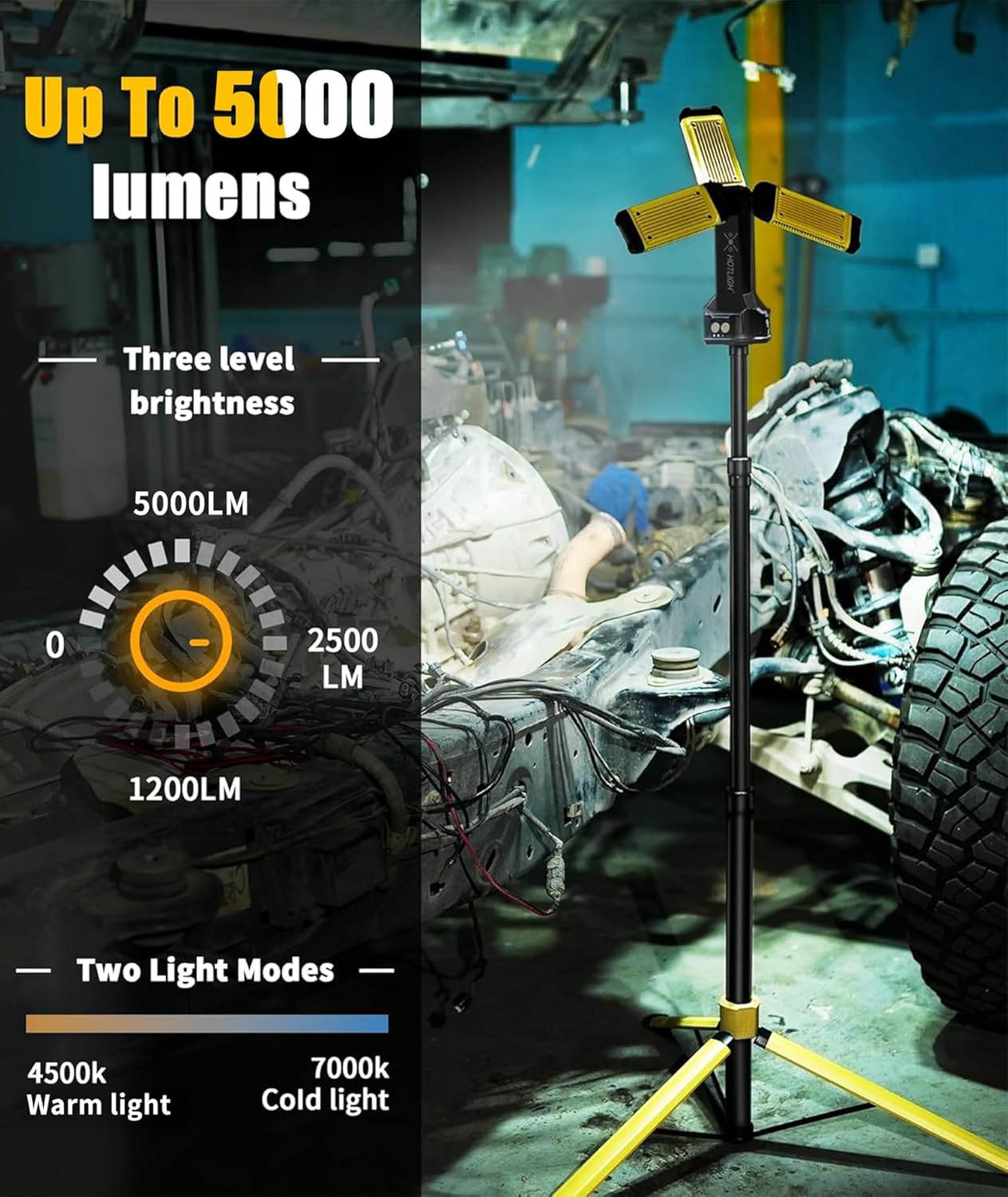
Figure 5: Display showing the three brightness levels and two light modes (warm/cool).
4.2 Switching Light Modes
The work light offers two light modes: warm light (3500-4500K) and cool light (6000-7000K). Use the dedicated mode button (if present, or refer to specific button functions on your device) to switch between these color temperatures.

Figure 6: Visual representation of the two light modes (white and warm) and their respective brightness settings.
4.3 Power Bank Functionality
The integrated 10000mAh battery can charge external devices. Connect your mobile phone or GPS device to the USB-A output port on the light head using a compatible cable.

Figure 7: The work light being used to charge a smartphone, demonstrating its power bank feature.
4.4 Mounting Options
The light offers multiple mounting options for versatility:
- Tripod: Use the included tripod for stable, freestanding illumination.
- Magnetic Base: The light head has a magnetic base for attachment to metallic surfaces, such as vehicle hoods or machinery.
- Hook: A built-in hook allows for hanging the light from overhead structures, tents, or branches.

Figure 8: Close-up view of the integrated hook on the light head for hanging.

Figure 9: The work light demonstrating its versatility in different environments, including magnetic attachment to a vehicle and hanging from a tent.
5. Features
- High Brightness: Up to 5000 lumens for extensive area illumination.
- Adjustable Light Modes: Switch between warm (3500-4500K) and cool (6000-7000K) light.
- Dimmable: Three brightness levels (1200, 2500, 5000 lumens).
- Long-lasting Battery: 10000mAh rechargeable battery provides extended use.
- Power Bank Function: USB-A output to charge mobile devices.
- Durable Construction: Premium CNC-machined aluminum alloy housing with cooling grid design for heat dissipation.
- Versatile Mounting: Features a tri-mount system including a magnetic base, hook, and detachable tripod.
- Adjustable Light Head: 180° vertical and 270° horizontal rotation for precise lighting.
- Portable: Cordless design and foldable tripod for easy transport.
6. Specifications
| Specification | Detail |
|---|---|
| Brand | HOTLIGH |
| Model Number | zf6957-29 |
| Brightness | 5000 Lumens (Max) |
| Battery Capacity | 10000mAh |
| Light Source Type | Light Emitting Diode (LED) |
| Color Temperature | Warm (3500-4500K), Cool (6000-7000K) |
| Material | Aluminum, Plastic |
| Mounting Type | Magnetic Base, Hook, Tripod |
| Product Dimensions | 4"L x 4"W x 67"H |
| Item Weight | 6.6 pounds (3 Kilograms) |
| Charging Port | Type-C |
| Output Port | USB-A |
7. Maintenance
- Cleaning: Wipe the light and tripod with a soft, damp cloth. Do not use abrasive cleaners or solvents.
- Storage: Store the device in a cool, dry place away from direct sunlight when not in use. Ensure the battery is partially charged before long-term storage.
- Battery Care: To prolong battery life, avoid fully discharging the battery frequently. Recharge the light regularly, even if not in active use.
8. Troubleshooting
- Light not turning on: Ensure the battery is charged. If the battery is low, connect the light to a power source using the Type-C cable.
- Light dims quickly: This may indicate a low battery. Recharge the device.
- Device not charging: Check the Type-C cable and power adapter for damage. Ensure connections are secure.
- External device not charging from power bank: Ensure the work light has sufficient charge. Check the USB-A cable and the connection to your external device.
9. Official Product Videos
The following video demonstrates the features and usage of the HOTLIGH Rechargeable Work Light with Stand:
Video 1: A comprehensive overview of the HOTLIGH Camping Light with Stand, showcasing its assembly, features, and various applications.
10. Warranty & Support
For product support, technical assistance, or warranty inquiries, please refer to the contact information provided with your purchase documentation or visit the official HOTLIGH website. Optional protection plans are available for extended coverage.