
1. Setup and Installation
This section provides a general overview of the installation process. For detailed visual instructions, please refer to the embedded videos.
1.1 Package Contents
Verify that all components are present in your package:

Image 1.1: The image displays the packing list for the SIXWIN Android 13 Car Stereo. It includes the 9-inch head unit, GPS antenna, RCA cables, microphone, power cable, radio antenna, accessories, user manual, USB cable, rear camera, rear camera input cable, additional power cable, and installation tools. The head unit dimensions are 370mm (14.5 inches) wide, 300mm (11.8 inches) high, and 180mm (7.08 inches) deep.
1.2 Wiring Connections
Proper wiring is crucial for optimal performance. Ensure all cables are securely connected.
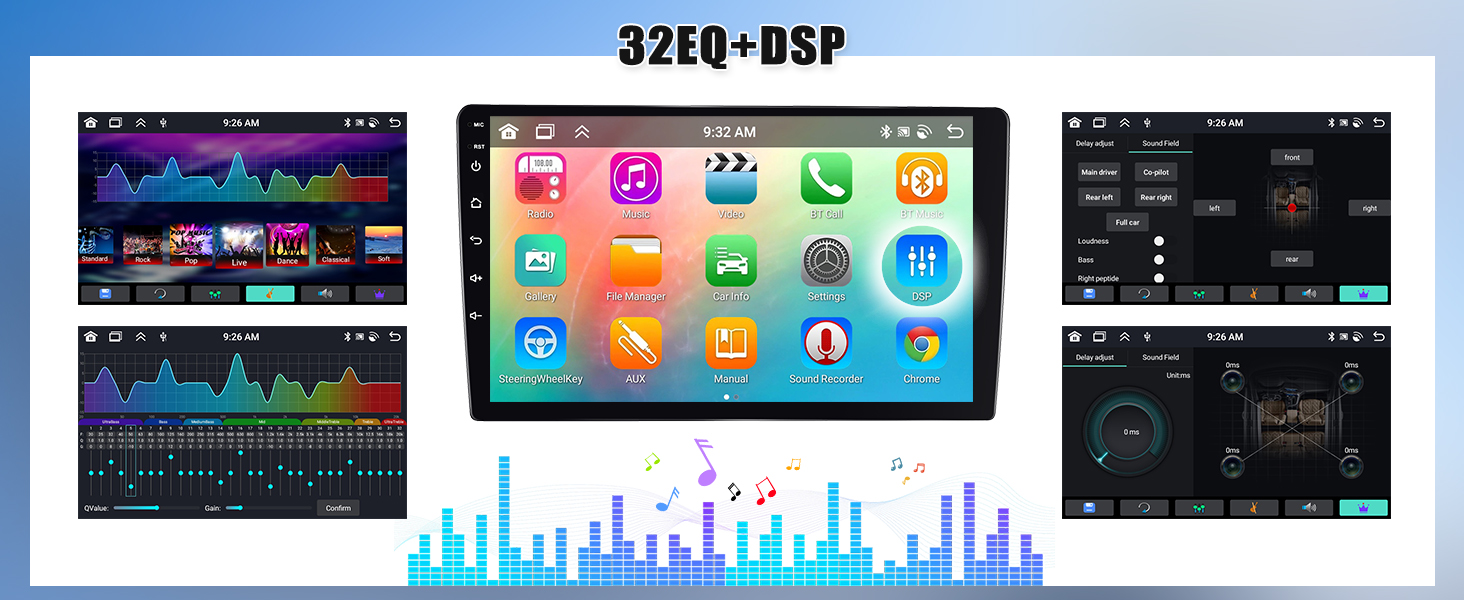
Image 1.2: This image shows the rear view of the SIXWIN Android 13 Car Stereo with various ports labeled. Key connections include: 1. Power Cable, 2. RCA Input/Output, 3. Reversing Camera Input, 4. USB Cable, 5. GPS Antenna, and 6. Radio Antenna. An external microphone is also shown connected.

Image 1.3: The image illustrates the wiring for the backup camera and Canbus. The red cable (1) connects to the positive pole of the car's reversing light cable, and the black cable (2) connects to the negative pole. The two other red extension cables (3, 4) do not need to be connected. The white plug must be connected to the main device for Bluetooth and WiFi signals.
Important Note: If your car is equipped with an amplifier control cable, it must be pulled out separately and connected to the power line ACC. Failure to do so may result in no sound output.
1.3 Installation Videos
Video 1.1: This video provides a step-by-step guide on how to install the car radio unit in a Hyundai Elantra. It covers removing the old unit, connecting new wiring, and fitting the new head unit into the dashboard.
Video 1.2: This video demonstrates the wiring process for the car stereo, showing how to connect various cables and harnesses to the head unit.
2. Operating Instructions
2.1 User Interface and Display
The SIXWIN Car Stereo features a 9-inch touch screen with Android 13 OS. It offers 59 UI desktop themes and supports 19 different wallpapers for personalization. The 3-split screen function allows for multi-tasking.

Image 2.1: This image showcases the user interface features including a weather forecast display, a three-split screen function for multitasking, and options to change between 19 different wallpapers.
2.2 Audio Features
Experience superior sound quality with the integrated DSP 32-band Equalizer (EQ) and various sound effects. The unit also includes FM/RDS radio and Network Radio for diverse listening options.

Image 2.2: The image highlights the audio features of the car stereo, including Bluetooth 5.0 for hands-free calls and music streaming, FM/RDS radio with automatic station search and 18 station storage, and a DSP 32-band equalizer with 7 presets for sound customization.
2.3 Navigation and Connectivity
The stereo supports both online and offline GPS navigation. Connect to WiFi for online navigation and app downloads. Wireless CarPlay and Android Auto provide seamless smartphone integration.

Image 2.3: This image illustrates the WiFi connectivity for browsing and online navigation, built-in GPS navigation supporting online and offline maps (with the Here We Go app), and Network Radio for accessing global radio stations.
2.4 Smartphone Integration
Utilize Wireless CarPlay and Android Auto for accessing phone functions safely while driving. Mirror Link functionality is also supported.

Image 2.4: The image demonstrates the CarPlay and Android Auto interfaces on the 9-inch touch screen, showing various apps and navigation. It also highlights the 59 UI desktop themes available for customization. Note: Android Auto does not support Samsung phones.
Video 2.1: This video provides a demonstration of the car radio's features, including its interface, music playback, and navigation capabilities, specifically for the Hyundai Elantra 2011-2013 model.
Video 2.2: This video showcases the CarPlay, Android Auto, GPS, and Bluetooth functionalities of the car stereo, demonstrating seamless integration and ease of use.
Video 2.3: This video demonstrates the UI functions, CarPlay, and Android Auto connection process, highlighting the user-friendly interface and connectivity options.
2.5 Vehicle Controls and Safety
The unit supports steering wheel controls, allowing you to manage audio and calls without distraction. An AHD backup camera is included for safer reversing.

Image 2.5: The image displays the Mirror Link function for both iOS and Android devices, the steering wheel control interface for programming buttons, and the backup camera display with AHD camera support for parking assistance.
3. Maintenance
To ensure the longevity and optimal performance of your SIXWIN Android 13 Car Stereo, follow these maintenance guidelines:
- Cleaning: Use a soft, dry cloth to clean the screen and exterior. Avoid abrasive cleaners or solvents.
- Software Updates: Periodically check for available software updates to ensure you have the latest features and bug fixes.
- Temperature: Avoid exposing the unit to extreme temperatures, which can affect its performance and lifespan.
4. Troubleshooting
If you encounter issues with your car stereo, refer to the following common troubleshooting tips:
- No Sound: Ensure the amplifier control cable (if present in your car) is correctly connected to the power line ACC. Check all speaker connections.
- Android Auto Connectivity Issues: Note that Android Auto may not support all Samsung phone models. Ensure your phone's software is up to date.
- Touch Screen Unresponsive: Try restarting the unit. If the issue persists, check for any physical damage or debris on the screen.
- GPS Signal Loss: Ensure the GPS antenna is properly installed and has a clear line of sight to the sky.
- Steering Wheel Controls Not Working: Access the steering wheel control settings in the unit's menu to program or re-calibrate the buttons.
5. Specifications
| Feature | Detail |
|---|---|
| Model Number | A7246A3454A4MI2 |
| Operating System | Android 13 |
| Memory | 6GB RAM + 128GB Storage |
| Display Size | 9 Inches |
| Connectivity | Bluetooth 5.0, WiFi, Wireless CarPlay, Android Auto |
| Special Features | GPS Navigation, Rear View Camera Input, Touchscreen, DSP 32EQ, Network Radio, Weather Forecast, Split Screen, Mirror Link |
| Item Weight | 3.69 pounds |
| Product Dimensions | 1 x 1 x 1 inches |
| Included Components | 1 x Car Stereo |
6. Warranty
This SIXWIN Android 13 Car Stereo comes with a 1-year warranty from the date of purchase. Please retain your proof of purchase for any warranty claims.
7. Support
For further assistance, technical support, or user manual inquiries, please contact us via email:
