
Introduction
This manual provides detailed instructions for the setup, operation, and maintenance of your Meifigno Smart AI Glasses Model GY300. These AI smart glasses offer real-time translation in over 100 languages, crystal-clear open-ear audio, and precise voice recognition. They are designed for hands-free calls, music, and smart assistance, featuring Bluetooth 5.4 connectivity, noise-canceling microphones, and intuitive touch controls. The UV400 lenses provide eye protection, and the lightweight stainless steel frame ensures comfort and durability.
Product Overview
The Meifigno Smart AI Glasses GY300 combine advanced technology with a stylish design. Key features include:
- Real-Time AI Translation: Supports over 100 languages with simultaneous, face-to-face, and dual-ear modes. Includes meeting recording functionality.
- Bluetooth 5.4 Open-Ear Audio: Provides stable connectivity and immersive stereo sound while allowing awareness of surroundings. Ideal for outdoor activities.
- UV400 Lenses: Blocks 100% of harmful UVA/UVB rays, reduces glare, and enhances visual clarity.
- Smart Touch Control: Easy control for translation, music playback, calls, and photo capture.
- Lightweight Stainless Steel Frame: Designed for comfort and durability.
- Long Battery Life: Up to 5 hours of playback and 50 hours of standby on a 90-minute charge.
Package Contents
Your package includes:
- Meifigno Smart AI Glasses
- Magnetic Charging Cable
- App Download and Activation Card
- User Guide (this manual)

Image: Meifigno Smart AI Glasses GY300 with its packaging and accessories, including a charging cable and user manual.
Setup
1. Powering On
To power on your Smart AI Glasses, press and hold both independent power switches located on each temple simultaneously for 3 seconds. Alternating red and blue indicator lights inside the temples will confirm successful startup.

Image: Close-up view of the glasses' temples, highlighting the power indicator lights and touch points.
2. Connecting to Your Device (Bluetooth Pairing)
Ensure your glasses are powered on. Enable Bluetooth on your smartphone or tablet. Search for available devices and select "GY-300" (or similar model number found on the outer packaging label) to pair. Confirm the pairing request on your device.
Video: This video demonstrates the process of powering on the glasses and connecting them via Bluetooth to a smartphone, including checking battery status on both iOS and Android devices.
3. App Download and Activation
To utilize the full range of AI features, download the "NebulaBuds" app. You can find it by searching in your device's app store (App Store for iOS, Google Play Store for Android) or by scanning the QR code provided on the included App Download and Activation Card. Once installed and your glasses are connected, open the app and follow the on-screen instructions to activate your device. You may need to enter an activation code found on the card or scan a QR code within the app's settings under "Bind New Device."
Video: This video illustrates how to download the NebulaBuds app from an app store or via QR code, and how to activate the device within the app using an activation code or QR scan.
Operating Instructions
1. AI Translation
The NebulaBuds app enables real-time AI translation across more than 100 languages. Select your desired translation mode within the app:
- Simultaneous Interpretation: Translates conversations in real-time as they happen.
- Face-to-Face Mode: Facilitates direct conversations with translation displayed on your phone and heard through the glasses.
- Dual Ear Mode: Allows two users with connected glasses to communicate with real-time translation.
- Meeting Recording: Records conversations and provides instant text transcription and summaries.
Note: The glasses include 300 minutes of free AI translation. Additional minutes can be purchased through the app's "Membership Center." For optimal translation accuracy, speak clearly at 1-3 words per second.

Image: A visual representation of the AI glasses providing real-time translation during a conversation in a restaurant, with text displayed on a phone screen.
Video: This video demonstrates the AI translation and voice recording features of the glasses, showing how conversations are translated and transcribed in real-time.
2. Audio Playback and Calls
The open-ear audio design allows you to listen to music, podcasts, or take calls while remaining aware of your surroundings. The integrated noise-canceling microphones ensure clear communication during calls.
- Play/Pause: Double-tap either temple.
- Next Song: Single-tap the left temple.
- Answer/End Call: Double-tap either temple.
- Activate Voice Assistant (Siri/Google Assistant): Triple-tap the left temple.
Adjust the volume directly on your connected smartphone or tablet.

Image: The smart glasses are shown with graphic elements representing 360° immersive sound and Bluetooth 5.4 connectivity, highlighting noise-canceling mics and button controls.
Video: This video demonstrates various touch controls for music playback, answering calls, and activating the voice assistant while wearing the smart glasses.
3. Remote Shooting
Use the glasses to remotely trigger your phone's camera. Triple-tap the right temple to take a photo.
Maintenance
Proper care will extend the life of your Meifigno Smart AI Glasses.
- Cleaning: Use a soft, clean cloth (preferably microfiber) to wipe the lenses and frame. Avoid using harsh chemicals or abrasive materials.
- Water Resistance: The glasses are water-resistant for daily use (e.g., light splashes, sweat). Do not submerge them in water or expose them to heavy rain. Water contact may cause a short circuit or overheating during charging.
- Storage: When not in use, store the glasses in their protective case to prevent scratches and damage. Avoid exposing them to extreme temperatures.
- Charging: Use only the provided magnetic charging cable. Ensure the charging contacts are dry before connecting to power.
Troubleshooting
If you encounter issues with your Meifigno Smart AI Glasses, please refer to the following common solutions:
| Problem | Solution |
|---|---|
| Glasses do not power on. | Ensure both power switches on the temples are pressed simultaneously for 3 seconds. Check battery level and charge if necessary. |
| Cannot connect via Bluetooth. | Make sure Bluetooth is enabled on your phone and the glasses are powered on. Ensure the glasses are within 15 meters of your device. Try restarting both the glasses and your phone. |
| No audio or poor sound quality. | Check the volume level on your connected phone. Ensure the glasses are properly paired. If audio is distorted, try moving closer to your phone or restarting the connection. |
| AI translation is inaccurate or not working. | Ensure the NebulaBuds app is open and the correct languages are selected. Speak clearly at a moderate pace (1-3 words per second). Check your internet connection for translation services. Verify if you have remaining free translation minutes. |
| Glasses automatically power off. | The glasses will auto power off after 3 minutes if Bluetooth disconnects or exceeds a 15m range. Reconnect to your device. |
Specifications
| Feature | Detail |
|---|---|
| Model Number | GY300 |
| Connectivity | Bluetooth 5.4 |
| AI Translation | 100+ languages, simultaneous, face-to-face, dual-ear modes, meeting recording. (300 free minutes included) |
| Audio | Open-ear stereo audio, noise-canceling microphones |
| Lenses | UV400 (100% UVA/UVB protection) |
| Frame Material | Lightweight Stainless Steel |
| Battery Life | Up to 5 hours playback, 50 hours standby |
| Charging Time | Approx. 90 minutes for full charge |
| Water Resistance | Water-resistant for daily use (not submersible) |
| Package Dimensions | 6.85 x 2.87 x 2.24 inches |
| Weight | 4.94 ounces |
| Batteries | 1 A battery required (internal) |
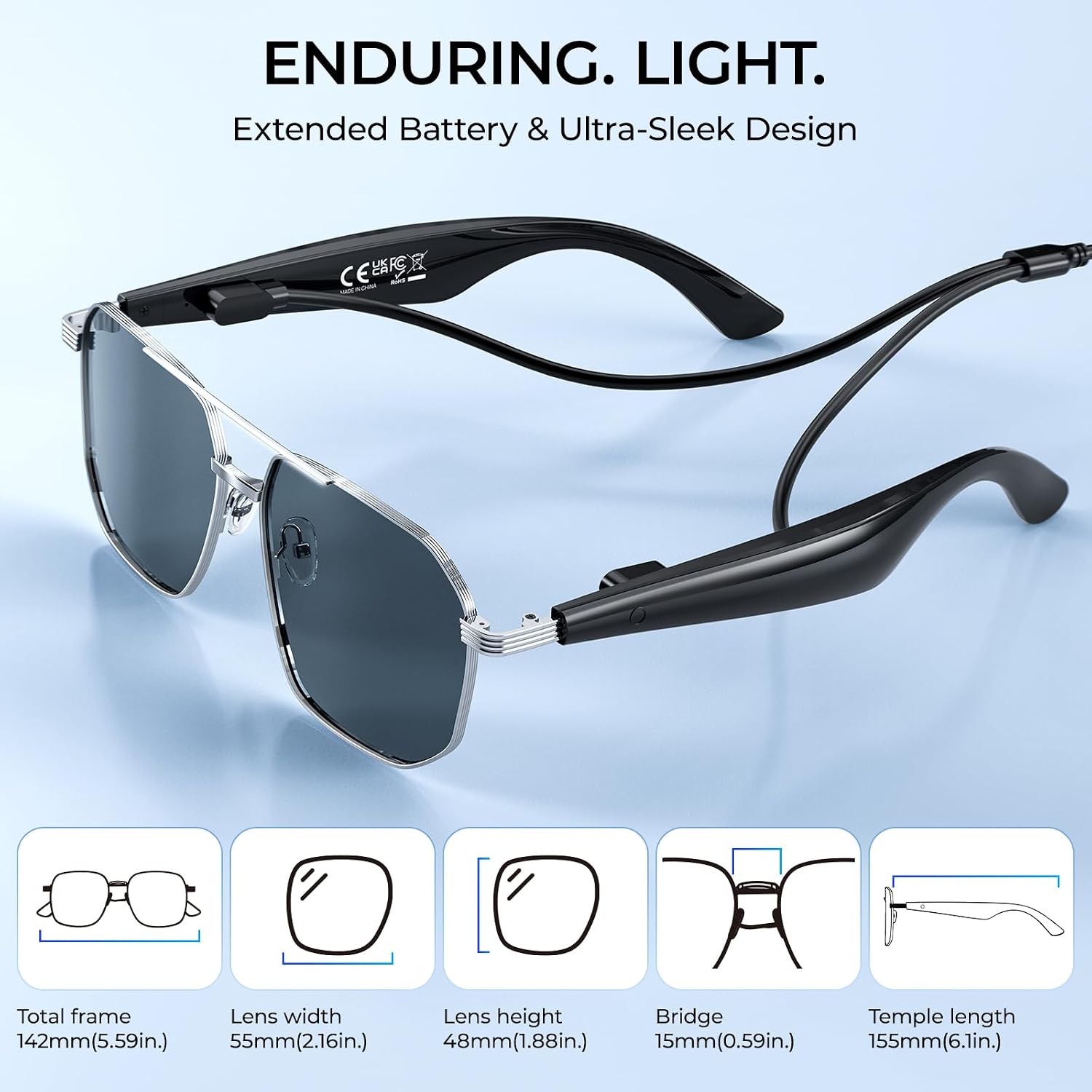
Image: Detailed diagram illustrating the dimensions of the Meifigno Smart AI Glasses GY300, including total frame width, lens width, lens height, bridge, and temple length.
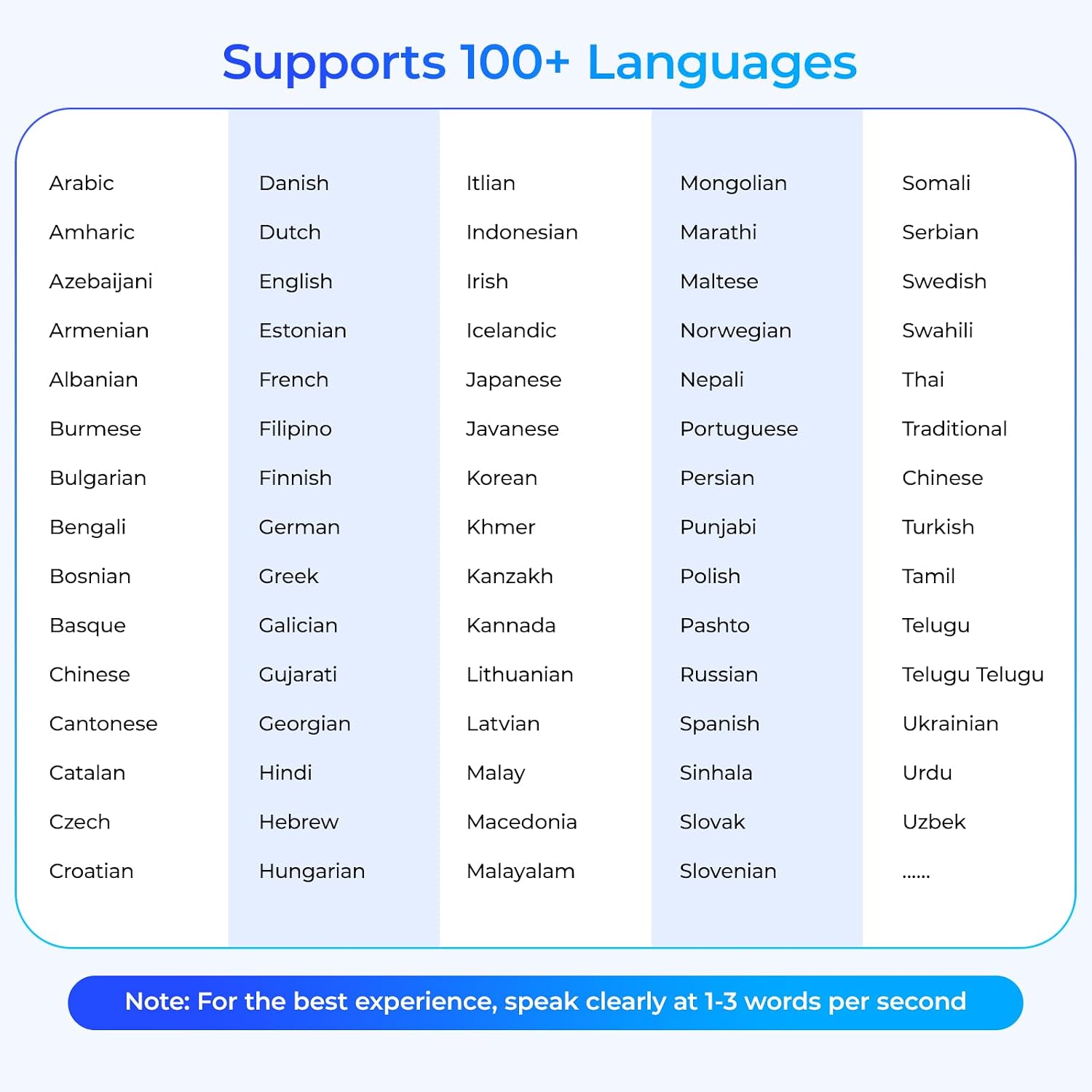
Image: A comprehensive list of over 100 languages supported by the AI translation feature of the glasses, categorized alphabetically.
Warranty and Support
Your Meifigno Smart AI Glasses GY300 come with a 12-month quality guarantee. For any questions or support needs regarding your Smart AI Glasses, please contact us through the Amazon message center. We are committed to resolving your issues promptly.
Please note that the included 300 minutes of free AI translation are a feature of the app and are not covered under the product warranty. Additional translation minutes can be purchased via the "Membership Center" within the NebulaBuds app once the free quota is exhausted.