
NIORSUN B003
NIORSUN Motion Sensor Wall Light (Model B003) Instruction Manual
Model: B003 | Brand: NIORSUN
Introduction
This manual provides detailed instructions for the installation, operation, maintenance, and troubleshooting of your NIORSUN Motion Sensor Wall Light, Model B003. Please read this manual thoroughly before use to ensure proper function and longevity of your device.
Product Overview
The NIORSUN Motion Sensor Wall Light is a versatile, battery-operated lighting solution designed for indoor use. It features a 5000mAh rechargeable battery, three color temperature options, dimmable brightness, and convenient remote control functionality. Its motion-sensing capabilities provide efficient, hands-free illumination.

Image: Two NIORSUN motion sensor wall lights installed above framed artwork in a hallway, demonstrating their upward and downward light projection.

Image: A woman on a staircase, with two NIORSUN wall lights providing illumination. The image also highlights the light's compact dimensions (4.2in x 2.6in) and brightness (350 LM), along with battery life estimates (10 hours constant, 90 days motion sensor).
Setup and Installation
The NIORSUN Motion Sensor Wall Light is designed for easy, wireless installation without the need for drilling or complex wiring. Follow these steps for quick setup:
- Prepare the Mounting Surface: Ensure the wall surface is clean, dry, and smooth for optimal adhesive performance.
- Attach the Adhesive Base: Peel the protective backing from the adhesive tape on the mounting base.
- Position the Base: Align the mounting base on your desired wall location. The base includes a built-in level to assist with straight placement. Press firmly to secure it to the wall.
- Mount the Light: Once the base is securely attached, slide the wall light onto the base. The light can be attached reversibly to direct light upwards or downwards as preferred.

Image: Step-by-step installation guide showing how to remove tape from the base, secure the base to a wall using its built-in level, and then attach the wall lamp to the base.
Charging the Device
The wall light is equipped with a 5000mAh rechargeable battery. Before initial use, or when the light dims, charge the device using the provided USB-C cable.
- Connect the USB-C cable to the charging port on the light.
- Connect the other end of the cable to a standard USB power adapter (not included).
- A full charge typically takes 3-4 hours.
- Once fully charged, the light can provide up to 10 hours of continuous illumination or up to 3 months of use in motion-sensing mode (based on 10 triggers per day).

Image: The NIORSUN wall light connected to a USB-C charger, illustrating the universal charging method. Text indicates 4 hours for a full charge and 10 hours of lighting time.
Operating Instructions
Your NIORSUN wall light offers flexible operation modes and customizable settings via its integrated controls and the included infrared remote control.
Light Modes
The light features two primary operating modes:
- Always-On Mode: Provides continuous illumination.
- Motion-Sensing Mode: The light activates when motion is detected within its range and automatically turns off after 15 seconds of no motion.
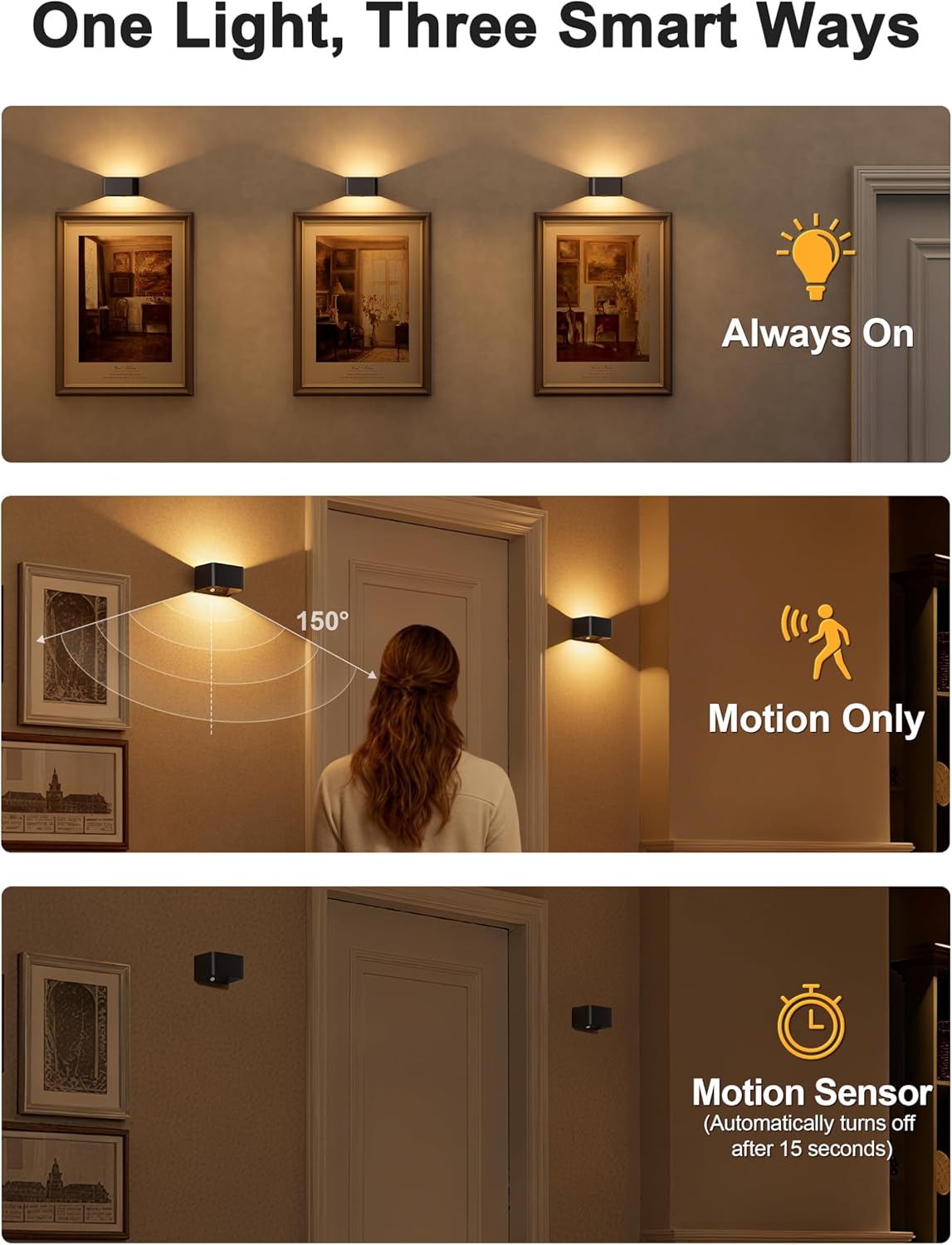
Image: Visual representation of the three smart ways to use the light: Always On, Motion Only (showing a person triggering the sensor), and Motion Sensor (indicating automatic turn-off after 15 seconds).
Color Temperature and Brightness Adjustment
Customize your lighting experience with three color temperature options and adjustable brightness levels:
- Color Temperatures:
- 3000K (Warm White)
- 4500K (Natural White)
- 5500K (Cool White)
- Brightness Levels: The light is dimmable, allowing you to adjust the intensity to your preference.

Image: Demonstrates the three available color temperatures (3000K, 4500K, 6500K) and five brightness levels (20%, 40%, 60%, 80%, 100%) of the wall lights.
Remote Control and Timer Function
The included infrared remote control allows for convenient adjustment of settings from up to 4-6 meters away.
- Remote Functions: Use the remote to switch between modes, adjust color temperature, and change brightness.
- Timer Function: Set the light to automatically turn off after 1 hour, 2 hours, 3 hours, or 4 hours. This feature helps conserve battery life.

Image: A hand holding the remote control, with the wall lights illuminating a living room, emphasizing the "Smart Remote Control" feature.

Image: A person sleeping in a bedroom with the wall light on, illustrating the timer function (1H, 2H, 4H) for energy saving and convenience.
Product Demonstration Video
Video: An official NIORSUN video demonstrating the features and installation of the Motion Sensor Wall Lights, including size, color options, easy installation, motion sensing, and color temperature changes.
Maintenance
To ensure optimal performance and longevity of your NIORSUN Motion Sensor Wall Light, follow these simple maintenance guidelines:
- Cleaning: Gently wipe the surface of the light with a soft, dry cloth. Avoid using abrasive cleaners, solvents, or harsh chemicals, as these can damage the finish or internal components.
- Charging: Recharge the battery when the light output appears dim or when the motion sensor becomes less responsive. Regular charging helps maintain battery health.
- Storage: If storing the light for an extended period, ensure it is fully charged and then store it in a cool, dry place. Recharge periodically (e.g., every 3-6 months) to prevent deep discharge of the battery.
- Environment: This product is designed for indoor use only. Avoid exposure to moisture, extreme temperatures, or direct sunlight for prolonged periods.
Troubleshooting
If you encounter any issues with your NIORSUN Motion Sensor Wall Light, refer to the following common problems and solutions:
| Problem | Possible Cause | Solution |
|---|---|---|
| Light does not turn on. | Battery is depleted. Incorrect mode selected. Motion sensor blocked or faulty. | Charge the light fully (3-4 hours). Ensure the light is set to "Always-On" or "Motion-Sensing" mode. Check for obstructions in front of the motion sensor. |
| Motion sensor is not responsive. | Battery low. Sensor range obstructed. Ambient light too high (if in motion-sensing mode with light sensor). | Recharge the light. Ensure the sensor has a clear line of sight. Test in a darker environment. |
| Remote control not working. | Remote battery depleted. Obstruction between remote and light. Remote out of range. | Replace the remote control battery. Ensure a clear path between the remote and the light's receiver. Operate the remote within 4-6 meters of the light. |
| Light output is dim or inconsistent. | Low battery. Brightness setting too low. | Recharge the light. Adjust brightness using the remote or integrated controls. |
Specifications
| Feature | Detail |
|---|---|
| Brand | NIORSUN |
| Model Number | B003 |
| Color | Black |
| Material | Acrylonitrile Butadiene Styrene |
| Product Dimensions | 5.91"L x 4.13"W x 2.36"H |
| Power Source | Battery Powered (5000mAh Lithium Polymer) |
| Light Source Type | LED |
| Light Color Temperatures | 3000K (Warm White), 4500K (Natural White), 5500K (Cool White) |
| Brightness | Up to 300 Lumens |
| Control Method | Push Button, Remote (Infrared) |
| Special Features | Dimmable & 3CCT, Level calibration and installation, Motion Sensor & Battery Powered, Smart Remote & Touch Control, Timer & Memory Function |
| Installation Type | Wall Mount |
| Indoor/Outdoor Usage | Indoor |
| Voltage | 3.7 Volts |
| Wattage | 2 watts |
| Item Weight | 0.46 Kilograms (1.01 pounds) |
Warranty and Support
NIORSUN provides a 3-year manufacturer's warranty for this wall lamp. This warranty covers defects in materials and workmanship under normal use.
For warranty claims, technical support, or any inquiries regarding your product, please contact NIORSUN customer service through the retailer where the product was purchased or visit the official NIORSUN website for contact information.
Please retain your proof of purchase for warranty validation.
Ask a question about this manual
Ask about setup, troubleshooting, compatibility, parts, safety, or missing instructions. Manuals+ will review the question and use this page’s manual context to help answer it.