
Sakerplus CP91954-X62590
Sakerplus Portable Cordless Pressure Washer User Manual
Model: CP91954-X62590
Introduction
Thank you for choosing the Sakerplus Portable Cordless Pressure Washer. This manual provides essential information for the safe and efficient operation, maintenance, and troubleshooting of your new pressure washer. Please read this manual thoroughly before first use and retain it for future reference.
This cordless pressure washer is designed for various cleaning tasks, including car washing, driveway cleaning, patio maintenance, fence cleaning, and general home cleaning. Its portable design and powerful battery make it suitable for outdoor use without the need for a power outlet.
Safety Information
Always observe basic safety precautions when using this product to reduce the risk of injury or damage.
- High Pressure Warning: This pressure washer generates a maximum water pressure of 600 PSI. Keep hands, face, and all body parts away from the nozzle. Do not direct the spray at people, pets, or electrical devices.
- Eye Protection: Always wear appropriate eye protection (safety glasses or goggles) when operating the pressure washer.
- Stable Footing: Ensure you have stable footing and balance before and during operation. The high-pressure spray can cause recoil.
- Water Source: Use only clean water. Do not use corrosive or flammable liquids.
- Battery Safety: Use only the charger provided by the manufacturer. Do not expose the battery to extreme temperatures or direct sunlight. Do not disassemble or short-circuit the battery.
- Children and Pets: Keep children and pets away from the operating area. This product is not a toy.
- Storage: Store the pressure washer in a dry, secure location, out of reach of children.
Package Contents
Verify that all items are present in the package:
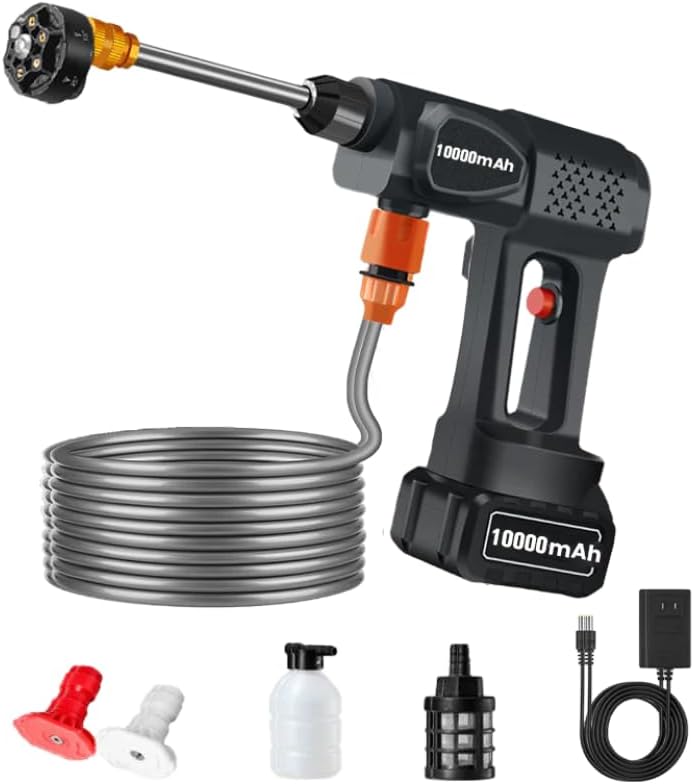
Image: The main components of the Sakerplus Portable Cordless Pressure Washer, including the main unit with battery, long spray wand, flexible water intake hose, 6-in-1 nozzle, foam pot, water filter, and charging cable with adapter.
- Sakerplus Pressure Washer Main Unit
- 10000mAh Rechargeable Battery
- Battery Charger
- Long Spray Wand
- 6-in-1 Multi-function Nozzle
- Water Intake Hose
- Water Filter
- Foam Pot
- User Manual (this document)
Setup
- Charge the Battery: Before first use, fully charge the 10000mAh battery. Connect the charger to the battery and plug it into a standard electrical outlet. The charging indicator will show the charging status.
- Attach the Battery: Slide the fully charged battery into the battery compartment at the base of the pressure washer handle until it clicks securely into place.
- Connect the Spray Wand: Insert the long spray wand into the front port of the pressure washer unit. Twist it clockwise until it is firmly locked.
- Attach the Nozzle: Select the desired 6-in-1 multi-function nozzle and attach it to the end of the spray wand. Ensure it is securely fastened.
- Connect the Water Intake Hose: Attach one end of the water intake hose to the water inlet port on the pressure washer. Submerge the other end, with the water filter attached, into a bucket or container of clean water. Ensure the filter is fully submerged to prevent air intake.
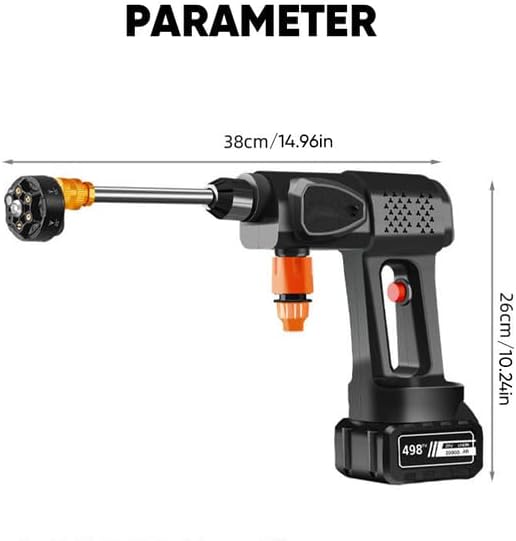
Image: A diagram illustrating the dimensions of the pressure washer, showing a length of 38cm (14.96 inches) and a height of 26cm (10.24 inches).
Operating Instructions
Starting the Pressure Washer
- Ensure the battery is fully charged and securely attached.
- Ensure the water intake hose is properly connected and the filter end is submerged in water.
- Point the nozzle away from yourself and others.
- Press and hold the trigger to start the water flow. It may take a few seconds for water to prime and flow consistently.
Using the 6-in-1 Multi-function Nozzle
The 6-in-1 nozzle provides versatile spray patterns for different cleaning needs. Rotate the nozzle head to switch between the following modes:

Image: A close-up view of the 6-in-1 multi-function nozzle, illustrating its six distinct spray patterns: 0°, 15°, 25°, 40°, Straight Mode, and Shower Mode, which can be selected by rotating the nozzle head.
- 0° (Direct Jet): For concentrated, high-impact cleaning on tough stains or small areas. Use with caution due to high pressure.
- 15° (Narrow Fan): For intense cleaning of smaller surfaces.
- 25° (Medium Fan): A versatile setting for general cleaning tasks.
- 40° (Wide Fan): For gentle cleaning of larger, delicate surfaces.
- Straight Mode: A continuous, straight stream for specific applications.
- Shower Mode: For rinsing or watering plants, providing a gentle, wide spray.
Using the Foam Pot
The included foam pot can be used to apply soap or detergent. Fill the foam pot with your desired cleaning solution, attach it to the spray wand in place of the nozzle, and activate the pressure washer. This is ideal for car washing or pre-soaking dirty surfaces.

Image: A collage demonstrating the wide range of applications for the pressure washer, including cleaning pets, motorcycles, windows, yards, plants, and ground surfaces.

Image: A grid of six images showcasing different cleaning applications using the adjustable nozzles, such as yard wash, air conditioner external unit cleaning, green spraying (watering), domestic car wash, house doors and windows cleaning, and large equipment cleaning.
Maintenance
- After Each Use:
- Disconnect the water intake hose and remove the battery.
- Run the pressure washer for a few seconds to clear any remaining water from the pump and hose.
- Clean the exterior of the unit with a damp cloth.
- Rinse the nozzle and water filter to remove any debris.
- Battery Care: Store the battery in a cool, dry place. If storing for extended periods, charge the battery every 3-6 months to maintain its lifespan.
- Winter Storage: If storing in freezing temperatures, ensure all water is drained from the unit and accessories to prevent damage from ice expansion.
Troubleshooting
| Problem | Possible Cause | Solution |
|---|---|---|
| Pressure washer does not start. | Battery not charged or not properly installed. | Ensure battery is fully charged and securely clicked into place. |
| No water flow or weak pressure. |
|
|
| Water leaks from connections. | Loose connections or worn O-rings. | Tighten all connections. Inspect and replace O-rings if damaged. |
| Unit stops during operation. | Battery low or overheating protection activated. | Recharge the battery. Allow the unit to cool down if it has been used continuously for a long period. |
Specifications

Image: An image highlighting key performance specifications: Jet accessibility of 6-8 meters, Strong driving force of 36 bar (approximately 522 PSI), and an Endurance time of 60 minutes.
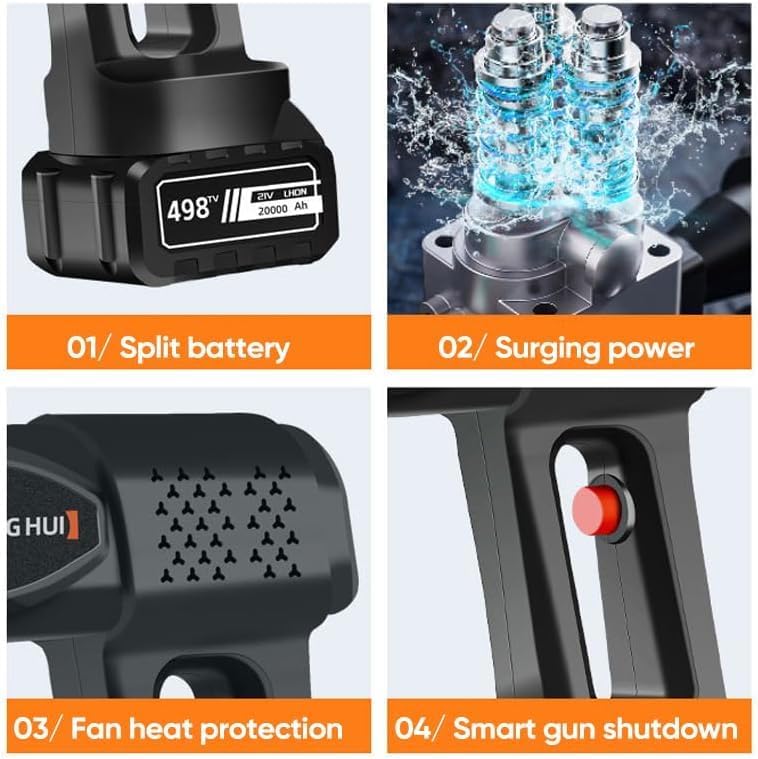
Image: A four-panel image detailing internal features: 01/ Split battery design, 02/ Surging power mechanism, 03/ Fan heat protection for the motor, and 04/ Smart gun shutdown for safety and efficiency.
- Model: CP91954-X62590
- Power Source: 10000mAh Lithium-ion Battery (Battery Powered)
- Maximum Pressure: 600 PSI (Pound per Square Inch)
- Product Dimensions: 14.96"L x 14.96"W x 10.2"H (38cm x 38cm x 26cm)
- Color: Black
- Nozzle Type: 6-in-1 Multi-function Nozzle
- Manufacturer: aogelei
- Country of Origin: China
Warranty and Support
For warranty information or technical support, please contact the retailer or manufacturer directly. Keep your purchase receipt as proof of purchase.
Return Policy: This product typically has a 30-day return policy for refund or replacement, as per standard retail terms.
Ask a question about this manual
Ask about setup, troubleshooting, compatibility, parts, safety, or missing instructions. Manuals+ will review the question and use this page’s manual context to help answer it.