
SONICWARE LVN-090
SONICWARE LIVEN Evoke Acoustronic Synthesizer with Granular Effect - Instruction Manual
Model: LVN-090
1. Introduction
The SONICWARE LIVEN Evoke is a portable acoustronic synthesizer designed for cinematic ambient and post-classical music production. It features a unique Acoustronic Flux Oscillator, Granular Effect (Grain FX), and a versatile 4-track sequencer, allowing for the creation of organic and richly fluctuating soundscapes.
2. Safety Information
Please read and understand the following safety precautions before operating your LIVEN Evoke synthesizer:
- Do not expose the unit to rain, moisture, or extreme temperatures.
- Avoid placing the unit near heat sources or in direct sunlight.
- Use only the specified power source (6xAA batteries or optional 9V DC AC adapter).
- Do not attempt to disassemble or modify the unit. Refer all servicing to qualified personnel.
- Keep out of reach of children.
3. Package Contents
Ensure all items are present upon unboxing:
- SONICWARE LIVEN Evoke Synthesizer (Model LVN-090)
- Instruction Manual (this document)
- Note: AA batteries and AC adapter are not included and must be purchased separately.
4. Product Overview
The LIVEN Evoke is a compact and powerful synthesizer. Familiarize yourself with its layout and controls.
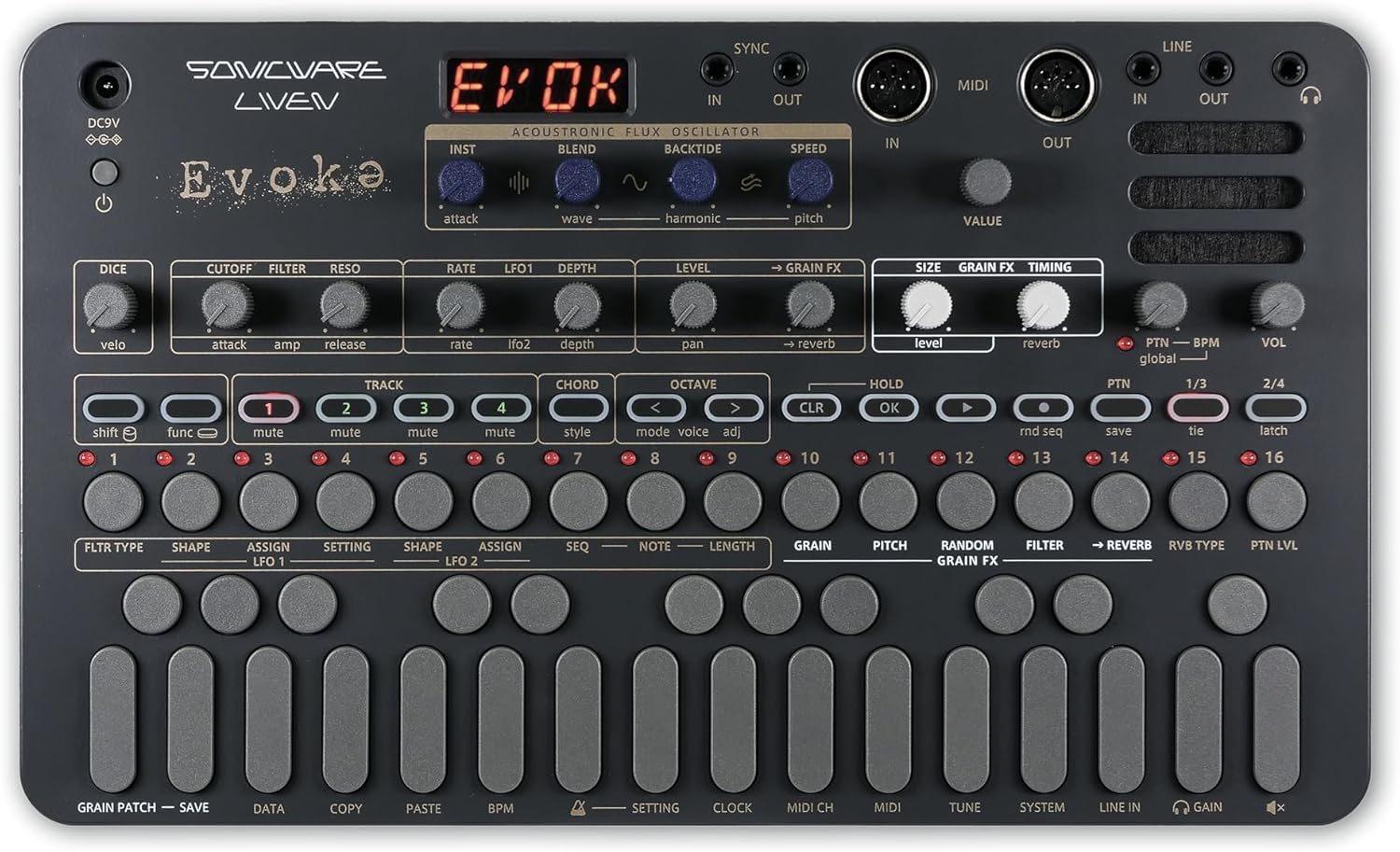
Figure 4.1: Top-down view of the LIVEN Evoke, highlighting the control panel and connectivity options.

Figure 4.2: Angled view of the LIVEN Evoke, illustrating its portable form factor.
4.1. Key Features
- Acoustronic Flux Oscillator: Combines 34 acoustic instrument tones with 20 wavetables (+ 2 noise types) for organic sound creation.
- Grain FX Granular Effect: Up to 12 grains, tempo-synced harmonization and randomization. Applicable to internal and external sources.
- 10 Reverb Types: Deep and multi-dimensional reverbs for immersive soundscapes.
- 4-Track Sequencer: Supports step and real-time recording, parameter locking, and random/probability playback.
- One-Finger Chord Mode: Play chords easily with 16 selectable chord styles.
- Portable Design: Battery-powered (6xAA), built-in speaker, lightweight for on-the-go music production.
5. Setup
5.1. Powering the Unit
The LIVEN Evoke can be powered by either AA batteries or an optional AC adapter.
- Battery Power: Insert 6xAA batteries into the battery compartment on the underside of the unit. Ensure correct polarity.
- AC Adapter: Connect a 9V DC AC adapter (not included) to the DC9V input jack.
5.2. Connections
The unit offers various input and output options:
- LINE IN/OUT: Connect external audio sources or output the synthesizer's audio.
- MIDI IN/OUT: Connect to other MIDI devices for synchronization and control.
- SYNC IN/OUT: Use for analog clock synchronization with compatible devices.
- Headphone Jack: For private monitoring.
6. Operating Instructions
6.1. Acoustronic Flux Oscillator
This newly developed synth engine combines acoustic instrument tones with wavetables and noise types to create unique sounds. Use the INST, BLEND, WAVE, HARMONIC, and PITCH controls to sculpt your sound.

Figure 6.1: Acoustronic Flux Oscillator architecture.
6.2. Grain FX Granular Effect
The Grain FX allows for granular synthesis, creating musical textures with up to 12 grains. Parameters like SIZE, GRAIN FX, and TIMING can be adjusted. This effect can also be applied to external audio sources connected via LINE IN.

Figure 6.2: Grain FX controls on the LIVEN Evoke.
Video 6.2.1: Demonstration of instantly applying multiple Grain FX on the Sonicware Liven Evoke.
6.3. Reverbs
The LIVEN Evoke includes 10 deep and multi-dimensional reverb types. These can be combined with Grain FX to build immersive, dreamlike soundscapes. Adjust the REVERB knob to control the amount of reverb.

Figure 6.3: Reverb controls on the LIVEN Evoke.
6.4. 4-Track Sequencer
The built-in 4-track sequencer supports both step and real-time recording. It features parameter locking, random/probability playback, and can be synchronized with other gear via SYNC and MIDI connections.
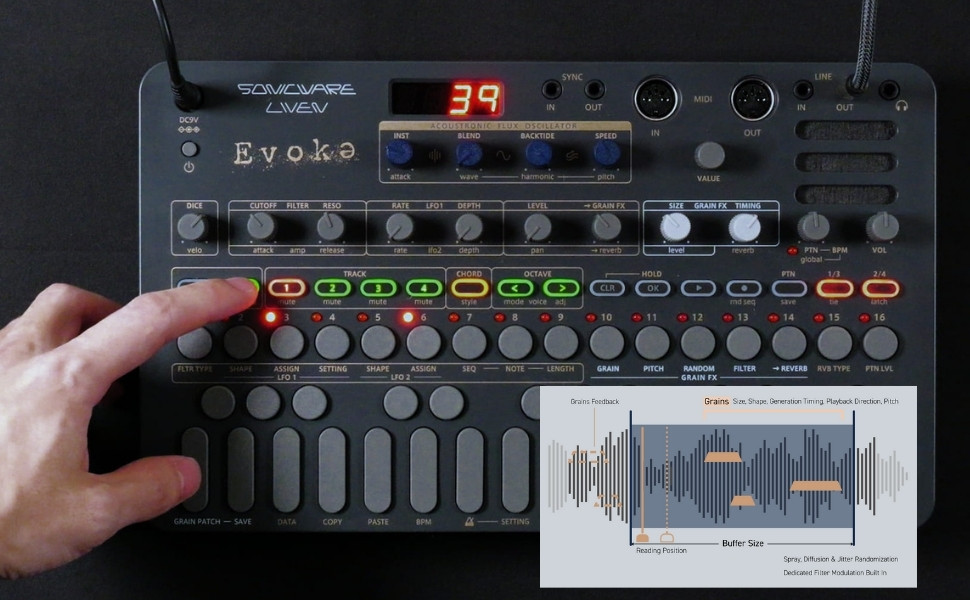
Figure 6.4: 4-Track Sequencer controls on the LIVEN Evoke.
Video 6.4.1: Demonstration of preset patterns on the Sonicware Liven Evoke.
6.5. One-Finger Chord Mode
The One-Finger Chord Mode allows you to play chords with a single finger, offering 16 different chord styles for quick and expressive performance.

Figure 6.5: One-Finger Chord Mode in action.
Video 6.5.1: Demonstration of layering sounds on the Sonicware Liven Evoke.
7. Maintenance
To ensure the longevity and optimal performance of your LIVEN Evoke:
- Cleaning: Use a soft, dry cloth to clean the unit. Avoid abrasive cleaners or solvents.
- Storage: Store the unit in a cool, dry place away from direct sunlight and extreme temperatures. If storing for extended periods, remove batteries to prevent leakage.
- Handling: Handle with care to avoid physical damage to controls and connections.
8. Troubleshooting
If you encounter issues with your LIVEN Evoke, refer to the following common solutions:
| Problem | Possible Cause | Solution |
|---|---|---|
| Unit does not power on. | Low or dead batteries; AC adapter not connected or faulty. | Replace batteries or check AC adapter connection and functionality. |
| No sound output. | Volume too low; incorrect audio connections; internal speaker muted. | Increase volume; verify LINE OUT/headphone connections; check internal speaker settings. |
| Sequencer not playing. | No pattern recorded; sequencer stopped; external sync issue. | Record a pattern; ensure sequencer is playing; check SYNC/MIDI connections. |
For further assistance, please visit the official SONICWARE support website.
9. Specifications
- Model Name: LIVEN Evoke
- Item Model Number: LVN-090
- Brand: SONICWARE
- Body Material: Plastic
- Color: Dark Grey
- Item Weight: 1.74 pounds (790 Grams)
- Product Dimensions (L x W x H): 6.93 x 11.69 x 1.89 inches
- Batteries: 6 AA batteries required (not included)
- Connector Type: 5-pin DIN MIDI, Auxiliary
10. Warranty & Support
The SONICWARE LIVEN Evoke comes with a standard manufacturer's warranty. For detailed warranty information, product registration, and technical support, please visit the official SONICWARE website or contact their customer service.
For additional resources and community support, you may also explore the SONICWARE Store on Amazon.
Ask a question about this manual
Ask about setup, troubleshooting, compatibility, parts, safety, or missing instructions. Manuals+ will review the question and use this page’s manual context to help answer it.