
Important Safety Instructions
Please read and understand all instructions before assembly and use. Keep this manual for future reference.
- Always follow the assembly instructions carefully to avoid injury.
- Use the anti-tipping kit to secure the TV stand to the wall to prevent tipping. This is crucial for safety, especially in households with children or pets.
- Do not overload the power outlets to prevent fire hazards. Ensure total wattage does not exceed the rated capacity.
- Keep the area around the TV stand clear to avoid potential pinch points or hazards.
- Ensure the TV stand is placed on a level and stable surface.
- Do not allow children to climb on the TV stand or drawers.
Product Overview
The BTHFST LED TV Stand is designed to accommodate televisions up to 75 inches, offering a blend of functionality and modern aesthetics. It features integrated power outlets, multi-functional RGB LED lighting, and various storage options.
Key Features:
- Convenient Power Outlets: Equipped with 2 standard AC outlets (125V/12A), 1 USB-A port (5V/2.1A), and 1 Type-C port (5V/2.1A) for easy device charging.
- Multi-Functional RGB LED Lights: Control over 60,000 colors, brightness, modes, and timer settings via mobile app or button. Includes Music Sync Mode.
- Ample Storage: Features 6 fabric drawers, 4 fabric pockets, open shelves, and 2 height-adjustable metal mesh shelves.
- Sturdy and Stable Construction: Made from engineered wood, metal, and non-woven fabric, with an included anti-tipping kit and adjustable feet for stability.

Image: The BTHFST LED TV Stand, illustrating its dimensions (63"W x 13.8"D x 20"H) and suitability for 55", 65", 70", and 75" televisions.
Package Contents
Before beginning assembly, please ensure all components listed below are present and undamaged. If any parts are missing or damaged, please contact customer support.
- TV Stand Frame Components
- 6 Fabric Drawers
- LED Light Strip and Controller
- Charging Station Unit (with 2 AC outlets, 1 USB-A, 1 Type-C)
- Assembly Kit (screws, bolts, tools)
- Detailed Assembly Instructions
- Anti-Tipping Kit
Setup and Assembly
Assembly is required for this TV stand. Please follow the included detailed instructions and use the provided assembly kit. All parts are clearly labeled with numbers or letters to facilitate the process.
Assembly Steps (General Guidance):
- Unpack all components and verify against the package contents list.
- Assemble the main frame of the TV stand using the provided hardware.
- Install the adjustable metal mesh shelves into their desired positions.
- Insert the fabric drawers into their designated slots.
- Attach the fabric pockets to the sides of the stand.
- Install the charging station unit into the tabletop cutout.
- Affix the LED light strip to the designated area, typically along the underside of the top shelf or within the open compartments.
- Attach the adjustable feet to the bottom of the stand and adjust for stability.
- Secure the TV stand to the wall using the anti-tipping kit.

Image: Illustration of the anti-tipping device installation, demonstrating how to secure the TV stand to a wall for enhanced safety.

Image: Detail of the height-adjustable feet, which help balance the TV stand on uneven floors and protect surfaces from scratches.
Operating Instructions
Power Outlets and USB Ports:
The integrated charging station provides convenient access to power. Simply plug your devices into the 2 AC outlets, 1 USB-A port, or 1 Type-C port located on the tabletop. Ensure devices are compatible with the specified voltage and amperage.

Image: The built-in charging station, featuring two standard AC outlets, one USB-A port, and one Type-C port for convenient power access.
RGB LED Lights:
The LED lights can be controlled via a mobile application or the included button controller. Refer to the separate LED light instruction sheet for detailed pairing and operation of the mobile app.
- Mobile App Control: Download the specified mobile application to access over 60,000 colors, customize brightness, select various dynamic modes, and set timers.
- Music Sync Mode: Activate this mode via the app to synchronize the LED lights with the rhythm of music playing in the room.
- Button Control: Use the physical button controller to cycle through basic colors and modes.

Image: The TV stand illuminated with RGB LED lights, showcasing the ambient effect and the mobile app interface for light control.
Video: This video demonstrates the features of the BTHFST LED TV Stand, including its dimensions, storage options, built-in charging station, adjustable components, and the dynamic RGB LED lighting system.
Maintenance
Proper care and maintenance will ensure the longevity and appearance of your BTHFST LED TV Stand.
- Cleaning: Wipe surfaces with a soft, damp cloth. Avoid harsh chemicals or abrasive cleaners that may damage the finish.
- Spills: The desktop is waterproof. In case of spills, wipe immediately with a dry cloth to prevent water damage to the underlying material.
- Scratch Resistance: While designed to be scratch-resistant, avoid dragging sharp objects across the surface to maintain its integrity.
- Fabric Drawers: Spot clean fabric drawers with a mild detergent and allow to air dry. Do not machine wash.
- Hardware: Periodically check and tighten all screws and bolts to ensure the stand remains stable.
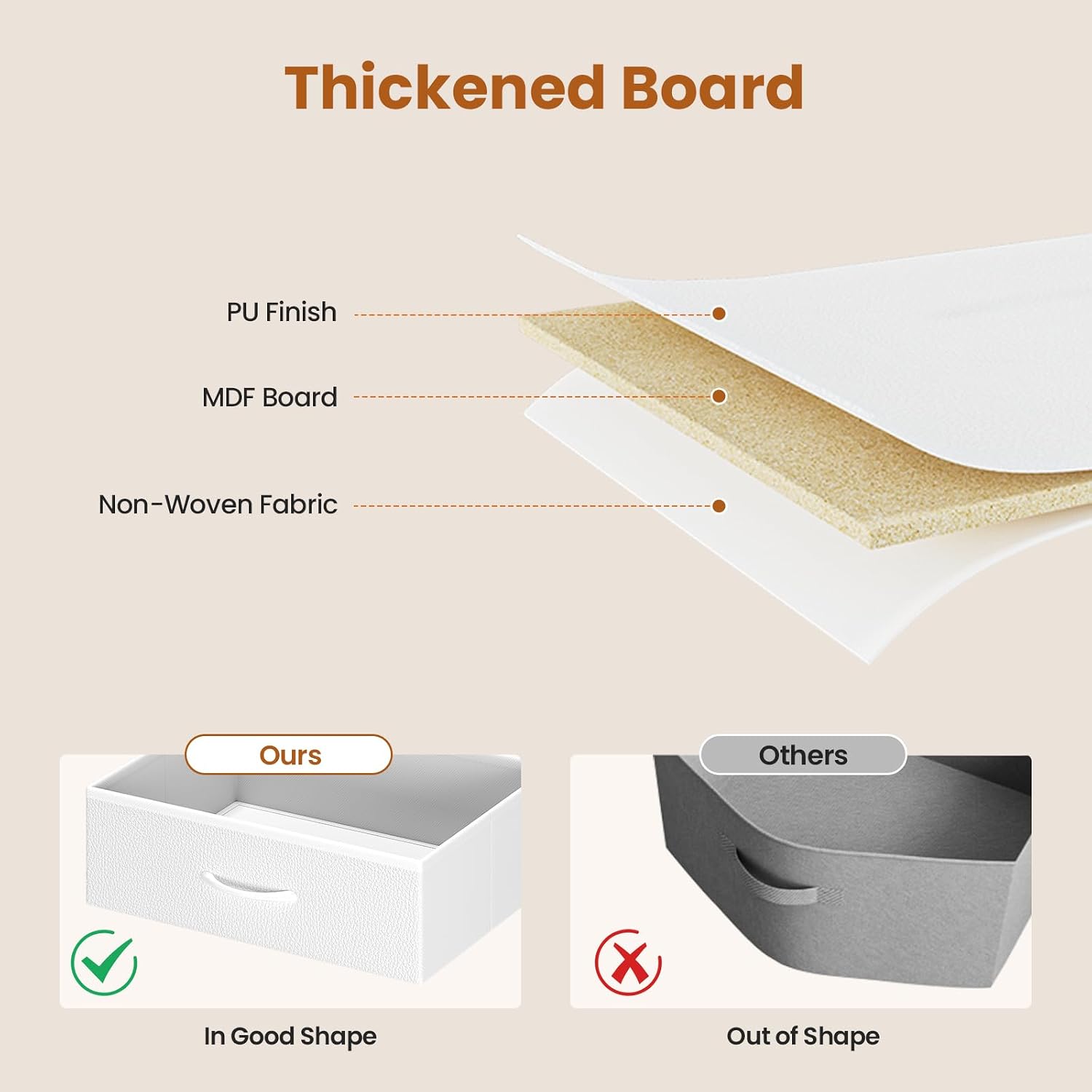
Image: A cross-section diagram illustrating the material composition of the TV stand, including PU finish, MDF board, and non-woven fabric, highlighting its durability.
Troubleshooting
If you encounter any issues with your BTHFST LED TV Stand, please refer to the following common solutions.
Common Issues and Solutions:
- LED Lights Not Working:
- Check if the power adapter is securely plugged into a working outlet.
- Ensure the LED strip is properly connected to the controller.
- If using the app, verify Bluetooth connection and app settings. - Stand is Unstable/Wobbly:
- Adjust the leveling feet at the bottom of the stand until it is stable on the floor.
- Ensure all assembly hardware (screws, bolts) are tightened securely. - Power Outlets/USB Ports Not Functioning:
- Verify the main power cord for the charging station is plugged into a working wall outlet.
- Check if the device you are trying to charge is functioning correctly with other power sources.
- Do not exceed the maximum load capacity of the outlets. - Drawers Not Sliding Smoothly:
- Ensure the fabric drawers are correctly inserted and not overloaded.
- Check for any obstructions in the drawer slots.
If the issue persists after attempting these solutions, please contact customer support for further assistance.
Specifications
| Brand | BTHFST |
| Model Number | B0FB52CT6D |
| Color | White |
| Material | Engineered Wood, Metal, Non-Woven Fabric |
| Dimensions (L x W x H) | 63" x 13.8" x 20" (160cm x 35cm x 50.8cm) |
| Mounting Type | Floor Mount |
| Number of Drawers | 6 Fabric Drawers |
| Number of Shelves | 3 (including 2 adjustable metal mesh shelves) |
| Power Outlets | 2 AC Outlets (125V/12A) |
| USB Ports | 1 USB-A (5V/2.1A), 1 Type-C (5V/2.1A) |
| Assembly Required | Yes |
| Included Components | TV Stand, 6 Fabric Drawers, LED Lights, Charging Station, Assembly Kit, Instructions |
Warranty Information
BTHFST products are manufactured with quality and care. For specific warranty details regarding your LED TV Stand, please refer to the warranty card included in your package or contact BTHFST customer support. Keep your purchase receipt as proof of purchase for any warranty claims.
Customer Support
If you have any questions, require assistance with assembly, or need to report missing/damaged parts, please do not hesitate to contact our customer support team. We are committed to providing satisfactory service.
Contact information can typically be found on the product packaging, the included instruction manual, or the official BTHFST website.