
BEBIRD R37R
Bebird Earsight Plus R37R Instruction Manual
Model: R37R
1. Introduction
The Bebird Earsight Plus R37R is an advanced ear cleaning camera and wax removal tool kit designed for visual and precise ear care. It features a flexible ear scope otoscope camera with light, and wireless earwax remover tweezers, suitable for both adults and children. This manual provides essential information for the safe and effective use of your device.
Key features include a flexible, bendable otoscope for natural ear canal fit, a 3P waterproof, dustproof, and anti-fog HD camera for clear vision, and precision tweezers for pain-free wax removal without touching the skin. The kit also includes various cleaning tips and a home check-up kit for ear, nose, and throat examinations.
2. Product Components and Setup
Before first use, please familiarize yourself with all components and ensure the device is fully charged.

Image: Overview of the Bebird Earsight Plus R37R and its complete set of accessories, including the main device, various ear tips, charging cable, and storage case.
2.1 Charging the Device
- Connect the provided USB charging cable to the device's charging port.
- Plug the other end into a standard USB power adapter (not included) or a computer USB port.
- The indicator light will show charging status and turn off when fully charged. A full charge typically takes approximately 1 hour.
2.2 App Installation and Connection
- Download the official Bebird app from your device's app store (iOS App Store or Google Play Store).
- Turn on the Bebird Earsight Plus R37R device.
- Open the Bebird app on your smartphone or tablet.
- Follow the in-app instructions to connect to the device via Wi-Fi. The device will broadcast its own Wi-Fi network.
- Once connected, you will see the live view from the camera on your screen.
3. Operating Instructions
3.1 Using the Flexible Otoscope
The flexible otoscope is designed to adapt to the natural curves of your ear canal, providing a clear and stable view.

Image: Demonstrates the flexible design of the otoscope, allowing it to bend and fit the ear canal, alongside an illustration of its triple-layer optical lenses providing crystal clear, waterproof, dustproof, and fog-resistant vision.
- Gently insert the flexible otoscope tip into the ear canal while observing the live feed on your connected device.
- Adjust the angle and depth as needed. The built-in safety scale and protective stopper help prevent over-insertion.
- The HD camera provides a clear view of the ear canal and eardrum.
3.2 Using the Visual Ear Tweezers
The precision tweezers allow for gentle and pain-free removal of earwax without direct contact with the ear canal skin.

Image: A person using the visual ear tweezers with a camera, demonstrating how the precision tool removes ear debris without touching the skin, ideal for sensitive ears.
Video: This video demonstrates the gentle and pain-free cleaning process using the Bebird ear tweezers, showing how they accurately pick up earwax without touching the ear wall, ensuring a safe and comfortable experience.
- Attach the ear tweezers accessory to the device.
- Using the live camera feed, carefully maneuver the tweezers to grasp and remove earwax.
- Ensure the soft silicone coating and spiral tip are securely in place before use.
3.3 Utilizing Different Cleaning Tips
The kit includes 4 types of cleaning tips, each designed for specific ear cleaning needs.

Image: An illustrative guide detailing the function of each ear cleaning tip: tweezers for stubborn earwax, scooper for regular earwax, scraper for extracting debris, and sponge for wet earwax.
- Tweezers: For removing stubborn earwax.
- Scooper: Ideal for regular earwax removal.
- Scraper: Designed for extracting debris.
- Sponge: Best for removing wet earwax.
- Select the appropriate tip for your specific cleaning requirement and attach it firmly to the device.
3.4 Home Check-Up Features
Beyond ear cleaning, the device can be used for general home check-ups of the ear, nose, and throat.

Image: Illustrates the versatility of the device for home check-ups, showing its use for ear, nasal, and oral examinations with different attachments.
- Attach the appropriate examination tip (e.g., ear exam tip, nasal exam tip, oral exam tip).
- Use the live camera feed to visually inspect the ear canal, nasal passages, or oral cavity.
- This feature is for visual inspection only and should not replace professional medical advice or diagnosis.
4. Maintenance
Proper maintenance ensures the longevity and hygiene of your Bebird Earsight Plus R37R.
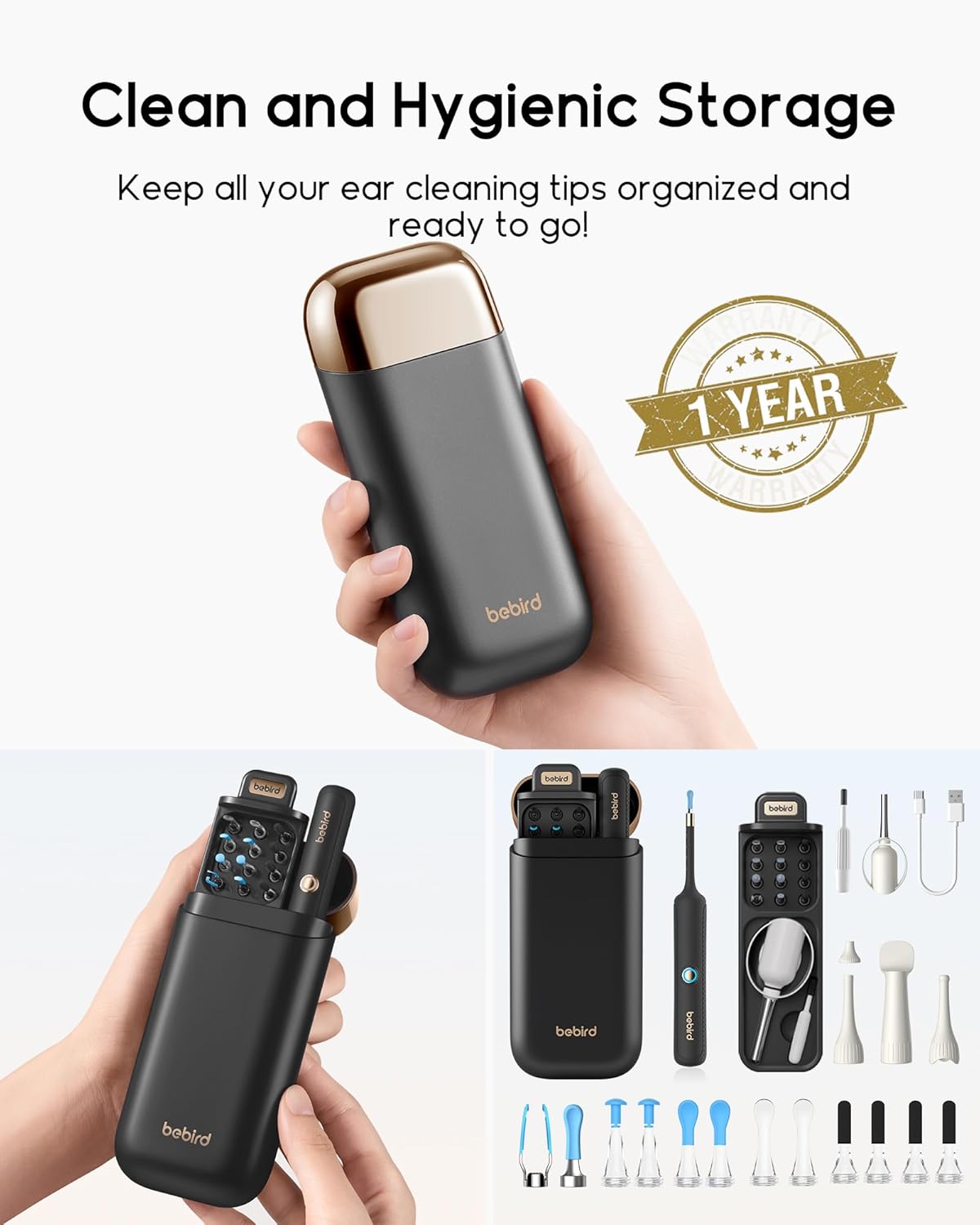
Image: The product's clean and hygienic storage case, designed to keep all ear cleaning tips organized and ready for use.
4.1 Cleaning the Device and Tips
- After each use, detach the cleaning tip from the device.
- Clean the tips with rubbing alcohol or a mild disinfectant solution. Ensure they are completely dry before storing or reattaching.
- Wipe the main body of the device with a soft, dry cloth. Do not immerse the main body in water.
- The camera lens can be gently cleaned with a lens cleaning cloth or cotton swab.
4.2 Storage
- Store the device and all accessories in the provided compact storage case when not in use.
- Keep the device in a cool, dry place, away from direct sunlight and extreme temperatures.
5. Troubleshooting
If you encounter any issues with your Bebird Earsight Plus R37R, please refer to the following common problems and solutions.
- Device not turning on: Ensure the device is fully charged. If the issue persists, try a different charging cable or power source.
- Cannot connect to Wi-Fi:
- Make sure the device is turned on and its Wi-Fi signal is active.
- Restart both the Bebird device and your smartphone/tablet.
- Ensure you are connecting to the correct Wi-Fi network broadcast by the Bebird device (usually starts with "bebird-").
- Disable mobile data on your phone during connection to prevent interference.
- Blurred or unclear image:
- Clean the camera lens gently with a soft, dry cloth or lens cleaner.
- Ensure there is no debris or wax obstructing the lens.
- App freezing or crashing:
- Close and restart the app.
- Ensure your app is updated to the latest version.
- Check if your smartphone's operating system is compatible with the app's requirements.
- Tips falling off: Ensure the tips are securely attached to the device. They should click firmly into place.
If you experience issues not listed here or if the problem persists, please contact customer support.
6. Specifications
| Feature | Detail |
|---|---|
| Model | R37R |
| Package Dimensions | 7.95 x 5.31 x 1.38 inches |
| Item Weight | 9.6 ounces |
| Manufacturer | Heifeng Zhizao (Shenzhen) Technology Co., Ltd |
| ASIN | B0FB3RPNW9 |
| Camera | 3P Waterproof, Dustproof, Anti-fog HD Camera |
| Connectivity | Wireless (Wi-Fi) |
| Compatibility | iOS and Android devices via Bebird App |
7. Warranty and Support
Your Bebird Earsight Plus R37R is designed for reliable performance. For any concerns or support, please refer to the following information.
7.1 Return Policy
This product is eligible for a refund or replacement within 30 days of purchase, subject to the seller's return policy.
7.2 Customer Support
For technical assistance, warranty claims, or any product-related inquiries, please contact Bebird Premium Official, the seller of this product. Bebird is committed to quality and precision, and their support team is available to ensure you are fully supported.
You can typically find contact information for the seller on the platform where you purchased the product or through the official Bebird website.
Ask a question about this manual
Ask about setup, troubleshooting, compatibility, parts, safety, or missing instructions. Manuals+ will review the question and use this page’s manual context to help answer it.