
1. Introduction
The Wolf Guard HD12 is an advanced 4-in-1 detector designed for household safety. It continuously monitors for carbon monoxide (CO) and various combustible gases, including natural gas, LPG, methane, ethane, propane, and butane. Additionally, it features integrated sensors for real-time temperature and humidity display. Equipped with high-performance electrochemical and semiconductor sensors, this device provides rapid and accurate detection. A built-in 1000mAh rechargeable lithium battery ensures emergency power supply during outages, maintaining continuous protection.
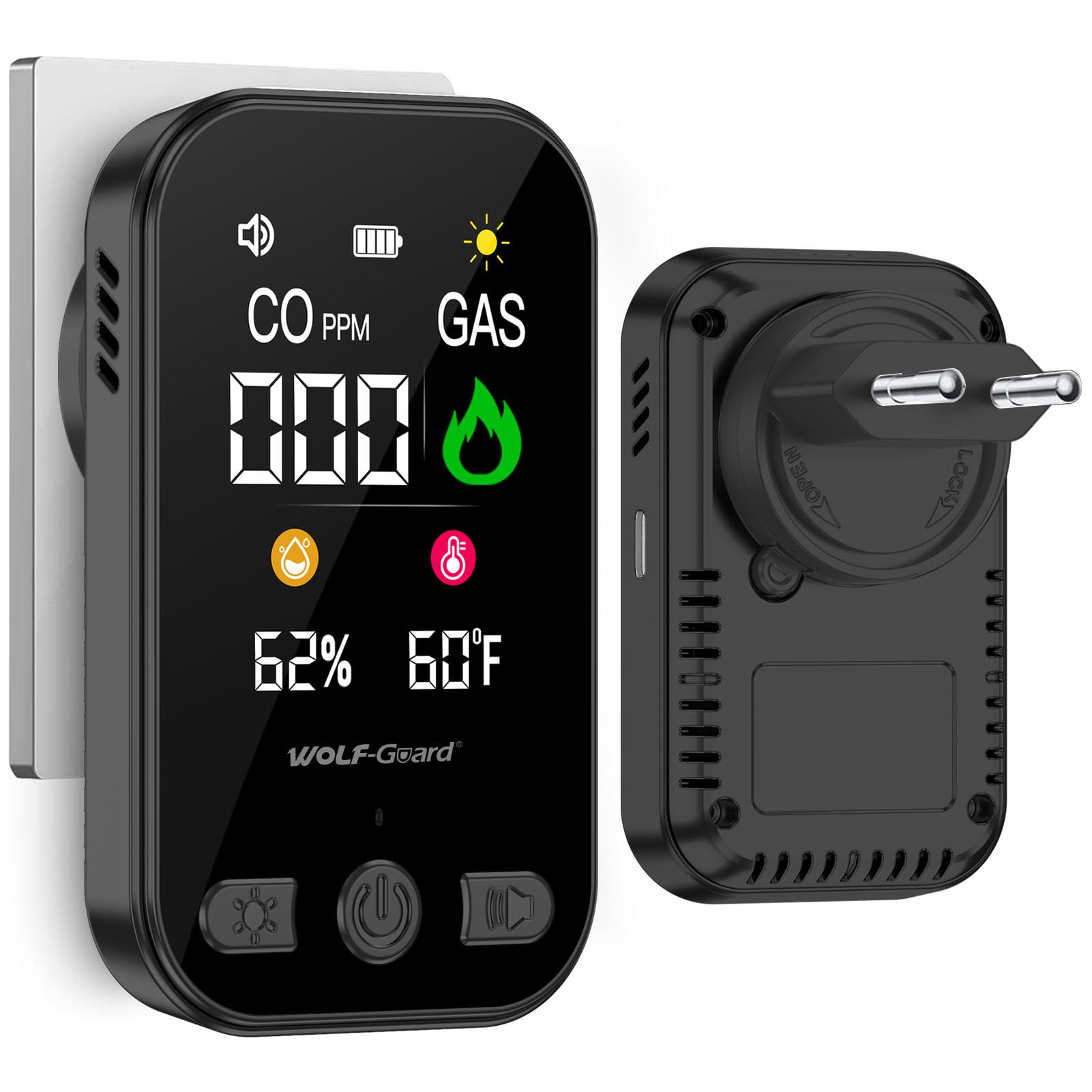
This image shows the front of the Wolf Guard HD12 detector, highlighting its digital display with readings for carbon monoxide (CO), combustible gas, humidity percentage, and temperature in Fahrenheit. It also indicates battery level and an audible alarm icon.
2. Setup and Installation
The Wolf Guard HD12 detector is designed for simple plug-and-play installation. Follow these steps for proper setup:
- Unpacking: Carefully remove the detector from its packaging.
- Power Connection: Plug the device directly into a standard household electrical outlet. The device will automatically power on and begin its initial self-check.
- Optimal Placement:
- For combustible gases (like natural gas, methane, which are lighter than air), install the detector in a high position, approximately 30 cm (12 inches) from the ceiling and within 1.5 meters (5 feet) of potential gas sources.
- For LPG/butane/propane (which are heavier than air), install the detector in a low position, approximately 30 cm (12 inches) from the floor and within 1.5 meters (5 feet) of potential gas sources.
- For carbon monoxide (CO), install the detector at a height between 1.5 meters (5 feet) and 2.5 meters (8 feet) from the floor, in areas where CO is likely to accumulate, such as near fuel-burning appliances. Avoid placing it directly above heat sources or in areas with high airflow.
- Orientation: The detector can be rotated to accommodate different outlet orientations (0, 90, 180, 270 degrees) for optimal display visibility.

The detector is shown plugged into a standard electrical outlet, demonstrating its direct insertion design. The screen displays current CO and gas concentration levels, along with humidity and temperature.

This image provides an overview of the detector's core functionalities, indicating its ability to detect Carbon Monoxide (CO), combustible gases, temperature, and humidity, along with its emergency battery feature.

This image demonstrates the detector's ability to rotate for optimal placement in outlets, showing its display in both standard (0-degree) and 90-degree rotated positions.

This image further illustrates the detector's rotational flexibility, displaying its appearance when rotated 270 degrees and 180 degrees to accommodate various wall outlet configurations.
3. Operation
3.1 Display Information
The 2.8-inch HD color screen provides clear, real-time readings:
- CO PPM: Carbon Monoxide concentration in parts per million.
- GAS: Combustible gas presence indicator.
- Humidity: Relative humidity percentage.
- Temperature: Ambient temperature (Celsius or Fahrenheit).
- Battery Icon: Indicates the charge level of the built-in emergency battery.
- Speaker Icon: Indicates the status of the audible alarm.
- Sun Icon: Indicates screen brightness level.

A detailed view of the 2.8-inch HD color screen, emphasizing its clarity and broad perspective (IPS technology). It displays CO and gas concentrations, humidity, and temperature, with a resolution of 240x296.
3.2 Button Functions
The device features three control buttons:
- Power Button (Left):
- Short Press: Initiates a self-check of the device.
- Long Press: Powers the device on or off.
- Buzzer Button (Middle):
- Short Press: Activates or deactivates the audible buzzer.
- Screen Brightness Button (Right):
- Short Press: Adjusts the screen brightness.
- Long Press: Changes the temperature unit between Celsius and Fahrenheit.

A clear diagram detailing the functions of each button: Power (short press for self-check, long press for on/off), Buzzer (short press to activate/deactivate), and Screen Brightness (short press to adjust, long press to change temperature unit).
3.3 Alarm Indications
The detector provides both audible and visual alarms:
- Green Light: Indicates normal operation and continuous monitoring of gas concentration.
- Red Light / Audible Alarm: Activated when CO or combustible gas concentration exceeds safe levels. This also indicates a mute error or sensor malfunction.
The sensors operate every 2 seconds for frequent and rapid detection. An alarm is triggered immediately if CO concentration exceeds 50 ppm or if combustible gas is detected.
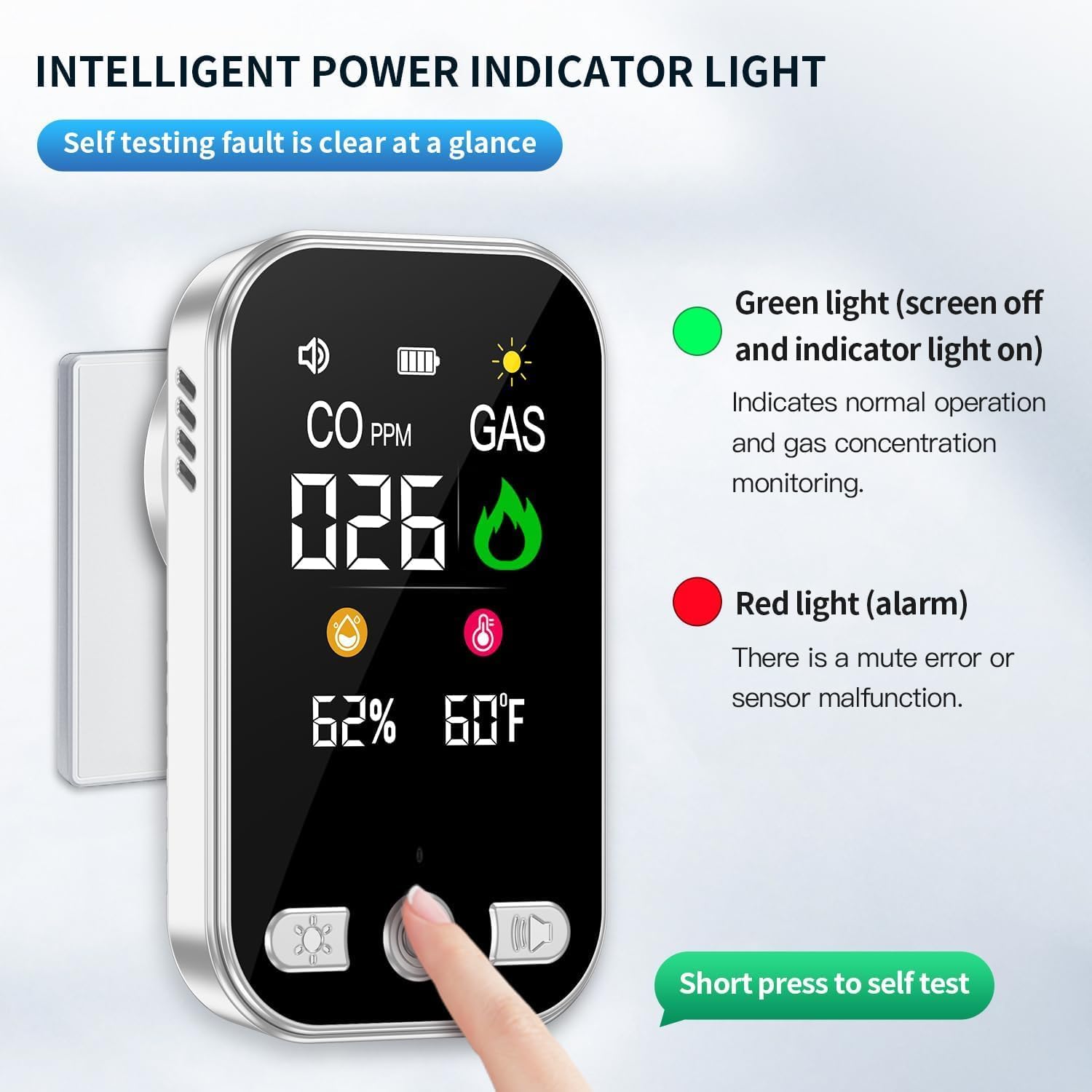
This image illustrates the intelligent power indicator light system. A green light signifies normal operation and continuous monitoring, while a red light indicates an alarm, mute error, or sensor malfunction. The self-test button is highlighted for quick system checks.

The detector's screen shows a high CO reading (350 ppm) with a flame icon, indicating a dangerous level of carbon monoxide. The visual alarm is accompanied by text "Drip~ Drip~" suggesting an audible alert.
3.4 Detection Phases for CO/Gas
The device indicates gas and CO levels through three distinct phases:
- Security (0 - 50 ppm): No alarm, green light.
- Warning (51 - 200 ppm): Yellow flashing light, audible alarm.
- Danger (201 - 999 ppm): Red flashing light, loud audible alarm.

This graphic explains the three alert phases: Security (0-50 ppm, no alarm, green light), Warning (51-200 ppm, yellow flashing light), and Danger (201-999 ppm, red flashing light).
3.5 Emergency Power Supply
The integrated 1000mAh rechargeable lithium battery acts as an emergency power source. In case of a sudden power failure, the device automatically switches to battery power, ensuring continuous monitoring and protection.
4. Maintenance
Proper maintenance ensures the longevity and accuracy of your detector:
- Regular Self-Check: Perform a self-check weekly by short-pressing the Power button to ensure all functions are operating correctly.
- Cleaning: Gently wipe the exterior of the detector with a soft, dry cloth. Do not use cleaning agents, solvents, or abrasive materials, as these can damage the sensors or casing. Avoid spraying cleaners directly onto the device.
- Sensor Lifespan: The high-performance sensors in this device have an estimated lifespan of approximately 5 years. After this period, consider replacing the unit to ensure continued accuracy and reliability.
- Avoid Obstructions: Ensure that the ventilation openings on the detector are not blocked by dust, dirt, or other objects.

This image provides an internal look at the detector, revealing its high-precision sensors designed for sensitive and stable detection performance. The built-in 1000mAh rechargeable lithium battery is also visible.
5. Troubleshooting
If your detector is not functioning as expected, refer to the following common issues and solutions:
- Alarm Sounds Without Apparent Danger:
- Check for Hidden Sources: Carbon monoxide is odorless and invisible. Check for potential CO sources such as faulty furnaces, water heaters, gas stoves, or vehicle exhaust.
- Combustible Gas Leaks: For gas alarms, check for leaks from gas appliances, pipes, or cylinders.
- Environmental Factors: High humidity or certain aerosols can sometimes trigger false alarms. Ventilate the area.
- Test Procedure: Follow the testing procedure outlined in section 3.6 to confirm sensor functionality.
- Red Light Indicator / Sensor Malfunction:
- If the red light indicates a sensor malfunction, perform a self-check. If the issue persists, the sensor may need replacement or the unit may require servicing.
- No Power / Display Off:
- Check Power Outlet: Ensure the detector is securely plugged into a functioning electrical outlet.
- Power Outage: If there is a power outage, the device should switch to its internal emergency battery. If the battery is depleted, the device will not operate until main power is restored or the battery is recharged.
5.1 How to Test the Detector
To verify the detector's functionality, you can perform a simple test:
- Step 1: Press the Power button briefly to initiate the self-check. The device should respond with visual and audible cues.
- Step 2 (CO Test): Carefully bring a lit cigarette or a small amount of smoke near the CO sensor. The CO reading should increase, and an alarm may sound if the concentration reaches warning levels.
- Step 3 (Gas Test): Carefully bring a gas lighter (without igniting the flame) or a small amount of combustible gas near the gas sensor. The gas indicator should activate, and an alarm may sound.
Caution: Perform these tests briefly and in a well-ventilated area. Do not expose the detector to excessive amounts of gas or smoke.

This image provides a visual guide on how to perform a functional test of the detector. Step 1: Press the Power button for self-check. Step 2: Place a lit cigarette near the detector. Step 3: Place a lighter near the detector.
5.2 Potential Sources of CO
Understanding common sources of carbon monoxide can help prevent exposure:
- Idling automobile engines in an attached garage.
- Portable generators.
- Corroded or detached water heater exhaust pipes.
- Portable kerosene or gas heaters.
- Cracked or loose furnace heat exchangers.
- Incorrect kitchen hood installation.
- Indoor or garage grilling.
- Gas or wood-burning fireplaces.

This image lists common sources of carbon monoxide, including idling car engines in garages, portable generators, corroded water heater exhaust pipes, portable kerosene/gas heaters, cracked furnace heat exchangers, incorrect kitchen hood installation, indoor/garage grilling, and wood-burning fireplaces.
6. Specifications
| Model Number | HD12 |
| Manufacturer | Shenzhen Huidu Technology Co., Ltd. |
| Product Dimensions | 3.5 x 5 x 8 cm |
| Product Weight | 150 g |
| Power Source | Electric Cable (Plug-in) |
| Voltage | 5 Volts |
| Battery Type | Built-in rechargeable Lithium-Ion (1000mAh for emergency power) |
| Sensor Type | Electrochemical (CO), Semiconductor (Combustible Gas) |
| Alarm Type | Audible and Visual |
| Color | Black |
| Sensor Lifespan | Approximately 5 years |
7. Warranty Information
Specific warranty details may vary by region and retailer. Please refer to the warranty card included with your product or contact the seller for precise warranty terms and conditions. Generally, Wolf Guard products are covered by a limited warranty against defects in materials and workmanship under normal use.
8. Customer Support
For technical assistance, troubleshooting, or any questions regarding your Wolf Guard HD12 detector, please contact your retailer or the manufacturer's customer support. Contact information can typically be found on the product packaging or the official Wolf Guard website.

