
1. Introduction
Thank you for choosing the QCY Crossky C50 Clip On Earbuds. These open-ear wireless headphones are designed for comfort, high-quality audio, and seamless connectivity, making them ideal for various activities including running, fitness, and daily use. This manual provides detailed instructions to help you get the most out of your new earbuds.

Image: The QCY Crossky C50 earbuds are shown both inside and outside their sleek, grey charging case, highlighting their compact and ergonomic design.
2. Product Features
- Unique Appearance & Comfortable Fit: Features an anti-fingerprint leather shell and soft silicone ear hooks with flexible titanium memory alloy for pressure-free open-ear comfort. The anti-drop ergonomic design ensures stability during active use.
- AI-Powered 4 Mics for Crystal Calls: Integrated with four microphones, these earbuds employ multi-pronged noise reduction, including wind noise reduction and up to 45dB call noise cancellation, enhanced by an AI-powered algorithm for clear voice transmission.
- Seamless Connectivity & Directional Audio Technology: Utilizes Bluetooth 6.0 for ultra-fast, stable device pairing. Reverse soundwave technology reduces sound leakage by 90% compared to standard open-ear designs, directing audio precisely into the ears for a private listening experience.
- Extended Playtime: Offers 7.5 hours of listening time per charge, with the charging case providing an additional three recharges for a total of up to 35 hours of playtime.
- Auto L/R Correlation: Effortlessly pairs earbuds to the correct sides automatically, streamlining setup for instant audio enjoyment.
- Customized App & Dual Connection: Personalize EQ modes and button functions via the QCY App. Access real-time power information and firmware updates. Connect to two devices simultaneously, allowing seamless switching between media and calls.
- IPX5 Waterproof: Designed to withstand intense workouts, light rain, and daily splashes, ensuring durability in various environments.

Image: A close-up of the QCY Crossky C50 earbud highlighting the soft silicone finish and flexible titanium memory alloy for comfortable and secure fit.

Image: An exploded view of the earbud's internal components, showcasing the 10.8mm dual-magnetic driver and carbon-fiber diaphragms responsible for powerful bass.

Image: The earbuds and charging case are depicted alongside text indicating 7.5 hours of playtime per charge and 35 hours total with the charging case.
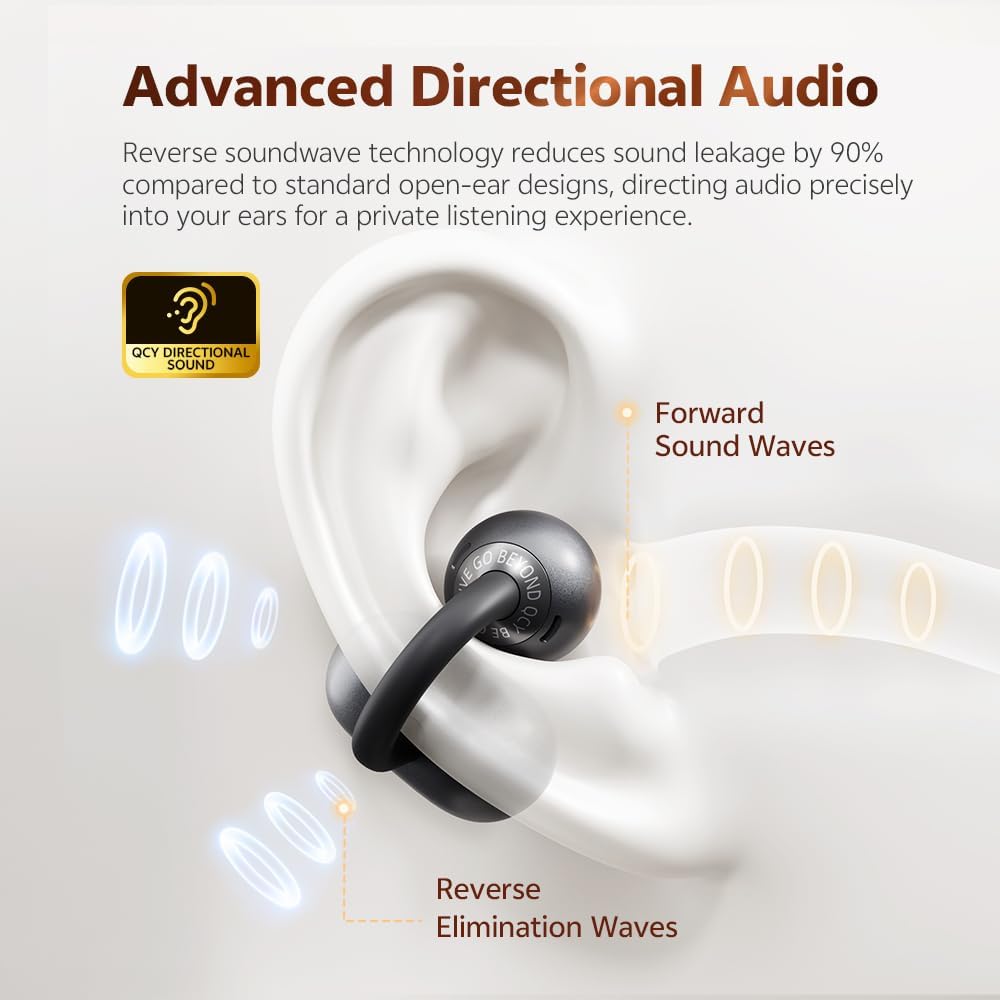
Image: A diagram illustrating how the QCY Crossky C50's reverse soundwave technology directs audio into the ear while minimizing sound leakage.

Image: A visual representation of the 4-microphone system in the earbuds, highlighting its capabilities for wind noise reduction, call noise cancellation, and AI algorithm processing for clear calls.

Image: The earbuds are shown with water droplets, visually representing their IPX5 sweat and splash resistance.

Image: A person is shown wearing the QCY Crossky C50 earbuds while exercising, demonstrating their anti-drop secure fit during movement.
3. Setup Guide
3.1. What's in the Box
- QCY Crossky C50 Earbuds
- Charging Case
- User Manual
- USB-C Cable

Image: A flat lay showing the QCY Crossky C50 earbuds, charging case, USB-C cable, and user manual, representing the contents included in the product box.
3.2. How to Wear
- Clip the earbud onto the thinnest part of your ear.
- Slide the earbuds down and adjust the position for optimal audio performance.

Image: A step-by-step diagram illustrating the correct method for clipping and adjusting the QCY Crossky C50 earbuds on the ear for a secure and comfortable fit.
3.3. Initial Pairing (Bluetooth 6.0)
The QCY Crossky C50 earbuds utilize Bluetooth 6.0 for fast and stable connections.
- Open the charging case. The earbuds will automatically enter pairing mode.
- On your device (smartphone, tablet, etc.), go to Bluetooth settings.
- Select "QCY Crossky C50" from the list of available devices.
- Once connected, you will hear an audio prompt, and the indicator light on the earbuds will change.

Image: An illustration of the Bluetooth 6.0 chip, representing the advanced connectivity technology within the earbuds.
3.4. Dual Connection
The QCY Crossky C50 supports connecting to two devices simultaneously.
- Connect the earbuds to your first device as described in section 3.3.
- Disconnect the earbuds from the first device's Bluetooth settings.
- Connect the earbuds to your second device.
- Reconnect the earbuds to the first device. They should now be connected to both devices, allowing seamless audio switching.

Image: The QCY Crossky C50 earbuds and charging case are shown positioned between a smartphone and a tablet, illustrating their dual connection capability.
4. Operating Instructions
4.1. Touch Controls
The QCY Crossky C50 earbuds feature intuitive touch controls for easy management of music and calls.
| Function | Action |
|---|---|
| Play/Pause | Double tap |
| Next Track | Triple tap on the right earbud |
| Answer/End Call | Double tap |
| Reject Call | Tap and hold for 1.5 seconds |
| Activate Voice Assistant | Triple tap on the left earbud |

Image: A visual guide detailing the touch control functions for the QCY Crossky C50 earbuds, including actions for music playback, call management, and voice assistant activation.
4.2. Charging
To charge your QCY Crossky C50 earbuds, place them into the charging case. Connect the USB-C cable to the charging case and a power source. The indicator light on the case will show the charging status. A full charge provides up to 7.5 hours of listening time, and the case holds enough power for three additional charges, totaling 35 hours of playback.
4.3. QCY App Features
Enhance your experience by downloading the QCY App. The app allows you to:
- Personalize EQ modes for customized sound.
- Customize button functions.
- Access real-time power information.
- Receive firmware updates.
- Switch between Game Mode and Sleep Mode.
- Use the 'Find My Earbuds' feature.

Image: A graphic showcasing various features available through the QCY App, including battery indicator, EQ customization, multi-point connection, 'Find My Earbuds', touch control customization, mode switching, and firmware updates.
5. Maintenance
5.1. Cleaning
Regularly clean your earbuds and charging case to ensure optimal performance and hygiene. Use a soft, dry, lint-free cloth. For stubborn dirt, slightly dampen the cloth with water. Avoid using abrasive materials or harsh chemicals.
5.2. Water Resistance (IPX5)
The QCY Crossky C50 earbuds are IPX5 water-resistant, meaning they can withstand splashes and sweat. However, they are not designed for submersion in water. Do not wear them while swimming or showering. Ensure the earbuds and charging port are dry before charging to prevent damage.
6. Troubleshooting
- One Earbud Has No Sound: If one earbud has no voice, please try to update the firmware via the QCY App. Ensure both earbuds are properly seated in the charging case and have sufficient charge.
- Connection Issues: If the earbuds fail to connect, ensure they are in pairing mode. Turn off and on your device's Bluetooth, then try reconnecting. If issues persist, try resetting the earbuds (refer to the QCY App or product support for specific reset instructions).
- Poor Sound Quality: Ensure the earbuds are clean and properly positioned on your ears. Check your device's volume and EQ settings.
- Charging Problems: Ensure the charging cable is securely connected to both the case and the power source. Check for any debris in the charging port.
For any further questions or persistent issues, please contact QCY customer service.
7. Specifications
| Feature | Detail |
|---|---|
| Model Name | Crossky C50 |
| Connectivity Technology | Wireless (Bluetooth 6.0) |
| Ear Placement | Open Ear |
| Form Factor | Open Ear (Clip) |
| Audio Driver Size | 10.8 Millimeters |
| Microphones | 4 (AI-powered, noise-cancelling) |
| Total Playtime | Up to 35 Hours (with charging case) |
| Earbud Playtime (single charge) | 7.5 Hours |
| Charging Case Battery Capacity | 380 Milliamp Hours |
| Water Resistance Level | IPX5 Waterproof |
| Control Type | Touch Control, App |
| Item Weight | 45.6 Grams (1.61 ounces) |
| Product Dimensions | 4.29 x 1.06 x 2.32 inches |
| Material | Plastic |
| Color | Grey |
8. Official Product Video
Video: An official introduction video for the QCY Crossky C50 earbuds, showcasing their design, features, and key benefits. This video is provided by the seller, QCY US Direct.
9. Warranty and Support
QCY products are designed for reliability and performance. For specific warranty information, please refer to the warranty card included with your product or visit the official QCY website. If you encounter any issues or have questions regarding your QCY Crossky C50 earbuds, please contact QCY customer service for assistance. Contact details can typically be found in the user manual or on the QCY official website.