
Introduction
The QCY Crossky C50 Open-Ear Wireless Earbuds are designed for comfortable, pressure-free listening while maintaining awareness of your surroundings. Featuring Bluetooth 6.0 connectivity, advanced audio technology, and a secure clip-on design, these earbuds are suitable for various activities including fitness and daily use. This manual provides detailed instructions for setup, operation, and maintenance to ensure optimal performance.
What's in the Box

Image: QCY Crossky C50 packaging contents.
The package includes the following items:
- QCY Crossky C50 Earbuds (Left and Right)
- Charging Case
- User Manual
- USB-C Cable
Setup
1. Initial Pairing
To pair your QCY Crossky C50 earbuds with your device:
- Ensure the earbuds are fully charged.
- Open the charging case. The earbuds will automatically enter pairing mode.
- On your device (smartphone, tablet, etc.), enable Bluetooth.
- Search for "QCY Crossky C50" in the list of available Bluetooth devices and select it to connect.
- Once connected, you will hear an audio prompt, and the earbuds will be ready for use.
2. QCY App Installation
Enhance your experience by downloading the official QCY App. The app allows for customization of touch controls, EQ modes, firmware updates, and more.
- Scan the QR code provided in the user manual or search for "QCY" in your device's app store.
- Install the app and follow the on-screen instructions to connect your Crossky C50 earbuds.

Image: QCY App interface for managing earbud settings.
Wearing Instructions
The QCY Crossky C50 earbuds feature a clip-on design for a secure and comfortable fit. Follow these steps for proper placement:

Image: Visual guide for wearing the QCY Crossky C50 earbuds.
- Clip the earbud onto the thinnest part of your ear.
- Slide the earbud downward and adjust its position to align the sound outlet vertically with your ear canal for optimal audio performance.
Note: Incorrect wearing may affect call quality and audio performance.
Operating Instructions
1. Touch Controls
The QCY Crossky C50 earbuds feature intuitive touch controls. Default functions are as follows, but can be customized via the QCY App:

Image: Touch control functions for QCY Crossky C50.
- Play/Pause: Double tap (either earbud).
- Next Track: Triple tap on the right earbud.
- Answer/End Call: Double tap (either earbud).
- Reject Call: Tap and hold for 1.5 seconds (either earbud).
- Activate Voice Assistant: Triple tap on the left earbud.
- Volume Up/Down: Customizable via QCY App.
2. App Features
The QCY App provides additional functionalities:
- Battery Indicator: View real-time battery levels for each earbud.
- Preset & Custom EQ: Adjust audio equalization to your preference.
- Multi-Point Connection: Connect to two devices simultaneously.
- Find My Earbuds: Locate misplaced earbuds.
- Customize Touch Control: Personalize earbud touch functions.
- Mode Switch: Toggle between Gaming Mode and Sleep Mode.
- Upgrade Firmware: Receive and install firmware updates for improved performance.
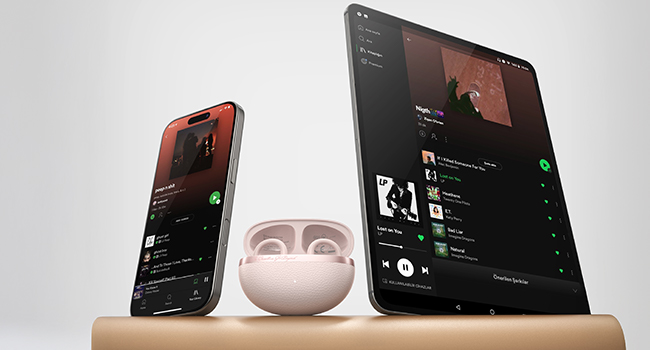
Image: Dual device connection feature.
Maintenance
Proper maintenance ensures the longevity and optimal performance of your QCY Crossky C50 earbuds.
- Cleaning: Regularly wipe the earbuds and charging case with a soft, dry, lint-free cloth. Avoid using harsh chemicals or abrasive materials.
- Water Resistance (IPX5): The earbuds are IPX5 waterproof, meaning they can withstand splashes and sweat. However, they are not designed for submersion in water. After exposure to moisture, ensure the earbuds are completely dry before placing them back in the charging case to prevent damage.
- Storage: When not in use, store the earbuds in their charging case to protect them from dust and physical damage. Store in a cool, dry place away from extreme temperatures.

Image: IPX5 Sweat & Splash Resistance.
Troubleshooting
If you encounter issues with your QCY Crossky C50 earbuds, refer to the following common solutions:
- One Earbud Has No Sound: If one earbud is not producing sound, try updating the firmware via the QCY App. Ensure both earbuds are properly seated in the charging case and have sufficient charge.
- Pairing Issues: If the earbuds fail to pair, ensure they are in pairing mode (open case, LED blinking). Turn off and on your device's Bluetooth, or try resetting the earbuds (refer to the app or full manual for reset instructions).
- Touch Control Sensitivity: If touch controls are too sensitive or unresponsive, adjust the sensitivity settings within the QCY App.
- Sound Quality Issues: Ensure earbuds are worn correctly and are clean. Adjust EQ settings in the QCY App.
For further assistance, please contact QCY customer service.
Specifications
| Model Name | Crossky C50 |
| Connectivity Technology | Wireless (Bluetooth 6.0) |
| Playtime (per charge) | 7.5 hours |
| Total Playtime (with charging case) | Up to 35 hours |
| Water Resistance Level | IPX5 (Waterproof) |
| Audio Driver Size | 10.8 Millimeters (Dual-Magnet Driver) |
| Control Type | Touch Control, App Control |
| Microphones | 4 Mics with AI-powered noise reduction |
| Ear Placement | Open Ear (Clip-on) |
| Item Weight | 5.6 ounces |
| Product Dimensions | 4.29 x 1.06 x 2.32 inches |
Official Product Videos
Introduction of QCY Crossky C50
Video: An official introduction to the QCY Crossky C50 earbuds, highlighting their design and key features.
Warranty and Support
For warranty information, technical support, or any questions regarding your QCY Crossky C50 earbuds, please refer to the official QCY website or contact their customer service directly. Contact details can typically be found in the included user manual or on the product packaging.


