
1. Introduction
Thank you for choosing the Pinmoco Full Luxury Fabric Upholstered Bed Frame. This manual provides essential information for the safe assembly, operation, and maintenance of your new bed frame. Please read these instructions carefully before beginning assembly and retain them for future reference.
This bed frame features a modern and elegant design with an adjustable headboard, integrated lighting, solid wood slat support, and a noise-free construction. It is designed for quick assembly and does not require a box spring.

Image 1.1: The Pinmoco Full Luxury Fabric Upholstered Bed Frame, showcasing its elegant design and illuminated headboard.
2. Safety Information
- Always assemble the bed frame on a soft, clean surface to prevent damage.
- Ensure all bolts and screws are securely tightened before use. Periodically check and re-tighten as necessary.
- Do not exceed the maximum weight capacity of the bed frame.
- Keep small parts away from children during assembly to avoid choking hazards.
- Use only the provided hardware for assembly.
3. Package Contents
Before assembly, verify that all components are present. Refer to the included "Installation Manual" for a detailed list of parts and hardware. Typically, the package includes:
- Headboard (with integrated lighting)
- Footboard
- Side Rails
- Wood Slats
- Support Legs
- Assembly Hardware (bolts, screws, washers, Allen wrench)
- Installation Manual
4. Setup and Assembly Instructions
Assembly of the Pinmoco bed frame is designed to be straightforward. It is recommended that two adults perform the assembly. Please follow the step-by-step instructions provided in the dedicated "Installation Manual" included with your product.
General Assembly Steps:
- Unpack all components and lay them out on a clean, soft surface.
- Attach the side rails to the headboard and footboard using the provided hardware.
- Install the central support beam and support legs.
- Place the wood slats onto the side rails and secure them as instructed.
- Ensure all connections are tight and the frame is stable.
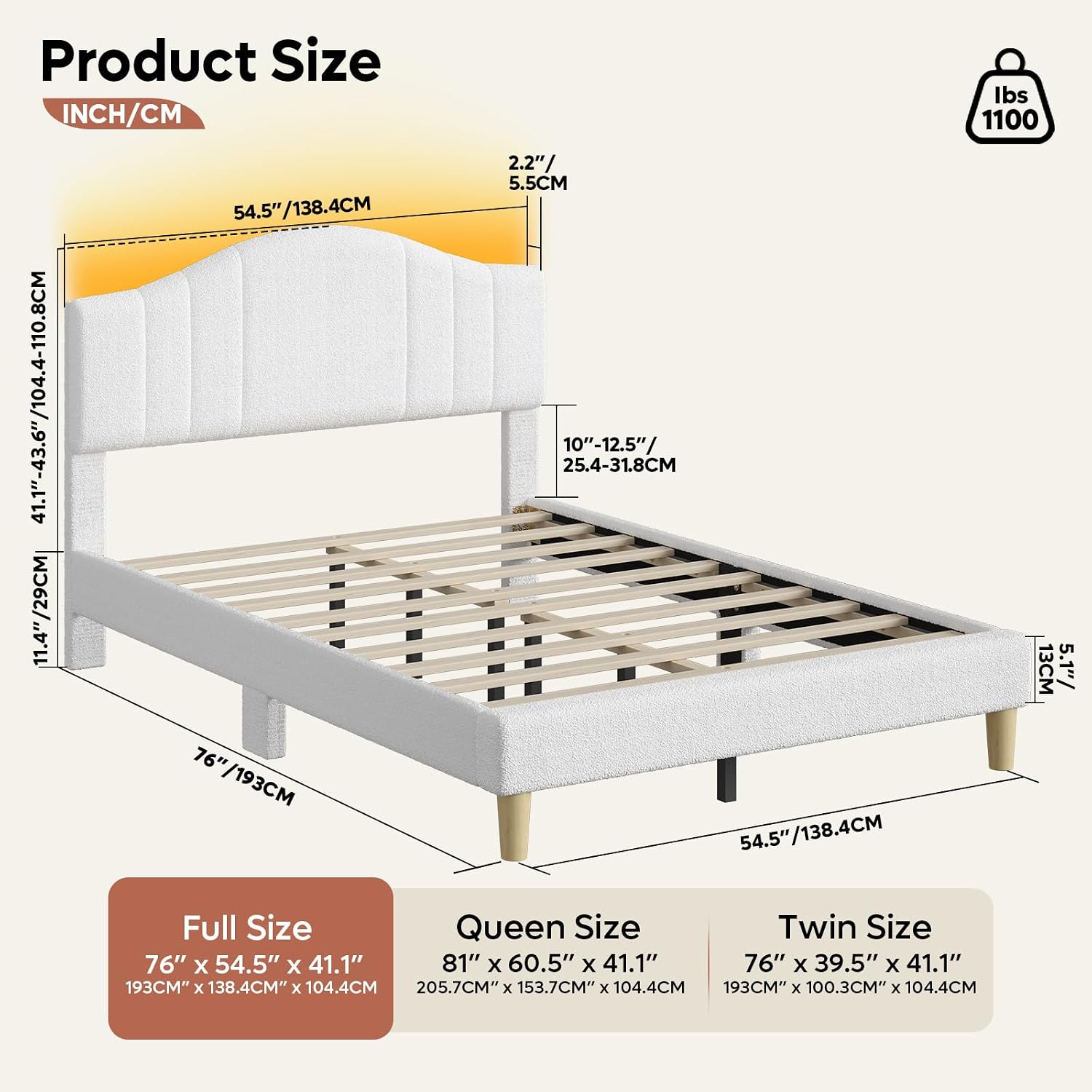
Image 4.1: A detailed diagram illustrating the dimensions and structural components of the bed frame, including headboard height and overall length/width.
5. Operating Instructions
Adjustable Headboard:
The headboard of your Pinmoco bed frame is adjustable to accommodate mattresses of varying heights. To adjust, locate the adjustment mechanism (typically bolts or slots) on the headboard supports. Loosen the fasteners, raise or lower the headboard to the desired height, and then securely re-tighten all fasteners.
Integrated Headboard Lighting:
The headboard features integrated lighting. Connect the power cord from the headboard to a standard electrical outlet. The lighting is typically controlled by a switch located on the headboard itself or via a remote control (if included). Refer to the specific instructions in your "Installation Manual" for details on operating the lighting features, including color and brightness adjustments if available.

Image 5.1: The Pinmoco bed frame illuminated in a bedroom, demonstrating the ambient lighting feature of the headboard.
6. Maintenance
Cleaning the Fabric Upholstery:
- Regularly vacuum the fabric upholstery using a soft brush attachment to remove dust and debris.
- For spills, blot immediately with a clean, dry cloth. Do not rub, as this can spread the stain.
- For stubborn stains, use a mild fabric cleaner specifically designed for upholstery. Test the cleaner on an inconspicuous area first.
- Avoid using harsh chemicals, abrasive cleaners, or excessive moisture, as these can damage the fabric.
General Care:
- Periodically check all bolts and screws and re-tighten them to ensure the frame remains stable and noise-free.
- Avoid dragging the bed frame when moving it; lift it to prevent damage to the legs and frame structure.
- Keep the bed frame away from direct sunlight and heat sources to prevent fading or damage to the fabric.
7. Troubleshooting
Noise or Squeaking:
- Solution: Check all bolts and screws. Tighten any loose connections. Ensure all slats are properly seated and secured.
Headboard Lights Not Working:
- Solution: Verify that the power cord is securely plugged into both the headboard and a working electrical outlet. Check the switch or remote control for proper operation.
Bed Frame Feels Unstable:
- Solution: Re-check all assembly steps to ensure all components are correctly installed and all hardware is fully tightened. Ensure the bed is on a level surface.
8. Specifications
| Feature | Detail |
|---|---|
| Brand | Pinmoco |
| Model Number | B702037H |
| Size | Full (Note: Other sizes like Twin and Queen are available for this model.) |
| Product Dimensions | 76"L x 54.5"W x 41"H (for Full size) |
| Special Feature | Adjustable Headboard, Integrated Lighting |
| Color | White (as per product data, other colors may exist) |
| Finish Type | Brushed |
| Included Components | Installation Manual |
| Assembly Required | Yes |
| Item Weight | 56.5 pounds |
| GTIN | 00810187171536 |
Note: Specifications are subject to change without notice.
9. Warranty and Support
For warranty information, please refer to the documentation included with your purchase or contact Pinmoco customer support directly. If you require assistance with assembly, missing parts, or have any questions regarding your bed frame, please reach out to the manufacturer or your retailer.
You can visit the official Pinmoco store for more information and support: Pinmoco Store


