
Introduction
This Light My Bricks 2.0 Light Kit is designed to illuminate your Lego Flower Arrangement set #10345 (Lego set not included). The kit enhances the visual appeal of your botanical build by adding individual lighting to each flower, creating a vibrant display.
The kit includes 14 astro lights, allowing for flexible arrangement and customization of your floral masterpiece. Each light is designed to highlight specific elements, such as the red Night Rider Camellia with a red glow, the yellow Itoh Peony with a yellow hue, and the purple Hydrangea with a violet color. Other flowers like the orange Persian Buttercup, orange Lily, purple trio Hummingbird, and white trio Baby's Breath feature warm white, orange, pink, and cool white lighting respectively.
Product Overview
Observe the illuminated details of the Lego Flower Arrangement with the Light My Bricks kit.


Setup and Installation
What's Included
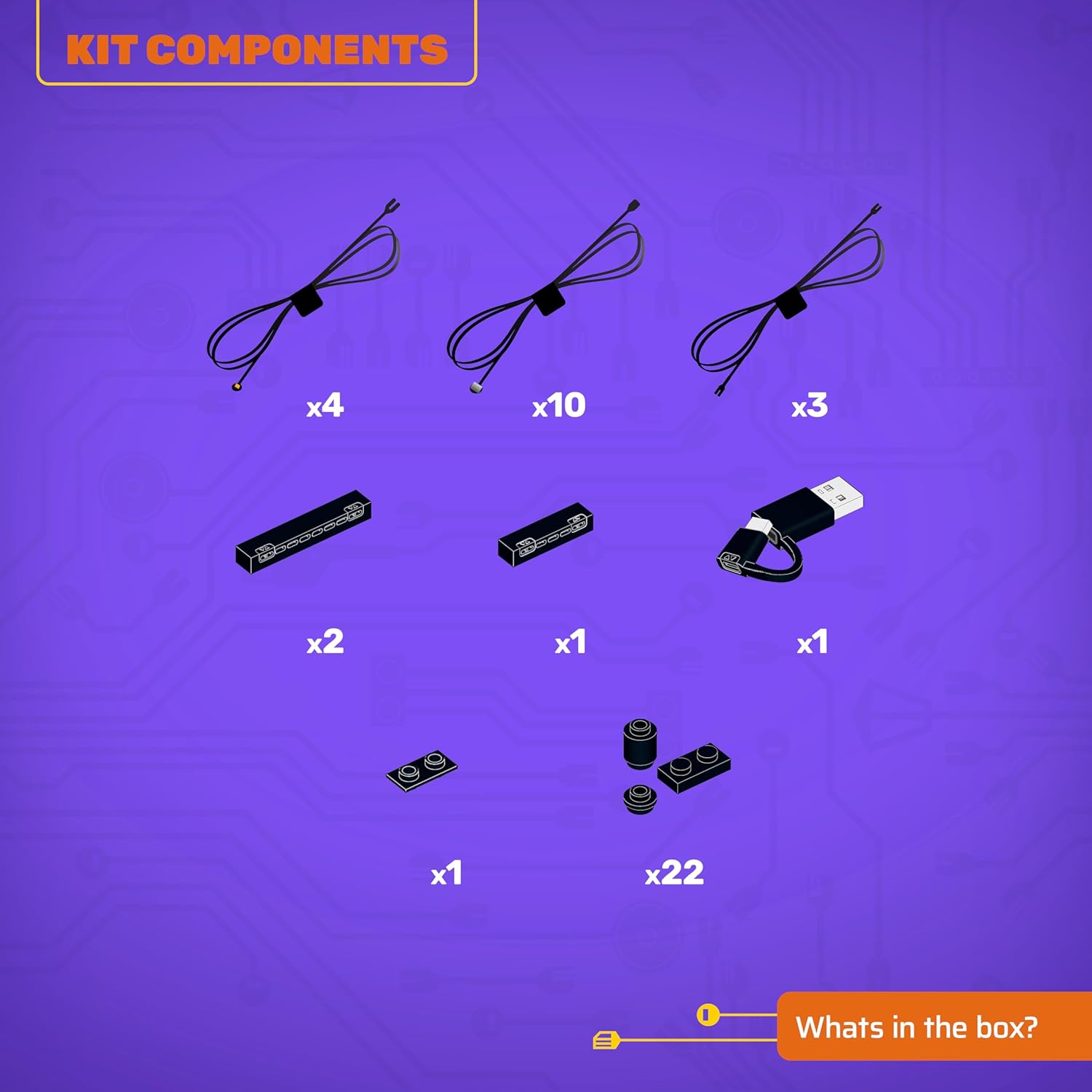
Before beginning installation, verify that all components are present in your kit:
- 13 x Lights
- 3 x Belts
- 3 x Docks
- 1 x Flux Power
- 1 x Accessory
- 22 x Assorted Bricks
Power Supply Requirement
This light kit requires external power. We recommend using a USB Power Bank or a USB Wall Adaptor to connect to a mains outlet. These power components are not included with the light kit and must be acquired separately.
3D Installation Guide
For detailed, step-by-step installation instructions, refer to the official 3D installation guides. These guides are designed to assist you whether you choose to light your Lego set during the building process or after completion. To access the 3D installation guides, scan the QR code located on the side of the product box.
Operating Instructions
Once the Light My Bricks kit is fully installed into your Lego Flower Arrangement #10345, connect the USB power cable to a compatible USB power source (e.g., USB power bank or wall adapter). The lights will illuminate, bringing your Lego model to life. Ensure all connections are secure for consistent lighting.
Maintenance
- Cable Care: Handle the thin cables with care to avoid damage. Do not pull or bend them sharply.
- Dusting: Regularly dust your illuminated Lego set using a soft brush or compressed air to maintain light clarity and prevent dust buildup on components.
- Power Disconnection: Always disconnect the power source when making adjustments or performing maintenance on the light kit.
- Storage: If disassembling the kit for storage, carefully remove components and store them in a dry, cool place to prevent damage.
Troubleshooting
- Lights Not Illuminating:
- Check if the USB power source is properly connected and functioning.
- Ensure all light kit connectors are securely plugged into the expansion boards.
- Verify that the power source provides sufficient power for the kit.
- Flickering Lights:
- Inspect cable connections for looseness. Re-seat any loose connections.
- Ensure cables are not pinched or damaged by Lego bricks.
- Try a different USB power source to rule out power supply issues.
- Individual Light Not Working:
- Check the specific light's connection to the expansion board.
- Carefully inspect the light's wire for any visible damage.
Specifications
| Feature | Detail |
|---|---|
| Product Dimensions | 5.7 x 4.5 x 1.9 inches |
| Item Weight | 4.5 ounces |
| Item Model Number | 2.0-10345 |
| Manufacturer Recommended Age | 12 years and up |
| Manufacturer | Light My Bricks |
Safety Information
Warning: Choking Hazard - small parts. Not for children under 3 years.
Warranty and Support
For information regarding product warranty, returns, or technical support, please refer to the official Light My Bricks website or contact their customer service directly. Keep your proof of purchase for any warranty claims.
You can visit the Light My Bricks store for more products and information: Light My Bricks Store
