
1. Introduction
Thank you for choosing the Shadowhawk S1670 Rechargeable Tactical LED Flashlight. This manual provides essential information for the safe and efficient operation, maintenance, and care of your flashlight. The S1670 features an advanced XHM90.2 LED chip, a COB side light, multiple lighting modes, and a rechargeable battery with power bank functionality. It is designed for durability and performance in various conditions.
2. Safety Information
- Eye Safety: Do not look directly into the LED light or shine it directly into anyone's eyes. The high intensity light can cause temporary vision impairment or permanent eye damage.
- Water Resistance: The flashlight is IP67 waterproof, meaning it is protected from dust and can withstand immersion in water up to 1 meter for 30 minutes. However, do not immerse the flashlight in water for extended periods or at depths greater than 1 meter. Ensure the USB port cover is securely closed to maintain water resistance.
- Battery Safety: Use only the specified rechargeable battery or AAA batteries with the provided adapter. Do not mix old and new batteries, or different types of batteries. Dispose of batteries responsibly.
- Charging: Use the provided USB-C cable for charging. Do not attempt to charge with damaged cables or chargers.
- Children: Keep out of reach of children.
3. Package Contents
The Shadowhawk S1670 flashlight kit includes the following items:
- 1 x Shadowhawk S1670 LED Flashlight
- 1 x Rechargeable Battery (pre-installed or separate)
- 1 x Mini UV Keychain Torch
- 3 x AAA Batteries (for optional use with adapter)
- 1 x AAA Battery Tube/Holder
- 1 x Flashlight Case
- 1 x USB-C Data Cable
- 1 x Lanyard
- 1 x Instruction Manual
- 1 x Torch Holster

Image: All items included in the Shadowhawk S1670 flashlight kit.
4. Product Overview
Familiarize yourself with the main components of your Shadowhawk S1670 flashlight:
- XHM90.2 LED Chip: Primary light source for high lumen output.
- COB Side Light: Secondary light source for broader area illumination.
- Power Button: Controls power and mode selection.
- Power Indicator: Displays current battery level.
- USB Input/Output Ports: For charging the flashlight and acting as a power bank.
- Adjustable Focus: Allows switching between spotlight and floodlight.
- Non-Slip Texture: For secure grip.
- Rear Cover: Secures the battery compartment.
- Lanyard: For convenient carrying.
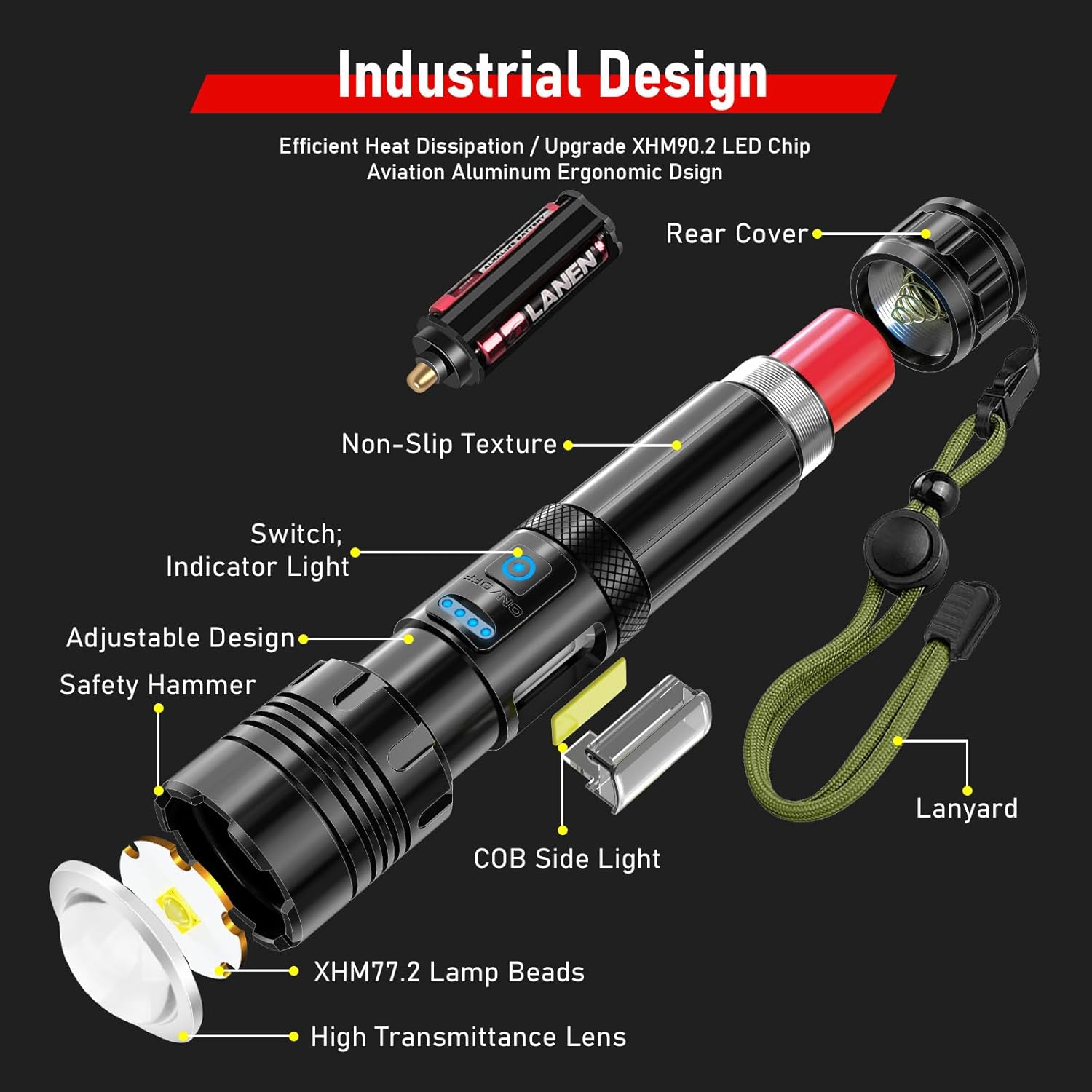
Image: Detailed view of the flashlight's components.
5. Setup and Battery Installation
Your Shadowhawk S1670 flashlight can be powered by the included rechargeable battery or three AAA batteries using the provided adapter.
5.1. Installing the Rechargeable Battery
- Unscrew the rear cover of the flashlight.
- Important: If the rechargeable battery has a transparent protective film, please remove it before use.
- Insert the rechargeable battery into the flashlight with the positive (+) end facing towards the head of the flashlight.
- Screw the rear cover back on securely.
5.2. Installing AAA Batteries (Optional)
- Unscrew the rear cover of the flashlight.
- Place three AAA batteries into the AAA battery holder, ensuring correct positive (+) and negative (-) polarity.
- Insert the loaded AAA battery holder into the flashlight with the positive (+) end facing towards the head of the flashlight.
- Screw the rear cover back on securely.

Image: Visual guide for battery installation.
Video: Demonstrates battery installation, charging, and mode switching for the Shadowhawk S1670 flashlight.
6. Charging the Flashlight
The Shadowhawk S1670 features a built-in USB-C input port for convenient charging.
- Locate the USB port cover on the side of the flashlight and open it.
- Connect the provided USB-C cable to the flashlight's input port.
- Connect the other end of the USB-C cable to a USB power source (e.g., wall adapter, computer, power bank).
- The power indicator lights will illuminate to show the charging progress (25%, 50%, 75%, 100%).
- Once fully charged, disconnect the cable and securely close the USB port cover to maintain water resistance.
A full charge typically takes 4-6 hours and provides up to 12 hours of runtime on low mode.

Image: Flashlight connected to a USB-C charger, showing power indicator.
7. Operating Instructions
7.1. Power On/Off and Mode Switching
- Turn On: Press the power button once to turn on the main LED light.
- Cycle Main Modes: With the main LED light on, press the power button repeatedly to cycle through High, Medium, and Strobe modes.
- Switch to COB Light: Double-click the power button quickly (whether the main light is on or off) to activate the COB side light.
- Cycle COB Modes: With the COB light on, press the power button repeatedly to cycle through High, Medium, Red, and Red Strobe modes.
- Turn Off: Press and hold the power button for 3 seconds in any lighting mode to turn off the flashlight.
7.2. Adjustable Focus
The S1670 features an adjustable focus function. Gently pull or push the head of the flashlight to switch between a narrow spotlight beam for long-range illumination and a wide floodlight beam for broad area lighting.

Image: Adjustable focus from floodlight to spotlight.
8. Lighting Modes Overview
The Shadowhawk S1670 offers 7 distinct lighting modes for various situations:
8.1. Main LED Light Modes (3 Modes)
- High: Maximum brightness for powerful illumination.
- Medium: Balanced brightness for general use and extended battery life.
- Strobe: Flashing light for signaling or disorientation.
8.2. COB Side Light Modes (4 Modes)
- High: Bright area lighting for tasks or camping.
- Medium: Lower brightness for reading or close-up work.
- Red: Preserves night vision, ideal for astronomy or discreet use.
- Red Strobe: Emergency signaling or warning light.

Image: Visual representation of the 7 available lighting modes.
9. Power Bank Function
The Shadowhawk S1670 can also function as a portable power bank to charge your electronic devices in an emergency.
- Open the USB port cover on the side of the flashlight.
- Connect your device's charging cable to the flashlight's USB output port.
- The flashlight will begin charging your device.
- Once charging is complete, disconnect the cable and securely close the USB port cover.
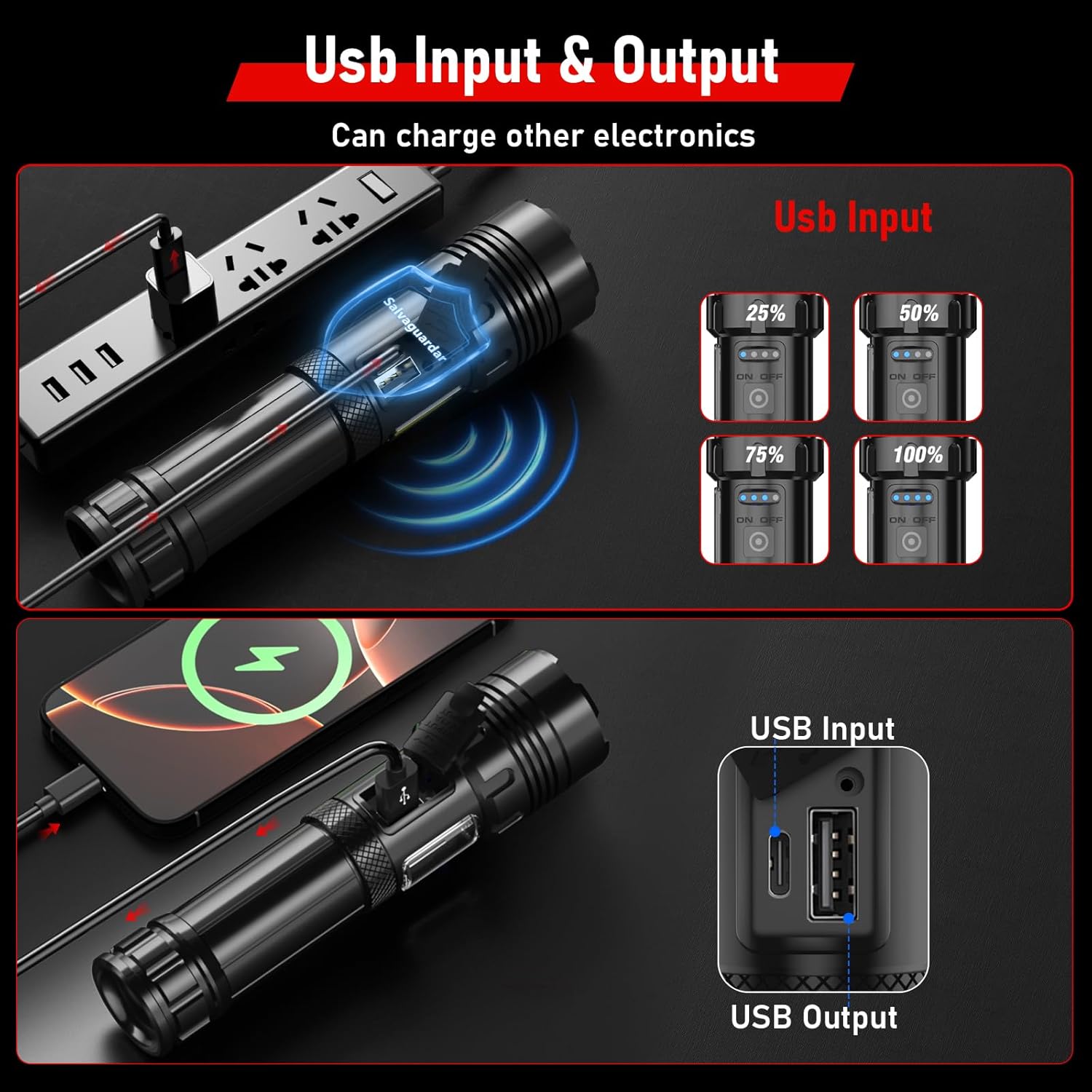
Image: Flashlight acting as a power bank to charge a smartphone.
10. Mini UV Keychain Torch Function
The included mini UV keychain torch emits UV light at 395 nanometers, useful for detecting substances invisible to the naked eye.
- Pet Stain Detection: Identify dried pet urine or other organic stains on carpets and upholstery.
- Currency Verification: Check security features on banknotes and official documents.
- Fluorescent Material Detection: Locate fluorescent agents in various materials.
- Food Residue: Detect hidden food residues in kitchens or dining areas.
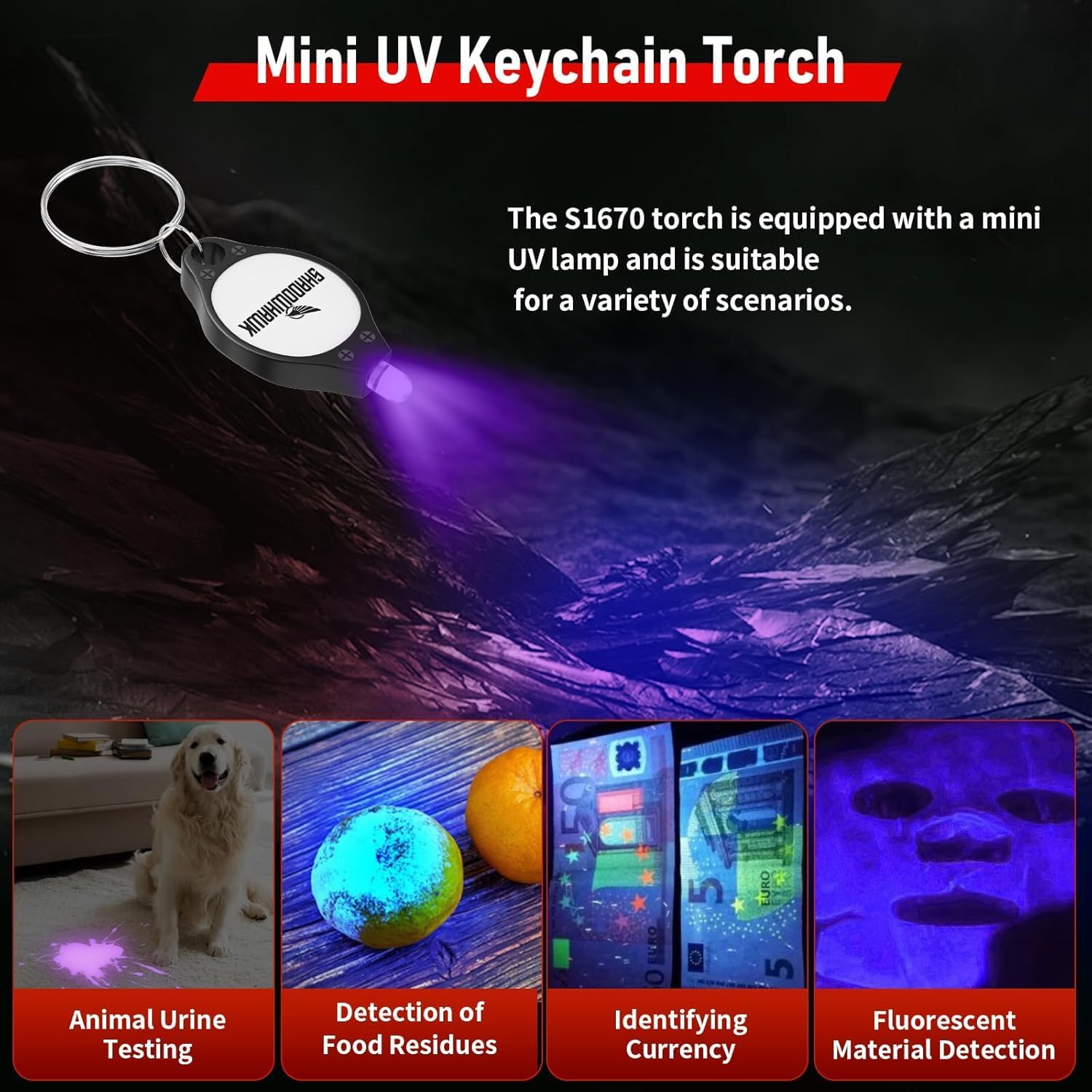
Image: Applications of the mini UV keychain torch.
11. Maintenance
- Cleaning: Wipe the flashlight body with a soft, damp cloth. Do not use abrasive cleaners or solvents.
- Battery Care: If the flashlight will not be used for an extended period, remove the battery to prevent leakage. Store batteries in a cool, dry place.
- O-Rings: Periodically check the O-rings for wear and tear. Replace if damaged to maintain water resistance. Apply silicone grease to O-rings if needed.
- Storage: Store the flashlight in a dry, cool environment away from direct sunlight and extreme temperatures.

Image: Flashlight demonstrating IP67 waterproof capability.
12. Specifications
| Feature | Description |
|---|---|
| Model Number | CA-S1670 |
| Light Source | XHM90.2 LED (Main), COB (Side) |
| Light Output (White) | Up to 10000 Lumens (Max) |
| Wattage | 30 Watts |
| Lighting Modes | 7 (Main: High, Medium, Strobe; COB: High, Medium, Red, Red Strobe) |
| Battery Type | Rechargeable Lithium Ion (included), 3x AAA (with adapter, included) |
| Runtime | Up to 12 hours (on low mode) |
| Charging Port | USB-C Input |
| Power Bank Function | USB Output |
| Water Resistance | IP67 (Protected from dust and immersion up to 1m for 30 min) |
| Material | Advanced Aluminum Alloy |
| Product Dimensions | 22D x 5.5W x 17.5H Centimetres |
| Weight | 460 g |
13. Warranty and Support
Shadowhawk is committed to product quality. Every flashlight undergoes strict quality inspection. For any questions or support needs, please contact Shadowhawk customer service. The manufacturer warranty description states "always", indicating ongoing support for product quality issues.