
1. Introduction
The Radtel RT-880G is a versatile and durable two-way radio designed for reliable communication in various environments. Featuring built-in GPS positioning and APRS automatic position reporting, it enhances safety and convenience for outdoor activities like hiking and camping, as well as professional applications. Its robust construction and user-friendly interface make it suitable for both casual users and professionals seeking clear, long-range communication.
Key features include hands-free VOX functionality, extensive channel capacity, and multiple charging options, ensuring continuous operation and adaptability to diverse communication needs.
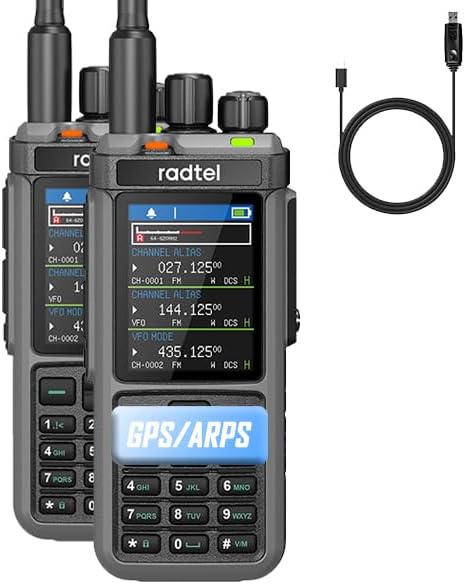
Figure 1: Radtel RT-880G Walkie Talkie and included USB-C charging cable.
2. What's in the Box
Upon opening your Radtel RT-880G package, please verify that all the following items are included:
- 1x RT-880G Main unit
- 1x 2400mAh Li-ion Battery
- 1x Dual band antenna
- 1x Belt Clip
- 1x Type C charging Cable
- 1x Power supply with USB port
- 1x MW Antenna
- 1x SW Antenna
- 1x English User Manual

Figure 2: All components included in the Radtel RT-880G package.
3. Setup Guide
3.1 Battery Installation and Charging
The RT-880G comes with a 2400mAh Li-ion battery. Ensure the battery is fully charged before first use.
- Align the battery with the back of the radio and slide it into place until it clicks securely.
- To charge, connect the provided Type-C charging cable to the radio's Type-C port or place the radio in the desktop charging cradle.
- Connect the charging cable or cradle to the power supply with USB port, then plug into a wall outlet.
- The charging indicator light on the radio will show charging status (refer to the radio's display for battery level).

Figure 3: The Type-C charging port on the Radtel RT-880G.
3.2 Antenna Attachment
The RT-880G supports dual antenna interfaces for versatile use. Attach the appropriate antenna (Dual band, MW, or SW) by screwing it clockwise onto the antenna connector until finger-tight.

Figure 4: Dual antenna interface for flexible antenna options.
4. Operating Instructions
4.1 Power On/Off and Volume
To power on or off, rotate the top knob clockwise or counter-clockwise. This knob also controls the volume. Adjust to a comfortable listening level.
4.2 Display and Navigation
The RT-880G features a 2.4-inch TFT HD large color screen display. Use the keypad and navigation buttons to access menus and settings.
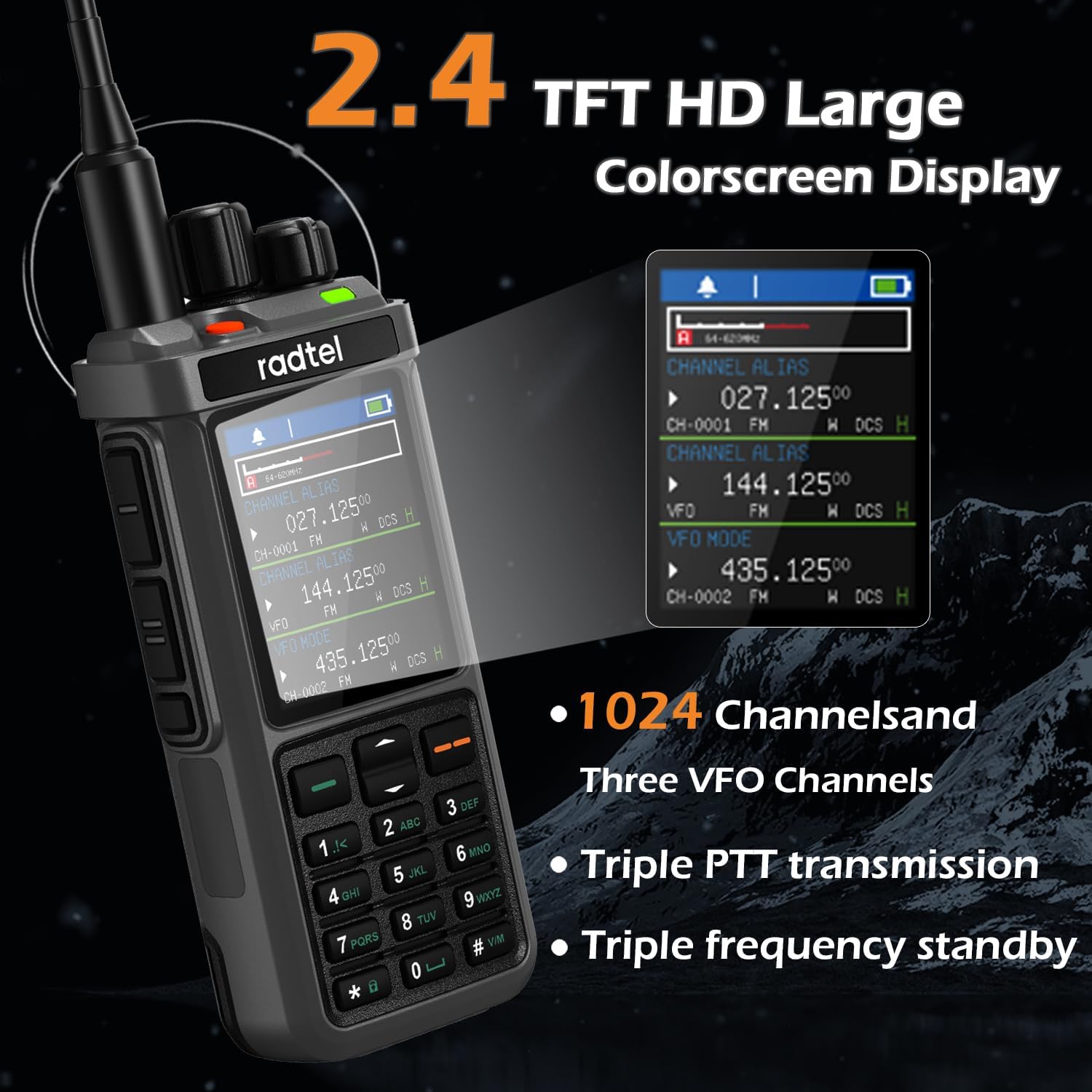
Figure 5: The 2.4-inch TFT HD color display showing channel information.
4.3 GPS Positioning and APRS
The built-in GPS allows for real-time positioning. The APRS (Automatic Packet Reporting System) feature enables automatic position reporting, crucial for tracking and safety during outdoor activities.

Figure 6: Visual representation of APRS and GPS capabilities.
4.4 VOX Function
Activate the VOX (Voice-Activated Transmission) function for hands-free operation. This feature allows the radio to transmit automatically when it detects your voice, eliminating the need to press the PTT button.
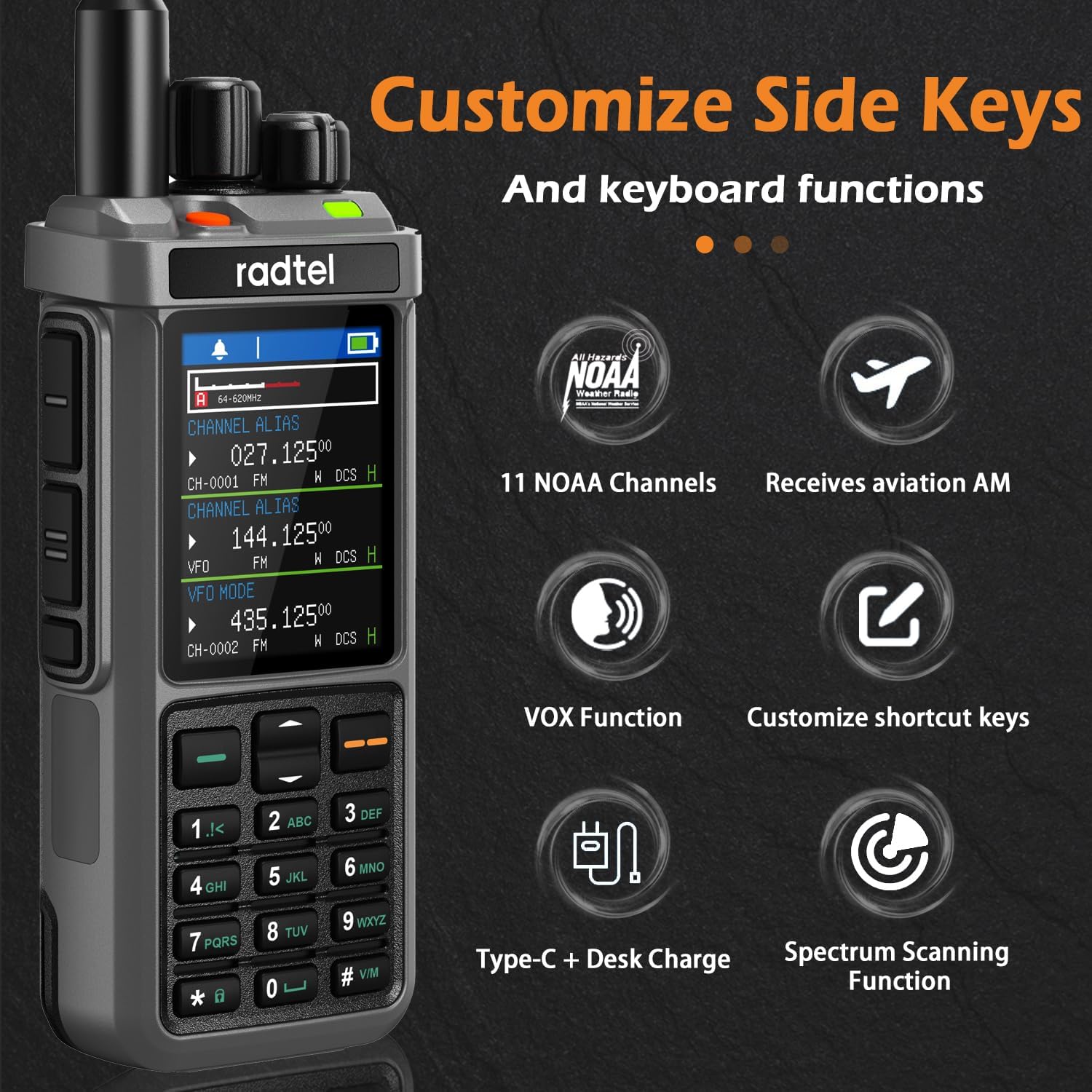
Figure 7: Customizable side keys and VOX function icon.
4.5 Channel Management and Frequencies
The RT-880G supports 1024 channels and three VFO (Variable Frequency Oscillator) channels, allowing for extensive frequency storage and flexible communication. It also features triple frequency standby, enabling monitoring of multiple frequencies simultaneously.
- Frequency Range: 144-148Mhz/420-450Mhz (TX/RX), 136-174Mhz (TX/RX), 400-520Mhz (TX/RX).
- AM/FM/SSB Reception: Supports various modulation types for broad compatibility.
- 11 NOAA Channels: Access to weather alerts and information.
- Cross Band Repeater: Extends communication range by relaying signals between different frequency bands.
- Spectrum Scanning Function: Scans for active frequencies.
4.6 Push-to-Talk (PTT) Buttons
The radio features dual PTT buttons for convenient operation. Press and hold the PTT button on the side of the radio to transmit, and release to receive.
Video 1: Overview of Radtel RT-880G features, including dual PTT, charging options, and menu navigation.
5. Maintenance
To ensure the longevity and optimal performance of your Radtel RT-880G, follow these maintenance guidelines:
- Cleaning: Use a soft, damp cloth to clean the radio's exterior. Avoid using harsh chemicals or abrasive cleaners.
- Battery Care: Store the battery in a cool, dry place when not in use. Avoid fully discharging the battery frequently to prolong its lifespan.
- Storage: If storing the radio for an extended period, remove the battery. Store in a dry, dust-free environment.
- Water Resistance: The RT-880G is Not Water Resistant. Avoid exposure to water or high humidity.
6. Troubleshooting
If you encounter issues with your Radtel RT-880G, refer to the following common problems and solutions:
| Problem | Possible Cause | Solution |
|---|---|---|
| Radio does not power on. | Battery is low or not installed correctly. | Charge the battery or re-install it securely. |
| Cannot transmit or receive. | Incorrect frequency/channel, antenna not attached, or out of range. | Verify frequency/channel settings. Ensure antenna is securely attached. Move closer to the other radio. |
| Poor audio quality. | Low battery, interference, or incorrect squelch level. | Charge battery. Move away from sources of interference. Adjust squelch level. |
| GPS/APRS not working. | Poor satellite signal, feature disabled in settings. | Move to an open area with clear sky view. Check GPS/APRS settings in the menu. |
If the problem persists after trying these solutions, please contact customer support.
7. Specifications
| Feature | Detail |
|---|---|
| Model Number | RT-880G |
| Item Weight | 2.2 pounds |
| Product Dimensions | 1.26 x 2.36 x 12 inches |
| Batteries | 1 9V batteries required. (included) |
| Manufacturer | Xiamen Radtel Electronics Co.,Ltd |
| Number of Channels | 1024 |
| Special Features | GPS/APRS, AM FM SSB Reception, 1024 Channels, Cross Band Repeater |
| Frequency Range | 144-148Mhz/420-450Mhz |
| Talking Range Maximum | 10 Kilometer |
| Tuner Technology | AM/FM/SSB |
| Voltage | 7.4 Volts |
| Water Resistance Level | Not Water Resistant |
8. Warranty and Support
The Radtel RT-880G comes with a 1-Year Warranty from the date of purchase. This warranty covers manufacturing defects and ensures reliable operation under normal use.
For technical support, warranty claims, or any inquiries regarding your Radtel RT-880G, please contact the seller:
- Seller Name: Heng Sheng An Hong
- Manufacturer: Xiamen Radtel Electronics Co.,Ltd
- For further assistance, please refer to the contact information provided with your purchase or visit the official Radtel store on Amazon: Radtel Store


