
1. Introduction
Thank you for choosing the Akxomel Fluted Nightstand. This modern bedside table combines elegant design with practical features, including an integrated charging station and customizable RGB LED lighting. This manual provides detailed instructions for assembly, operation, maintenance, and troubleshooting to ensure optimal use and longevity of your product.

2. Safety Information
Please read and understand all safety instructions before assembly and use. Keep this manual for future reference.
- Ensure all components are securely fastened before use. Loose parts can cause instability and injury.
- Do not overload the nightstand. Refer to the specifications for weight limits.
- Keep electrical components (charging station, LED lights) away from water and moisture.
- Do not attempt to modify the electrical components. Contact qualified personnel for repairs.
- Place the nightstand on a level surface to prevent tipping.
- Keep small parts and plastic bags away from children to prevent choking hazards.
3. Package Contents
Verify that all parts are present before beginning assembly. If any parts are missing or damaged, please contact customer support.
- Nightstand Panels (Top, Bottom, Sides, Back, Drawer Fronts)
- Drawer Components (Sides, Back, Bottom)
- Splayed Legs
- Golden Handles
- Charging Station Unit (with power cord)
- RGB LED Light Strip
- Assembly Hardware (screws, dowels, cam locks, drawer slides)
- Installation Tool (Allen Key)
- Assembly Guide
4. Assembly Instructions
Assembly typically takes approximately 90 minutes. It is recommended to have a Phillips head screwdriver in addition to the provided Allen key. Follow the included Assembly Guide carefully. Do not use an electric drill, as this may strip screws or damage the engineered wood. Applying a small amount of wood glue to dowel joints can enhance stability.

- Prepare Workspace: Clear a spacious area and lay out all components and hardware. Keep the Assembly Guide accessible.
- Assemble Main Frame: Attach the side panels to the bottom panel using the designated hardware (dowels, cam locks, screws). Ensure the fluted design faces outwards.
- Install Drawer Slides: Secure the drawer slides to the inner side panels of the nightstand frame. Pay attention to the orientation (left/right, front/back).
- Assemble Drawers: Construct the two drawers by attaching the sides, back, and bottom to the drawer fronts. Install the golden handles onto the drawer fronts.
- Insert Drawers: Carefully slide the assembled drawers onto the installed drawer slides. Ensure they operate smoothly.
- Attach Top Panel: Secure the top panel to the main frame.
- Install Splayed Legs: Attach the splayed legs to the bottom of the nightstand. Ensure they are firmly tightened for stability.
- Install Charging Station: Place the charging station unit into the pre-cut opening on the top panel and secure it with screws. Route the power cord as instructed.
- Install LED Light Strip: Adhere the RGB LED light strip to the designated area, typically under the top panel or within the open shelf. Secure it with any provided clips or screws.
- Final Check: Verify that all screws are tightened and the nightstand is stable.
5. Operating Instructions
5.1 Charging Station
The integrated charging station provides convenient power access for your devices.

- Power Connection: Plug the nightstand's power cord into a standard 120V AC wall outlet.
- AC Outlets: Two (2) standard 120V/12A AC outlets are available for powering lamps, laptops, or other small appliances.
- USB Ports: Two (2) 5V/2A USB ports are provided for charging smartphones, tablets, and other USB-powered devices.
- Usage: Simply plug your devices into the appropriate port. The charging station is always active when the nightstand is plugged in.
5.2 RGB LED Lighting System
The RGB LED light strip offers customizable ambient lighting for your bedroom.
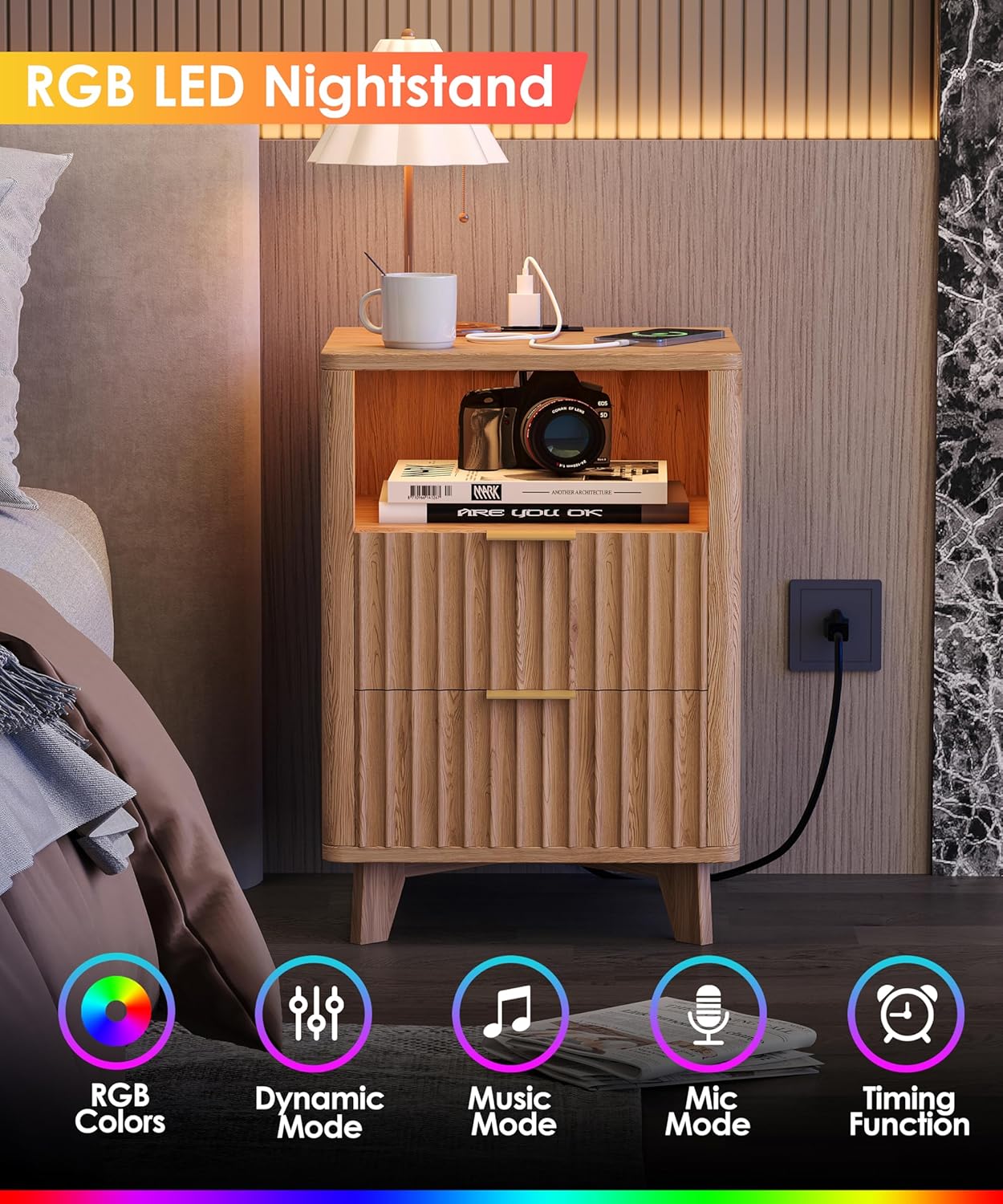
- Control: The LED lights are typically controlled via a remote control or a dedicated mobile application (refer to the LED light strip's specific instructions for pairing and usage).
- Color Selection: Choose from over 60,000 vibrant colors to match your mood or room decor.
- Lighting Modes:
- Style Mode: Displays steady, static colors.
- Dynamic Mode: Cycles through various color patterns and transitions.
- Music Mode: Lights pulse and change in sync with music or audio played nearby.
- Mic Mode: Lights react to ambient sounds detected by a built-in microphone.
- Timer Function: Set a timer for the lights to automatically turn off after a specified duration.
6. Maintenance
Proper care will help maintain the appearance and functionality of your nightstand.
- Cleaning: Wipe surfaces with a soft, damp cloth. Avoid abrasive cleaners or harsh chemicals that can damage the finish.
- Spills: Clean spills immediately to prevent staining, especially on the engineered wood surface.
- Dusting: Regularly dust the nightstand with a dry, soft cloth.
- Drawer Care: Periodically check drawer slides for smooth operation. If needed, a silicone-based lubricant can be applied sparingly.
- Electrical Components: Ensure the charging station and LED lights are free from dust and debris. Do not attempt to clean with liquids while plugged in.
- Tighten Hardware: Periodically check and tighten all screws and fasteners to maintain structural integrity.
7. Troubleshooting
Refer to the table below for common issues and their solutions.
| Problem | Possible Cause | Solution |
|---|---|---|
| Nightstand is wobbly/unstable. | Loose fasteners; uneven floor. | Tighten all assembly screws. Ensure the nightstand is on a level surface; use furniture pads if necessary. |
| Drawers do not slide smoothly or are misaligned. | Incorrectly installed drawer slides; obstruction; loose hardware. | Recheck drawer slide installation and alignment. Ensure no objects are blocking the slides. Tighten all drawer hardware. |
| Charging station is not working. | Nightstand not plugged in; power outlet issue; device cable fault. | Ensure the nightstand's power cord is securely plugged into a functional wall outlet. Test the outlet with another device. Try a different charging cable for your device. |
| LED lights are not turning on or responding. | LED strip not connected; remote control battery dead; app not paired. | Check that the LED light strip is properly connected to its power source. Replace remote control batteries. Re-pair the LED lights with the remote or mobile app as per the LED light strip's specific instructions. |
8. Specifications

| Feature | Detail |
|---|---|
| Brand | Akxomel |
| Model Name | 107H |
| Product Dimensions (D x W x H) | 13.8" x 15" x 22.8" (35cm x 38cm x 58cm) |
| Item Weight | 25.3 Pounds (11.48 kg) |
| Color | Natural Oak |
| Material Type | Engineered Wood |
| Number of Drawers | 2 |
| Charging Station | 2 AC Outlets (120V/12A), 2 USB Ports (5V/2A) |
| Power Cord Length | 4.9 FT |
| LED Lighting | RGB, 60,000+ colors, Dynamic, Music, Mic, Timer Modes |
| Recommended Tools for Assembly | Allen Key (included), Phillips Head Screwdriver (not included) |
9. Warranty and Support
Akxomel is committed to providing quality products. For any questions, missing parts, or issues not covered in this manual, please contact Akxomel customer support through your purchase platform or the official Akxomel website. Please have your model number (107H) and purchase information ready when contacting support.