
ARRAROWN ZK-1001U
ARRAROWN ZK-1001U Bluetooth 5.3 Mono Amplifier Board
User Manual
1. Introduction
This manual provides detailed instructions for the proper setup, operation, and maintenance of your ARRAROWN ZK-1001U Bluetooth 5.3 Mono Amplifier Board. Please read this manual thoroughly before use to ensure optimal performance and to prevent damage.
The ZK-1001U is a compact mono audio amplifier board designed for DIY speaker projects, offering 100W power output, Bluetooth 5.3 connectivity, TWS functionality, and adjustable treble and bass controls.
2. Safety Information
- Ensure the power supply is within the specified DC 9-24V range. Do not connect to AC power.
- Observe correct polarity when connecting power and speakers.
- Avoid short circuits on output terminals.
- Do not expose the board to moisture or extreme temperatures.
- Handle with care to prevent damage to electronic components.
- Keep out of reach of children.
3. Package Contents
- ZK-1001U Bluetooth 5.3 Mono Amplifier Board (Quantity as purchased, e.g., 1 or 2)
- Heat sink (pre-attached or included for installation)
- Knobs for Treble, Bass, and Volume/Multi-function control
- Power cable (optional, depending on package)
4. Product Features
- Mono Channel Amplifier: 100W rated power output, designed for a single passive speaker (20-100W, 3-8Ω impedance).
- Bluetooth 5.3 Connectivity: Supports AAC decoding, APP control, and TWS function with low latency. Wireless range up to 15 meters (49 feet).
- Multiple Audio Inputs: AUX (3.5mm), USB flash drive, USB sound card, and Bluetooth wireless.
- Boost Circuit: Automatically adjusts input voltage (9V/15V) to a stable 19V or 24V output. Default is 24V. Switch to '1' for 24V, 'ON' for 19V.
- Treble and Bass Control: Independent knobs for adjusting high and low audio frequencies.
- TWS Box Function: Allows two ZK-1001U boards to be paired for left and right channel stereo sound.
- High-Performance Chip: Utilizes TPA3116D2 chip for ultra-low distortion and high-definition sound quality.
- Supported Audio Formats (USB): MP3, WMA, WAV, FLAC, APE lossless formats.

Image: Overview of the ZK-1001U amplifier board highlighting its Bluetooth 5.3, AUX, USB, TWS, and APP input capabilities, shown connected to two speakers.
5. Product Diagram and Components

Image: Detailed component layout of the ZK-1001U amplifier board, indicating power input, speaker terminals, boost circuit, Bluetooth chip, USB/AUX ports, indicator lights, heat sink, and control knobs for Treble, Bass, and Volume/Multi-function.
- Power Input: DC 9-24V (DC female socket 5.5 * 2.1mm or wiring terminal).
- Passive Speaker Output: Connects to a 3-8Ω, 20-100W passive speaker.
- Boost Circuit Section: Switch for 19V/24V output.
- Bluetooth 5.3 Chip: Supports AAC decoding and TWS.
- USB Input: For USB flash drives (MP3/WMA/WAV/FLAC/APE) and USB sound card function.
- 3.5mm AUX Input: For wired audio connection.
- Work Indicator Light: Red.
- TWS Indicator Light: Blue.
- Enlarged Heat Sink: With adhesive backing for thermal management.
- Treble Knob: Adjusts high frequencies.
- Bass Knob: Adjusts low frequencies.
- Volume & Multi-Function Button: Controls volume and playback functions.
6. Setup Instructions
- Connect Speaker: Connect your passive speaker (20-100W, 3-8Ω) to the speaker output terminals on the amplifier board. Ensure correct polarity (+ to + and - to -).
- Power Supply: Connect a DC 9-24V power supply (minimum 4A) to the power input port. Warning: Do not use AC power. This board is suitable for 7.4V/12V/21V etc. batteries, but not 24V batteries directly due to the boost circuit.
- Boost Circuit Setting: If using a lower voltage input (e.g., 9V or 15V), the boost circuit will automatically adjust. For a 24V output, ensure the red switch is set to '1'. For a 19V output, set it to 'ON'. The default setting is 24V.
- Initial Power On: Long press the Multi-Function knob to power on the device. The work indicator light (red) will illuminate.
7. Operating Instructions
7.1 Multi-Function Knob Operations
- Volume Adjustment: Turn the knob clockwise to increase volume, counter-clockwise to decrease.
- Play/Pause: Click the knob once.
- Next Song: Double click the knob.
- Enter/Exit TWS Mode: Triple click the knob.
- Power On/Off: Long press the knob.
7.2 Bluetooth Connection
- Ensure the amplifier board is powered on.
- The board will automatically enter Bluetooth pairing mode. The work indicator light (red) may flash.
- On your audio device (smartphone, tablet, laptop), search for Bluetooth devices and select "ZK-1001U".
- Once connected, the work indicator light will remain solid. You can now play audio wirelessly.
7.3 AUX Input
- Connect your audio source to the 3.5mm AUX input jack using an audio cable.
- The amplifier will automatically switch to AUX input mode when a cable is detected.
7.4 USB Input (Flash Drive / Sound Card)
- USB Flash Drive: Insert a USB flash drive containing supported audio files (MP3, WMA, WAV, FLAC, APE) into the USB port. The amplifier will automatically detect and play the audio.
- USB Sound Card: Connect the amplifier board to a computer via the USB port. The computer should recognize it as an audio output device. Select the amplifier as your playback device in your computer's sound settings.
7.5 TWS (True Wireless Stereo) Pairing
This function allows two ZK-1001U amplifier boards to work together to create a stereo sound system (one for left channel, one for right channel).

Image: Two ZK-1001U amplifier boards illustrating the TWS Box Matching Function for stereo sound.
- Ensure both ZK-1001U amplifier boards are powered on and not connected to any Bluetooth device.
- On one of the amplifier boards, triple click the Multi-Function knob. The blue TWS indicator light will flash. This board is now attempting to pair as the primary unit.
- The second amplifier board will automatically pair with the first. Once paired, one board will be designated as the left channel and the other as the right channel. The red indicator light on the primary board will remain solid, and the blue TWS indicator light on both boards will flash slowly.
- The next time you power on both boards, they will automatically re-establish the TWS connection.
- To exit TWS mode, triple click the Multi-Function knob on either board.
7.6 Treble and Bass Adjustment

Image: The ZK-1001U amplifier board highlighting the Treble and Bass adjustment knobs, indicating its HiFi audio capabilities.
- Use the "TREBLE" knob to adjust the high-frequency response of the audio.
- Use the "BASS" knob to adjust the low-frequency response of the audio.
- Adjust these to suit your personal listening preferences.
8. Maintenance
- Keep the amplifier board clean and free from dust. Use a soft, dry cloth for cleaning.
- Ensure adequate ventilation around the board, especially around the heat sink, to prevent overheating.
- Avoid placing heavy objects on the board or subjecting it to physical shock.
- If the heat sink is not pre-attached, ensure it is properly installed with its adhesive backing for optimal thermal performance.
9. Troubleshooting
| Problem | Possible Cause | Solution |
|---|---|---|
| No sound output. |
|
|
| Bluetooth connection unstable or not pairing. |
|
|
| TWS pairing fails. |
|
|
| Distorted sound. |
|
|
| Board gets hot. |
|
|
10. Specifications
| Parameter | Value |
|---|---|
| Model Number | ZK-1001U |
| Brand | ARRAROWN |
| Amplifier Type | Mono Channel, Class D |
| Output Power | 100W |
| Chip Model | TPA3116D2 |
| Power Input | DC 9-24V / 4A (minimum) |
| Speaker Impedance | 3-8Ω |
| Speaker Power | 20-100W |
| Bluetooth Version | 5.3 |
| Bluetooth Range | Up to 15m (49ft) |
| Audio Inputs | Bluetooth, AUX (3.5mm), USB Flash Drive, USB Sound Card |
| Supported USB Formats | MP3, WMA, WAV, FLAC, APE |
| Boost Circuit Output | 19V / 24V (selectable) |
| Product Dimensions | Approx. 105mm x 55mm (4.13 x 2.17 inches) |
| Item Weight | 7 ounces |
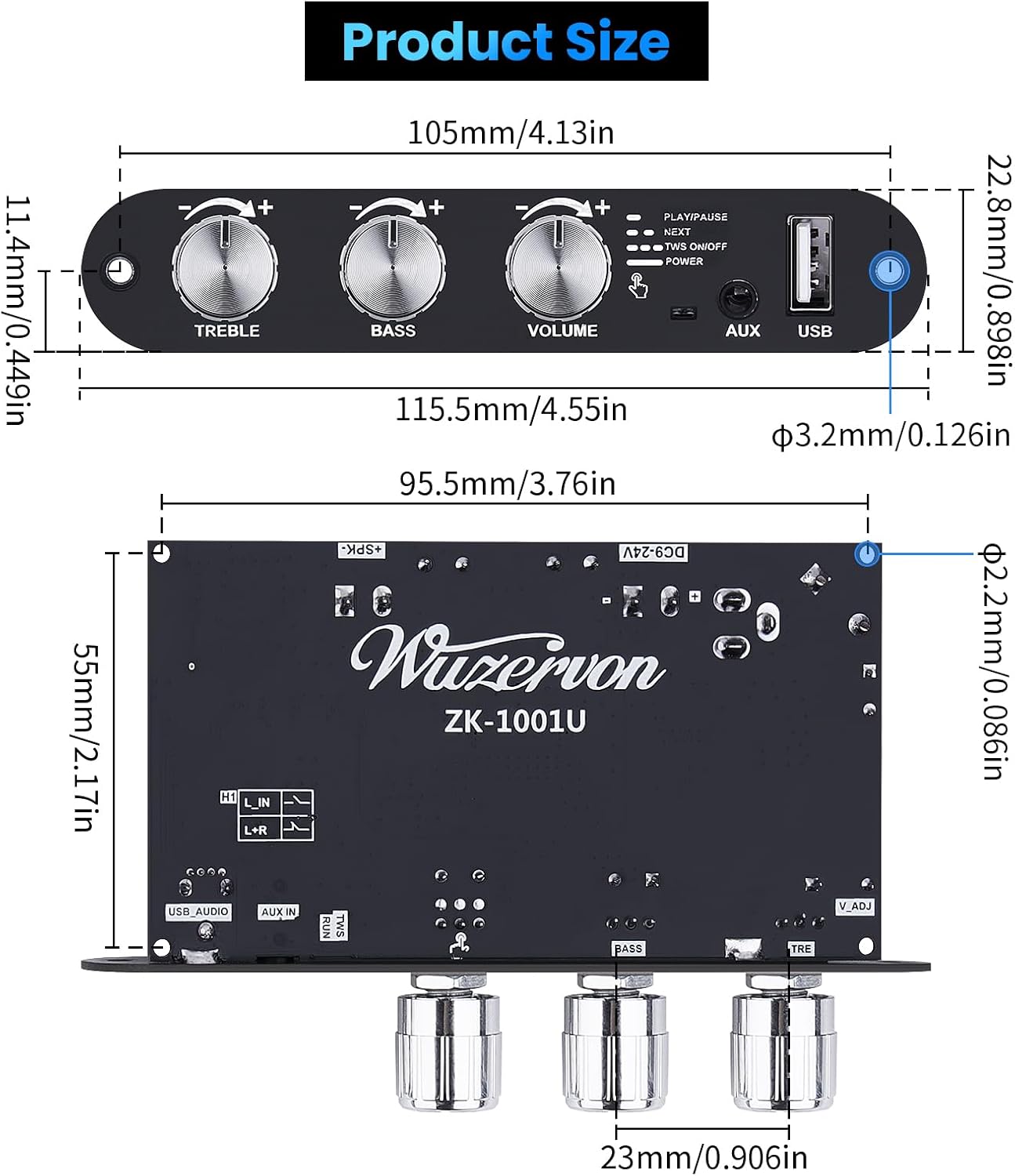
Image: Dimensions of the ZK-1001U amplifier board.
11. Warranty and Support
For warranty information and technical support, please refer to the seller's policy on the purchase platform or contact ARRAROWN customer service directly. Keep your purchase receipt as proof of purchase.
For further assistance, you may visit the ARRAROWN Store on Amazon.
Ask a question about this manual
Ask about setup, troubleshooting, compatibility, parts, safety, or missing instructions. Manuals+ will review the question and use this page’s manual context to help answer it.