
1. Introduction
The ZYHKJYL KH-6 AI Language Translator Earbuds are designed to facilitate real-time, two-way communication across multiple languages. Featuring advanced Bluetooth 5.4 technology, these earbuds offer seamless connectivity and faster pairing for uninterrupted audio experiences. They function as a 3-in-1 device, providing translation, music streaming, and phone call capabilities, making them ideal for travel, business, and learning.
2. What's in the Box
- ZYHKJYL KH-6 AI Language Translator Earbuds (Left and Right)
- Charging Case
- USB Charging Cable
- User Manual
3. Product Features
- Wide Compatibility: Compatible with Android, iOS, and Windows devices that support Bluetooth.
- Multi-Language Translation: Supports real-time, two-way translation in 144 languages with high accuracy.
- 3-in-1 Functionality: Serves as translator earbuds, music streaming devices, and phone call headsets.
- Versatile Translation Modes: Includes Free Talk, Speech-to-Text, and Photo Translation modes for various scenarios.
- One-Step Pairing & Touch Control: Automatic connection upon removal from the charging case and intuitive touch controls.

Figure 1: Various application scenarios for the earbuds.
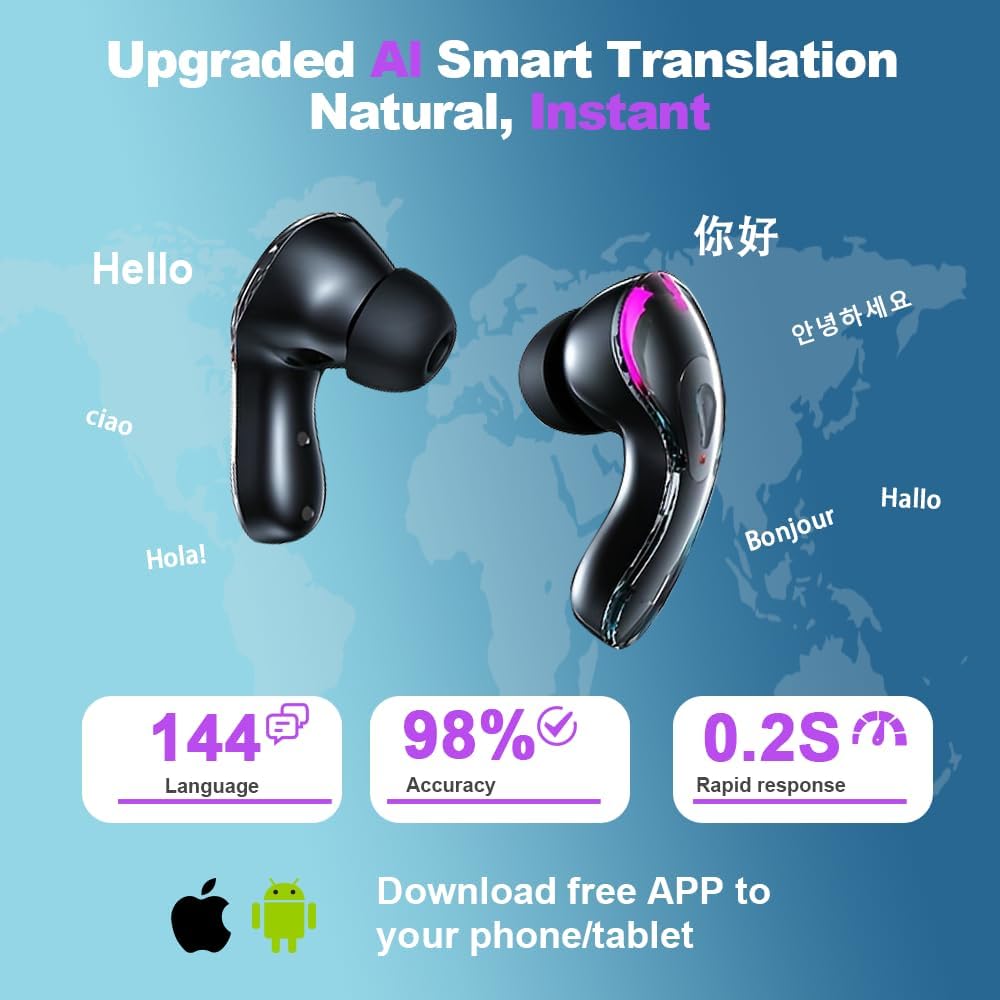
Figure 2: Overview of AI smart translation features.

Figure 3: The 3-in-1 functionality of the earbuds.
4. Setup Guide
4.1 Initial Pairing
- Ensure the earbuds are charged. The charging case displays the battery level.
- Open the charging case and remove both earbuds. They will automatically enter pairing mode.
- On your mobile device, go to Bluetooth settings and enable Bluetooth.
- Search for available devices and select "KH-6" (or similar device name) to connect.
- Once connected, you will hear an audio prompt, and the earbuds will be ready for use.
4.2 App Download and Device Binding
To utilize the translation features, you must download the companion application.
- Scan the QR code provided in the physical user manual or on the product packaging to download the "AI COOL" or "WOOASK" app from your device's app store (Google Play Store for Android, Apple App Store for iOS).
- Register an account within the app.
- In the app, navigate to the device binding section (often labeled "Binding Device" or similar).
- Ensure your earbuds are connected via Bluetooth to your phone.
- Scan the device binding QR code found in your physical user manual to bind the earbuds to the app. It is recommended to take a photo of this code to prevent loss.
- Once bound, you can select the desired translation mode to begin using the features.

Figure 4: App download and device binding process.
Video 1: A guide demonstrating the unboxing, wearing, app download, and translation features of the AI translator earbuds.
5. Operating Instructions
5.1 Translation Modes
The app offers several translation modes to suit different communication needs:
- Touch Mode: Two users wear an earbud each. Tap or double-click the earbud to translate in real-time. Ideal for direct conversations.
- Speaker Mode: One person wears an earbud, and the other person holds the mobile phone. Suitable for situations where the other party is not wearing an earbud.
- Free Talk Mode: Both users wear an earbud, allowing for real-time, hands-free communication.
- Photo Translation: Translate text from images by shooting or importing photos.
- Offline Mode (Paid Feature): Allows translation without internet access for supported languages (e.g., Chinese, English, Japanese, Korean, Russian, German, French, Spanish).
- Silent Mode: Displays translation results without audio.
- Earphone Mode: Speak with your phone and listen to the translation from your headset.
- Two Earphone Mode: Each person wears a headset, speaks into it, and hears the translated audio from the headset.
5.2 Touch Controls
The earbuds feature intuitive touch controls for various functions:
- Play/Pause Music: Single tap on either earbud.
- Answer/End Call: Single tap on either earbud.
- Next Track: Double tap on the right earbud.
- Previous Track: Double tap on the left earbud.
- Activate Voice Assistant/Translation: Long press on either earbud (functionality may vary based on app settings).

Figure 5: Ergonomic design and touch control features.
6. Maintenance
6.1 Charging
The charging case is self-chargeable and also charges the earbuds. The case features a digital display showing the battery percentage of the case and individual earbuds.
- Place the earbuds back into the charging case to charge them.
- Connect the USB charging cable to the charging port on the case and a power source to charge the case.
- A full charge for the case typically takes approximately 1.5 hours, providing up to 30 hours of extended use for the earbuds.
6.2 Cleaning
Regularly clean your earbuds and charging case to ensure optimal performance and hygiene.
- Use a soft, dry, lint-free cloth to wipe the earbuds and charging case.
- Avoid using abrasive materials, solvents, or spray cleaners.
- Gently clean the charging contacts on both the earbuds and the case with a dry cotton swab if necessary.

Figure 6: Long-lasting battery and charging indicators.
7. Troubleshooting
7.1 Earbuds Not Pairing
- Ensure both earbuds are fully charged.
- Make sure Bluetooth is enabled on your device and the earbuds are within range.
- Try resetting the earbuds by placing them back in the case, closing it, and then reopening it after a few seconds.
- Forget the device in your phone's Bluetooth settings and attempt to pair again.
7.2 Translation Issues
- Verify that the earbuds are correctly connected to the app.
- Check your internet connection if using online translation modes. Offline translation may require a subscription.
- Ensure the correct source and target languages are selected in the app.
- Speak clearly and at a moderate pace into the earbud's microphone.
- Update the app to the latest version.
7.3 Short Battery Life
- Ensure the charging case is fully charged before placing the earbuds inside.
- Check that the charging contacts on both the earbuds and the case are clean and free of debris.
- Avoid extreme temperatures, which can affect battery performance.
8. Specifications
| Feature | Detail |
|---|---|
| Model Name | KH-6 |
| Brand | ZYHKJYL |
| Connectivity Technology | Wireless (Bluetooth 5.4) |
| Noise Control | Active Noise Cancellation |
| Ear Placement | In Ear |
| Form Factor | In Ear |
| Material | Plastic |
| Item Weight | 0.352 ounces (0.01 Kilograms) |
| Package Dimensions | 3.78 x 2.64 x 1.14 inches |
| Batteries | 2 Nonstandard Battery batteries required (included) |
| UPC | 769663457643 |

Figure 7: Product dimensions.
9. Warranty and Support
For warranty information, technical support, or further assistance, please refer to the contact details provided on the product packaging or the official ZYHKJYL website. Keep your purchase receipt for warranty claims.