
Introduction
The Lenco MCR-113BK is an all-in-one, portable, and compact emergency radio equipped with multiple essential functions. It serves not only as a radio but also as a powerful flashlight and a power bank for charging your mobile phone or other devices.
The Lenco MCR-113BK offers multiple power options: manual crank generation, integrated solar panel recharging, or convenient charging via a USB-C cable (included) when power is available. It receives FM and shortwave (AM/KG) radio signals. Its 1200 mAh battery allows for quick phone charging and up to 15 hours of radio playback. For critical situations, it features an SOS alarm with a siren. Additionally, a bright LED flashlight is integrated for illumination in the dark. Thanks to its compact size and light weight (218 g), it is perfect for camping, travel, or keeping at home for emergencies.
Safety Information
- Do not expose the device to extreme temperatures, direct sunlight, or high humidity.
- Keep the device away from water and other liquids.
- Do not attempt to disassemble or modify the device. This will void the warranty and may cause damage.
- Use only the provided USB-C cable for charging.
- Ensure the crank handle is fully retracted when not in use to prevent damage.
- When using the solar panel, place the device in direct sunlight for optimal charging.
- The SOS siren is loud; avoid prolonged exposure to prevent hearing damage.
Package Contents
Please check the package for the following items:
- Lenco MCR-113BK Emergency Radio
- USB-C Charging Cable
- Instruction Manual (NL/EN/DE/FR/ES/DK/SE)
Product Overview
Familiarize yourself with the different parts of your Lenco MCR-113BK radio.
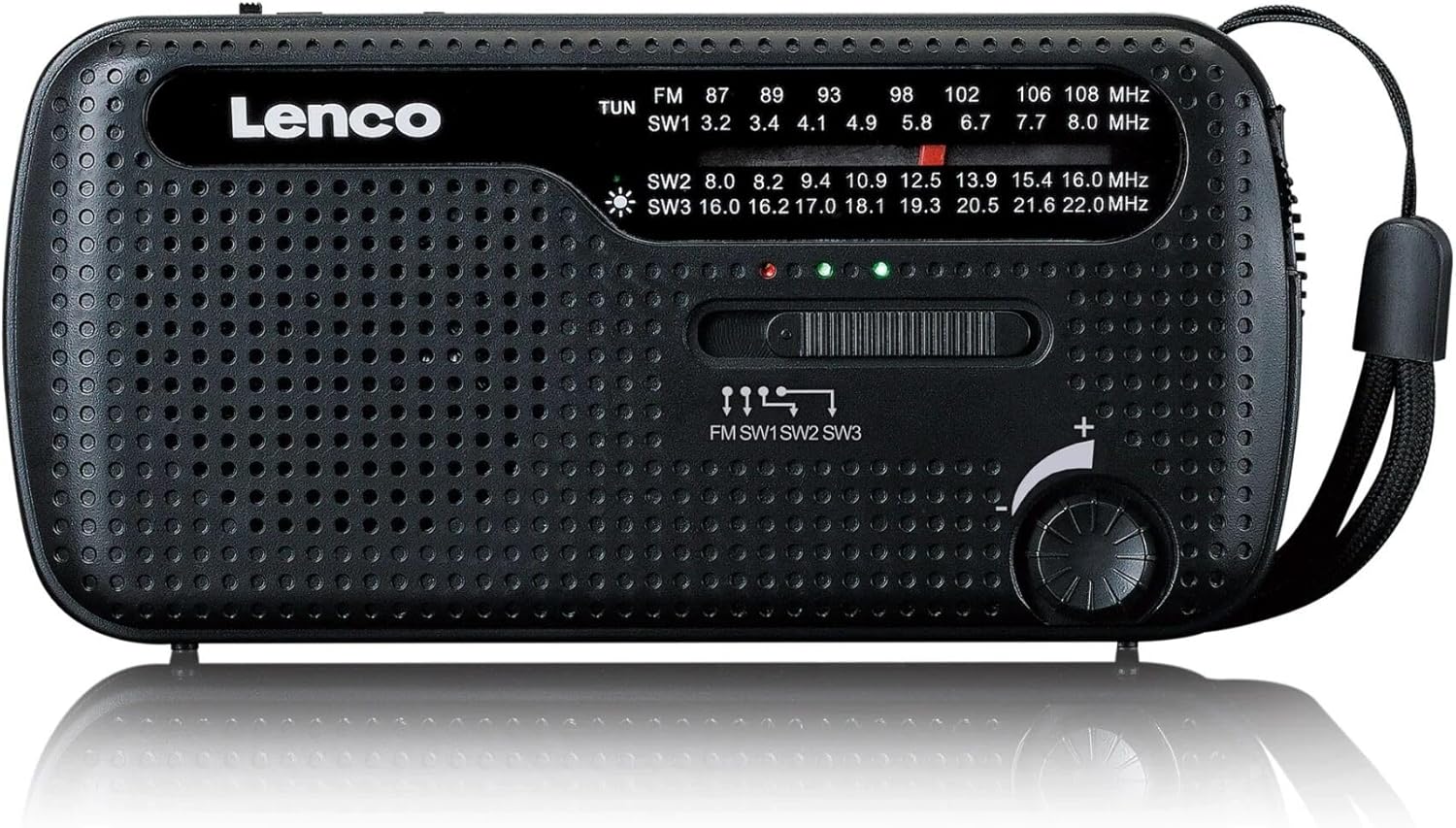
Figure 1: Front view of the Lenco MCR-113BK emergency radio, displaying the speaker grille, tuning dial, frequency display, and main control buttons.

Figure 2: Top view of the Lenco MCR-113BK, showing the integrated solar panel for charging and the telescopic antenna extended for radio reception.

Figure 3: Side view of the Lenco MCR-113BK, illustrating the powerful integrated LED flashlight on one end of the device.
Key Components:
- Telescopic Antenna: For optimal radio signal reception.
- Solar Panel: Located on top for solar charging.
- Crank Handle: Foldable handle for manual power generation.
- LED Flashlight: Integrated light source for illumination.
- Tuning Dial: To select radio frequencies.
- Band Selector: To switch between FM, AM (SW1), and Shortwave (SW2, SW3) bands.
- Volume Control: Adjusts the audio output level.
- USB-C Input/Output Port: For charging the device and for using it as a power bank.
- SOS Button: Activates the emergency siren and flashlight.
Setup
Initial Charging:
Before first use, it is recommended to fully charge the internal battery. This can be done via USB-C, solar power, or manual cranking.
- USB-C Charging: Connect the supplied USB-C cable to the radio's USB-C port and the other end to a standard USB power adapter (not included) or a computer's USB port. The charging indicator light will illuminate.
- Solar Charging: Place the radio with the solar panel facing direct sunlight. Ensure no obstructions block the panel. Solar charging is slower and primarily for maintaining charge or emergency top-ups.
- Crank Charging: Unfold the crank handle from the back of the radio. Rotate the handle clockwise or counter-clockwise at a steady pace (approximately 120-150 RPM) for 3-5 minutes to gain sufficient power for basic operation.
Battery Installation (Optional):
The MCR-113BK can also be powered by 3 AAA batteries (not included) as an alternative power source. Open the battery compartment cover on the back of the unit and insert 3 AAA batteries, observing the correct polarity (+/-).
Operating Instructions
Radio Operation:
- Extend the telescopic antenna fully for best reception.
- Turn the volume knob clockwise to power on the radio and adjust the volume.
- Use the band selector switch to choose between FM, AM (SW1), or Shortwave (SW2, SW3) bands.
- Rotate the tuning dial to scan for radio stations. The frequency display will show the current frequency.
- Adjust the antenna position for clearer reception.
Flashlight Operation:
- Locate the flashlight switch, usually on the side or front panel.
- Slide the switch to turn the LED flashlight on or off.
Power Bank Function:
- Connect your mobile phone or other small USB-powered device to the radio's USB-C output port using your device's charging cable.
- The radio's internal 1200 mAh battery will begin charging your connected device. Note that this function will drain the radio's battery.
SOS Alarm:
- Press and hold the SOS button (if available, typically marked with "SOS" or a siren icon) to activate the loud siren and flashing LED light.
- Release the button to deactivate the alarm.
Maintenance
- Cleaning: Wipe the radio with a soft, dry cloth. Do not use abrasive cleaners or solvents.
- Storage: Store the radio in a cool, dry place when not in use. If storing for extended periods, ensure the battery is partially charged (around 50%) to prolong its lifespan.
- Battery Care: Avoid fully discharging the battery frequently. Recharge it regularly, especially if it has been stored for a long time.
Troubleshooting
| Problem | Possible Cause | Solution |
|---|---|---|
| Radio does not turn on. | Battery is depleted. | Charge the radio using USB-C, solar, or crank. Check if AAA batteries are inserted correctly if using them. |
| Poor radio reception. | Antenna not extended; weak signal; interference. | Fully extend the telescopic antenna. Adjust the radio's position. Try a different location. |
| Flashlight not working. | Battery is low; switch is off. | Charge the radio. Ensure the flashlight switch is in the "ON" position. |
| Cannot charge external device. | Radio battery is too low; incorrect cable; device not compatible. | Ensure the radio's internal battery is sufficiently charged. Use a compatible USB-C cable. Some high-power devices may not be fully supported. |
Specifications
- Model: MCR-113BK
- Brand: Lenco
- Radio Bands: FM, AM (Shortwave 1), Shortwave (SW2, SW3)
- Power Sources: Internal 1200 mAh rechargeable battery, Solar Panel, Hand Crank, 3x AAA batteries (not included)
- Battery Life (Radio): Up to 15 hours (approx.)
- Flashlight: Integrated LED
- Power Bank Output: USB-C (for charging external devices)
- Dimensions: 14 cm (L) x 5 cm (W) x 7 cm (H)
- Weight: 218 g
- Included Components: Lenco MCR-113BK Emergency Radio, USB-C Charging Cable, Instruction Manual
Warranty and Support
Lenco products are manufactured to high quality standards. This product is covered by a manufacturer's warranty. For detailed warranty terms and conditions, please refer to the warranty information provided in the included instruction manual or visit the official Lenco website.
For technical support, troubleshooting assistance, or spare parts, please contact Lenco customer service. Contact information can typically be found in the instruction manual or on the Lenco official website (www.lenco.com).


