
1. Introduction
Thank you for choosing the Metro Mobility M2-22.5AH Folding Mobility Scooter. This manual provides essential information for the safe assembly, operation, maintenance, and troubleshooting of your new mobility device. Please read this manual thoroughly before using the scooter to ensure proper function and to prevent injury or damage.
The Metro Mobility M2-22.5AH is designed to provide reliable and comfortable personal transportation for individuals requiring mobility assistance. Its lightweight, folding design makes it ideal for travel and easy storage.

Image 1.1: The Metro Mobility M2-22.5AH Folding Mobility Scooter, shown in blue with a front basket and comfortable seat.
2. Safety Guidelines
Your safety is paramount. Always adhere to the following guidelines:
- Read the Entire Manual: Familiarize yourself with all instructions and warnings before operation.
- Weight Capacity: Do not exceed the maximum weight capacity of 330 lbs (150 kg).
- Environmental Conditions: Avoid operating the scooter in heavy rain, snow, or on icy surfaces.
- Speed Control: Always operate at a safe speed, especially in crowded areas or on uneven terrain.
- Braking: The scooter features an automatic electromagnetic brake system. Ensure it is functioning correctly before each use.
- Incline Limits: Do not attempt to climb inclines steeper than 8 degrees.
- Anti-Tipping Wheels: The scooter is equipped with anti-tipping wheels for stability. Do not remove or modify them.
- Visibility: Use the integrated LED headlight and rear brake light in low-light conditions.
- Children and Pets: Keep children and pets away from the scooter during operation and charging.
3. Product Overview and Components
Understand the key parts of your Metro Mobility M2-22.5AH scooter.
3.1 Key Features
- High-Performance Motor: 260W brushless motor for efficient travel.
- Long Range Battery: Detachable 22.5Ah lithium battery offering up to 20 miles per charge.
- Comfortable Seating: Breathable, removable seat with adjustable tiller.
- Safety Lighting: Front LED headlight and rear brake light.
- Electromagnetic Brake: Automatic braking for secure stops.
- USB Charging Port: Convenient port for charging personal devices.
- Folding Design: Easy to fold for transport and storage.

Image 3.1: Detailed view highlighting the breathable seat, rear brake light, and front LED headlight.
4. Setup and Assembly
Your scooter comes largely pre-assembled. Follow these steps for initial setup.
4.1 Unboxing and Initial Inspection
- Carefully remove all components from the packaging.
- Inspect for any signs of damage during shipping. Contact customer support immediately if damage is found.
- Ensure all listed components are present: main scooter body, seat, battery, charger, and user manual.
4.2 Assembly Steps
- Unfold the Scooter: Gently lift the tiller and rear section until the scooter locks into its open position. Ensure all locking mechanisms are secure.
- Install the Seat: Slide the seat post into the receiver on the scooter base. Ensure it clicks into place. Adjust the seat height as desired.
- Install the Battery: The 22.5Ah lithium battery is detachable. Insert the battery pack into its designated compartment, ensuring a secure connection.
- Adjust Tiller: Loosen the tiller adjustment knob, set the tiller to a comfortable height and angle, then tighten the knob securely.

Image 4.1: The scooter is designed for easy assembly and portability, shown here being placed into a car trunk.
5. Operation
Learn how to safely operate your Metro Mobility M2-22.5AH scooter.
5.1 Control Panel Overview
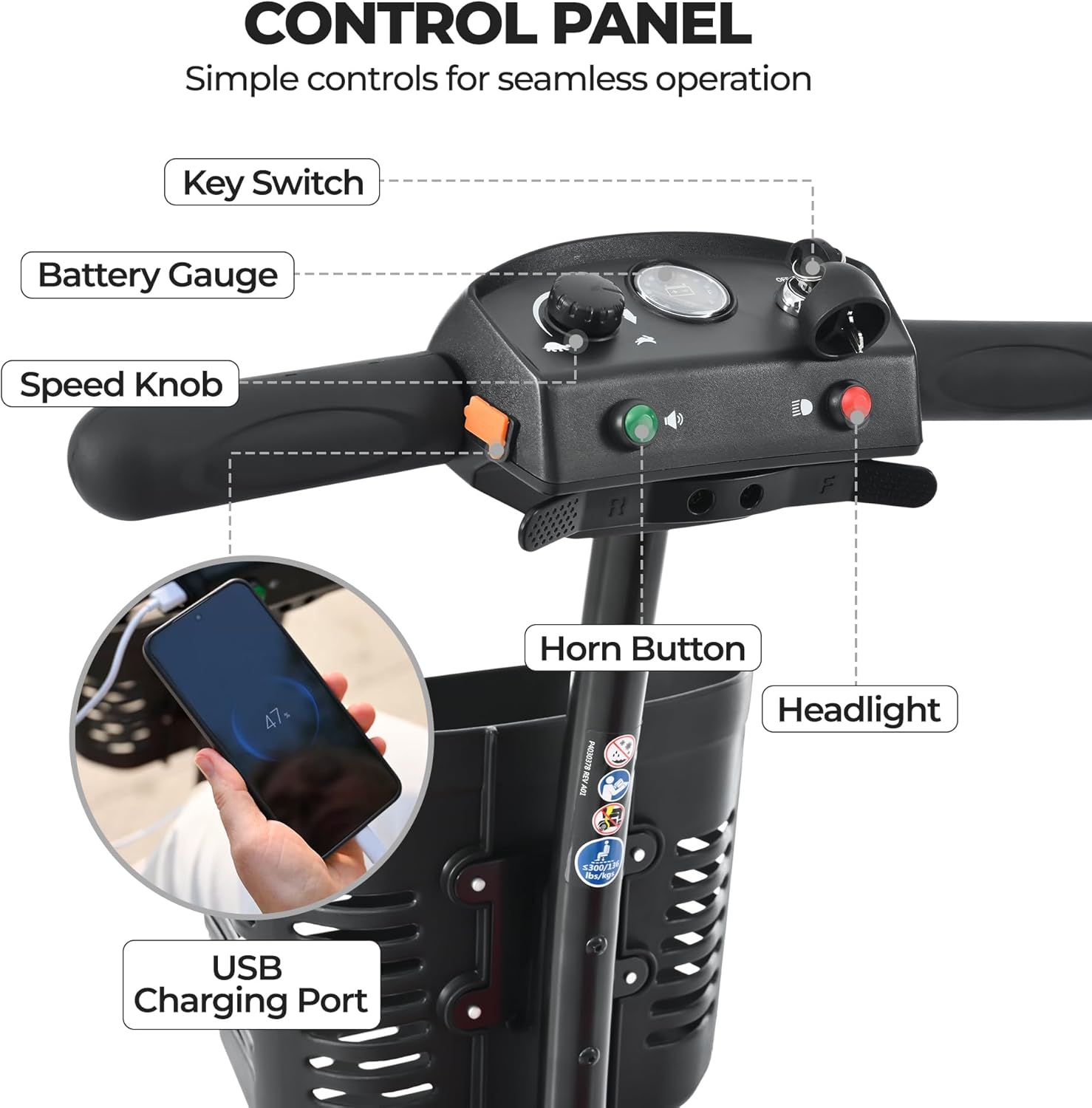
Image 5.1: The control panel with labels for the Key Switch, Battery Gauge, Speed Knob, Horn Button, Headlight Switch, and USB Charging Port.
- Key Switch: Turns the scooter power on/off.
- Battery Gauge: Displays the current battery charge level.
- Speed Knob: Adjusts the maximum speed of the scooter.
- Horn Button: Activates the horn for signaling.
- Headlight Switch: Turns the front LED headlight on/off.
- USB Charging Port: Allows charging of external devices (e.g., smartphones).
5.2 Starting and Driving
- Insert the key into the Key Switch and turn it to the 'ON' position.
- Check the Battery Gauge to ensure sufficient charge.
- Adjust the Speed Knob to your desired maximum speed. Start with a lower speed until you are comfortable.
- To move forward, gently push the throttle lever on the right handlebar. To reverse, gently push the throttle lever on the left handlebar.
- To stop, release the throttle lever. The electromagnetic brake will engage automatically.
- Steer by turning the tiller handlebars.

Image 5.2: The scooter demonstrating its safe electromagnetic brake system and anti-tipping wheels on an 8-degree incline.
5.3 Folding and Transporting
The M2-22.5AH scooter is designed for easy folding and transport:
- Ensure the scooter is turned off and the key is removed.
- Remove the seat by lifting it straight up from its post.
- Locate the folding mechanism (refer to the diagram in the quick start guide if available) and disengage the lock.
- Gently fold the tiller down towards the base and the rear section forward until it locks into its folded position.
- The scooter can now be easily lifted and placed into a vehicle trunk or stored in a compact space.
6. Battery Care and Charging
Proper battery care ensures optimal performance and longevity.
6.1 Charging the Battery
- Ensure the scooter is turned off.
- Locate the charging port on the battery pack or scooter.
- Connect the charger to the charging port, then plug the charger into a standard wall outlet.
- The charger indicator light will typically show red during charging and turn green when fully charged.
- A full charge can take several hours. Do not overcharge the battery.
- Always charge the battery in a well-ventilated area.

Image 6.1: The scooter in use, emphasizing its long-lasting 22.5Ah lithium battery, providing up to 20 miles of travel.
6.2 Battery Maintenance Tips
- Charge the battery regularly, even if the scooter is not used frequently.
- Avoid completely draining the battery before recharging.
- Store the scooter and battery in a cool, dry place.
- If storing for an extended period, charge the battery to approximately 50-70% and recharge every few months.
7. Maintenance and Cleaning
Regular maintenance helps ensure the longevity and safe operation of your scooter.
7.1 Cleaning
- Wipe down the scooter with a damp cloth and mild detergent. Avoid harsh chemicals.
- Do not use a high-pressure washer or spray water directly onto electrical components.
- Keep the wheels and chassis free of dirt and debris.
7.2 General Checks
- Tires: Check tire pressure regularly (if applicable) and inspect for wear or damage.
- Brakes: Test the electromagnetic brake before each ride to ensure it engages properly.
- Connections: Periodically check all electrical connections and cables for looseness or damage.
- Fasteners: Ensure all nuts, bolts, and screws are tight. Do not overtighten.
8. Troubleshooting
This section addresses common issues you might encounter.
| Problem | Possible Cause | Solution |
|---|---|---|
| Scooter does not turn on | Key not fully inserted/turned; Battery discharged; Loose battery connection | Ensure key is 'ON'; Charge battery; Check battery connection. |
| Scooter moves slowly or lacks power | Low battery charge; Speed knob set too low; Overweight load | Recharge battery; Adjust speed knob; Reduce load. |
| Brakes not engaging properly | Throttle not fully released; Brake system malfunction | Ensure throttle is fully released; Contact customer support if issue persists. |
| Unusual noises during operation | Loose components; Debris in wheels/motor | Inspect for loose parts and tighten; Clean wheels/motor area. If noise persists, contact support. |
If you encounter a problem not listed here or if the suggested solutions do not resolve the issue, please contact Metro Mobility customer support.
9. Specifications
Detailed technical specifications for the Metro Mobility M2-22.5AH Scooter.
| Feature | Specification |
|---|---|
| Model | M2-22.5AH |
| Brand | Metro Mobility |
| Weight Capacity | 330 lbs (150 kg) |
| Motor Power | 260W Brushless |
| Battery Type | 22.5Ah Lithium (1 x 12V included) |
| Max Travel Range | Up to 20 miles |
| Top Speed | 4.97 mph |
| Turning Radius | 47.2 inches |
| Max Incline | 8 degrees |
| Item Weight | 84.93 Pounds |
| Wheel Size | 8 Inches |
| Package Dimensions | 45.3 x 19.7 x 16.5 inches |
| Color | Blue |
| UPC | 725380613342 |
10. Warranty and Customer Support
Metro Mobility is committed to providing quality products and support.
10.1 Limited Warranty
Your Metro Mobility M2-22.5AH Scooter comes with a 1-year limited warranty. This warranty covers manufacturing defects in materials and workmanship under normal use. Please retain your proof of purchase for warranty claims. The warranty does not cover damage due to misuse, accidents, unauthorized modifications, or normal wear and tear.
10.2 Customer Support
For any questions, technical assistance, or warranty claims, please contact Metro Mobility customer service. Refer to the contact information provided with your purchase or visit the official Metro Mobility website for support details.


