
1. Introduction
This manual provides detailed instructions for the setup, operation, and maintenance of your Outinput PC300 2K 3MP Indoor WiFi Security Camera. Please read this manual thoroughly before using the device to ensure proper functionality and safety. The PC300 camera is designed for indoor surveillance, offering high-resolution video, night vision, two-way audio, and smart detection features for monitoring your home, pets, or children.
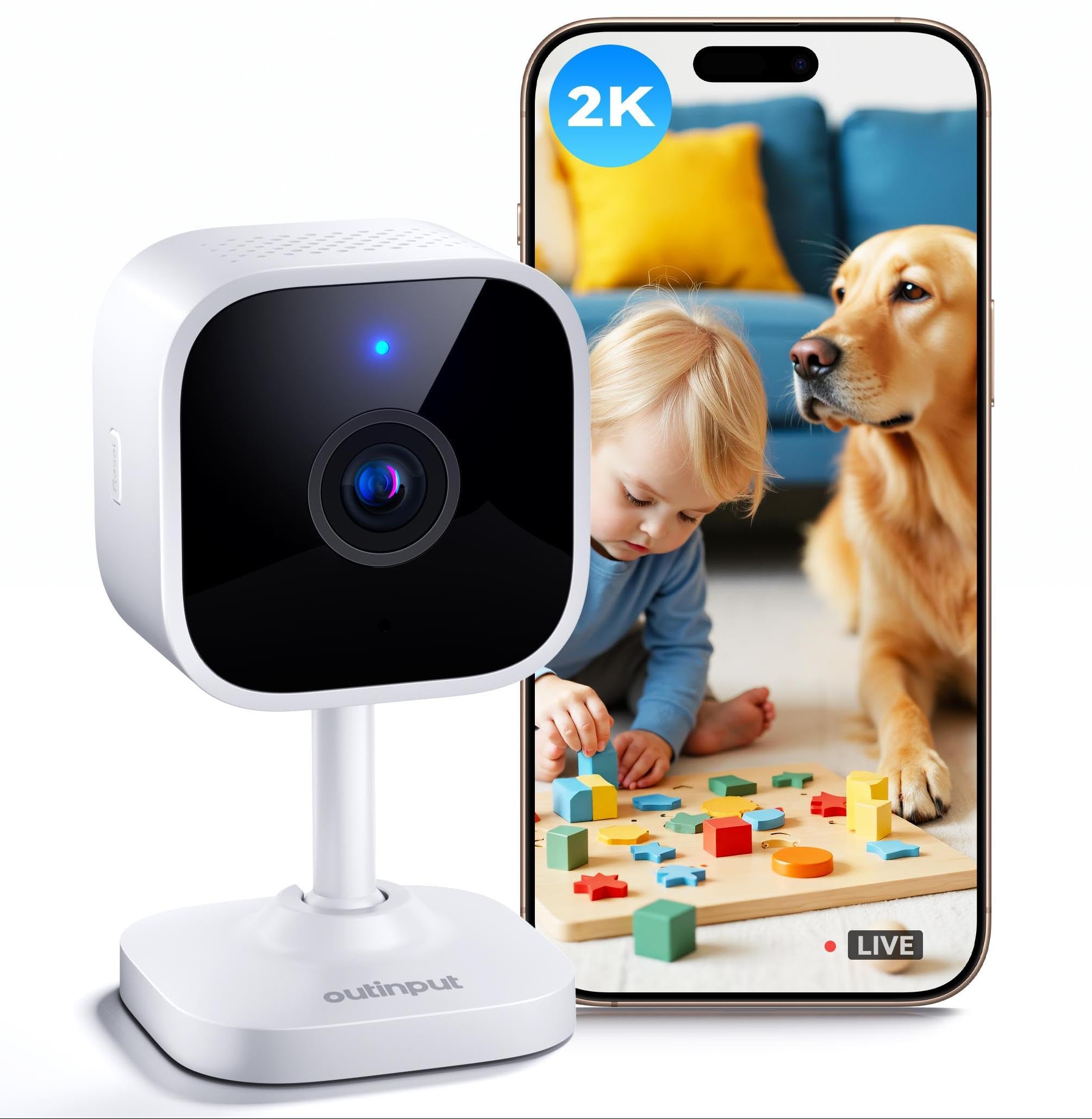
Figure 1: Outinput PC300 Indoor WiFi Security Camera
2. Package Contents
Verify that all items listed below are included in your package:
- 1 x Outinput PC300 Indoor Camera
- 1 x Power Adapter
- 1 x Charging Cable
- 1 x Mounting Bracket
- 1 x Set of Mounting Screws
- 1 x 3M Adhesive Pad
- 1 x User Manual

Figure 2: All items included in the Outinput PC300 package.
3. Product Overview
The Outinput PC300 camera is a compact indoor security device equipped with advanced monitoring capabilities. It features a 2K 3MP lens for clear video, infrared night vision for low-light conditions, and a built-in microphone and speaker for two-way audio communication. The camera also supports motion and sound detection with instant alerts.

Figure 3: Key features of the Outinput PC300 camera, including 2K QHD, motion & sound detection, two-way audio, night vision, siren, local & cloud storage, instant alerts, and 3x zoom.
4. Setup
4.1. Installation Options
The PC300 camera offers flexible installation to suit your needs:
- Tabletop Placement: Use the included bracket to place the camera on any flat surface.
- Shelf Placement: The camera can be placed directly on a shelf without the bracket for a discreet setup.
- Wall Mounting: Use the provided mounting screws or 3M adhesive pad to fix the camera to a wall. Ensure the mounting surface is clean and dry if using adhesive.

Figure 4: Various installation methods for the Outinput PC300 camera.
4.2. App Download and Account Creation
- Download the Outinput App from your smartphone's app store (Google Play Store for Android or Apple App Store for iOS). You can also scan the QR code provided in the quick start guide or visit a.smart321.com/outinputcom.
- Open the app and follow the on-screen instructions to create a new account or log in if you already have one.
4.3. Connecting to Wi-Fi
- Plug in the camera using the provided power adapter and charging cable. Wait for the indicator light to flash, indicating it's ready for pairing.
- Open the Outinput App, tap the "+" icon to add a new device.
- Select your camera model (PC300) from the list.
- Follow the in-app instructions to connect the camera to your 2.4 GHz Wi-Fi network. Note: The camera only supports 2.4 GHz Wi-Fi.
- Once connected, the indicator light will turn solid, and you will see the camera in your app's device list.

Figure 5: Steps for easy connection: Download the app, plug in the camera, and add the device via the app.
5. Operating Instructions
5.1. Live View and Recording
Once connected, tap on your camera in the Outinput App to access the live video feed. You can view real-time footage, manually record video, or capture screenshots directly from the app.
5.2. Two-Way Audio
The PC300 features a built-in microphone and speaker for two-way communication. Tap the microphone icon in the live view interface to speak through the camera, and listen to audio from the camera's environment.

Figure 6: Demonstrating two-way audio functionality for real-time interaction.
5.3. Motion and Sound Detection
The camera can detect both motion and sound. Configure sensitivity levels and alert preferences in the app settings. When an event is detected, the camera will trigger recording and send instant notifications to your smartphone.

Figure 7: The camera's dual detection defense system with real-time alerts for motion and sound.
5.4. Night Vision
The PC300 is equipped with infrared night vision, automatically activating in low-light conditions to provide clear monitoring up to 10 meters, even in complete darkness.

Figure 8: Crystal clear night vision for monitoring in low-light conditions.
5.5. Recording and Storage
The camera supports two storage options:
- Micro SD Card: Insert a Micro SD card (up to 256GB, not included) into the camera's slot for local storage of recordings.
- Cloud Storage: Utilize the secure cloud storage service, which includes a 7-day free trial. Your videos are encrypted for maximum protection.

Figure 9: Storage options for the PC300 camera, including cloud storage and Micro SD card support.
5.6. Privacy Mode
Activate Privacy Mode via the app to temporarily disable video recording and live viewing, ensuring your privacy when needed.
5.7. Family Sharing and Multi-Camera View
- Family Sharing: Share access to your PC300 camera with up to 5 family members through the Outinput App.
- Multi-Camera View: If you have multiple Outinput cameras, the app allows simultaneous viewing of up to 16 video streams on a single screen.

Figure 10: Seamless sharing of camera view with family members and multi-camera monitoring.
5.8. Digital Zoom
The camera supports 3x digital zoom, allowing you to magnify details in the live view or recorded footage.

Figure 11: Comparison of 2K visuals versus 1080P, highlighting the clarity of the PC300 camera.
6. Maintenance
6.1. Cleaning
To maintain optimal performance, regularly clean the camera lens and body with a soft, dry cloth. Avoid using harsh chemicals or abrasive materials.
6.2. Firmware Updates
Periodically check the Outinput App for available firmware updates. Keeping your camera's firmware up-to-date ensures access to the latest features and security enhancements.
6.3. Storage Management
Regularly review and manage your recorded footage. For Micro SD card storage, consider backing up important videos and formatting the card periodically to ensure continuous recording. For cloud storage, manage your subscription and stored clips via the app.
7. Troubleshooting
- Camera Offline:
- Ensure the camera is powered on and the power adapter is securely connected.
- Check your Wi-Fi router and internet connection.
- Verify the camera is within range of your 2.4 GHz Wi-Fi network.
- Restart the camera and your Wi-Fi router. - Unable to Connect to Wi-Fi:
- Confirm your Wi-Fi network is 2.4 GHz. The camera does not support 5 GHz networks.
- Double-check your Wi-Fi password.
- Move the camera closer to your Wi-Fi router during setup.
- Reset the camera (refer to the quick start guide for reset instructions) and try the connection process again. - Poor Video Quality:
- Ensure the camera lens is clean.
- Check your Wi-Fi signal strength; a weak signal can affect video quality.
- Adjust the camera's position to optimize lighting conditions. - No Motion/Sound Alerts:
- Verify that motion and sound detection are enabled in the app settings.
- Adjust the sensitivity levels for detection.
- Ensure app notifications are enabled on your smartphone. - Two-Way Audio Issues:
- Check the volume settings on your smartphone and in the app.
- Ensure there are no obstructions blocking the camera's microphone or speaker.
- Verify your internet connection is stable.
8. Specifications
| Feature | Specification |
|---|---|
| Product Dimensions (L x W x H) | 4.6 x 4.6 x 8.51 cm |
| Weight | 63.5 grams |
| Model Number | PC300 |
| Recommended Uses | Pet monitoring, Baby monitoring, Indoor security |
| Connectivity Technology | Bluetooth, Wired, Wi-Fi (2.4 GHz only) |
| Special Features | Two-way audio, Motion detector, Barking detection, HD resolution, Night vision |
| Indoor/Outdoor Use | Indoor |
| Compatible Devices | Smartphone, Tablet |
| Power Source | Electric cable |
| Control Type | Outinput App |
| Mounting Type | Wall mount, Table mount |
| Color | White |
| Installation Type | Self-adhesive |
| Material | Acrylonitrile Butadiene Styrene (ABS) |
| Water Resistance Level | Not waterproof |
| Alert Type | Audio and motion |
| Effective Capture Resolution | 3 Megapixels |
| Voltage | 5 Volts |
| Wattage | 5 Watts |
| Batteries Required | No |
| Video Encoding | H.264, H.265 |
| Video Capture Format | MP4 |
| Night Vision Range | 10 Meters |
| Number of IR LEDs | 8 |
| Flash Memory Type | Micro SD |
| Max Flash Memory Supported | 256 GB |
| Screen Capture Resolution | 2K |
| Effective Video Resolution | 1296 |
| View Angle | 100 Degrees |
| Optical Zoom | 3 x |
| Focus Type | Auto Focus |
| Zoom Type | Digital Zoom |
| Zoom Ratio | 3 |
9. Warranty Information
Outinput products are designed for reliability and performance. For specific warranty details, please refer to the warranty card included in your product packaging or contact Outinput customer support. Keep your purchase receipt as proof of purchase for warranty claims.
10. Support
If you encounter any issues or have questions regarding your Outinput PC300 camera, please refer to the troubleshooting section of this manual. For further assistance, you can visit the Outinput Brand Store on Amazon or contact Outinput customer service through the contact information provided in your product packaging or on the official Outinput website.
