
Introduction
This manual provides essential instructions for the assembly, operation, and maintenance of your Pinmoco 42" L-Shaped Gaming Desk. Please read this manual thoroughly before assembly and use to ensure proper function and longevity of your product.

Image: The Pinmoco L-Shaped Gaming Desk in a modern gaming environment, showcasing its monitor stand, LED lighting, and storage features.
Safety Information
Please observe the following safety guidelines to prevent injury or damage to the product:
- Always assemble the desk according to the provided instructions.
- Keep the desk away from heat sources and avoid placing heavy objects on the monitor stand.
- Do not operate the desk while the RGB lighting is in motion mode if you have any sensitivity to light or seizures.
- Always unplug the desk from the power source before making any adjustments or cleaning.
Package Contents
Verify that all components are present before beginning assembly. If any parts are missing or damaged, please contact customer support.
- Desk panels (L-shaped desktop, monitor stand, under-desk storage shelf)
- Metal frame components (legs, support beams)
- RGB LED lighting strip and controller
- Headset hook
- Foldable cup holder
- Adjustable leveling pads
- Assembly hardware (screws, bolts, etc.)
- Assembly instructions
Setup and Assembly
Assembly is required for this product. Please follow the detailed instructions provided in the separate assembly guide included with your package. Ensure you have adequate space and the necessary tools before starting.
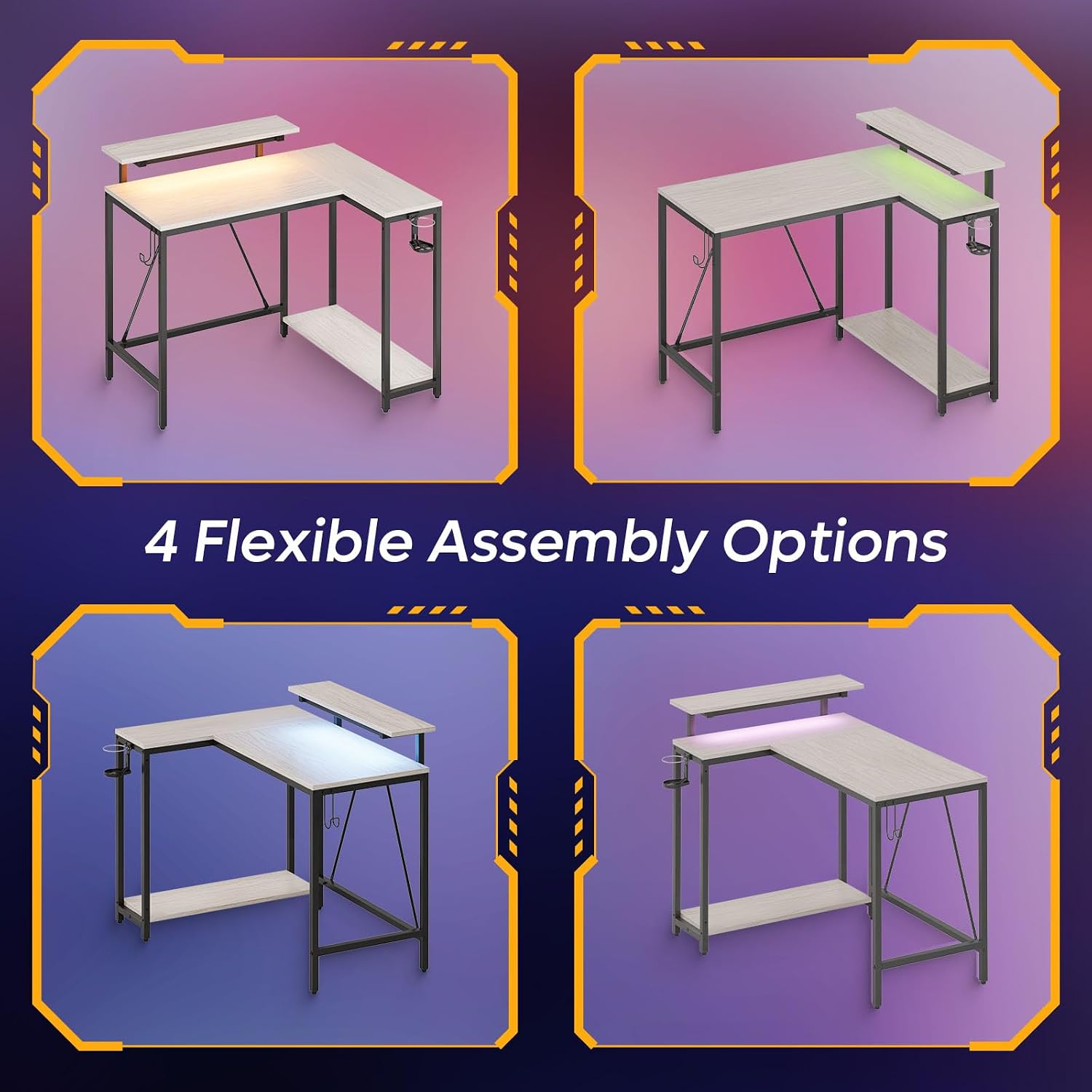
Image: This illustration demonstrates the four flexible assembly options for the L-shaped desk, allowing users to configure it to suit their space.
Key Assembly Considerations:
- Reversible Layout: The L-shaped design allows for a reversible configuration to fit various room layouts. Refer to the assembly guide for specific steps on how to achieve your desired orientation.
- Reinforced Legs and Leveling Pads: Ensure all legs are securely fastened. The adjustable leveling pads should be used to stabilize the desk on uneven surfaces, preventing wobbling.
- Monitor Stand Placement: The monitor stand is designed to be placed on the main desktop. Secure it according to the assembly instructions.
Operating Instructions
RGB LED Lighting
The desk features integrated RGB LED lighting. Connect the LED strip to a power source and use the included controller to select from 7 primary colors and 20 dynamic modes. Refer to the LED controller's specific instructions for detailed operation.

Image: This graphic highlights the LED monitor stand's features, including 7 main colors, RGB, and 22 dynamic modes, alongside a comparison of ergonomic posture benefits.
Ergonomic Monitor Stand
The adjustable monitor stand is designed to elevate your screen to eye level, promoting better posture and reducing strain on your neck and spine during extended use.
Accessory Management
- Headset Hook: Utilize the integrated hook on the side of the desk to keep your headphones organized and easily accessible.
- Foldable Cup Holder: The foldable cup holder provides a convenient and secure place for beverages, helping to prevent spills on your workspace.
- Under-Desk Storage Shelf: The spacious shelf beneath the desk is suitable for storing files, books, or a PC tower, contributing to a clutter-free environment.

Image: This image details the versatile storage options, including the under-desk shelf dimensions, the cup holder, and the headphone hook.
Maintenance
To maintain the appearance and functionality of your desk:
- Wipe surfaces with a soft, damp cloth. Avoid abrasive cleaners.
- Ensure all screws and connections remain tight. Periodically check and tighten if necessary.
- Keep the desk dry and away from direct sunlight or extreme temperatures.
- For the LED lights, ensure the power cable is not pinched or damaged.
Troubleshooting
Desk Wobbles
- Ensure all assembly hardware is securely tightened.
- Adjust the leveling pads on the bottom of the desk legs to compensate for uneven flooring.
LED Lights Not Working
- Check that the LED strip is properly connected to the power source and the controller.
- Verify that the power outlet is functional.
- Ensure the controller's battery (if applicable) is working or that it is properly connected.
Missing Parts or Damaged Components
- Refer to the package contents list. If any items are missing or damaged upon arrival, contact Pinmoco customer support immediately for assistance.
Specifications
| Brand | Pinmoco |
| Product Dimensions (D x W x H) | 41.93"D x 32.36"W x 36.02"H |
| Color | Walnut Wash |
| Style | Modern |
| Base Material | Metal |
| Top Material Type | Wood (P2 particleboard) |
| Special Feature | LED Light, Ergonomic Monitor Stand, Headset Hook, Cup Holder, Under-desk Storage Shelf, Adjustable Leveling Pads |
| Recommended Uses | Gaming, Home Office |
| Required Assembly | Yes |
| Number of Shelves | 1 (under-desk) |

Image: Detailed dimensions and weight capacities for various sections of the desk, including the main desktop, monitor stand, and lower shelf.
Warranty and Support
This Pinmoco product comes with a limited warranty. Please refer to the warranty card included in your package for specific terms and conditions. For technical support, missing parts, or warranty claims, please contact Pinmoco customer service through the retailer where the product was purchased or visit the official Pinmoco website.
For additional information or assistance, please visit the Pinmoco Store on Amazon.
