1. Product Overview
The OLIGHT Oclip Series Headlamp Strap Bundle combines the versatile Oclip rechargeable EDC flashlight with a dedicated headlamp strap, offering a hands-free lighting solution. This bundle is designed for various activities requiring portable and adaptable illumination, such as camping, hiking, and everyday tasks.
Key Features:
- Oclip Headlamp Strap: This strap is specifically compatible with Oclip series flashlights, including Oclip, OclipPro, and OclipUltra.
- Flexible Rotating Light Holder: The adjustable angle design of the headlamp bracket allows for a 160-degree rotation, ensuring optimal lighting direction for various tasks.
- Durable Materials: The headlamp strap is constructed from premium nylon, providing durability, lightweight comfort, and a secure fit for reliable performance in outdoor activities.
- Oclip Flashlight: A powerful mini pocket flashlight featuring dual light sources: a white light for general illumination and a red light for night vision preservation.
- Compact and Lightweight: The Oclip clip-on light weighs only 1.05 oz (30 g) and measures 1.90 in (48.5 mm) in length, making it highly portable.
- Versatile Clip: The Oclip can be used as a keychain light, clipped onto a cap, attached to clothing, or used as a signal tool on a backpack. It also features a magnetic base for attachment to metal surfaces.
- Rechargeable: The Oclip flashlight is easily rechargeable via a universal Type-C charging port.

Image: The OLIGHT Oclip Series Headlamp Strap Bundle, showcasing the black headlamp strap and the orange Oclip flashlight. This image provides a clear view of both components included in the bundle.

Image: A visual representation of the OLIGHT Oclip flashlight's compact size and versatile carrying options, including its dimensions, ability to attach to metal surfaces, clip onto clothes, and be hung from a keychain.
2. Package Contents
Please verify that all items are present in your package:
- Oclip Headlamp Strap
- Oclip Rechargeable EDC Flashlight
- USB Type-C Charging Cable
- User Manual (this document)
3. Setup
3.1 Attaching the Oclip Flashlight to the Headlamp Strap
The Oclip headlamp strap features a dedicated holder designed for the Oclip series flashlights. Ensure the flashlight is securely seated in the holder before use.
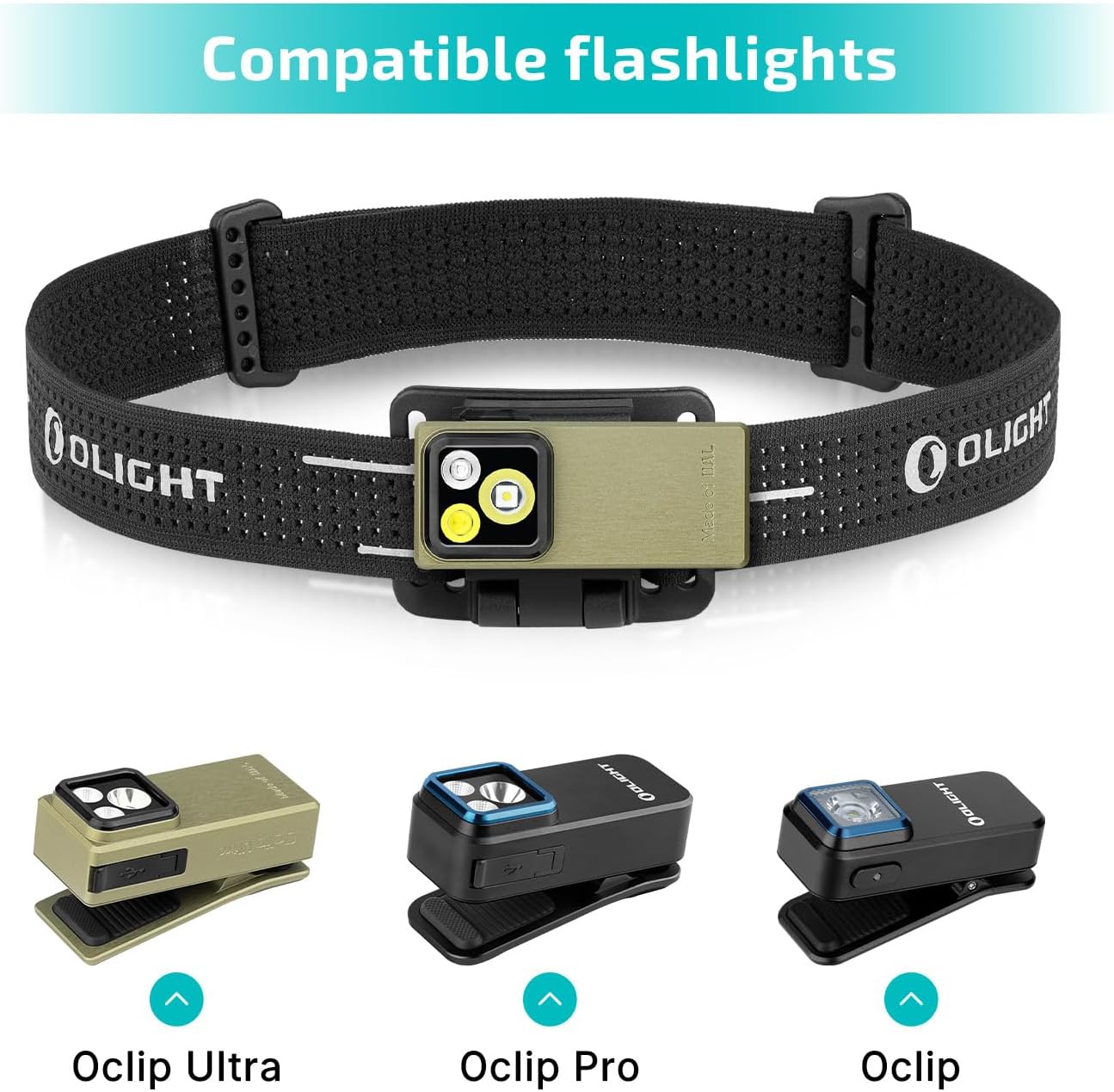
Image: The Oclip Headlamp Strap shown with various compatible Oclip series flashlights (Oclip Ultra, Oclip Pro, Oclip). The image demonstrates how different Oclip models fit into the strap's holder, ensuring proper attachment.
- Identify the flashlight holder on the headlamp strap.
- Align the Oclip flashlight with the holder, ensuring the clip mechanism is positioned correctly.
- Gently push the flashlight into the holder until it clicks securely into place.
- Verify the flashlight is firmly attached and does not wobble before use.
3.2 Adjusting the Headlamp Strap
The headlamp strap is adjustable to fit various head sizes, ensuring a comfortable and secure fit during use.

Image: A close-up view of the OLIGHT Oclip Headlamp Strap, highlighting its adjustable design and the breathable texture of the strap material.
- Place the headlamp strap on your head.
- Use the adjustable buckles on either side of the strap to tighten or loosen it until a snug, comfortable fit is achieved.
- Ensure the strap is not too tight, which could cause discomfort, or too loose, which could cause the headlamp to slip during activity.
4. Operating Instructions
4.1 Oclip Flashlight Operation
The Oclip flashlight features a single button for controlling its various light modes and power functions.

Image: A detailed view of the orange OLIGHT Oclip flashlight, clearly showing its main light source and the single control button on the side.
- Power On/Off: Press and hold the button for approximately 1 second to turn the flashlight on or off.
- Change White Light Modes: When the white light is on, single-click the button to cycle through the modes in sequence: Moonlight → Low → Medium → High.
- Activate Red Light: From the off state, double-click the button to activate the red light. Single-click to turn off the red light.
- Memory Function: The flashlight will remember the last used white light mode when turned off and on again, providing convenience for repeated use.

Image: A person wearing the OLIGHT Oclip Headlamp Strap Bundle, illuminating a path in a dark, wooded area. This demonstrates the hands-free functionality and effective light output for night activities.
4.2 Light Modes and Runtime
The Oclip offers multiple white light modes and a dedicated red light mode, each with specific brightness and estimated runtime characteristics.

Image: A graphic illustrating the different light modes of the OLIGHT Oclip flashlight, including Moonlight, Low, Medium, High (white light), and Red Light, along with their respective lumen outputs and runtimes.
| Mode | Output (Lumens) | Runtime |
|---|---|---|
| Moonlight | 1.5 | 30 hours |
| Low | 10 | 12 hours |
| Medium | 100 | 90 minutes |
| High | 300-180 | 1 + 60 minutes |
| Red Light | 4 | 5 hours |
Note: High mode runtime is measured as the time until the output drops to 180 lumens, followed by the remaining time at that output.
4.3 Charging the Oclip Flashlight
The Oclip flashlight is equipped with a universal Type-C charging port for convenient and efficient recharging.

Image: The OLIGHT Oclip flashlight connected to a USB Type-C charging cable, clearly illustrating the charging port and the connection process.
- Locate the Type-C charging port on the Oclip flashlight.
- Insert the provided USB Type-C cable into the flashlight's port.
- Connect the other end of the USB cable to a compatible USB power source (e.g., computer, wall adapter, power bank).
- An indicator light on the flashlight will show the charging status (e.g., red for charging, green for fully charged).
5. Maintenance
Proper maintenance will ensure the longevity and optimal performance of your OLIGHT Oclip Series Headlamp Strap Bundle.
- Cleaning: Wipe the flashlight and headlamp strap with a soft, damp cloth. Do not use harsh chemicals, abrasive cleaners, or immerse the flashlight in water.
- Storage: Store the product in a cool, dry place away from direct sunlight, high humidity, and extreme temperatures.
- Battery Care: For optimal battery life, charge the Oclip flashlight regularly, even if not in frequent use. Avoid fully depleting the battery for extended periods.
- Clip Durability: The Oclip's clip is engineered for durability, designed to withstand 10,000 open-and-close cycles and offering a 14mm clamping capacity. Avoid forcing the clip beyond its intended capacity to prevent damage.

Image: A close-up of the OLIGHT Oclip flashlight's clip, demonstrating its 14mm clamping capacity and highlighting its robust design, built for frequent use.
6. Troubleshooting
If you encounter any issues with your OLIGHT Oclip Series Headlamp Strap Bundle, please refer to the following common troubleshooting steps:
- Flashlight not turning on:
- Ensure the battery is charged. Connect to a Type-C charger and check the indicator light for charging status.
- Verify the button is being pressed and held for approximately 1 second to activate the flashlight.
- Light output is dim:
- The battery may be low. Recharge the flashlight fully.
- Ensure the correct mode is selected (e.g., not Moonlight mode if a brighter light is desired).
- Headlamp strap feels loose:
- Adjust the buckles on the strap to achieve a tighter, more secure fit around your head.
- Flashlight not staying in headlamp holder:
- Ensure the flashlight is correctly aligned and fully pushed into the holder until it clicks securely into place.
- Check for any debris or damage in the holder or on the flashlight's clip mechanism that might prevent a secure fit.
7. Specifications
Detailed specifications for the OLIGHT Oclip Series Headlamp Strap Bundle:
| Feature | Detail |
|---|---|
| Product Name | OLIGHT Oclip Series Headlamp Strap Bundle |
| Model | Oclip Headlamp Strap Bundle Oclip OG |
| Flashlight Type | Rechargeable EDC Flashlight (Oclip) |
| Max Output (White Light) | 300 Lumens |
| Max Beam Distance | 68 meters |
| Light Sources | White Light, Red Light |
| Charging Port | USB Type-C |
| Oclip Weight | 1.05 oz (30 g) |
| Oclip Length | 1.90 in (48.5 mm) |
| Headlamp Strap Material | Premium Nylon |
| Headlamp Holder Rotation | 160 degrees |
| Clip Clamping Capacity | 14mm |
8. Warranty and Support
OLIGHT products are manufactured with high-quality materials and craftsmanship. For warranty information and customer support, please refer to the official OLIGHT website or contact their customer service directly.
Official Website: www.olightstore.com
For specific warranty terms and conditions, including details on product registration and service, please visit the support section of the OLIGHT website or contact the seller directly for assistance.


