
1. Introduction
Thank you for choosing the Bellemave Twin XL Loft Bed with Desk and Stairs. This product is designed to provide a functional and space-saving solution for sleeping, studying, and storage. It features a heavy-duty metal frame, an integrated L-shaped desk, staircase with storage shelves, a built-in wardrobe, LED lights, and USB charging ports. This manual provides detailed instructions for assembly, operation, and maintenance to ensure safe and optimal use of your new loft bed.
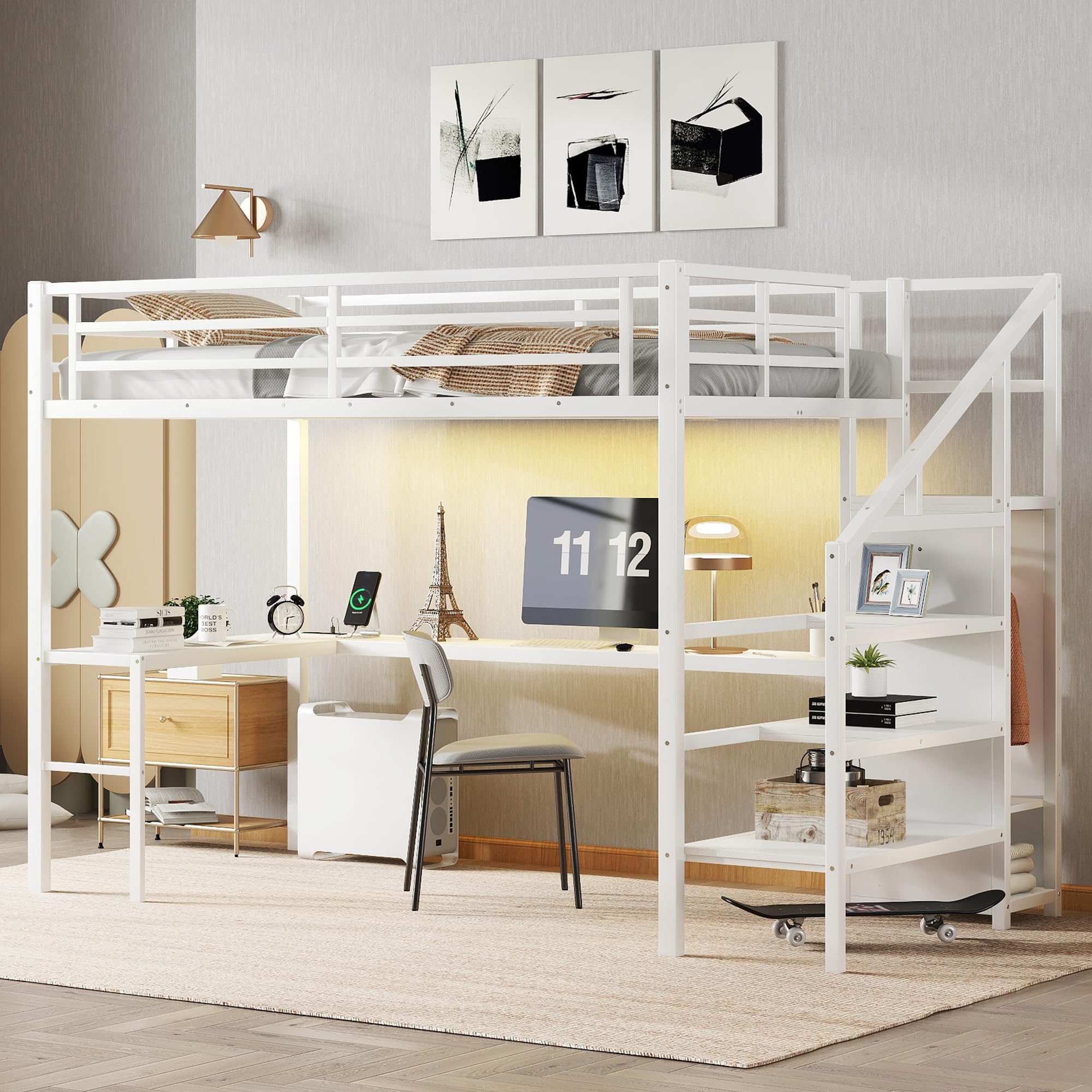
Figure 1: Bellemave Twin XL Loft Bed with Desk and Stairs. This image shows the complete loft bed unit, highlighting the bed frame, integrated desk, and staircase with storage.
2. Safety Information
Please read and understand all safety warnings and instructions before assembly and use. Failure to follow these instructions can result in serious injury.
- Always use the full-length guardrails when sleeping on the upper bunk.
- Do not exceed the weight limit of 350 lbs for the bed frame.
- Follow the assembly instructions carefully to prevent instability or collapse.
- Ensure all connections are tight before use and check periodically.
- Do not allow children under 6 years of age on the upper bunk.
- Use only a mattress that is 74-75 inches long and 37.5-38.5 inches wide, with a maximum thickness of 6 inches, to ensure proper guardrail height.
- Prohibit horseplay on or under the bed.
- Prohibit more than one person on the upper bunk.
- Always use the provided stairs for entering and exiting the upper bunk. Do not use other means.
- Keep all electrical cords (for LED lights and USB ports) away from moving parts and ensure they are not pinched or damaged.
- Do not remove warning labels from the bed structure.
3. Package Contents
Your Bellemave Twin XL Loft Bed is shipped in two boxes. Carefully unpack all components and verify that all parts and hardware are present before beginning assembly. Refer to the included parts list in your assembly guide.

Figure 2: Product Dimensions. This image provides a detailed diagram with measurements for the entire loft bed, including the bed frame, desk, and staircase.
If any parts are missing or damaged, please contact customer support immediately for assistance. Do not proceed with assembly if parts are missing or damaged.
4. Setup & Assembly Instructions
Assembly is required for this product. It is recommended that two adults assemble the loft bed. All parts are labeled, and tools are included for a hassle-free setup.
- Preparation: Clear a spacious area for assembly. Lay out all parts on a soft, clean surface to prevent scratches.
- Follow the Included Assembly Manual: Refer to the detailed step-by-step instructions provided in the separate assembly manual. Each step will guide you through connecting the frame components, installing the desk, attaching the staircase, and securing the wardrobe.
- Secure Connections: Ensure all bolts, screws, and fasteners are tightened securely at each step. Do not overtighten.
- Install Slats: Place the bed slats evenly across the bed frame and secure them according to the manual.
- Guardrail Installation: Ensure full-length guardrails are correctly installed and secured on the upper bunk.
- Desk and Storage Assembly: Assemble the L-shaped desk and integrate the storage shelves within the staircase and the wardrobe as per the instructions.

Figure 3: Angled view of the loft bed during assembly. This image illustrates the structure of the loft bed, showing the integrated desk and the staircase with storage compartments.
After assembly, double-check all connections for tightness and stability before use.
5. Operation
5.1. LED Lights
The loft bed includes a built-in LED light strip for ambiance. It offers 16 color options and is controlled via a remote.
- Power On/Off: Use the power button on the remote control to turn the LED lights on or off.
- Color Selection: Use the color buttons on the remote to select from 16 different colors.
- Brightness Adjustment: Adjust the brightness using the designated buttons on the remote.
- Mode Selection: Some remotes may offer various lighting modes (e.g., flash, strobe, fade, smooth). Refer to the remote's specific instructions for these functions.
5.2. USB Ports and Power Outlets
The integrated charging station provides convenient access to USB ports and power outlets.

Figure 4: Integrated USB ports and power outlets. This image shows the charging station built into the desk surface, featuring two USB ports and two standard power outlets.
- Power Connection: Ensure the power cord for the charging station is securely plugged into a wall outlet.
- USB Charging: Connect your USB-compatible devices (e.g., smartphones, tablets) to the USB ports for charging.
- Power Outlets: Use the standard power outlets for devices requiring AC power, such as laptops or lamps.
- Safety Precaution: Do not overload the power strip. Refer to the power strip's specifications for maximum wattage.
6. Maintenance
Regular maintenance will help prolong the life and ensure the safety of your Bellemave Loft Bed.
- Cleaning: Wipe down the metal frame and wooden surfaces with a soft, damp cloth. Avoid harsh chemicals or abrasive cleaners.
- Hardware Check: Periodically check all bolts, screws, and connections to ensure they remain tight. Retighten if necessary.
- Guardrails: Ensure guardrails are always securely attached and free from damage.
- Slats: Inspect bed slats for any signs of damage or weakness. Replace if necessary.
- Electrical Components: Ensure the LED light strip and charging station cables are not frayed, pinched, or damaged.
7. Troubleshooting
If you encounter any issues with your loft bed, refer to the following common problems and solutions:
| Problem | Possible Cause | Solution |
|---|---|---|
| Bed feels wobbly or unstable. | Loose hardware connections. | Check and tighten all bolts and screws. Ensure the bed is on a level surface. |
| LED lights not working. | Power not connected; remote battery dead; faulty strip. | Ensure the LED strip is properly plugged in. Replace remote battery. If still not working, contact support. |
| USB ports/outlets not charging. | Power strip not plugged in; overloaded circuit; faulty unit. | Verify the power strip is plugged into a live wall outlet. Reduce the number of devices connected. Contact support if the issue persists. |
| Squeaking noises from the bed. | Loose connections; friction between metal parts. | Retighten all hardware. Apply a small amount of lubricant (e.g., silicone spray) to contact points if necessary. |
If you cannot resolve the issue using the troubleshooting guide, please contact Bellemave customer support.
8. Specifications
- Model: Twin XL Loft Bed with Desk and Stairs
- ASIN: B0F9WTMC2B
- Brand: Bellemave
- Material: Metal
- Color: White
- Product Dimensions (L x W x H): 98.4" x 41.7" x 68.5"
- Weight Capacity: 350 lbs
- Compatible Mattress Size: Twin XL (74-75" L x 37.5-38.5" W)
- Max Mattress Thickness: 6 inches
- Special Features: Integrated L-shaped Desk, Storage Stairs, Built-in Wardrobe, LED Lights (16 colors, remote control), USB Ports, Power Outlets.
- Assembly Required: Yes
- Included Components: Bed frame, Desk, Wardrobe, LED light strip, Power strip with USB ports.
9. Warranty & Support
Bellemave is committed to customer satisfaction. If you have any questions, require assistance with assembly, or if any parts are missing or damaged upon arrival, please do not hesitate to contact our customer support team.
Contact Information: Please refer to the contact details provided in your purchase documentation or on the Bellemave official website.
We aim to resolve any issues within 24 hours.


