
1. Important Safety Information
Please read all instructions carefully before using this product and retain them for future reference. Failure to follow these instructions may result in electric shock, fire, or other hazards.
- Power Source: Use only the provided power adapter. Ensure the voltage matches the requirements of the device.
- Water and Moisture: Do not expose the device to rain, moisture, or any liquids. Do not place objects filled with liquids, such as vases, on the device.
- Ventilation: Ensure proper ventilation. Do not block any ventilation openings.
- Heat: Keep the device away from heat sources such as radiators, heat registers, stoves, or other apparatus (including amplifiers) that produce heat.
- Cleaning: Clean only with a dry cloth. Do not use liquid cleaners or aerosol cleaners.
- Servicing: Do not attempt to service this product yourself. Refer all servicing to qualified service personnel.
2. Product Overview
The M-Amazup L-CD201 is a versatile portable desktop CD player designed for home use, offering multiple audio playback options and a compact design. It features dual speakers for clear sound and an LCD display for easy navigation.
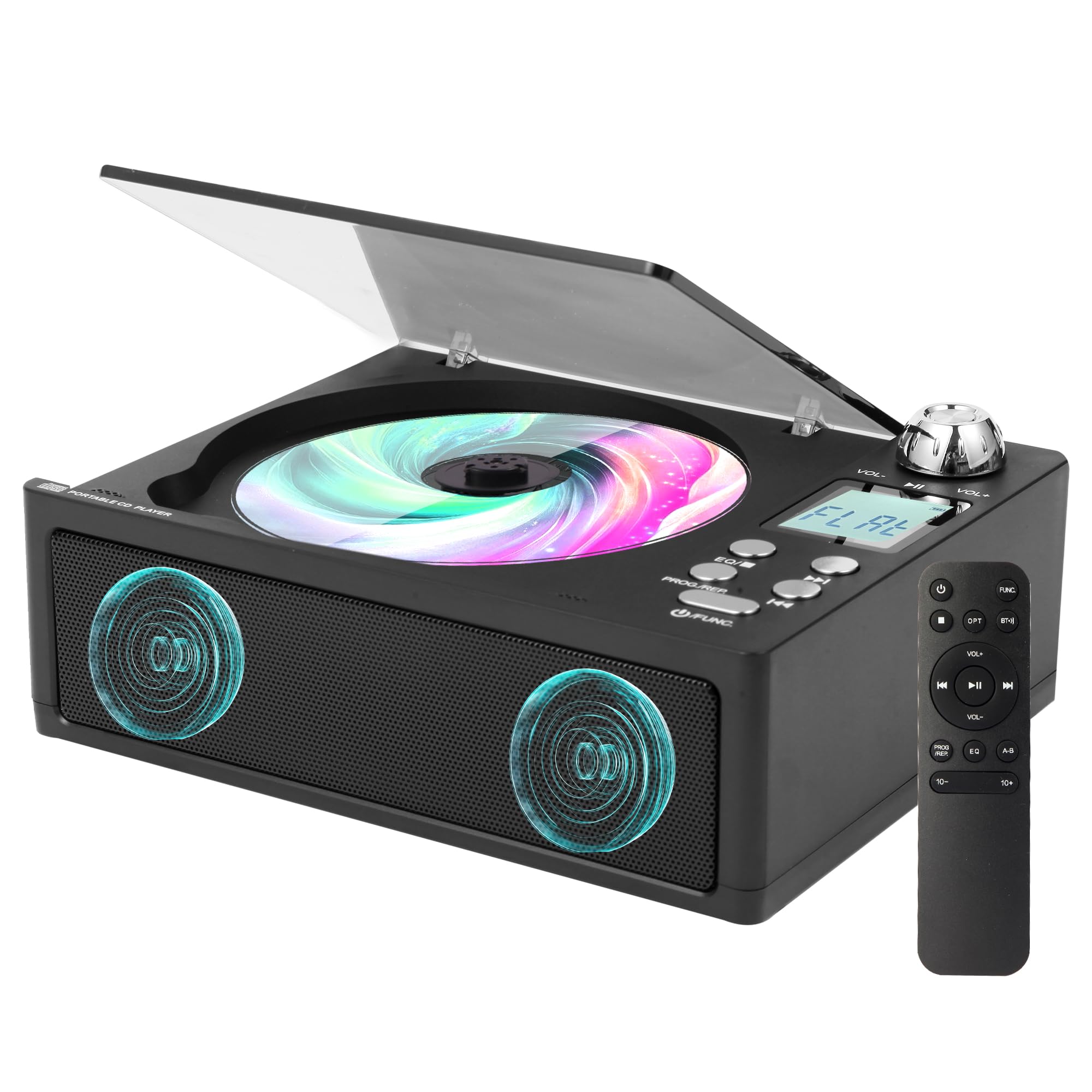
Figure 2.1: M-Amazup L-CD201 Portable Desktop CD Player in Black.
Key Features:
- 7-in-1 Multi-Function: Supports CD playback, Bluetooth streaming, FM Radio (87.5-108MHz), USB, AUX, TF card, and optical output.
- Dual Speakers: Provides high-fidelity sound with customizable EQ modes (POP/JAZZ/CLASSIC/ROCK/FLAT).
- Retro Design with Modern Tech: Features a tactile volume knob, translucent dust cover, and a 1.3-inch LCD display.
- Remote Control: For convenient operation from a distance.
- Lossless Audio Fiber Optic Output: For connecting to external audio systems with studio-quality sound.
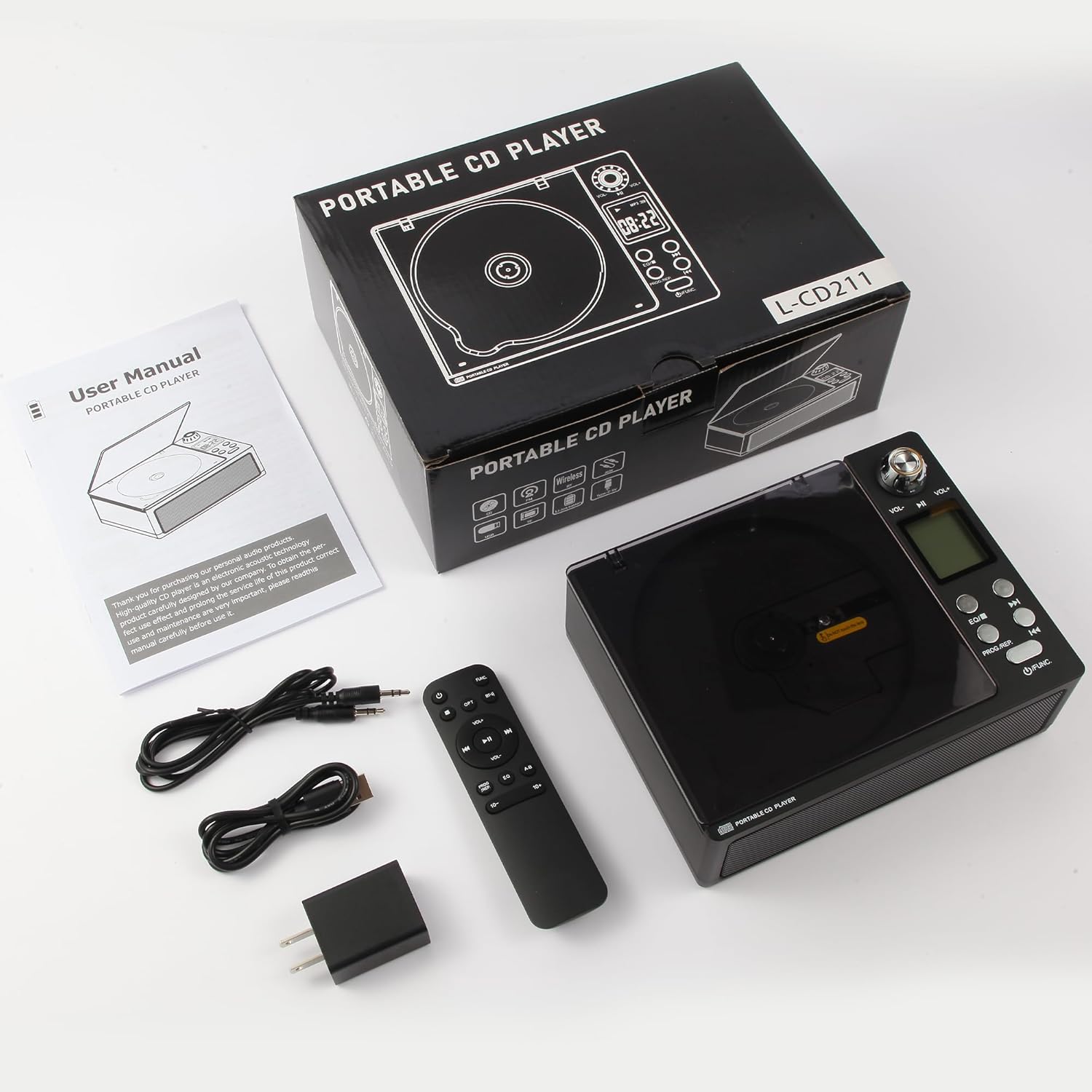
Figure 2.2: Overview of the 7-in-1 functions including CD, AUX, FM Radio, Built-in Speaker, USB, Dual-Bluetooth, and 3.5mm Audio Input/Output.
3. What's in the Box
Carefully unpack the box and ensure all items are present and in good condition.
- CD Player x1
- Cable x1
- Adapters x1
- Remote Control x1
- User Manual x1
Figure 3.1: Contents of the M-Amazup L-CD201 package, including the CD player, remote control, cables, adapter, and user manual.
4. Setup
4.1 Power Connection
- Connect the provided power cable to the DC 5V input port on the back of the CD player.
- Plug the adapter into a standard wall outlet.
- The device will power on or enter standby mode.
4.2 Initial Placement
Place the CD player on a stable, flat surface. Ensure there is adequate space around the device for ventilation.
Video 4.1: This video demonstrates the unboxing and initial setup of the M-Amazup L-CD201 CD player, including connecting the power adapter and placing a CD.
5. Operating Instructions
5.1 Basic Controls
- Power/Function Button: Press and hold to power on/off. Press briefly to switch between modes (CD, USB, TF, AUX, FM, Optical, Bluetooth).
- Volume Knob: Rotate clockwise to increase volume, counter-clockwise to decrease.
- Play/Pause Button: Press to play or pause playback.
- Previous/Next Track Buttons: Press to skip to the previous or next track/station.
- EQ Button: Press to cycle through equalizer presets (POP, JAZZ, CLASSIC, ROCK, FLAT).
- PROG/REP Button: For programming tracks or repeating playback.

Figure 5.1: The included remote control for convenient operation of the CD player's functions.
5.2 CD Playback
- Open the translucent dust cover.
- Place a CD onto the spindle, label side up.
- Close the dust cover. The player will automatically detect the CD and begin playback.
- Use the Play/Pause, Previous/Next, and Volume controls to manage playback.
5.3 Bluetooth Mode
- Press the Function button until "BT" appears on the LCD display.
- On your Bluetooth-enabled device (smartphone, tablet, etc.), search for "L-CD201" in the Bluetooth settings.
- Select "L-CD201" to pair. Once connected, you can stream audio wirelessly to the CD player.

Figure 5.2: The CD player functions as both a Bluetooth receiver (for streaming from devices) and a Bluetooth transmitter (for connecting to wireless headphones/speakers).
5.4 FM Radio
- Press the Function button until "FM" appears on the LCD display.
- Use the Previous/Next track buttons to manually tune to a station or press and hold to auto-scan for available stations.
- The LCD display will show the current frequency.
5.5 USB/TF Card/AUX/Optical Playback
- Insert your USB drive, TF card, or connect an external device via the AUX or Optical port.
- Press the Function button to select the corresponding input mode (USB, TF, AUX, OPT).
- The player will automatically detect and begin playback from the selected source.

Figure 5.3: Rear view of the CD player showing various input/output ports including Optical, AUX, USB, and TF Card slots.
6. Maintenance
6.1 Cleaning
- Always unplug the device from the power outlet before cleaning.
- Use a soft, dry cloth to wipe the exterior of the unit.
- For the CD lens, use a specialized CD lens cleaning kit.
- Do not use abrasive cleaners, waxes, or solvents.
6.2 Storage
When not in use for extended periods, store the CD player in a cool, dry place, away from direct sunlight and extreme temperatures.
7. Troubleshooting
| Problem | Possible Cause | Solution |
|---|---|---|
| No power | Power adapter not connected or faulty outlet. | Check power connections. Try a different outlet. |
| CD not playing/skipping | CD is dirty, scratched, or inserted incorrectly. | Clean the CD. Ensure it is placed correctly. Try another CD. |
| No sound | Volume too low, mute activated, or incorrect mode. | Increase volume. Check if mute is on. Ensure correct input mode is selected. |
| Bluetooth not pairing | Device too far, not in pairing mode, or already connected. | Ensure both devices are in pairing mode and close to each other. Disconnect from other devices. |
| FM radio poor reception | Weak signal or interference. | Adjust the antenna. Move the player to a different location. |
8. Specifications
| Feature | Detail |
|---|---|
| Model Number | L-CD201 |
| Product Dimensions | 7.5 x 5.8 x 2.3 inches |
| Item Weight | 2.02 pounds |
| Connectivity Technology | Auxiliary, Bluetooth, Optical, USB |
| FM Tuner Range | 87.5-108MHz |
| Special Features | Built-in Speaker, Built-In Bluetooth Receiver and Transmit, Dust Cover, Headphone Jack Output, Portable |
| Power Source | Corded Electric (AC adapter included) |
9. Warranty and Support
This product comes with a standard manufacturer's warranty. For specific warranty details, please refer to the warranty card included in your package or contact M-Amazup customer support.
For technical support, troubleshooting assistance, or any inquiries regarding your M-Amazup L-CD201 CD Player, please visit the official M-Amazup website or contact their customer service department using the information provided in your product documentation.