
1. Important Safety Information
Before using the PASYOU SKY80 Air Resistance Ski Trainer, please read and understand all instructions in this manual. Keep this manual for future reference. Failure to follow these safety guidelines may result in injury or damage to the equipment.
- Consult a Physician: Always consult with a healthcare professional before starting any new exercise program, especially if you have pre-existing health conditions.
- Proper Use: Use the ski trainer only for its intended purpose as described in this manual. Do not modify the equipment.
- Supervision: Children and individuals with reduced physical, sensory, or mental capabilities should be supervised when using the equipment.
- Clear Area: Ensure a minimum clearance of 0.6 meters (2 feet) around the equipment during use. Keep pets and children away from the machine.
- Stable Surface: Place the ski trainer on a flat, stable, and non-slip surface. Use a protective mat if necessary.
- Inspect Before Use: Before each workout, check all components for wear, damage, or loose parts. Do not use the equipment if any part is damaged.
- Weight Limit: Adhere to the maximum user weight limit specified for this product.
- Proper Attire: Wear appropriate athletic clothing and footwear. Avoid loose clothing that could get caught in moving parts.
- Listen to Your Body: Stop exercising immediately if you feel pain, dizziness, or shortness of breath.
2. Product Overview
The PASYOU SKY80 Air Resistance Ski Trainer is designed to provide a comprehensive full-body workout, simulating the movements of Nordic skiing. It features an advanced air resistance system and an electronic monitor to track your performance.
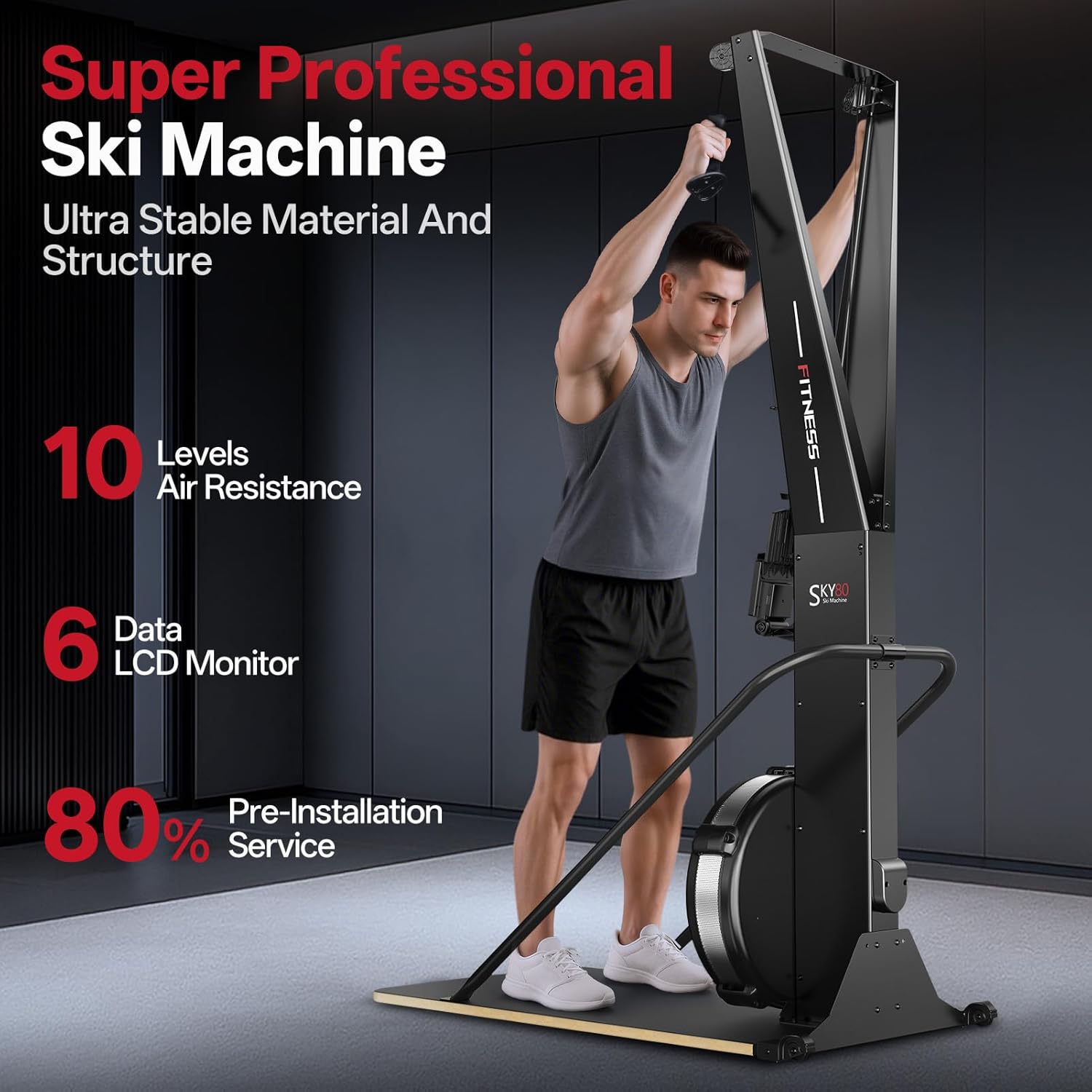
Figure 2.1: The PASYOU SKY80 Ski Trainer in use, showcasing its key features.
Key Features:
- Adjustable Air Resistance: Features a 10-level damping system for precise control over airflow and resistance, suitable for various intensity levels.
- Realistic Ski Simulation: A responsive flywheel system accurately mimics the feel of Nordic skiing, providing smooth and consistent resistance.
- Performance Monitoring: Equipped with a professional electronic monitor (PM) that displays real-time data including speed, watts, calories, and distance.
- Ergonomic and Durable Design: Constructed from high-strength alloy steel with ergonomic handles to ensure correct biomechanics and withstand intense workouts.
- Versatile Training: Ideal for resistance training, muscle strengthening, high-intensity interval training (HIIT), and rehabilitation programs.
Components:
- Flywheel and Air Damper: The core of the resistance system.
- Pull Handles: Ergonomically designed for comfortable grip and effective pulling motion.
- Electronic Monitor: Displays workout data.
- Base and Frame: Provides stability and structural integrity.
- Transport Wheels: For easy relocation of the unit.

Figure 2.2: Close-up of the advanced air resistance structure.
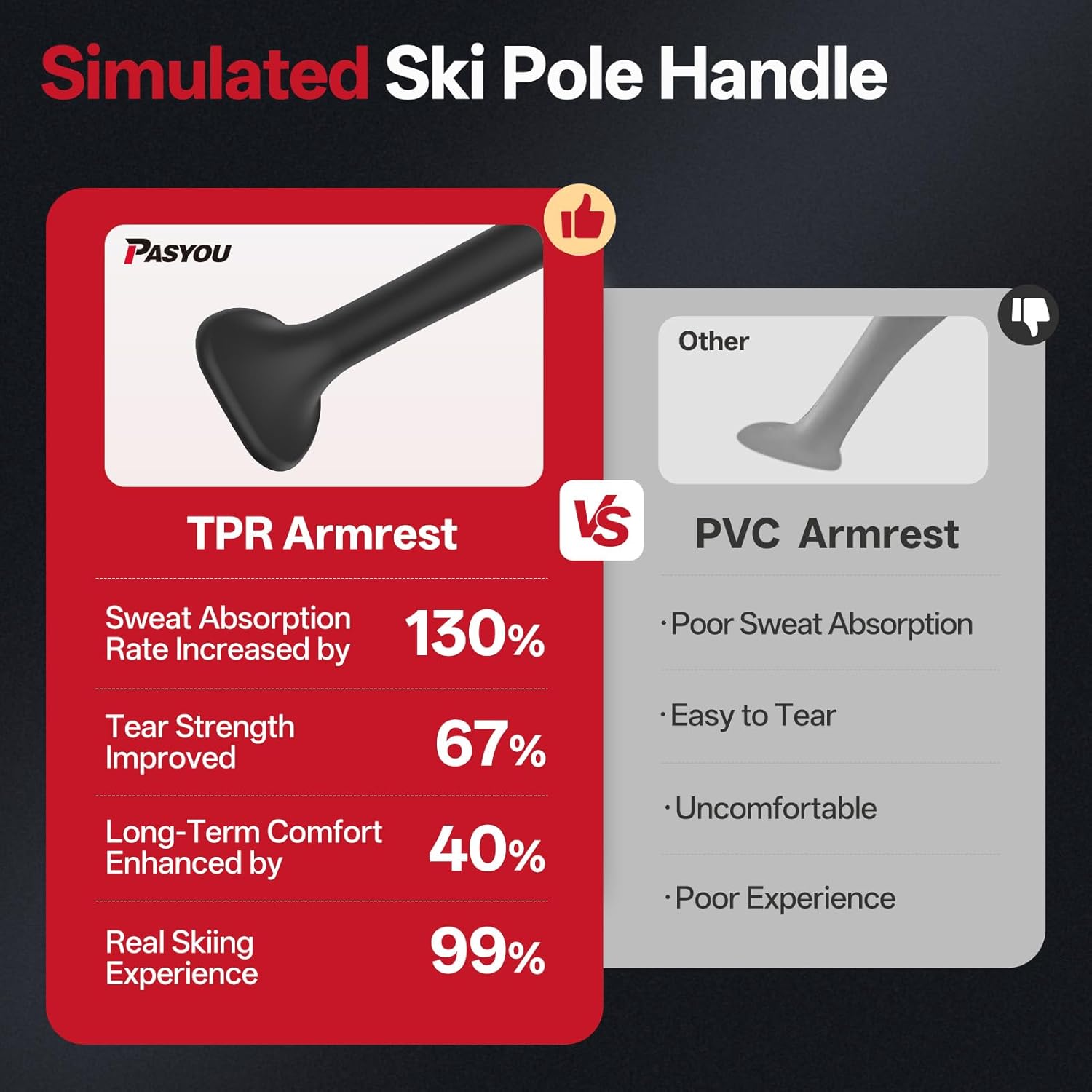
Figure 2.3: Comparison of TPR Armrest (left) and PVC Armrest (right). The TPR armrest offers improved sweat absorption, tear strength, long-term comfort, and a more realistic skiing experience.
3. Setup Instructions
The PASYOU SKY80 Ski Trainer comes 80% pre-installed, requiring minimal assembly. Follow these steps to complete the setup:
- Unpack Components: Carefully remove all parts from the packaging. Verify that all components listed in the packing list are present.
- Attach Vertical Supports: Secure the main vertical supports to the base unit using the provided hardware. Ensure all bolts are tightened securely.
- Install Monitor: Mount the electronic monitor onto its designated bracket. Connect any necessary cables as indicated in the assembly guide.
- Final Checks: Double-check all connections and ensure the unit is stable before first use.
An assembly guide and necessary tools are included in the package to facilitate quick setup, typically within 20 minutes.

Figure 3.1: Visual guide for the three main pre-installation steps.
4. Operating Instructions
4.1 Resistance Adjustment
The PASYOU SKY80 features a 10-level air resistance system. You can adjust the resistance level by moving the damper lever located on the flywheel housing. Higher numbers (10) indicate greater resistance, while lower numbers (1) provide lighter resistance.
- Levels 1-3: Ideal for warm-ups, rehabilitation, or light, steady-state cardio.
- Levels 4-7: Suitable for moderate intensity workouts, improving endurance and general fitness.
- Levels 8-10: Designed for high-intensity training, strength building, and simulating uphill skiing.
Experiment with different levels to find the resistance that best suits your workout goals and fitness level.
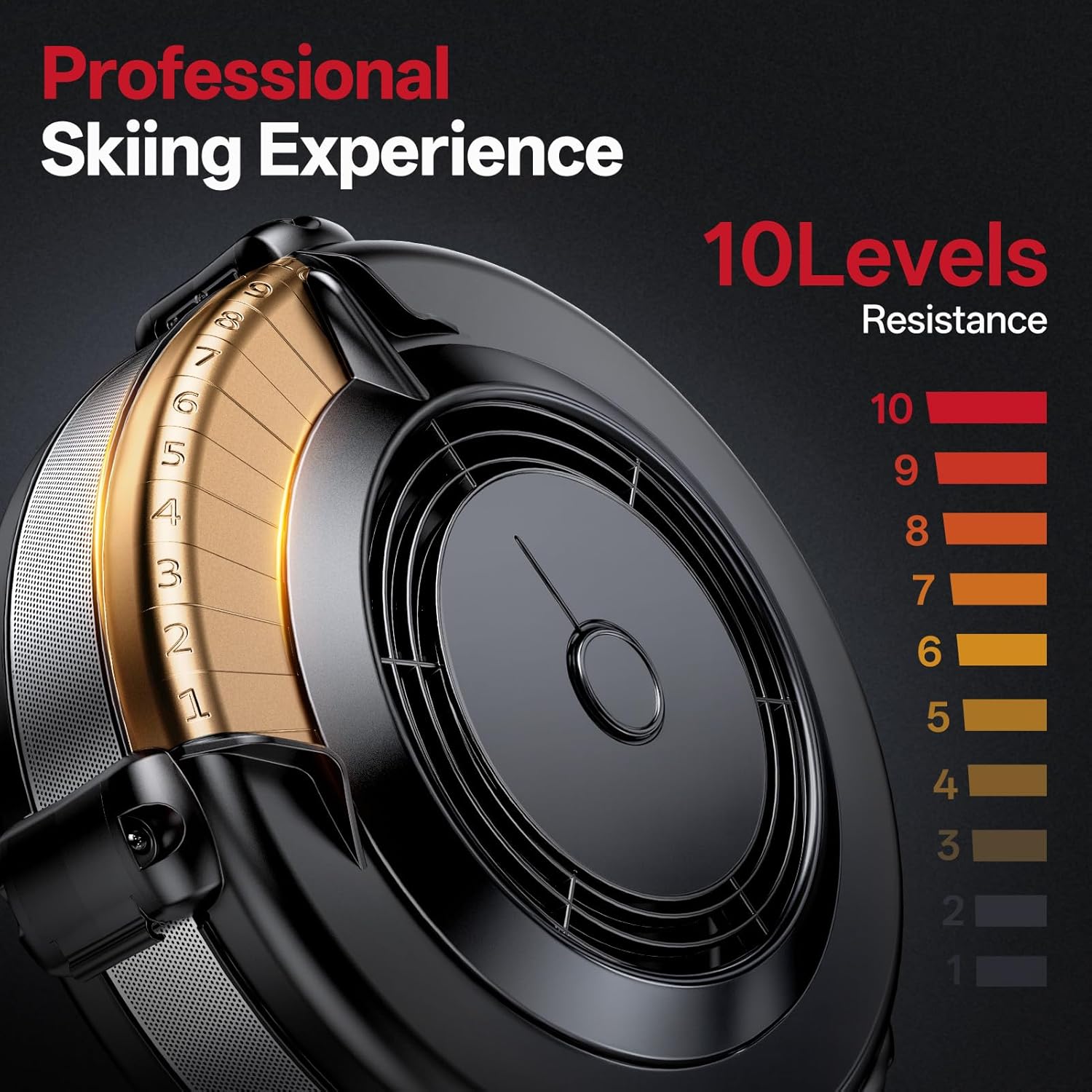
Figure 4.1: The 10-level resistance adjustment dial.
4.2 Using the Electronic Monitor
The integrated LCD monitor provides real-time feedback on your workout. Familiarize yourself with its functions:
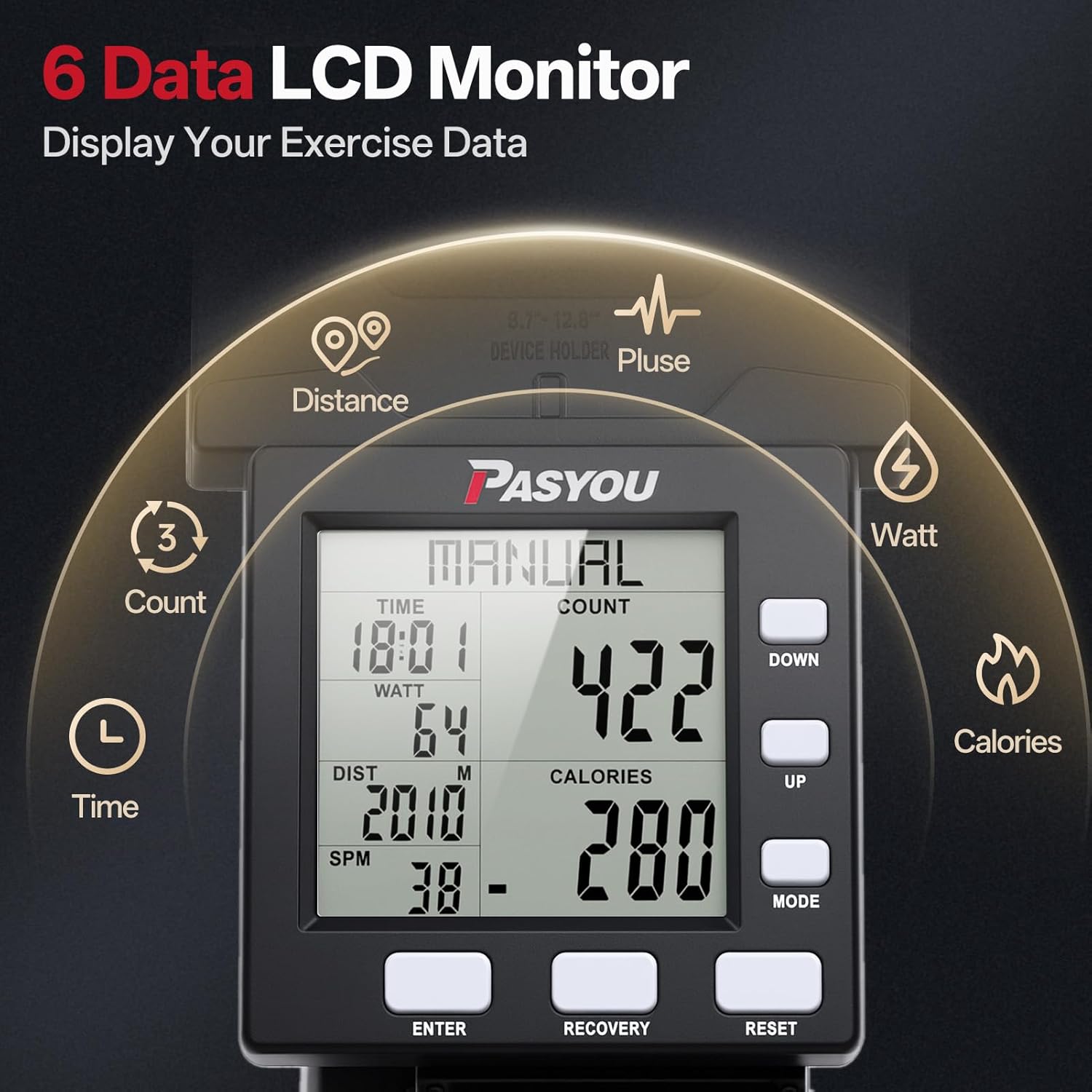
Figure 4.2: The 6-data LCD monitor displaying workout metrics.
- Time: Displays the duration of your current workout session.
- Count: Shows the total number of pulls or strokes.
- Distance: Estimates the distance covered during your workout.
- Watt: Measures the power output of your workout.
- Calories: Estimates the number of calories burned.
- Pulse: (If applicable, requires compatible heart rate monitor) Displays your heart rate.
Use the 'MODE' button to cycle through different display modes or to select specific metrics. The 'RESET' button will clear all workout data. Refer to the monitor's specific instructions for advanced functions like setting targets or recovery modes.
4.3 Workout Techniques
The ski trainer allows for various full-body exercises. The primary movement simulates Nordic skiing:
- Starting Position: Stand facing the machine with feet shoulder-width apart. Grasp the handles firmly with an overhand grip.
- The Pull: Initiate the movement by engaging your core and pulling the handles down towards your thighs. Bend your knees and hinge at your hips as if performing a squat.
- Extension: Extend your arms fully downwards, keeping your core engaged and back straight.
- Return: Control the return of the handles by reversing the motion, allowing your arms to extend upwards while maintaining a slight bend in your knees.
Focus on smooth, controlled movements rather than jerky motions. Maintain a consistent rhythm for optimal results. The ski trainer provides a low-impact, high-fat burning workout that simulates ski moves and engages your entire body.

Figure 4.3: User performing a ski simulation workout.
5. Maintenance
Regular maintenance ensures the longevity and safe operation of your PASYOU SKY80 Ski Trainer.
- Cleaning: Wipe down the machine with a damp cloth after each use to remove sweat and dust. Avoid abrasive cleaners or solvents.
- Check Connections: Periodically inspect all bolts, nuts, and moving parts to ensure they are secure. Tighten any loose fasteners.
- Cable Inspection: Check the pull cables for any signs of fraying or wear. Replace damaged cables immediately.
- Flywheel Cleaning: Keep the flywheel area free of dust and debris to ensure smooth operation of the air resistance system.
- Storage: When not in use, store the ski trainer in a clean, dry environment away from direct sunlight and extreme temperatures. The integrated transport wheels allow for easy relocation.
6. Troubleshooting
If you encounter any issues with your PASYOU SKY80 Ski Trainer, refer to the following common troubleshooting steps:
| Problem | Possible Cause | Solution |
|---|---|---|
| Monitor not displaying data | Low battery; Loose cable connection | Replace batteries; Check and secure all monitor cables. |
| Resistance feels inconsistent | Damper setting too low; Debris in flywheel; Cable wear | Adjust damper to a higher level; Clean flywheel housing; Inspect and replace cables if worn. |
| Unusual noises during operation | Loose fasteners; Worn parts; Debris | Check and tighten all bolts; Inspect moving parts for wear; Clean any debris from the flywheel or cable path. |
| Handles not retracting smoothly | Friction in cable path; Worn cable | Ensure cable path is clear; Inspect and replace cable if damaged. |
If the problem persists after attempting these solutions, please contact customer support.
7. Specifications
Technical specifications for the PASYOU SKY80 Air Resistance Ski Trainer:
| Specification | Detail |
|---|---|
| Model Number | SKY80 |
| Product Dimensions (L x W x H) | 126 x 58 x 225 cm |
| Product Weight (Net) | 51 kg |
| Product Weight (Gross/Shipping) | 110 kg |
| Material | Alloy Steel |
| Color | White (as per specifications, actual product may vary) |
| Resistance Type | Air Resistance (10 levels) |
| Display Type | LED |
| Monitor Functions | Time, Count, Distance, Watt, Calories, Pulse (optional) |
| Assembly | 80% Pre-installed, quick assembly required |
8. Warranty and Support
PASYOU is committed to providing high-quality products and specialized customer support.
- Warranty Information: For details regarding the product warranty, please refer to the warranty card included with your purchase or visit the official PASYOU website.
- Customer Support: If you have any questions, require technical assistance, or need to report an issue, please contact PASYOU customer support. Contact information can typically be found on the product packaging, the official website, or through your retailer.