
Ulefone Armor X16 Pro
Ulefone Armor X16 Pro 5G Rugged Phone User Manual
Model: Armor X16 Pro
Introduction
This manual provides comprehensive instructions for the Ulefone Armor X16 Pro 5G Rugged Phone. It covers essential information regarding setup, operation, maintenance, troubleshooting, and detailed specifications to ensure optimal use of your device.
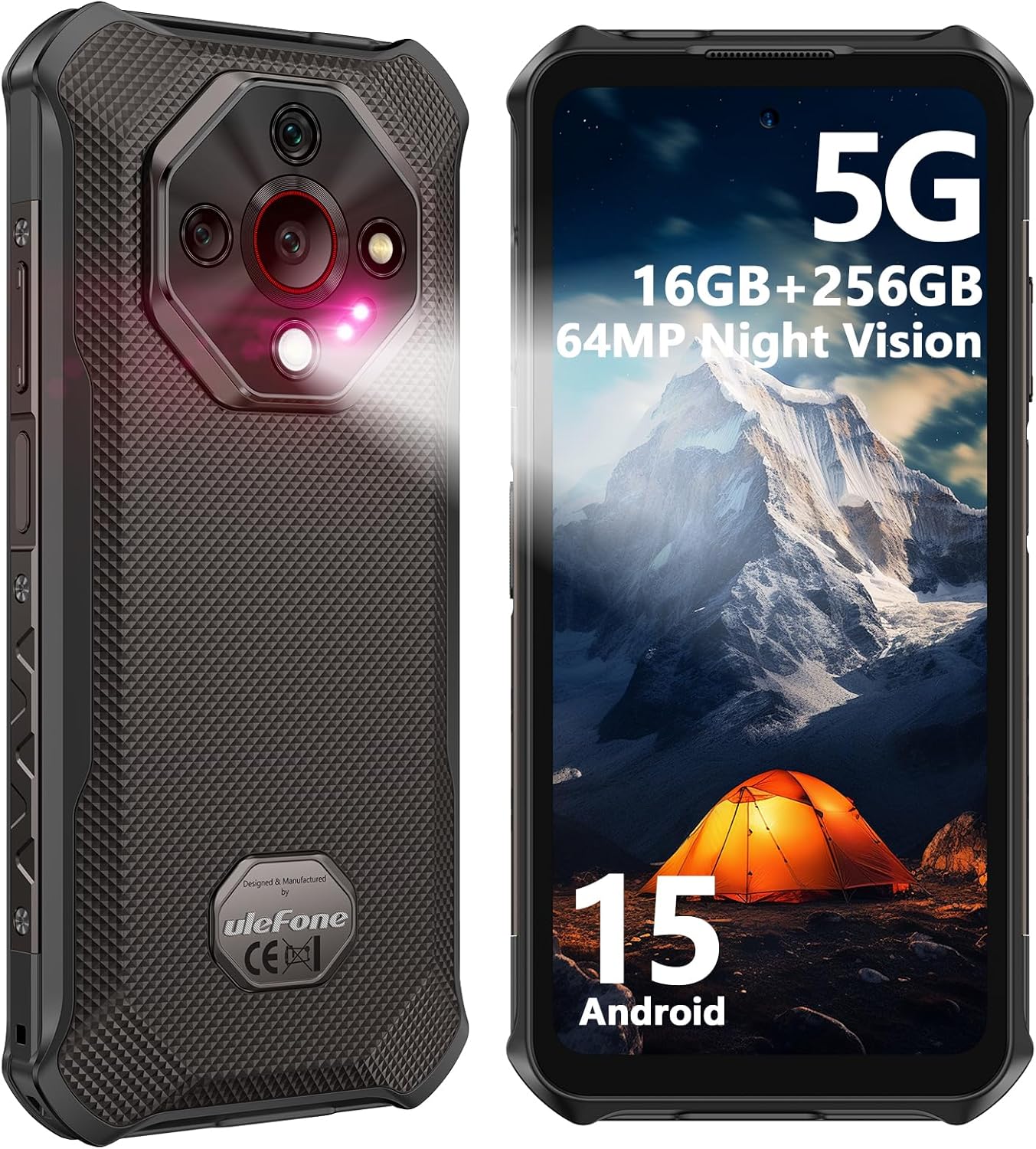
Figure 1: Front and back view of the Ulefone Armor X16 Pro 5G Rugged Phone, showcasing its robust design and camera module.
Setup Guide
Package Contents
Verify that all items are present in the package:
- 1x Ulefone Armor X16 Pro 5G Phone
- 1x AC Power Charger (100~240V)
- 1x Type-C to Type-C Data cable (100cm)
- 1x Protective Film (Pre-installed)
- 1x Tempered Glass Screen Protector
- 1x SIM Tray Ejector
- 1x Lanyard
- 1x Multi-language User Manual
- 1x Thermal Imaging Camera User Manual (if applicable)
- 1x Multi Function Instruction Card
- 1x Charging Instruction Card
- 1x Safety Prompt Card

Figure 2: All items included in the Ulefone Armor X16 Pro 5G retail package.
Charging the Device
Before first use, fully charge your Ulefone Armor X16 Pro 5G. The device supports 33W fast charging for quick power replenishment.
- Connect the Type-C cable to the phone's charging port.
- Connect the other end of the cable to the provided AC power charger.
- Plug the charger into a wall outlet.
- The charging indicator will appear on the screen.

Figure 3: The Ulefone Armor X16 Pro 5G connected to its 33W fast charger, highlighting its 10360mAh battery capacity.
SIM Card and Storage Installation
The Armor X16 Pro 5G features a 3-card slot, supporting dual SIM cards and a TF card for expanded storage up to 2TB.
- Locate the SIM card tray on the side of the device.
- Insert the SIM Tray Ejector tool into the small hole next to the tray to open it.
- Place your Nano-SIM cards and/or TF card into the designated slots on the tray. Ensure correct orientation.
- Gently push the tray back into the device until it clicks into place.

Figure 4: Illustration of the dual 5G connectivity and the 3-card slot for SIM and storage expansion.
Operating Instructions
Powering On/Off
- To power on: Press and hold the Power button until the Ulefone logo appears.
- To power off: Press and hold the Power button, then select "Power off" from the options.
- To restart: Press and hold the Power button, then select "Restart" from the options.
System and Performance
The Ulefone Armor X16 Pro 5G runs on Android 15, powered by the MediaTek Dimensity 6300 5G chipset. It features 8GB of RAM (expandable up to 16GB virtual RAM) and 256GB of internal storage, ensuring smooth multitasking and efficient performance.

Figure 5: Visual representation of the MediaTek Dimensity 6300 5G processor, highlighting its 8-core CPU and 6nm advanced process for hyper-fast multitasking and gaming.

Figure 6: Screenshots of the Android 15 operating system, showcasing its enhanced privacy features and multitasking capabilities.
Camera Features
Capture high-quality photos and videos with the versatile camera system:
- 64MP Main Camera: Equipped with a Sony IMX682 sensor for stunning detail and clarity.
- 25MP Night Vision Camera: Utilizes intelligent Ulefone NightEIF 2.0 to reveal details in extremely low-light conditions.
- 2MP Macro Camera: For capturing intricate details of small objects.
- 16MP Front Camera: Enhances selfies and provides clear video calls.
- Underwater Mode: Allows taking photos and videos while submerged.

Figure 7: An overview of the Ulefone Armor X16 Pro 5G's multi-camera setup, including the 64MP main, 25MP night vision, 2MP macro, and 16MP front cameras.

Figure 8: Example image taken with the 25MP Infrared Night Vision Camera, demonstrating its capability in dark conditions.
Display Features
The device features a 6.56-inch FHD+ display with a 720 x 1612 resolution and a 120Hz refresh rate for smooth visuals. With 910 nits brightness, it ensures visibility even under bright sunlight. The screen is protected by Corning Gorilla Glass 5 for enhanced durability.

Figure 9: The 6.56-inch 120Hz Gaming Display of the Ulefone Armor X16 Pro 5G, highlighting its size, resolution, refresh rate, and brightness.

Figure 10: Close-up of the Corning Gorilla Glass 5 protecting the display, emphasizing its durability against drops and scratches.
Additional Features
- 133 Lumen Flashlight: A dedicated glare flashlight for illumination in dark environments.
- AI Recorder: Automatically transcribes calls/meetings and generates instant summaries.
- Widevine L1: Access HD videos on streaming platforms like Netflix and Disney+.
- IR Blaster: Control compatible infrared devices.
- Fingerprint Unlock & Face Unlock: Secure and convenient access to your device.
- NFC & Google Pay: For contactless payments and data transfer.
- Headset-Free FM Radio: Enjoy radio without needing headphones as an antenna.
- Custom Key: A programmable button for quick access to preferred functions.
- Outdoor Toolbox: A suite of tools useful for outdoor activities.
- GPS + GLONASS + Beidou + Galileo: Multi-system navigation for accurate positioning.
- Gloves Mode: Allows touch screen operation while wearing gloves.

Figure 11: The built-in 133 lumens glare flashlight, demonstrating its adjustable brightness and one-key lighting feature.

Figure 12: The Ulefone Armor X16 Pro 5G featuring Google Gemini AI assistant and the AI Recorder for effortless call recording and transcription.

Figure 13: Features such as Face Unlock, Fingerprint ID, NFC for Google Pay, and multi-system GPS for accurate navigation.

Figure 14: Overview of additional features including Gloves Mode, Service Center access, Custom Key functionality, Digital Toolkit, Bluetooth 5.2, 3.5mm Headphone Jack, Headset-free FM Radio, and IR Blaster.
Maintenance and Durability
The Ulefone Armor X16 Pro 5G is designed for extreme durability, featuring IP68/IP69K and MIL-STD-810H certifications.
- Waterproof: Can withstand submersion up to 2 meters deep for 30 minutes.
- Shockproof: Endures drops from up to 2 meters.
- Dustproof: Safeguards against dust, dirt, and sand ingress.

Figure 15: The Ulefone Armor X16 Pro 5G demonstrating its IP68/IP69K waterproof, shockproof, and dustproof capabilities, certified to MIL-STD-810H standards.
Cleaning and Care
- After exposure to water, especially saltwater, rinse the phone with fresh water and dry thoroughly before charging.
- Use a soft, lint-free cloth to clean the screen and body. Avoid abrasive materials or harsh chemicals.
- Ensure all port covers are securely closed to maintain water and dust resistance.
Troubleshooting
This section addresses common issues you might encounter with your Ulefone Armor X16 Pro 5G.
Network Connectivity Issues
- No Signal/Limited Service: Ensure your SIM card is correctly inserted. Check if your carrier supports 5G in your area. Note that the device is not compatible with AT&T or Cricket networks.
- Slow Data Speed: Verify your mobile data is enabled. Check network settings and ensure you are in an area with good 5G coverage.
Battery and Charging Problems
- Phone Not Charging: Ensure the charging cable and adapter are securely connected and undamaged. Try a different outlet. Check the charging port for debris.
- Battery Drains Quickly: Close background applications. Reduce screen brightness. Disable unnecessary features like Wi-Fi, Bluetooth, or GPS when not in use.
Display and Touchscreen Issues
- Screen Unresponsive: Restart the device. If the issue persists, perform a factory reset (backup data first).
- Screen Too Dim/Bright: Adjust brightness settings in the quick settings panel or display settings.
Other Common Issues
- Apps Crashing/Freezing: Clear app cache and data. Update the app to the latest version. If the problem continues, uninstall and reinstall the app.
- Device Overheating: Avoid prolonged heavy usage, especially while charging. Close resource-intensive applications.
Technical Specifications
| Feature | Specification |
|---|---|
| Model Name | Armor X16 Pro |
| Operating System | Android 15 |
| Processor | MediaTek Dimensity 6300 (2.4 GHz CPU Speed) |
| RAM | 16 GB (8GB physical + up to 8GB virtual) |
| Internal Storage | 256 GB |
| Expandable Storage | Up to 2TB via TF card |
| Display Size | 6.56 Inches |
| Display Resolution | 720 x 1612 (FHD+) |
| Refresh Rate | 120 Hz |
| Peak Brightness | 910 nits |
| Main Camera | 64 MP (Sony IMX682 sensor) |
| Night Vision Camera | 25 MP |
| Macro Camera | 2 MP |
| Front Camera | 16 MP |
| Battery Capacity | 10360 mAh |
| Charging | 33W Fast Charging |
| Network Connectivity | Dual 5G, GSM |
| Durability Ratings | IP68/IP69K, MIL-STD-810H |
| Dimensions | 6.84 x 3.28 x 0.7 inches |
| Weight | 14.1 ounces |
| Special Features | Dual SIM, Rugged Body, USB OTG, Versatile LED Light, Water Resistant, 133 Lumen Flashlight, AI Recorder, Widevine L1, IR Blaster, Fingerprint Unlock, NFC, Headset-Free FM Radio, Custom Key, Outdoor Toolbox, GPS + GLONASS + Beidou + Galileo, Gloves Mode |
Warranty and Support
Ulefone provides a 12-month manufacturer warranty service in the US for the Armor X16 Pro 5G. For any questions or support regarding your product, please contact Ulefone customer service.
You can find more information and support on the official Ulefone website or through authorized service centers. Refer to the "Service Center" icon in the additional features section for guidance.
Video 1: Ulefone Armor X16 Pro 5G Rugged Phone Overview. This video provides a visual summary of the phone's key features and durability.
Related documentsArmor X16 Pro


Ask a question about this manual
Ask about setup, troubleshooting, compatibility, parts, safety, or missing instructions. Manuals+ will review the question and use this page’s manual context to help answer it.