
KATVR KAT Walk C2 PLUS
KATVR KAT Walk C2 PLUS VR Omnidirectional Treadmill User Manual
Model: KAT Walk C2 PLUS
1. Introduction
The KATVR KAT Walk C2 PLUS is an advanced omnidirectional treadmill designed to provide an immersive virtual reality locomotion experience. This manual provides essential information for the safe and effective use of your device, including setup, operation, maintenance, and troubleshooting.
2. Product Overview
2.1 Key Features
- 360° Full-Body Locomotion: Enables natural walking, running, and movement in virtual environments.
- Reduced Motion Sickness: Physical movement aligns with virtual movement, minimizing discomfort.
- Compact Footprint: Designed for home use with a 1.2m² footprint.
- Sitting Module: Integrated support for seated VR experiences.
- Integrated Vibration Feedback: Enhances immersion through tactile sensations.
- Cross-Platform Compatibility: Supports SteamVR headsets and wireless play on Meta Quest 2, 3, and Pro via the included KAT Nexus adapter.
- Fitness Integration: Allows for physical exercise during VR gameplay.
2.2 Components
The KAT Walk C2 PLUS package includes the following main components:
- KAT Walk C2 PLUS Omnidirectional Treadmill
- KAT VR Shoes (specific size included)
- Sitting Module
- KAT Nexus Adapter
- Required cables and assembly hardware

Image: The KAT Walk C2 PLUS omnidirectional treadmill, the KAT Nexus adapter, and a pair of KAT VR shoes, illustrating the complete system.
2.3 Model Comparison
The KAT Walk C2 series offers different models with varying features:
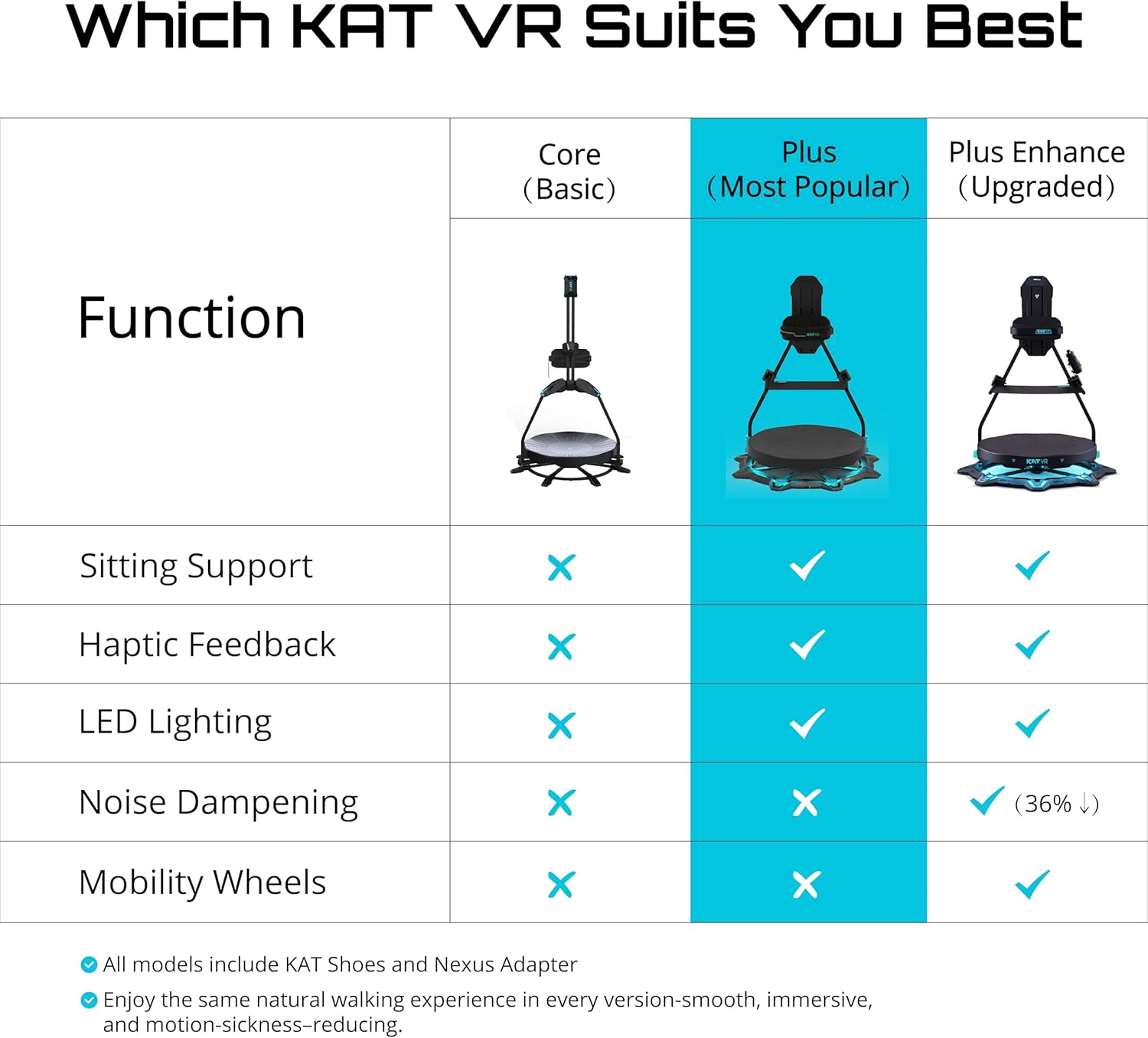
Image: A table comparing the features of KAT VR's Core (Basic), Plus (Most Popular), and Plus Enhanced (Upgraded) models, detailing differences in sitting support, haptic feedback, LED lighting, noise dampening, and mobility wheels.
3. Setup Instructions
Proper assembly and initial setup are crucial for optimal performance and safety. It is recommended to have assistance during assembly.
3.1 Unpacking and Inspection
- Carefully unpack all components from the packaging.
- Verify that all parts listed in the packing list are present and undamaged. Report any missing or damaged parts to customer support immediately.
3.2 Assembly
Follow the detailed assembly guide provided with your product. Ensure all bolts and fasteners are securely tightened. Do not overtighten.

Image: A user engaged in the assembly process of the KAT Walk C2 PLUS, showing the structural components being put together.
3.3 Software Installation and Calibration
- Connect the KAT Nexus adapter to your PC (Windows 10+ required for first-time setup).
- Install the necessary KAT Gateway software from the official KATVR website.
- Follow the on-screen instructions within the KAT Gateway software to pair your KAT VR shoes and calibrate the system.
- For wireless play with Meta Quest headsets, ensure your headset and KAT Nexus are on the same Wi-Fi network.

Image: A visual guide illustrating the connection process: HMD to Internet Router, Router to KAT Nexus, and KAT Nexus to the KAT VR device, highlighting easy setup.
4. Operating Instructions
4.1 Wearing the KAT VR Shoes and Harness
- Put on the KAT VR shoes. Ensure they fit snugly and are comfortable.
- Securely attach the safety harness around your waist and connect it to the treadmill's support structure. Adjust the harness height for comfort and proper support.
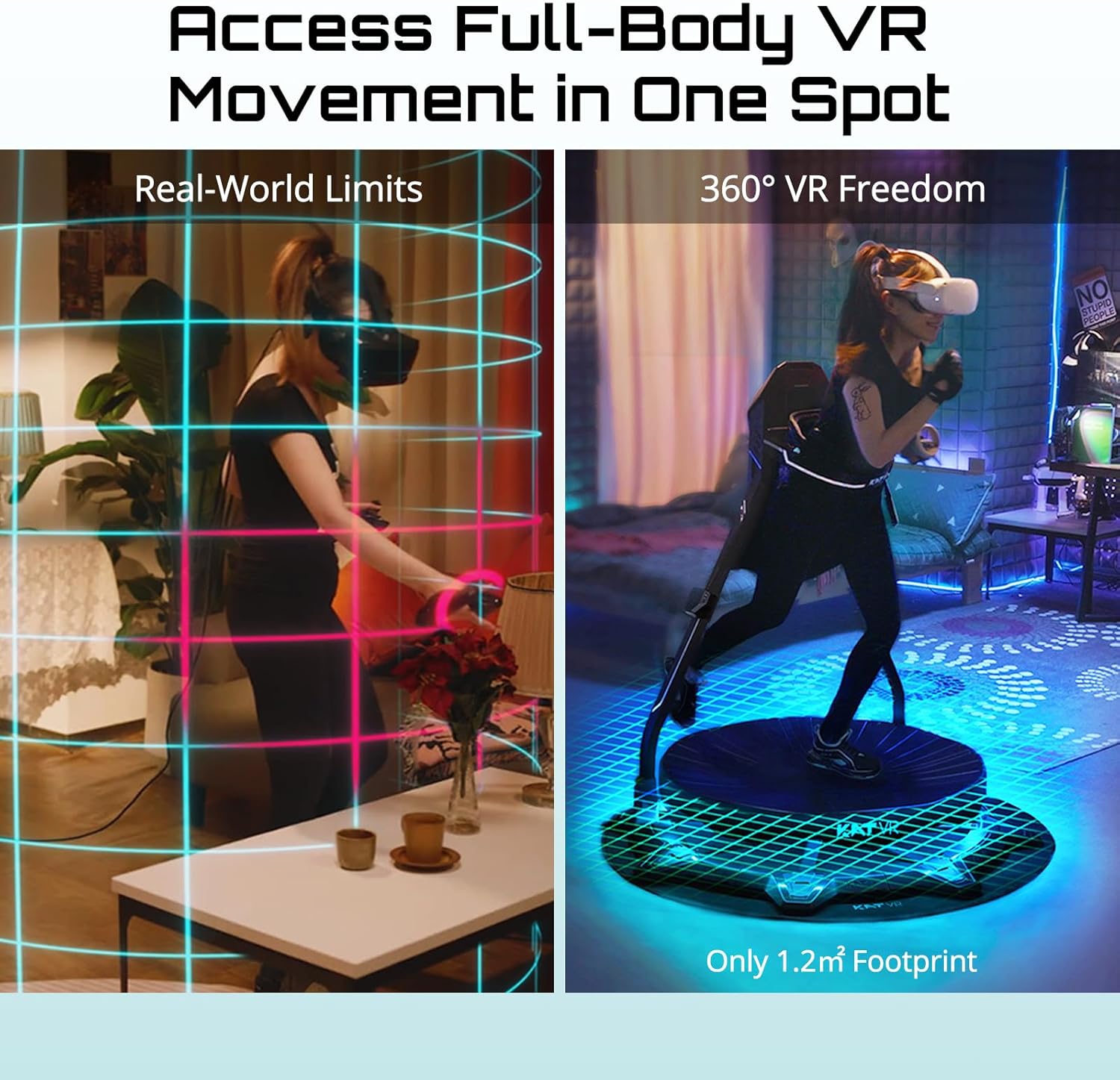
Image: A user wearing a VR headset and the KAT Walk C2 PLUS safety harness, demonstrating safe and immersive VR gameplay.
4.2 Initiating Movement
- Step onto the concave platform of the treadmill.
- Begin walking naturally. The low-friction surface and specialized shoes allow for continuous movement in any direction.
- Adjust your stride and speed to match the desired movement in your VR application.

Image: A side-by-side comparison showing a user experiencing motion sickness in VR while seated versus natural locomotion on the KAT Walk C2 PLUS, highlighting reduced VR dizziness.
4.3 Using the Sitting Module
The sitting module can be deployed for VR experiences that require sitting. Refer to the assembly guide for instructions on how to properly attach and use the sitting module.
5. Compatibility
The KAT Walk C2 PLUS is designed for broad compatibility with various VR platforms.
- PC VR: Fully compatible with SteamVR and Oculus Home (PC) platforms. Direct wired connection to PC is typically used.
- Standalone VR: Wireless compatibility with Meta Quest 2, Meta Quest 3, and Meta Quest Pro via the KAT Nexus adapter.
- Other Platforms: The KAT Nexus adapter is designed for universal input integration with Free-Locomotion games on multiple standalone VR platforms. Meta Quest platform is available on launch, with other platforms like PlayStation VR, PICO, and VIVE under integration.

Image: A graphic displaying compatibility with various VR headsets (Meta Quest, Pico, Vive) and platforms (SteamVR, Oculus Home, Meta), with the KAT Nexus adapter shown as a central component.
6. Maintenance
Regular maintenance ensures the longevity and optimal performance of your KAT Walk C2 PLUS.
- Cleaning: Wipe down the platform and frame with a soft, damp cloth. Avoid abrasive cleaners or solvents.
- Shoe Care: Keep the KAT VR shoes clean. Replace insoles or shoes if they show significant wear to maintain proper friction and tracking.
- Harness Inspection: Periodically check the safety harness for any signs of wear, fraying, or damage. Ensure all buckles and adjustments function correctly.
- Fastener Check: Regularly inspect all bolts and fasteners to ensure they remain tight. Retighten as necessary.
7. Troubleshooting
This section addresses common issues you might encounter.
7.1 Tracking Issues
- Symptom: Inaccurate or unresponsive movement in VR.
- Solution:
- Ensure KAT VR shoes are properly worn and sensors are clean.
- Recalibrate the system using the KAT Gateway software.
- Check for any obstructions around the treadmill that might interfere with sensor tracking.
- Verify that the KAT Nexus adapter is correctly connected and powered.
7.2 Connectivity Problems
- Symptom: Device not connecting to PC or VR headset.
- Solution:
- For wired connections, ensure all USB cables are securely plugged in.
- For wireless connections (Meta Quest), confirm that your headset and KAT Nexus are connected to the same Wi-Fi network.
- Restart the KAT Gateway software, your PC, and your VR headset.
- Check for updated drivers or firmware for the KAT Nexus and KAT Walk C2 PLUS.
7.3 Physical Discomfort or Dizziness
- Symptom: Feeling unbalanced or experiencing motion sickness.
- Solution:
- Ensure the safety harness is adjusted to the correct height and tightness.
- Take breaks as needed.
- Practice walking on the platform without VR initially to get accustomed to the sensation.
- Adjust VR settings (e.g., FOV, comfort options) if available.
8. Specifications
| Feature | Detail |
|---|---|
| Model Name | KAT Walk C2 PLUS |
| Product Dimensions | 49"D x 49"W x 79"H (124.5 cm D x 124.5 cm W x 200.7 cm H) |
| Platform Compatibility | Meta Quest, SteamVR, Oculus Home (PC), PlayStation VR, PICO, VIVE (via KAT Nexus, some platforms under integration) |
| Connectivity Technology | Wireless (Meta Quest), Wired (SteamVR) |
| Sensor Technology | Accelerometer, Gyroscope, Magnetometer |
| Age Range (Description) | 13 years and up |
| Manufacturer | KATVR |
8.1 Shoe Size Chart

Image: A table detailing KAT VR shoe sizes across Brand Size, US Men, US Women, EU, and UK measurements, assisting users in finding their correct fit.
9. Warranty and Support
For warranty information, please refer to the documentation included with your product or visit the official KATVR website. For technical support, product inquiries, or assistance with setup and troubleshooting, please contact KATVR customer service.
Contact Information: Refer to your product packaging or the official KATVR website for the most current support contact details.
Related documentsKAT Walk C2 PLUS


Ask a question about this manual
Ask about setup, troubleshooting, compatibility, parts, safety, or missing instructions. Manuals+ will review the question and use this page’s manual context to help answer it.