
Introduction
Thank you for choosing the Generic Future Pods Wireless Earbuds. These earbuds are designed to provide a seamless and high-quality audio experience with the convenience of wireless connectivity. Featuring a stylish Morandi color design, a digital battery display, and a long-lasting battery, they are perfect for daily commutes, workouts, or casual listening. Please read this manual carefully to ensure proper use and maintenance of your device.
What's in the Box
Before you begin, please check the contents of your package:
- Future Pods Wireless Earbuds (Left and Right)
- Wireless Charging Case
- Ear Cushions
- User Manual
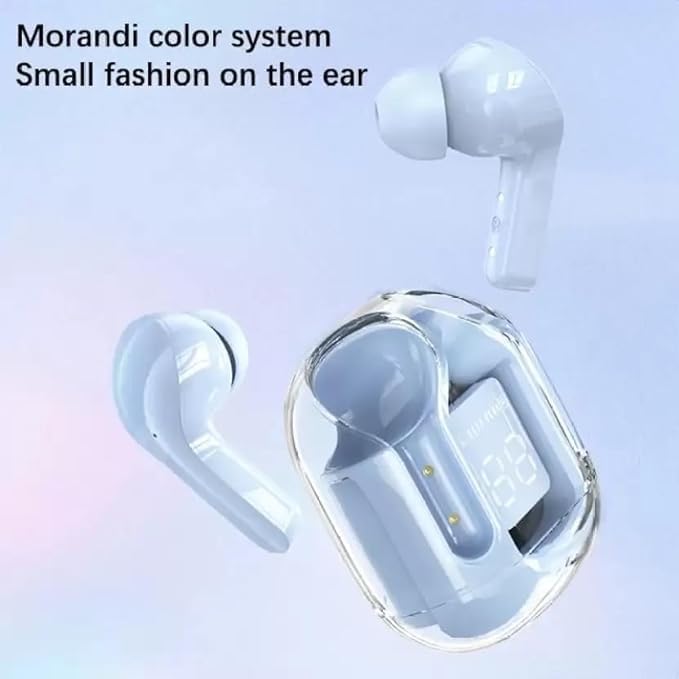 Image: The Future Pods Wireless Earbuds and their transparent charging case, showcasing the Morandi color system and compact design.
Setup
1. Charging the Case and Earbuds
- Initial Charge: Before first use, fully charge the charging case and earbuds.
- Charging the Case: Connect a USB Type-C charging cable (not included) to the charging port on the case and a power source. The digital display on the case will show the battery percentage.
- Charging the Earbuds: Place the earbuds into the charging case. They will automatically begin charging. The digital display on the case will indicate the charging status and battery level of the earbuds.
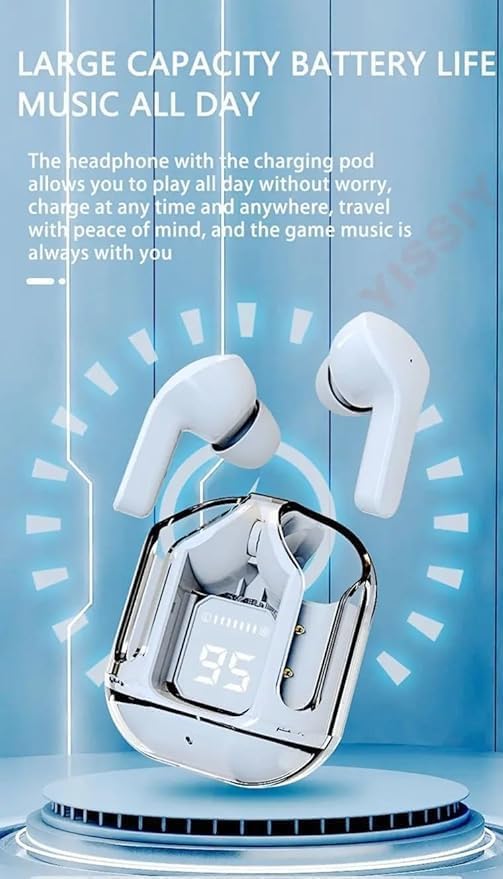 Image: The transparent charging case displaying a digital battery percentage, indicating the large capacity battery life.
Note: The charging case battery average life is 24 hours, and it takes approximately 1.5 hours to fully charge. Earbud battery charge time is approximately 6 hours.
2. Pairing with Your Device
- Power On: Open the charging case. The earbuds will automatically power on and enter pairing mode.
- Activate Bluetooth: On your smartphone, tablet, or laptop, go to the Bluetooth settings and enable Bluetooth.
- Select Device: Look for "Future Pods" or a similar name in the list of available devices and select it to connect.
- Confirmation: Once successfully paired, you will hear an audio prompt from the earbuds, and they will be ready for use.
The earbuds use Bluetooth 5.0 and have a wireless range of up to 10 meters.
Operating Instructions
1. Wearing the Earbuds
Gently insert the earbuds into your ears, ensuring a comfortable and secure fit. The ergonomic half in-ear design is intended for extended wear. Adjust them slightly to achieve optimal sound quality and passive noise cancellation.
2. Touch Controls
The Future Pods feature touch controls for easy management of music and calls. Specific touch functions may vary slightly, but common controls include:
- Play/Pause: Single tap on either earbud.
- Next Track: Double tap on the right earbud.
- Previous Track: Double tap on the left earbud.
- Answer/End Call: Single tap on either earbud during an incoming call.
- Reject Call: Press and hold on either earbud during an incoming call.
- Activate Voice Assistant: Triple tap on either earbud (if supported by your device).
Experiment with the touch controls to familiarize yourself with their specific functions.
3. Power On/Off
- Power On: Earbuds automatically power on when removed from the charging case.
- Power Off: Earbuds automatically power off when placed back into the charging case and the lid is closed.
Maintenance
1. Cleaning
- Regularly clean the earbuds and charging case with a soft, dry, lint-free cloth.
- Do not use abrasive cleaners, alcohol, or chemical solvents.
- Ensure charging contacts on both earbuds and case are clean and free of debris to maintain proper charging.
2. Storage
- When not in use, always store the earbuds in their charging case to protect them and keep them charged.
- Store the device in a cool, dry place, away from extreme temperatures and direct sunlight.
3. Water Resistance
These earbuds are Not Water Resistant. Avoid exposure to water, sweat, rain, or excessive moisture to prevent damage.
Troubleshooting
| Problem | Solution |
|---|---|
| Earbuds not pairing |
|
| No sound or low volume |
|
| Earbuds not charging |
|
| Intermittent connection |
|
Specifications
| Feature | Detail |
|---|---|
| Model Name | Future Pods |
| Model Number | Fp-2023 |
| Brand | Generic |
| Colour | Light Blue |
| Ear Placement | In Ear |
| Form Factor | In Ear |
| Impedance | 32 Ohms |
| Bluetooth Version | 5.0 |
| Bluetooth Range | 10 Metres |
| Control Type | Touch Control |
| Earbud Battery Charge Time | 6 Hours |
| Carrying Case Battery Life | 24 Hours (Average) |
| Carrying Case Charging Time | 1.5 Hours |
| Carrying Case Battery Capacity | 400 mAh |
| Noise Control | Passive Noise Cancellation |
| Frequency Response | 20 Hz |
| Sensitivity | 95 dB |
| Audio Driver Type | Dynamic Driver |
| Audio Driver Size | 13 Millimetres |
| Water Resistance Level | Not Water Resistant |
| Compatible Devices | Laptops, Smartphones, Tablets |
| Country of Origin | China |
Warranty and Support
For warranty information and customer support, please refer to the documentation provided at the time of purchase or contact your retailer. Keep your proof of purchase for any warranty claims.
Typical warranty terms may include:
- 10 days Replacement (as per product buying options)
For further assistance, please contact the manufacturer or seller through the platform where the product was purchased.


