
1. Introduction
This manual provides essential information for the safe and effective installation, operation, and maintenance of your DFHYTHU W19-94 01E Refrigerator Main PCB Power Control Board. This board is designed for compatibility with Haitech HRF-AM32 refrigerators and other universal models, serving as a direct replacement for part number 0321803669.
The main PCB (Printed Circuit Board) is a critical component responsible for managing the refrigerator's core functions, including temperature regulation and compressor operation. Proper installation and handling are crucial for the longevity and performance of your appliance.
2. Safety Information
WARNING: Before attempting any installation, repair, or maintenance on your refrigerator, always ensure the appliance is completely disconnected from the power supply. Failure to do so can result in electric shock, serious injury, or death.
- Always unplug the refrigerator from the wall outlet before beginning installation.
- If you are unsure about any step, consult a qualified technician.
- Handle the circuit board by its edges to avoid damaging electronic components or introducing static electricity.
- Ensure all connections are secure and correctly oriented before restoring power.
3. Setup and Installation
The W19-94 01E Main PCB is designed for simple plug-and-play replacement, typically requiring no special tools. Follow these general steps for installation:
- Disconnect Power: Unplug the refrigerator from the electrical outlet.
- Access the Control Board: Locate and carefully remove the access panel or housing that covers the existing main PCB. This location varies by refrigerator model.
- Document Connections: Before disconnecting any wires, take a photograph or make a diagram of all existing wire connections to the old board. This will serve as a reference for connecting the new board.
- Remove Old Board: Carefully disconnect all wires and mounting screws securing the old PCB.
- Install New Board: Position the new DFHYTHU W19-94 01E board in place. Secure it with the original mounting screws.
- Connect Wires: Refer to your documentation (photo/diagram) and connect all wires to the corresponding terminals on the new board. Ensure each connection is firm and correct.
- Secure Access Panel: Replace the access panel or housing.
- Restore Power: Plug the refrigerator back into the electrical outlet.
- Test Functionality: Verify that the refrigerator powers on and operates correctly, including cooling and temperature control.
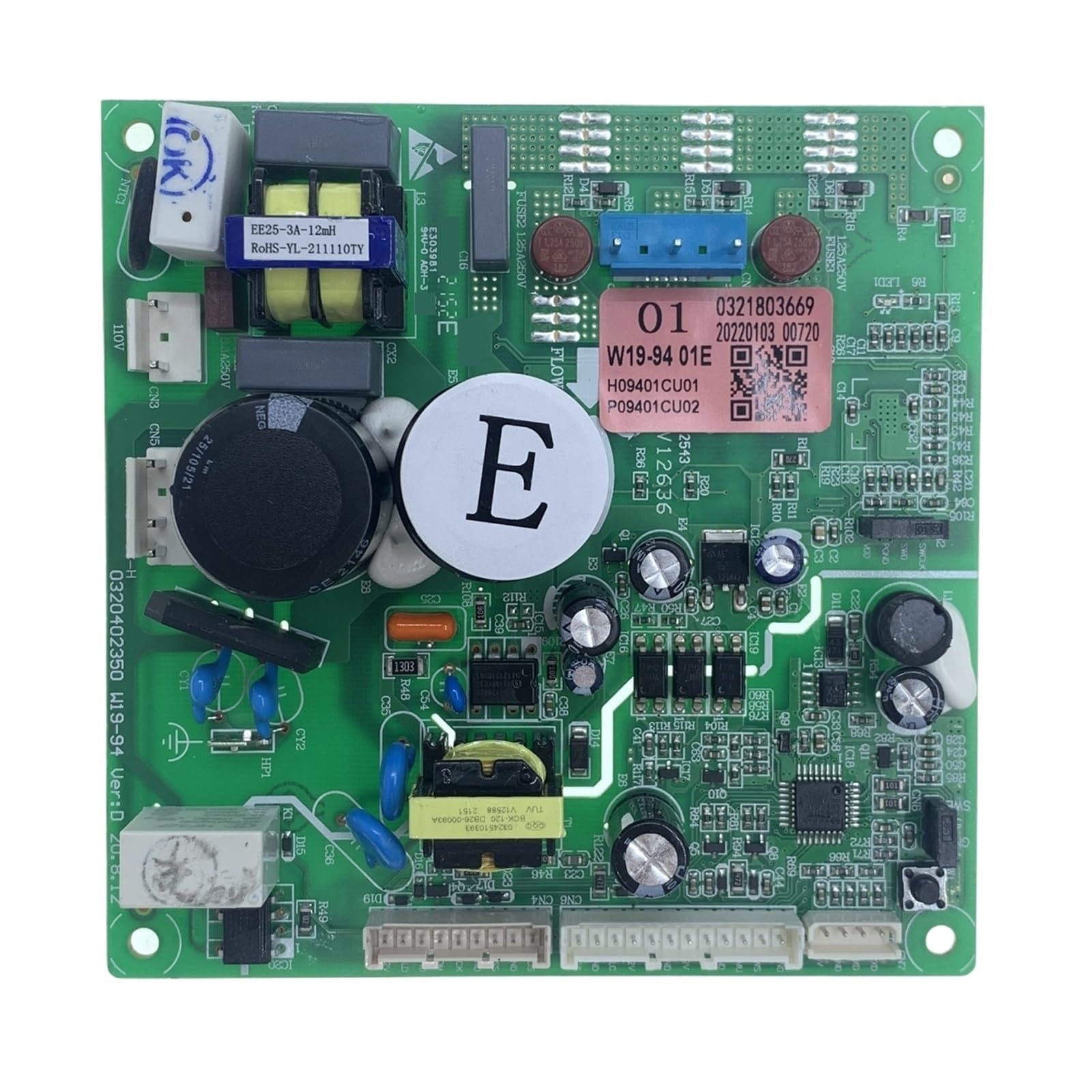
Figure 1: An overhead view of the green circuit board, showing various integrated circuits, resistors, capacitors, and connection points. This is the main PCB for the refrigerator.
4. Operating Principles
Once installed, the DFHYTHU W19-94 01E Main PCB Power Control Board will manage the internal temperature of your refrigerator. It continuously monitors temperature sensors and controls the compressor and fan operations to maintain optimal cooling conditions. This precise refrigeration management helps to preserve food freshness and extends the overall lifespan of your appliance.
The board is designed to operate stably within the refrigerator's environment, ensuring consistent performance and reliability.
5. Maintenance
The W19-94 01E Main PCB is constructed with industrial-grade materials and advanced circuitry for durability. Regular maintenance of the board itself is generally not required. However, to ensure its long-term performance:
- Ensure the area around the board remains clean and free of dust or debris.
- Avoid exposing the board to excessive moisture or extreme temperature fluctuations beyond the refrigerator's normal operating range.
- Periodically check for any loose connections if you suspect an issue, always after disconnecting power.
6. Troubleshooting
The W19-94 01E board undergoes rigorous testing to prevent common issues. If your refrigerator experiences problems after installation, consider the following:
- Refrigerator Not Starting: Double-check all wire connections to the PCB. Ensure the refrigerator is properly plugged into a working electrical outlet.
- Abnormal Freezer Temperature or Fluctuations: Verify that the temperature settings are correct. Ensure the refrigerator doors are sealing properly. If the issue persists, the board may be malfunctioning, or there could be an issue with temperature sensors.
- Compressor Failure or Clicking Sound: This could indicate an issue with the compressor itself or the control board's ability to properly signal it. Check for any loose wiring to the compressor.
- No Power to Specific Components: If certain parts of the refrigerator (e.g., lights, fan) are not working, inspect their connections to the main PCB.
The board includes comprehensive protection mechanisms for overvoltage, overheating, and short circuits. If troubleshooting steps do not resolve the issue, it is recommended to consult a professional appliance technician.
7. Specifications
| Feature | Detail |
|---|---|
| Product Type | Refrigerator Main PCB Power Control Board |
| Part Number | W19-94 01E (0321803669) |
| Compatibility | Haitech HRF-AM32 and other universal refrigerator models |
| Voltage | 110V ~ 120V |
| Package Dimensions | 0.39 x 0.39 x 0.39 inches |
| Item Weight | 1.76 ounces |
| Item Model Number | gvrgv444 |
| ASIN | B0F9TJB19N |
8. Warranty and Support
For information regarding product warranty, returns, or technical support, please contact the seller or manufacturer directly. Keep your purchase receipt or order details handy when seeking assistance.


