
1. Introduction
The Mad Catz N.E.K.O. Leverless Controller is a high-performance gaming peripheral designed for precision and comfort. This manual provides detailed instructions on setting up, operating, maintaining, and troubleshooting your controller to ensure optimal performance.

Figure 1: Mad Catz N.E.K.O. Leverless Controller
2. What's Included
Your Mad Catz N.E.K.O. Leverless Controller package includes the following items:

Figure 2: Included Accessories
- Mad Catz N.E.K.O. Leverless Controller
- USB-A to USB-C Cable (3m)
- Mad Catz Special Switch Puller Tool
- Hex Driver
- Warranty Card
- QR Code (Quick Setup Guide)
- Mad Catz Logo Sticker
3. Setup and Connectivity
The N.E.K.O. controller is designed for easy setup and stable connection.
3.1 Connecting the Controller
Connect the provided USB-A to USB-C cable to the controller's USB-C port and the other end to your gaming console or PC. The controller features a deep hold mechanism to secure the cable connector firmly, preventing accidental disconnections during intense gameplay.

Figure 3: Deep Hold Cable Mechanism
3.2 Optimal Playing Positions
The controller is comfortable for both desk and knee-rest positions, featuring an optimal tilt angle derived from keyboard design knowledge. This design maintains a natural wrist angle for stable operation and reduced fatigue.
4. Operating the Controller
4.1 Ergonomic Layout and Button Functions
The N.E.K.O. features an optimal ergonomic layout with button placement designed for each finger's range of motion and natural movement. The wide palm rest allows for extended play sessions without hand or wrist fatigue.

Figure 4: Optimal Ergonomic Layout
4.2 System Buttons
The system buttons (HOME, BACK, START) are conveniently located in the upper right corner, designed with attention to size, placement, and press feel to prevent accidental input while remaining easily accessible during gameplay.

Figure 5: System Button Placement
4.3 Kailh Choc V2 Buttons
The controller utilizes Kailh Choc V2 based dedicated design buttons with a 2mm short stroke, enabling immediate input. The smooth slide of the buttons is ideal for players requiring precise operation and complex combo inputs, enhancing reaction speed and operational accuracy.

Figure 6: Kailh Choc V2 Button Technology
4.4 SOCD Modes
The N.E.K.O. controller is equipped with three types of Simultaneous Opposing Cardinal Directions (SOCD) modes, allowing you to switch between them based on game rules or personal preference:
- Neutral Mode: CPT (Capcom Pro Tour) compliant, prioritizes neutral input when simultaneous Up/Down or Left/Right inputs occur.
- Up Priority Mode: Prioritizes the Up input when Up/Down are pressed simultaneously.
- Final Input Priority Mode: Adopts the last direction pressed when opposing directions are input simultaneously.

Figure 7: SOCD Mode Selection
4.5 Stability and Non-Slip Design
The entire back of the controller features a large non-slip material, ensuring high stability in both desk and knee-rest environments. This design prevents the unit from slipping, maintaining a comfortable and consistent operating experience even during intense gameplay.
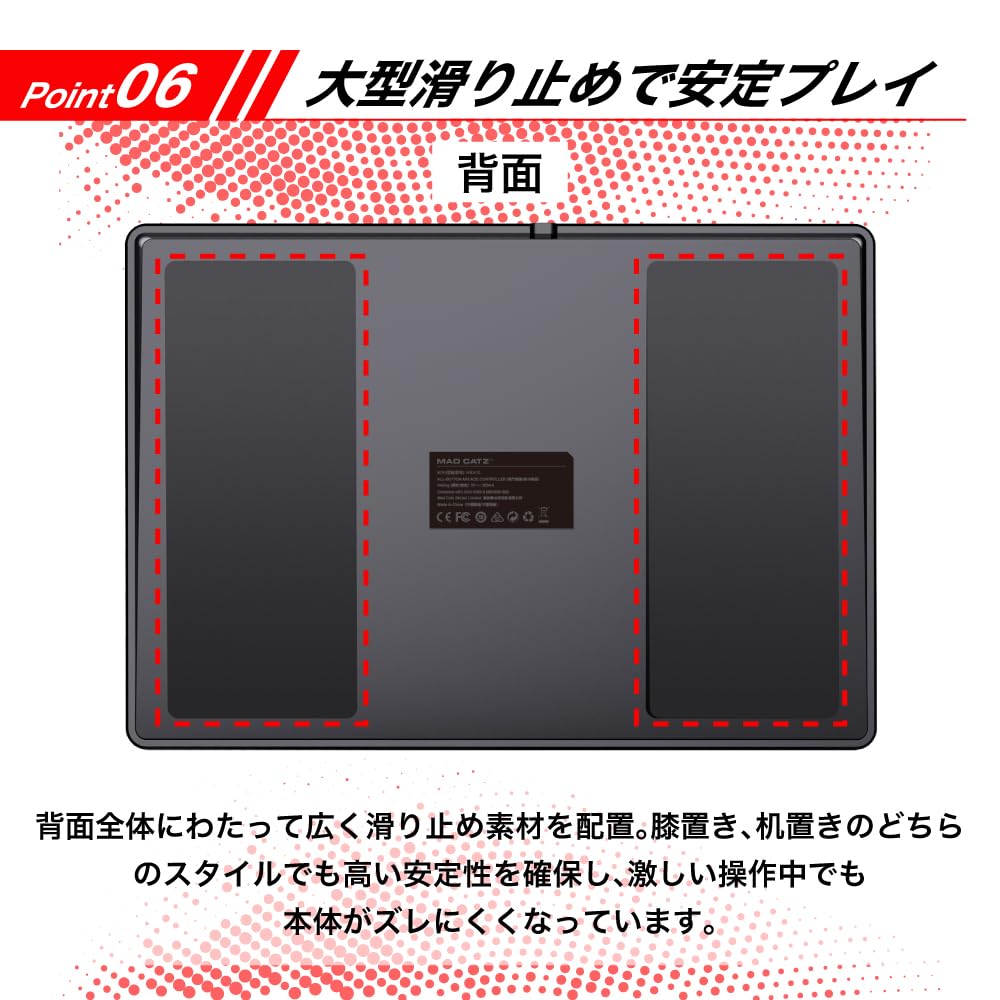
Figure 8: Non-Slip Base
5. Customization
The N.E.K.O. controller offers a freely customizable design, allowing you to exchange the top artwork to create your own unique look. Templates for custom artwork can be downloaded from the official Mad Catz website, making customization smooth and easy.

Figure 9: Customizable Top Artwork
6. Maintenance
To ensure the longevity and optimal performance of your Mad Catz N.E.K.O. Leverless Controller, follow these maintenance guidelines:
- Cleaning: Use a soft, dry cloth to wipe down the controller's surface. For stubborn dirt, slightly dampen the cloth with water. Avoid using harsh chemicals or abrasive materials.
- Storage: Store the controller in a cool, dry place away from direct sunlight and extreme temperatures.
- Cable Care: Always grasp the connector, not the cable, when plugging or unplugging. Avoid sharp bends or kinks in the cable.
- Button Switches: The included Mad Catz Special Switch Puller Tool and Hex Driver can be used for switch replacement or disassembly for maintenance. Refer to the official Mad Catz website for detailed instructions on advanced maintenance procedures.
7. Troubleshooting
If you encounter any issues with your Mad Catz N.E.K.O. Leverless Controller, please refer to the following common troubleshooting steps:
- Controller Not Responding:
- Ensure the USB-C cable is securely connected to both the controller and your device (PC/console).
- Try connecting the controller to a different USB port on your device.
- Restart your PC or gaming console.
- Test the controller on another compatible device if possible to rule out a device-specific issue.
- Buttons Not Registering:
- Ensure no debris is lodged under the buttons.
- If a specific button is consistently unresponsive, it might indicate a faulty switch. Contact customer support for assistance.
- Incorrect Input Behavior (SOCD):
- Verify that the correct SOCD mode is selected for your game or tournament rules. Refer to Section 4.4 for details on SOCD modes.
- RGB Lighting Issues:
- Ensure the controller is powered on.
- Check the controller's settings (if applicable via software) for RGB lighting controls.
If these steps do not resolve your issue, please contact Mad Catz customer support for further assistance.
8. Specifications
| Feature | Description |
|---|---|
| Model Name | N.E.K.O. |
| ASIN | B0F9T525ZX |
| Manufacturer | Mad Catz |
| Button Type | Kailh Choc V2 (2mm short stroke) |
| SOCD Modes | Neutral, Up Priority, Final Input Priority |
| Connectivity | Wired (USB-C) |
| Ergonomics | Optimal layout, wide palm rest, suitable for desk/knee-rest |
| Special Features | Deep hold cable mechanism, customizable artwork, low profile RGB lighting, non-slip base |
| Release Date | December 13, 2024 |
| First Available | May 24, 2025 |
9. Warranty and Support
The Mad Catz N.E.K.O. Leverless Controller comes with a 2-year warranty from the date of purchase. Please retain your proof of purchase for warranty claims.
For product support, troubleshooting assistance, or to download artwork templates, please visit the official Mad Catz website: www.madcatz.com
You may also refer to the Quick Setup Guide provided via QR code in your package for immediate assistance.


