
Ulefone Armor Mini 20 Pro 5G
Ulefone Armor Mini 20 Pro 5G Rugged Phone User Manual
Model: Armor Mini 20 Pro 5G | Brand: Ulefone
1. Introduction
This manual provides detailed instructions for the safe and effective use of your Ulefone Armor Mini 20 Pro 5G Rugged Phone. Please read this manual thoroughly before operating the device to ensure proper functionality and to maximize its lifespan. This device is designed for durability and performance in challenging environments.
The Ulefone Armor Mini 20 Pro 5G combines robust construction with advanced smartphone features, including a powerful processor, high-resolution cameras, and a long-lasting battery, all within a compact form factor.
2. Package Contents
Upon unboxing, please verify that all items listed below are present and in good condition:
- Ulefone Armor Mini 20 Pro 5G Rugged Phone
- Armor Case with Multi-function Shoulder Clip
- USB Cable (Type-C)
- Power Adapter
- SIM Needle
- User Manual (this document)

Image: Ulefone Armor Mini 20 Pro 5G Rugged Phone and Armor Case. This image displays the Ulefone Armor Mini 20 Pro 5G rugged smartphone alongside its dedicated armor case, which includes a multi-function shoulder clip. The phone features a durable design with visible camera modules and a textured back panel. The case is designed to provide additional protection and versatile mounting options.

Image: Ulefone Armor Mini 20 Pro Armor Case Components. This image shows the two main components of the Ulefone Armor Mini 20 Pro's armor case: the protective phone shell and the detachable shoulder clip. The case features a textured surface for grip, and the clip allows for secure attachment to clothing or gear.
3. Setup
3.1. Installing SIM/SD Card
To install your SIM card(s) and/or microSD card:
- Locate the SIM card tray on the side of the phone.
- Insert the provided SIM needle into the small hole next to the tray to eject it.
- Place your Nano-SIM card(s) and/or microSD card into the designated slots on the tray, ensuring correct orientation.
- Carefully reinsert the tray into the phone until it is flush with the device body.
3.2. Initial Charging and Power On
Before first use, it is recommended to fully charge the device.
- Connect the USB cable to the phone's Type-C port and the power adapter.
- Plug the power adapter into a wall outlet.
- Once sufficiently charged, press and hold the Power button (usually on the side) until the Ulefone logo appears.
- Follow the on-screen prompts to complete the initial setup, including language selection, Wi-Fi connection, and Google account setup.
4. Operating the Device
4.1. Basic Navigation
- Power Button: Press to turn the screen on/off. Press and hold to power on/off or restart.
- Volume Buttons: Adjust media volume, call volume, or ringtone volume.
- Touchscreen Gestures: Swipe, tap, pinch-to-zoom for navigation and interaction with apps.
- Fingerprint ID/Face Unlock: Use the integrated fingerprint sensor or front camera for secure unlocking.
4.2. Making Calls and Sending Messages
- Calls: Open the Phone app, enter the number, and tap the call icon.
- Messages: Open the Messages app, tap the new message icon, enter recipient and text, then send.
4.3. Display Features
The Ulefone Armor Mini 20 Pro features a compact yet vibrant display:
- Size: 4.7 inches HD+
- Resolution: 720 x 1600 pixels
- Pixel Density: 373 PPI
- Brightness: Up to 700 nits
- Refresh Rate: 90Hz for smoother visuals
- Protection: Corning Gorilla Glass Victus for enhanced durability.

Image: Ulefone Armor Mini 20 Pro Display and Dimensions. This image details the Ulefone Armor Mini 20 Pro's 4.7-inch HD+ display, featuring Corning Gorilla Glass Victus. Specifications such as 720 x 1600 resolution, 373 PPI, 700 nits brightness, and 90Hz refresh rate are presented. The phone's physical dimensions (133.3 mm height, 63.3 mm width) are illustrated with a credit card for scale, emphasizing its compact size.
4.4. Performance and Storage
The device is powered by a robust chipset for efficient performance:
- Processor: MediaTek Dimensity 6300 5G SoC (2.4GHz 8-core CPU, 6nm chipset)
- RAM: 8GB physical RAM (expandable up to 8GB virtual RAM, totaling 16GB)
- Internal Storage: 256GB UFS2.2
- Expandable Storage: Supports TF card expansion up to 2TB

Image: Ulefone Armor Mini 20 Pro Processor and Memory. This image focuses on the internal hardware of the Ulefone Armor Mini 20 Pro, specifically the MediaTek Dimensity 6300 5G System-on-Chip. It highlights the 6nm advanced process, up to 16GB RAM (including 8GB virtual RAM), 256GB ROM, a 2.4GHz clock speed, and an AnTuTu score of 433,932, indicating its performance capabilities.
4.5. Camera System
Capture high-quality photos and videos with the versatile camera setup:
- 64MP Night Vision Camera: OMNIVISION's OV64B sensor with two infrared LEDs and upgraded Ulefone NightElf Ultra 3.0 algorithm for clear images in low-light conditions.
- 50MP Main Camera: Samsung's ISOCELL GN1 image sensor (1/1.31" ultra large) with 1.2um pixel size and F/1.95 aperture for detailed daytime photography.
- 32MP Selfie Camera: Samsung GD1 Sensor with 5P lens and 80.4° field of view for clear self-portraits.
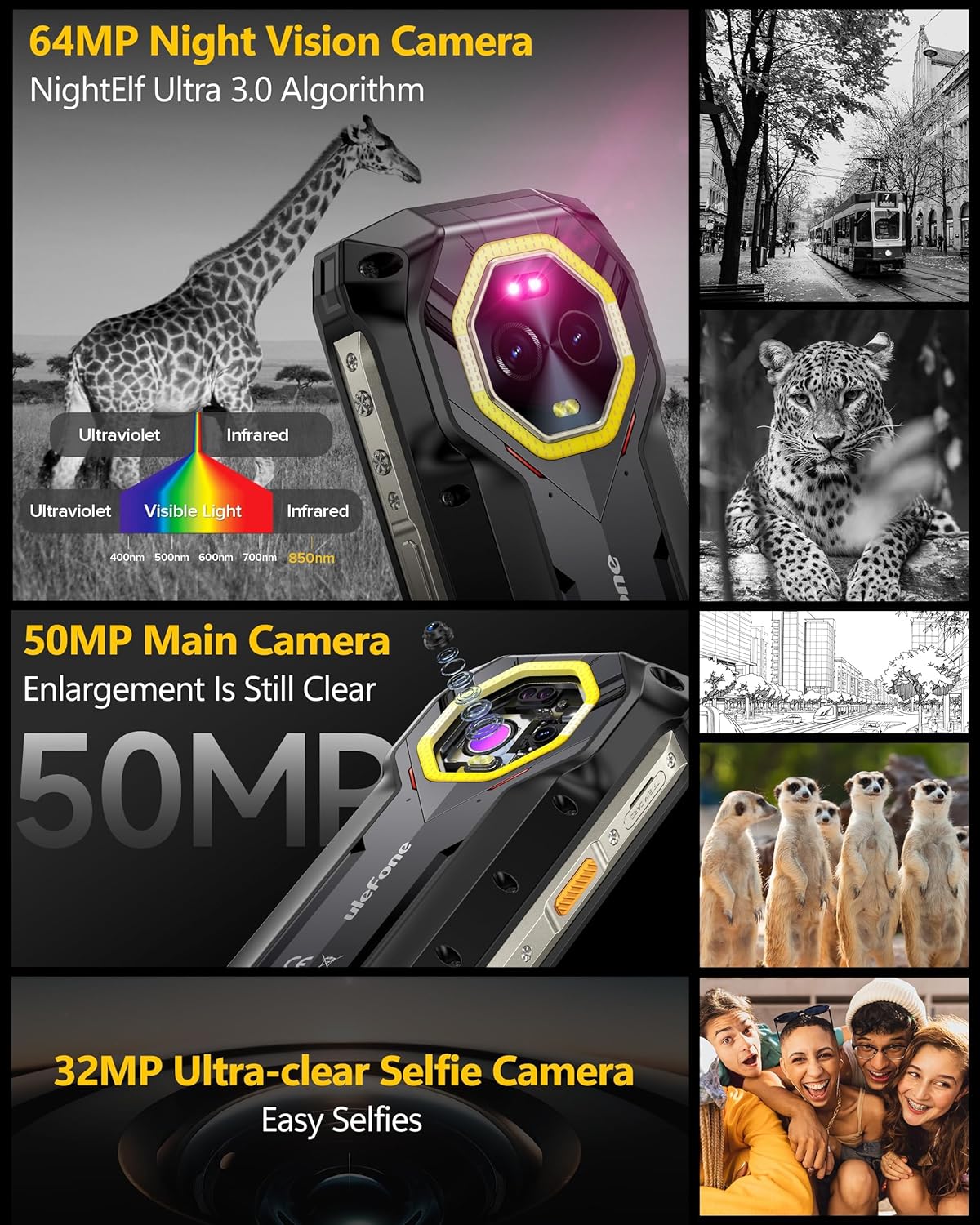
Image: Ulefone Armor Mini 20 Pro Camera System. This image illustrates the camera capabilities of the Ulefone Armor Mini 20 Pro. It features the 64MP Night Vision Camera with NightElf Ultra 3.0 algorithm, demonstrating its infrared and ultraviolet sensing. The 50MP Main Camera is highlighted for its clarity, and the 32MP Ultra-clear Selfie Camera is shown for high-quality self-portraits.
4.6. Battery and Charging
The device is equipped with a high-capacity battery and multiple charging options:
- Battery Capacity: 6200mAh sub-zero solid-state battery, designed to operate in temperatures as low as -20 degrees Celsius.
- Standby Time: Up to 336 hours
- Call Time: Up to 34 hours
- Video Playback: Up to 22 hours
- Fast Charging: Supports 33W fast charging.
- Wireless Charging: Supports 15W wireless charging.
- Reverse Charging: Capable of charging other devices.
- Ultra Power Saving Mode: Extends standby time significantly.

Image: Ulefone Armor Mini 20 Pro Battery and Charging. This image details the Ulefone Armor Mini 20 Pro's 6200mAh large battery. It provides estimated usage times: 336 hours standby, 34 hours call time, and 22 hours video playback. The image also showcases the 33W fast charging capability via cable and 15W wireless charging, illustrating the phone's power management features.
4.7. Ruggedness and Durability
The Ulefone Armor Mini 20 Pro is built to withstand harsh conditions:
- IP68 Rating: Water and dust resistant, capable of submersion in water up to 2 meters for 30 minutes.
- IP69K Rating: Resistant to high-pressure, high-temperature water jets.
- MIL-STD-810H Certification: Military-grade durability against drops, shocks, and extreme temperatures (up to 2 meters drop resistance).
4.8. Versatile LED Light
The integrated LED light offers multiple functionalities:
- General Illumination: Useful for camping, hiking, and cycling.
- Emergency Lighting: Provides illumination in power outages or dark environments.
- Warning Light: Features blue and red light modes, with constant and blink options, serving as a portable safety tool.

Image: Ulefone Armor Mini 20 Pro Ruggedness and LED Light. This image highlights the Ulefone Armor Mini 20 Pro's robust design and versatile LED light. It displays the phone's IP68 (waterproof), IP69K (dustproof), and MIL-STD-810H (drop resistance) certifications, with visual examples of the phone submerged in water, covered in dust, and surviving a fall. The image also illustrates the multi-functional LED light, usable for camping, hiking, cycling, emergency lighting, and as a warning light with various modes.
4.9. Operating System
The Ulefone Armor Mini 20 Pro runs on the latest Android 14 OS, offering enhanced personalization, protection, and accessibility features.
- Privacy Controls: Granular control over app permissions, including location, photos, and microphone access.
- Personalization: More options for customizing the user interface and experience.
- Security: Improved security features to protect user data.

Image: Ulefone Armor Mini 20 Pro Android 14 OS. This image showcases the Ulefone Armor Mini 20 Pro running the Android 14 operating system. It illustrates key user interface elements and privacy features, including screen time management, granular app permissions (e.g., access to photos, location data), and overall enhanced personalization and security provided by the latest Android version.
5. Maintenance
Proper maintenance ensures the longevity and optimal performance of your rugged phone.
- Cleaning: Use a soft, damp cloth to wipe the screen and body. Avoid harsh chemicals or abrasive materials. Ensure all port covers are securely closed before cleaning with water.
- Port Covers: Always ensure the USB port and SIM tray covers are securely sealed when the phone is exposed to water, dust, or dirt to maintain its IP ratings.
- Temperature: Avoid exposing the phone to extreme temperatures outside its operating range. While designed for sub-zero, prolonged exposure to very high temperatures can affect battery life.
- Software Updates: Regularly check for and install system updates to ensure your device has the latest security patches and performance improvements.
6. Troubleshooting
This section addresses common issues you might encounter with your Ulefone Armor Mini 20 Pro 5G.
- Device not powering on: Ensure the battery is charged. Connect to the charger for at least 15 minutes before attempting to power on again. If unresponsive, try a forced restart by holding the Power button for 10-15 seconds.
- Poor network signal: Check if your SIM card is properly inserted. Move to an area with better network coverage. If the issue persists, contact your network provider.
- Apps crashing or freezing: Close background applications. Clear the cache of the problematic app (Settings > Apps > [App Name] > Storage > Clear Cache). If the issue continues, uninstall and reinstall the app.
- Battery draining quickly: Reduce screen brightness, disable unused features like Wi-Fi, Bluetooth, GPS when not needed. Check battery usage in Settings to identify power-hungry apps.
- Charging issues: Ensure the charging cable and adapter are undamaged and properly connected. Try a different charger or cable if available. Clean the charging port gently if there's debris.
- Touchscreen unresponsive: Restart the device. If the issue persists, consider a factory reset (backup data first).
For issues not covered here, please refer to the official Ulefone support resources or contact customer service.
7. Specifications
Detailed technical specifications for the Ulefone Armor Mini 20 Pro 5G:
| Feature | Specification |
|---|---|
| Model | Ulefone Armor Mini 20 Pro 5G |
| Processor | MediaTek Dimensity 6300 5G (8-core, 2.4GHz, 6nm) |
| RAM | 16GB (8GB physical + 8GB virtual) |
| Internal Storage | 256GB UFS2.2 |
| Expandable Storage | Up to 2TB via TF card |
| Display | 4.7-inch HD+ (720 x 1600), 90Hz, 700 nits, Corning Gorilla Glass Victus |
| Main Camera | 50MP Samsung ISOCELL GN1 (F/1.95) |
| Night Vision Camera | 64MP OMNIVISION OV64B with dual IR LEDs |
| Front Camera | 32MP Samsung GD1 Sensor |
| Battery | 6200mAh (Sub-zero solid-state) |
| Charging | 33W Fast Charging, 15W Wireless Charging, Reverse Charging |
| Operating System | Android 14 |
| Durability | IP68, IP69K, MIL-STD-810H Certified |
| Connectivity | 5G, Wi-Fi, Bluetooth, GPS |
| Dimensions | 133.3 mm x 63.3 mm (approximate) |
| ASIN | B0F9SP9SB6 |
| Date First Available | December 10, 2024 |
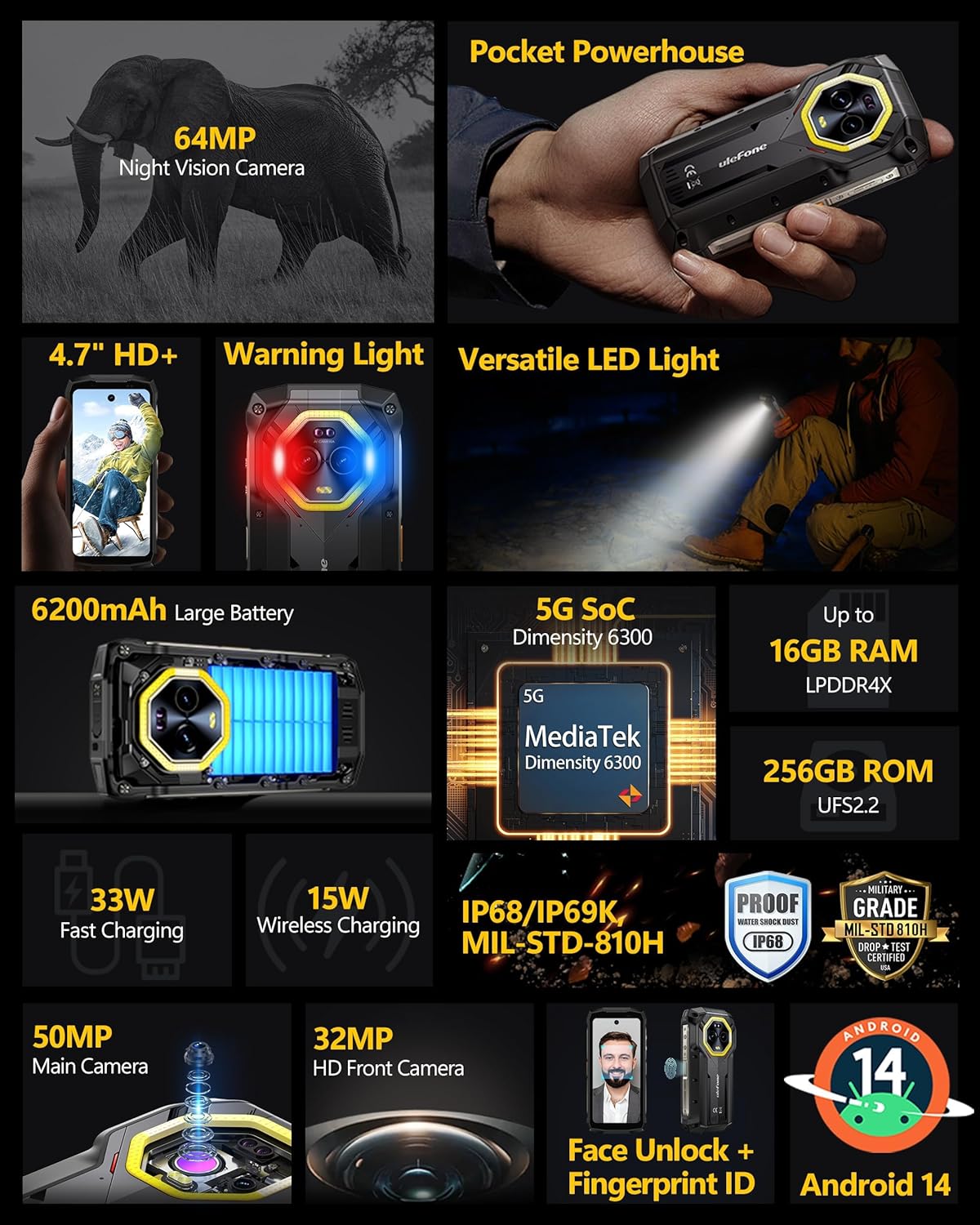
Image: Ulefone Armor Mini 20 Pro Key Features Overview. This composite image provides a visual summary of the Ulefone Armor Mini 20 Pro's primary features. It highlights the 64MP night vision camera, the compact 4.7-inch HD+ display, versatile LED lighting, a large 6200mAh battery, the MediaTek Dimensity 6300 5G processor, and its rugged certifications (IP68, IP69K, MIL-STD-810H). Also shown are details on RAM, ROM, charging capabilities, and biometric security.
8. Warranty and Support
Ulefone products are designed for reliability and performance. For warranty information, please refer to the warranty card included in your product packaging or visit the official Ulefone website.
For technical support, troubleshooting assistance, or service inquiries, please contact Ulefone customer support through their official channels. You can often find support contact information on the Ulefone website or within the device's 'Settings' menu under 'About phone' or 'Support'.
Online Resources: For additional information, FAQs, and software updates, please visit the official Ulefone website: www.ulefone.com
Related documentsArmor Mini 20 Pro 5G


Ask a question about this manual
Ask about setup, troubleshooting, compatibility, parts, safety, or missing instructions. Manuals+ will review the question and use this page’s manual context to help answer it.