
CORBOBO K98 Pro
LINGBAO K98 PRO Mechanical Keyboard User Manual
Model: K98 Pro | Brand: CORBOBO
1. Introduction
Thank you for choosing the LINGBAO K98 PRO 96% Mechanical Keyboard. This advanced keyboard is designed to enhance your typing and gaming experience with its versatile features, including tri-mode connectivity, a smart LCD display, a multi-function knob, and extensive customization options. This manual will guide you through the setup, operation, maintenance, and troubleshooting of your new keyboard.

Image 1.1: The LINGBAO K98 PRO Mechanical Keyboard, showcasing its 96% layout with a smart display and knob.

Image 1.2: An overview of the LINGBAO K98 PRO's key features, including Gasket-Mount, 10000mAh battery, Full Key Hot-Swappable, N-Key Rollover, Fine-Tuned Satellite Stabilizers, LCD Smart Screen, Tri-Mode Connectivity, 16 RGB Backlit Effects, 16.8 Million RGB Color Options, 101-Key Layout, Macro Programmable, and Knob Design.
2. Setup Guide
2.1 Package Contents
Before you begin, please ensure all items are present in the package:
- LINGBAO K98 PRO Mechanical Keyboard
- USB-C Cable
- Keycap Puller
- User Manual (this document)
2.2 Initial Charging
The keyboard comes with a built-in 10,000mAh battery. For optimal performance, it is recommended to fully charge the keyboard before first use. Connect the provided USB-C cable to the keyboard's USB-C port and the other end to a powered USB port on your computer or a wall adapter. The LCD display will indicate charging status.
2.3 Connectivity Modes
The LINGBAO K98 PRO supports three connectivity modes:
- 2.4GHz Wireless: For a stable and fast wireless connection. Insert the 2.4GHz USB receiver into your device's USB port. The keyboard will automatically connect.
- Bluetooth 5.0: For connecting to multiple devices. The keyboard can pair with up to 3 Bluetooth devices.
- USB-C Wired: For a direct, low-latency connection and charging. Connect the USB-C cable directly to your device.
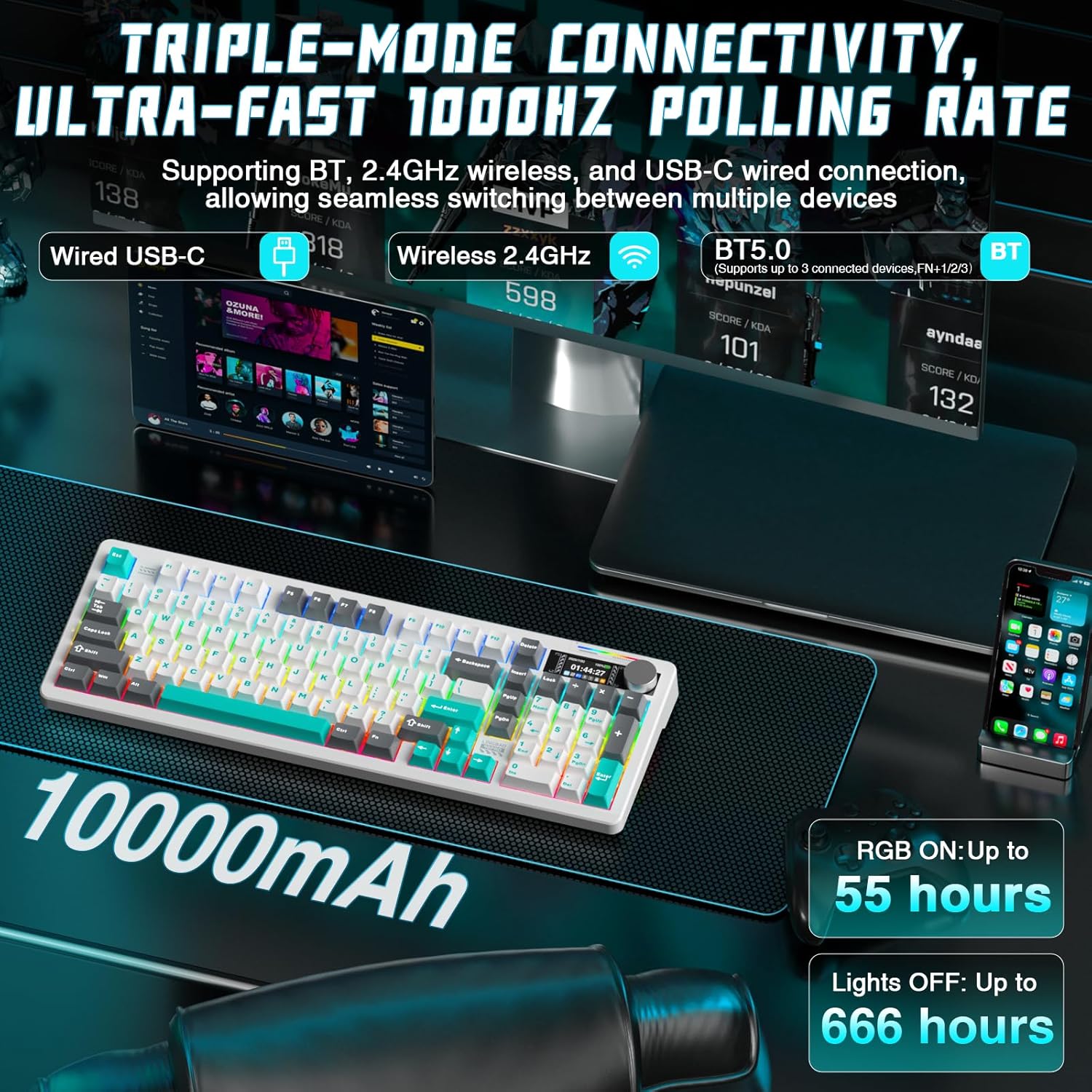
Image 2.1: Illustration of the keyboard's triple-mode connectivity options: Wired USB-C, Wireless 2.4GHz, and Bluetooth 5.0, along with battery life indicators.
2.4 System Compatibility
The keyboard is fully compatible with:
- Windows operating systems
- macOS
- Linux
- Android devices
3. Operating Instructions
3.1 Smart LCD Display and Multi-Functional Knob
The high-resolution LCD display provides real-time information such as time, date, battery level, and current keyboard settings. The multi-functional knob allows for quick and precise control over various functions.
- Knob Functions: Rotate the knob to adjust volume, brightness, or switch between RGB effects. Press the knob to confirm selections or mute/unmute audio.
- Display Navigation: Use the knob to navigate through display menus for settings like connectivity, lighting, and system information.
Note: Time and date must be set via the driver software.
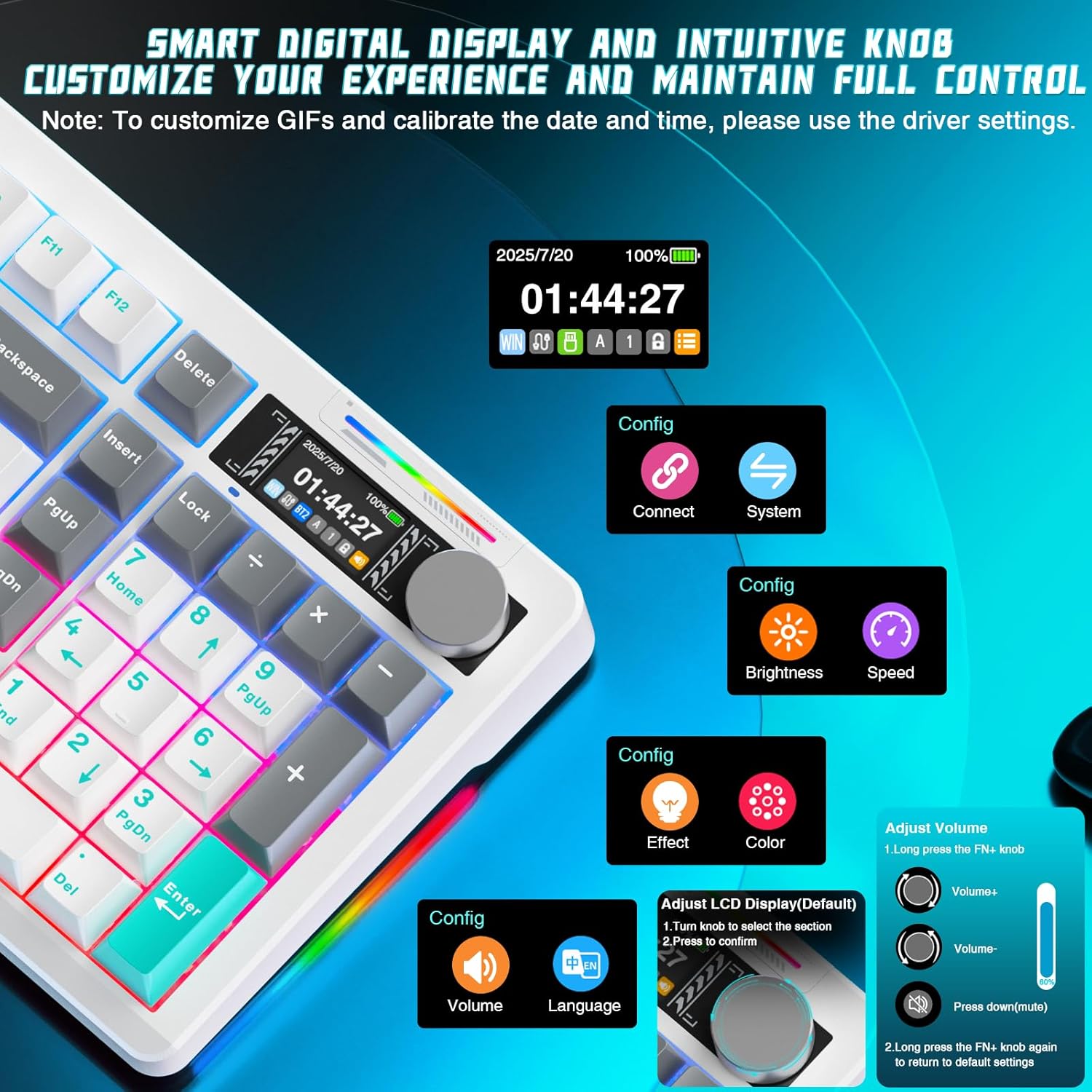
Image 3.1: Detailed view of the smart digital display and intuitive knob, showing options for connection, system, brightness, speed, effect, color, volume, and language adjustments.
3.2 RGB Lighting Customization
The keyboard features multi-zone RGB lighting with 16 dynamic backlighting effects and 6 side-lighting modes. You can adjust these directly from the keyboard using the smart screen and knob, or through the dedicated software for deeper customization.
- FN + Right Shift: Switch side lighting modes (e.g., Flowing Light, Aurora, Constant Brightness, Breathing Mode).
- FN + Left Shift: Switch RGB light strip modes (e.g., Flowing Light, Aurora, Constant Brightness, Breathing Mode, Turn Off).

Image 3.2: The keyboard displaying various RGB lighting effects, highlighting 16 RGB backlight effects and 6 RGB light effects.
3.3 Hot-Swappable Switches
The K98 PRO features a gasket-mount, fully hot-swappable PCB, supporting both 3-pin and 5-pin mechanical switches. This allows you to easily change switches without soldering, customizing your typing feel.

Image 3.3: Close-up view of the hot-swappable switch sockets and included LEOBOG Custom Switches, emphasizing easy switch and keycap replacement.
3.4 Key Functions and Layout
The 96% layout with 97 keys provides a compact design while retaining essential functions, including a full arrow key cluster, function row (F1-F12), dedicated media controls, and a built-in number pad.

Image 3.4: The 96% layout of the LINGBAO K98 PRO, highlighting its compact design and full numeric keypad for both work and gaming.
3.5 Personalization Software Customization
For advanced customization, download the official software. This allows you to:
- Create personalized lighting profiles with over 16 million colors.
- Set up music-responsive lighting effects.
- Design animated lighting sequences.
- Configure macros for gaming or productivity.
- Remap keys to suit your typing habits.
- Save multiple profiles for different uses.

Image 3.5: Screenshots of the customization software interface, showing options for key assignment, lighting effects, macro programming, and music-synced RGB lighting.
4. Maintenance
4.1 Cleaning
To maintain your keyboard's appearance and functionality:
- Use a soft, lint-free cloth slightly dampened with water or a mild cleaning solution to wipe down the keycaps and frame.
- For dust and debris between keys, use compressed air.
- Avoid using harsh chemicals or abrasive materials.
4.2 Battery Care
The keyboard is equipped with a 10,000mAh Lithium Ion battery. To prolong battery life:
- Avoid fully discharging the battery frequently.
- Store the keyboard in a cool, dry place when not in use for extended periods.
- If storing for a long time, charge the battery to about 50% before storage.
4.3 Keycap and Switch Replacement
The hot-swappable design allows for easy replacement of keycaps and switches. Use the provided keycap puller to gently remove keycaps. For switches, use a switch puller (not included unless specified) to carefully extract them from the PCB. Ensure proper alignment when inserting new switches to avoid bending pins.
5. Troubleshooting
5.1 Connectivity Issues
- 2.4GHz: Ensure the USB receiver is securely plugged in and within range. Try a different USB port.
- Bluetooth: Ensure Bluetooth is enabled on your device. Unpair and re-pair the keyboard. Check if the keyboard is in pairing mode.
- Wired: Try a different USB-C cable or USB port on your device.
5.2 Lighting Not Working
- Check battery level; low battery can affect RGB performance.
- Ensure RGB lighting is enabled via the knob or software.
- Perform a factory reset if necessary (refer to software instructions).
5.3 LCD Display Issues
- Ensure the keyboard is powered on.
- If the display is frozen or unresponsive, try restarting the keyboard.
- Update the keyboard firmware via the official software if available.
6. Specifications
| Feature | Detail |
|---|---|
| Model Name | LINGBAO K98 Pro |
| Layout | 96% (97 keys) |
| Connectivity | 2.4GHz Wireless, Bluetooth 5.0, USB-C Wired |
| Battery Capacity | 10,000mAh Lithium Ion |
| Battery Life (RGB On) | Up to 55 hours |
| Battery Life (Lights Off) | Up to 666 hours (power-saving mode) |
| Switches | Hot-swappable (3-pin & 5-pin compatible) |
| Keycaps | PBT Material |
| Backlighting | RGB (16 backlight effects, 6 side-lighting modes) |
| Special Features | Smart LCD Display, Multi-functional Knob, Gasket Mount |
| Compatible Devices | PC, Laptop, Gaming Console, Tablet (Windows, macOS, Linux, Android) |
| Product Dimensions | 40.64 x 14.3 x 4.09 cm |
| Item Weight | 1.65 kg |
7. Warranty and Support
Your LINGBAO K98 PRO Mechanical Keyboard is covered by a standard manufacturer's warranty. Please refer to the warranty card included in your package for specific terms and conditions, including warranty duration and coverage details. Keep your proof of purchase for warranty claims.
7.1 Customer Support
For technical assistance, troubleshooting not covered in this manual, or warranty inquiries, please contact CORBOBO customer support through the retailer's platform or the official brand website. Provide your product model and purchase details for faster service.
Ask a question about this manual
Ask about setup, troubleshooting, compatibility, parts, safety, or missing instructions. Manuals+ will review the question and use this page’s manual context to help answer it.