
PlusAcc RCPT08
PlusAcc Gooseneck Stand Holder with Remote Page Turner Manual
Model: RCPT08
Introduction
This manual provides comprehensive instructions for the assembly, operation, and maintenance of your PlusAcc Gooseneck Stand Holder with Remote Page Turner. Please read this manual thoroughly before use to ensure proper functionality and to maximize your reading experience.
Package Contents
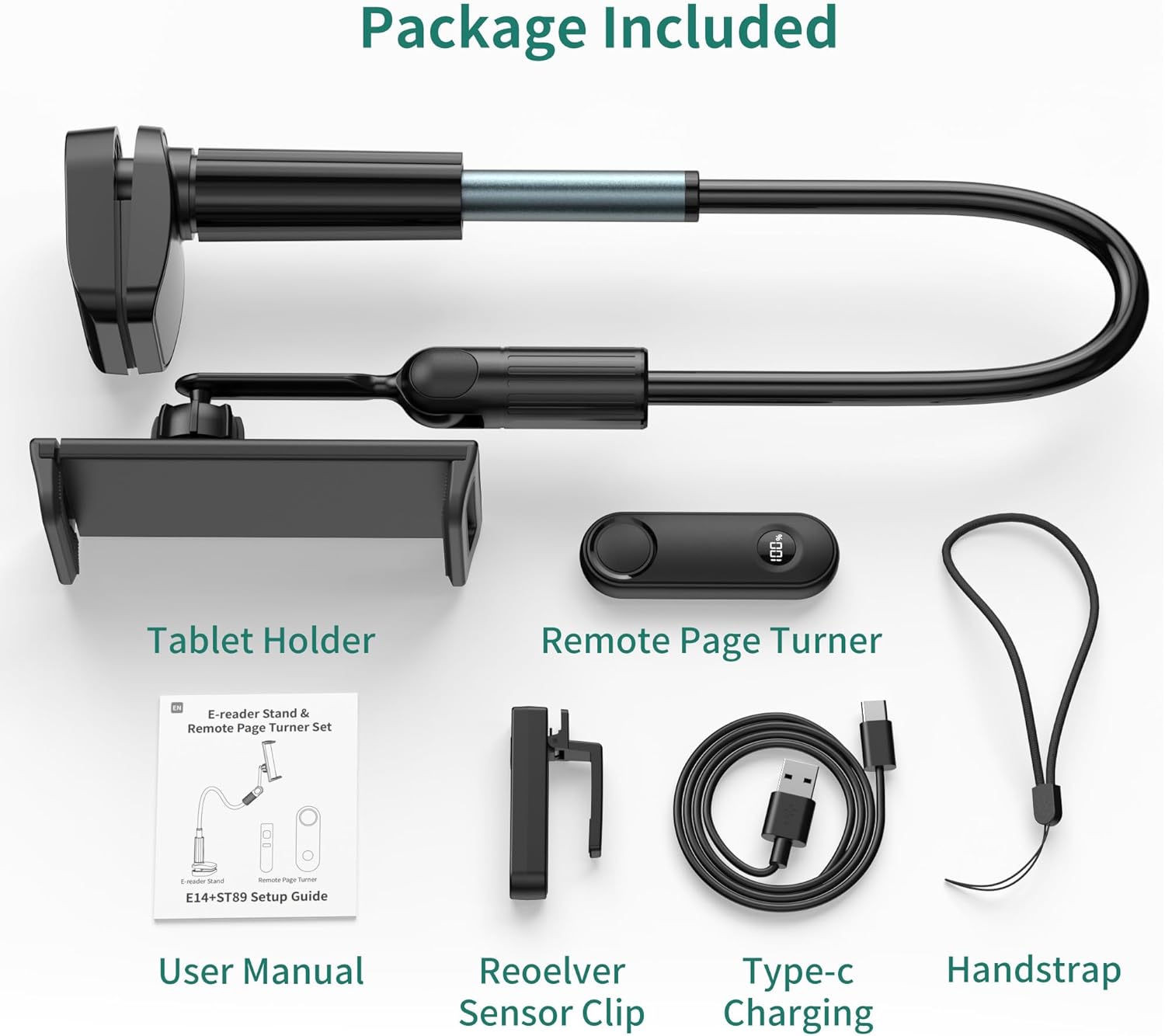
Figure 1: Package Contents
- 1x Gooseneck Stand Holder
- 1x Page Turner Sensor Clip
- 1x Remote Page Turner
- 1x Hand Strap
- 1x Type-C Charging Cable
- 1x Instruction Manual (this document)
Product Features
- Hands-Free Reading: Allows users to read e-books without holding their device, enhancing comfort.
- Remote Page Turning: Includes an RF remote for turning pages from a distance, eliminating the need for Wi-Fi or Bluetooth connection for this function.
- Dual 360° Rotation: Features two independent 360° rotatable joints for flexible positioning of both the holder and the gooseneck arm.
- Stable and Flexible Gooseneck Arm: Constructed from durable aluminum with an upgraded thickened metal pipe near the base for enhanced stability and bendability.
- Wide Device Compatibility: The clip extends from 4.92 inches to 8.78 inches, suitable for smartphones (4-8 inches) and various e-readers.
- Easy Installation: Tool-free installation with a 2.7-inch wide base fixture and non-slip silicone pads to protect furniture.
- Multi-Scenario Usage: Adaptable for use in various settings such as bed, kitchen, desk, or during exercise.
- Real-time Power Display: Remote control features a power display to monitor battery status.
Compatibility
The PlusAcc Gooseneck Stand Holder is designed for optimal use with e-readers and smartphones between 4 and 8 inches. The device clip can extend from 4.92 inches to 8.78 inches.

Figure 2: Compatible Devices (4-8 inch eReaders/Phones)

Figure 3: Incompatible Devices (Tablets 8 inches and above)
Specific Compatibility Notes:
- Compatible eReaders: Kindle Paperwhite, Kindle Colorsoft, Kindle Oasis, Kindle 10, Kindle 11, Kobo.
- Compatible Smartphones: iPhone 12-16 Pro Max, Galaxy S10e/S10/S9, LG, Google Pixel, and similar models within the 4-8 inch range.
- Compatible with Capacitive Touchscreen eReaders and Kindle apps on phones.
- Not Compatible with: Tablets 8 inches and above (e.g., iPad Pro, iPad, iPad Air, iPad mini, Fire HD 10, Galaxy Tab S9, Google Pixel Tablet).
- Also Not Compatible with: Older Kindle models (Kindle 7, 8), Kindle Oasis 1, Kindle Touch, Kindle Voyage, Kobo H2O.
Setup and Installation
- Attach the Gooseneck Stand:
Align the 2.7-inch wide base fixture with the desired installation position on a table, desk, or headboard. Rotate the screw mechanism to tighten the clamp securely. Ensure the non-slip silicone pads are in contact with the furniture surface to prevent scratches.

Figure 4: Attaching the Stand Base
- Insert Your Device:
Gently expand the device holder clip and insert your e-reader or smartphone. Ensure the device is securely held by the clip.

Figure 5: Device Insertion
- Position the Gooseneck Arm:
Bend and shape the flexible aluminum gooseneck arm to achieve your desired viewing angle. The dual 360° rotatable joints allow for precise adjustments of both the holder and the arm.

Figure 6: Adjusting the Gooseneck Arm
- Prepare the Remote Page Turner:
a. Charge the Remote and Sensor Clip: Use the provided Type-C charging cable to charge both the remote page turner and the sensor clip. The remote features a real-time power display.

Figure 7: Charging Components
b. Attach the Sensor Clip: Clip the page turner sensor onto the edge of your e-reader screen, ensuring it aligns with the area where you would normally tap to turn pages.Video 1: Demonstrates attaching the sensor clip to an e-reader and using the remote to turn pages.
Operating Instructions
- Power On the Sensor Clip: Press and hold the button on the page turner sensor clip for 3 seconds to power it on. The indicator lights will confirm activation.
- Use the Remote Page Turner: Once the sensor clip is active and positioned correctly, press the button on the remote page turner to advance to the next page on your e-reader. The remote operates via RF signal and does not require pairing via Wi-Fi or Bluetooth.

Figure 8: Hands-Free Reading with Remote
- Adjusting Viewing Angle: Reposition the gooseneck arm and rotate the device holder as needed for optimal viewing comfort.
Maintenance
- Cleaning: Wipe the stand and remote with a soft, dry cloth. Avoid using abrasive cleaners or solvents.
- Storage: When not in use, store the stand and accessories in a cool, dry place.
- Battery Care: Recharge the remote and sensor clip regularly to maintain battery health. Avoid prolonged exposure to extreme temperatures.
Troubleshooting
| Problem | Possible Cause | Solution |
|---|---|---|
| Remote page turner not working. |
|
|
| Gooseneck stand is unstable or sags. |
|
|
| Furniture is getting scratched. |
|
|
Specifications
| Feature | Detail |
|---|---|
| Brand | PlusAcc |
| Model Number | RCPT08 |
| Material Type | Aluminum |
| Compatible Devices | Kobo, eReaders, E-book, Smartphones, Kindle (4-8 inches) |
| Special Features | 360 Degree Rotation, Adjustable, Gooseneck, Hands-Free |
| Mounting Type | Tabletop Clamp (up to 2.7 inches thick) |
| Battery Type (Remote/Clip) | Lithium Polymer (included) |
| Remote Page Turner Connection | RF (Radio Frequency) |
| Item Dimensions (approx.) | 27 x 10.8 x 8.2 cm (Parcel Dimensions) |
| Item Weight (approx.) | 510 g |
Ask a question about this manual
Ask about setup, troubleshooting, compatibility, parts, safety, or missing instructions. Manuals+ will review the question and use this page’s manual context to help answer it.