
1. Introduction
This manual provides detailed instructions for the installation, operation, and maintenance of your Shelly Wall Display 2 and Shelly BLU H&T bundle. The Shelly Wall Display 2 is a 6.95-inch color touchscreen smart home control panel with an integrated 5A relay, designed for monitoring and controlling your Shelly ecosystem. The Shelly BLU H&T is a Bluetooth-enabled sensor for accurate temperature and humidity readings.
Please read this manual carefully before installation and use to ensure proper functionality and safety.
2. Safety Information
- Electrical Safety: Installation must be performed by a qualified electrician in accordance with local electrical codes. Ensure power is disconnected before installation. The Shelly Wall Display 2 requires a neutral conductor.
- Indoor Use Only: This device is designed for indoor use in dry environments. Do not expose to water or high humidity.
- Temperature Range: Operate within the specified temperature range to prevent damage.
- Cleaning: Use a soft, dry cloth for cleaning. Do not use abrasive cleaners or solvents.
- Children: Keep out of reach of children.
3. Package Contents
Your Shelly Wall Display 2 and BLU H&T bundle package should contain the following items:
- Shelly Wall Display 2 (Silver)
- Shelly BLU H&T Sensor (Silver)
- Installation accessories (screws, etc. - specific items may vary)
- User Manual (this document)

Image 1: Shelly Wall Display 2 and Shelly BLU H&T Sensor. This image shows the main Wall Display unit with its large screen interface, alongside the smaller, compact BLU H&T sensor. The display shows various smart home controls and environmental data.
4. Setup and Installation
4.1. Shelly Wall Display 2 Installation
- Power Disconnection: Before starting, ensure the main power supply to the circuit where the Wall Display will be installed is turned off at the circuit breaker.
- Mounting Location: Choose a suitable wall location, typically replacing a standard light switch. The device supports both portrait and landscape installation.
- Wiring: The Shelly Wall Display 2 requires a neutral conductor for operation. Connect the Live (L), Neutral (N), and Load (O) wires according to the wiring diagram provided in the separate installation guide (not included in this manual). The integrated 5A relay allows direct control of connected lighting or appliances.
- Secure Mounting: Secure the Wall Display to the wall box using the provided screws.
- Power Restoration: Once securely mounted and wired, restore power to the circuit. The display will power on.
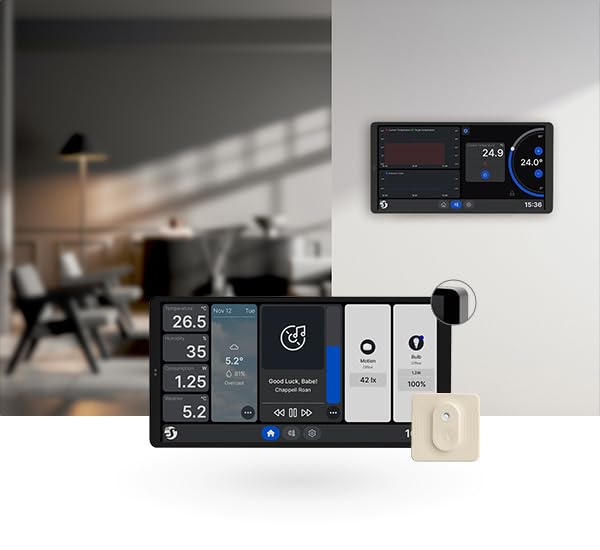
Image 2: Shelly Wall Display 2 installed on a wall. This image illustrates the Wall Display mounted in a home environment, showcasing its sleek design and how it integrates into a modern interior. Another display is visible in the background, suggesting multi-device integration.
4.2. Initial Setup and Connectivity
- First Boot: Upon first power-up, the Wall Display will guide you through initial setup steps on its 6.95-inch color touchscreen.
- Wi-Fi Connection: Connect the device to your 2.4 GHz Wi-Fi network. This is essential for seamless smart home control and integration with the Shelly ecosystem.
- Shelly App Integration: Download the Shelly Smart Control app from your device's app store. Follow the in-app instructions to add your Shelly Wall Display 2 to your Shelly account.
- Bluetooth Pairing: The device includes Bluetooth for simplified connection with other Shelly BLU devices.
4.3. Pairing Shelly BLU H&T Sensor
The Shelly BLU H&T sensor comes pre-bundled and is designed for easy integration:
- Activate Sensor: Ensure the Shelly BLU H&T sensor is activated (e.g., by pulling a battery tab if present, or inserting the included Lithium Metal battery).
- Add Device in App: In the Shelly Smart Control app, navigate to the device addition section and select to add a new Bluetooth device.
- Discovery: The app will discover the BLU H&T sensor. Follow the prompts to pair it with your Shelly ecosystem, typically linking it to your Wall Display 2 or another Shelly gateway.
- Placement: Place the BLU H&T sensor in the desired room for accurate temperature and humidity readings.
5. Operation
5.1. Touchscreen Interface
The Shelly Wall Display 2 features a 6.95-inch color touchscreen for intuitive control. Use multi-touch gestures for navigation and interaction.
- Home Screen: The customizable home screen provides central access to your devices, scenes, and environmental data.
- Navigation: Swipe left/right to access different panels or menus. Tap icons to select functions or devices.
- Adjustable Brightness: Screen brightness can be adjusted in the settings menu for optimal viewing.
- Screen Saver Mode: Configure a screen saver to activate after a period of inactivity.
5.2. Device Control and Monitoring
- Integrated 5A Switch: Use the built-in 5A relay to directly control connected lighting or other appliances. This function is accessible via the touchscreen interface.
- Environmental Sensors: The Wall Display includes integrated sensors for temperature, humidity, and LUX (light intensity). These readings are displayed on the screen and can be used for automation triggers.
- BLU H&T Data: Real-time temperature and humidity data from the paired Shelly BLU H&T sensor will be displayed and can be utilized for precise climate control.
- Energy Monitoring: If you have other Shelly PM (Power Monitoring) devices, the Wall Display can show their energy consumption data.
5.3. Smart Home Features
- Scenes and Schedules: Create custom scenes (e.g., "Good Morning" scene to turn on lights and adjust thermostat) and schedules for automated actions based on time or sensor input.
- Media Player: The home screen is equipped with a media player, supporting integrations like Sonos for audio control.
- Voice Assistant Integration: The Shelly Wall Display 2 is compatible with popular voice assistants like Alexa and Google Assistant for hands-free control (requires integration through the Shelly app).
6. Maintenance
6.1. Cleaning
To clean the Shelly Wall Display 2 screen and body:
- Ensure the device is in screen saver mode or temporarily turn off the display.
- Use a soft, lint-free, slightly damp cloth. Do not spray cleaning solutions directly onto the screen.
- Avoid using abrasive materials, alcohol, or chemical cleaners, as these can damage the screen and finish.
6.2. Software Updates
Periodically check for firmware updates through the Shelly Smart Control app. Updates provide new features, performance improvements, and security enhancements. Follow the in-app instructions for updating your device.
6.3. Shelly BLU H&T Battery Replacement
The Shelly BLU H&T sensor is powered by a Lithium Metal battery. When the battery level is low (indicated in the Shelly app), replace it with a new, compatible battery (e.g., CR2032, refer to the BLU H&T specific manual for exact type). Ensure correct polarity during replacement.
7. Troubleshooting
| Problem | Possible Cause | Solution |
|---|---|---|
| Device not powering on. | No power supply; incorrect wiring; neutral conductor missing. | Check circuit breaker. Verify wiring connections, ensuring neutral is connected. Consult a qualified electrician. |
| Cannot connect to Wi-Fi. | Incorrect Wi-Fi password; device too far from router; 5GHz network selected. | Double-check password. Move device closer to router. Ensure you are connecting to a 2.4 GHz Wi-Fi network. |
| BLU H&T sensor not pairing. | Sensor not activated; battery low; out of Bluetooth range. | Ensure sensor is active. Replace battery if needed. Move sensor closer to the Wall Display or Shelly gateway. |
| Touchscreen unresponsive. | Temporary software glitch; screen protector interference. | Restart the device (if possible, via app or power cycle). Remove any screen protectors to test. |
8. Specifications
| Feature | Detail |
|---|---|
| Model Number | 3800238072308 |
| Brand | Shelly |
| Display | 6.95-inch Color Touchscreen |
| Connectivity | Wi-Fi (2.4 GHz), Bluetooth |
| Integrated Relay | 5 Amps (Normally Open) |
| Sensors (Wall Display) | Temperature, Humidity, LUX (Light Intensity) |
| Sensors (BLU H&T) | Temperature, Humidity |
| Power Requirement | Neutral Conductor Required |
| Mounting Type | Wall Mount (Portrait or Landscape) |
| Product Dimensions | 3.3 x 17.8 x 8.7 cm |
| Weight | 256 Grams |
| BLU H&T Battery | 1 Lithium Metal battery (included) |
| Material | Steel (Contact material) |
9. Warranty and Support
For warranty information and technical support, please refer to the official Shelly website or contact your local distributor. Keep your proof of purchase for warranty claims.
Manufacturer: Shelly Europe


