1. Introduction
The VIHELM RS485-3178 is a versatile 7-in-1 multi-function digital meter designed for comprehensive water quality analysis. It accurately measures pH, Oxidation-Reduction Potential (ORP), Total Dissolved Solids (TDS), Electrical Conductivity (EC), Conductivity Factor (CF), Temperature, and Humidity. This device is suitable for various applications including fish tanks, aquariums, mariculture, swimming pools, drinking water analysis, and laboratory use.
The meter features a high-precision LCD digital display, a detachable electrode for easy maintenance, and an RS485 interface for data communication.
2. Package Contents
Before proceeding with setup, please verify that all items listed below are present in your package:
- 1 x RS485-3178 Monitor
- 1 x Electrode
- 1 x Power Adapter (220V or 110V optional)
- 3 x pH Buffer Powder packets
- 1 x English Instruction Manual
- 1 x Package Box
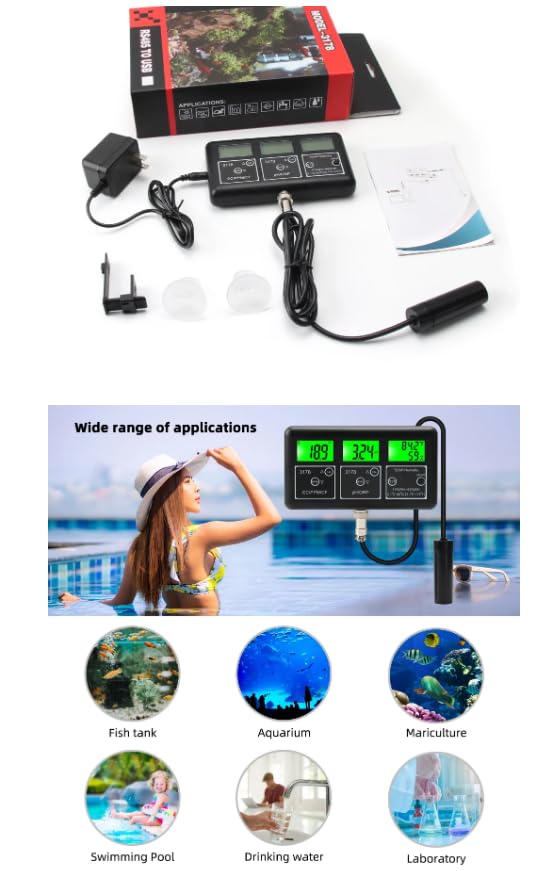
Figure 2.1: Contents of the RS485-3178 package and examples of its wide range of applications.
3. Setup
Follow these steps to set up your RS485-3178 meter:
- Connect the Electrode: Carefully connect the multi-functional electrode to the designated port on the meter. Ensure a secure connection. The electrode is designed to measure pH, ORP, EC, TDS, CF, Humidity, and Temperature.
- Connect the Power Adapter: Plug the power adapter into the meter's power input port. Then, connect the adapter to a suitable electrical outlet (110V or 220V, depending on your region and adapter type).
- Placement: Place the meter on a stable, flat surface. Ensure the electrode cable has enough slack to reach the sample without tension.
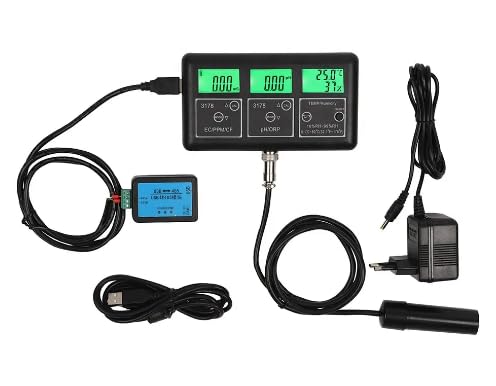
Figure 3.1: The RS485-3178 meter with its electrode and power adapter connected, ready for use.
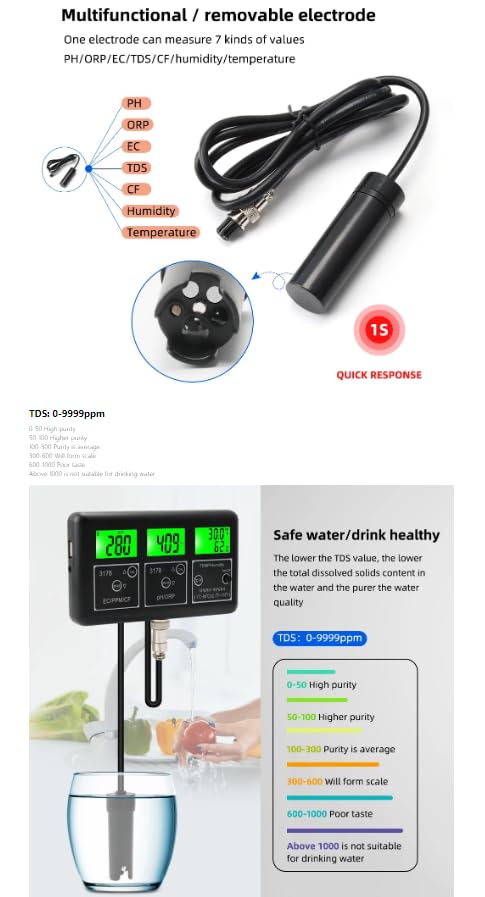
Figure 3.2: The multifunctional and removable electrode, capable of measuring 7 parameters with quick response.
4. Operating Instructions
4.1 Power On/Off
Press the 'ON/OFF' button located on the meter to power it on or off. The backlit display will illuminate upon activation.
4.2 Function Switching
The meter allows you to switch between different measurement parameters. Use the 'MODE' buttons to cycle through the available functions:
- EC/PPM/CF: Press the 'MODE' button under the EC/PPM/CF display to switch between Electrical Conductivity (EC), Total Dissolved Solids (PPM), and Conductivity Factor (CF).
- pH/ORP: Press the 'MODE' button under the pH/ORP display to switch between pH and Oxidation-Reduction Potential (ORP).
- Temperature Unit: Press the '°C/°F' button to toggle the temperature display between Celsius and Fahrenheit.
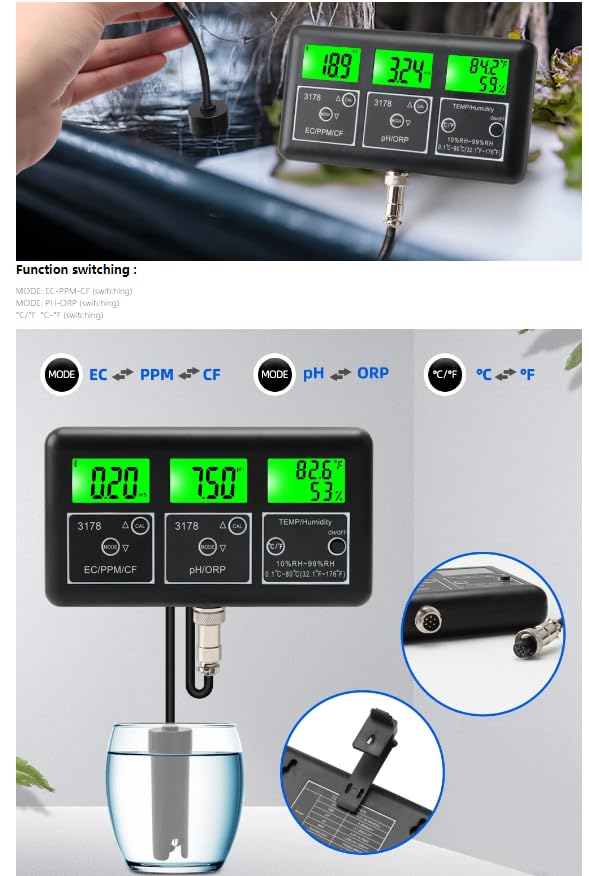
Figure 4.1: The meter's interface highlighting the 'MODE' and '°C/°F' buttons for switching measurement functions and temperature units.
4.3 Taking Measurements
- Prepare the Sample: Ensure your water sample is at a stable temperature for accurate readings.
- Immerse the Electrode: Gently immerse the electrode into the water sample, ensuring the sensor part is fully submerged.
- Read the Display: Wait for the readings on the digital display to stabilize. The meter will show the values for the selected parameters (EC/PPM/CF, pH/ORP, Temperature, and Humidity).
- Understand Readings:
- pH Value: Indicates the strength of acidity and alkalinity in the water. A pH scale from 0-14 is used, where 0-6 is acidic, 7 is neutral, and 8-14 is alkaline.
- EC Value: Measures the soluble salt concentration in the solution.
- TDS Value: Represents the total dissolved solids content. Lower TDS values generally indicate purer water.
- ORP Value: Measures the oxidation-reduction potential of the water.
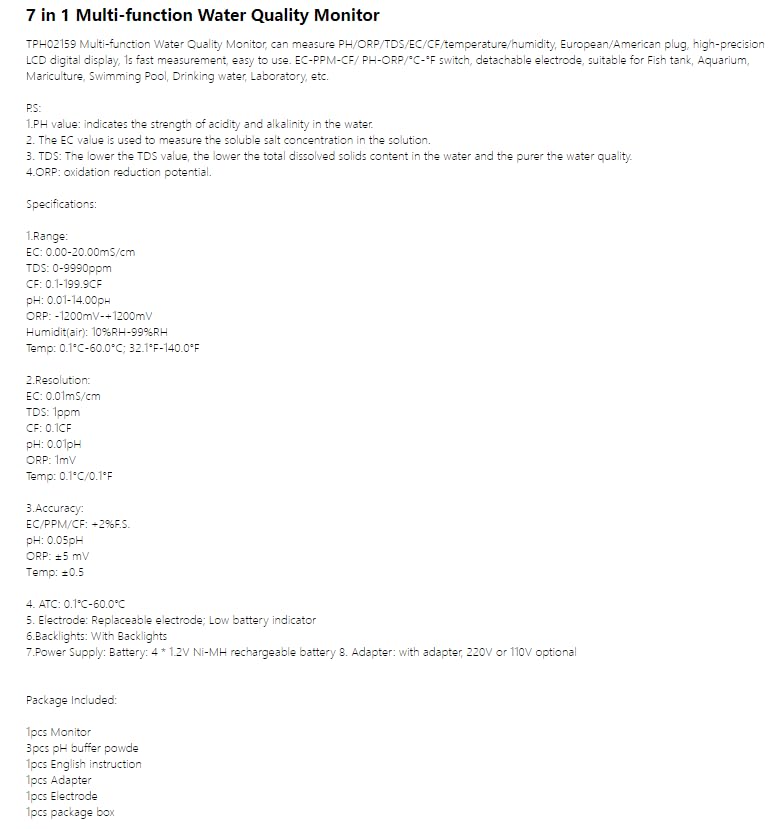
Figure 4.2: The meter displaying its 7-in-1 functions and typical measuring ranges while in operation.
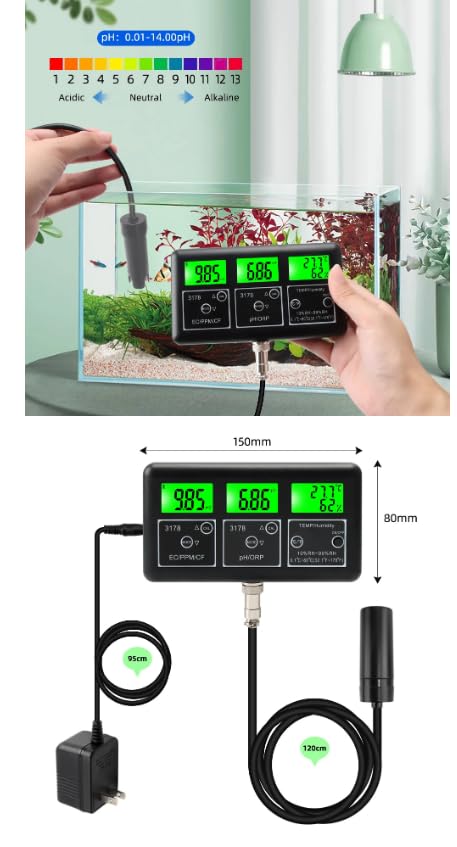
Figure 4.3: An illustration of the pH scale (acidic to alkaline) and the physical dimensions of the meter.
5. Calibration
Regular calibration ensures the accuracy of your meter. The RS485-3178 includes 'CAL' buttons for calibration. Refer to the detailed English Instruction Manual provided in the package for specific calibration procedures using the included pH buffer powders.
General pH Calibration Steps:
- Prepare the pH buffer solutions (e.g., pH 6.86, pH 4.00, pH 9.18) according to the instructions on the buffer powder packets.
- Clean the electrode with distilled water and blot dry.
- Immerse the electrode into the first buffer solution (e.g., pH 6.86).
- Press and hold the 'CAL' button under the pH/ORP display until the display indicates calibration mode.
- Wait for the reading to stabilize and confirm the calibration.
- Repeat the process for other buffer solutions as required (e.g., pH 4.00 for acidic range, pH 9.18 for alkaline range).
Note: Specific calibration steps for ORP, EC, TDS, and CF may vary. Always consult the included instruction manual for precise calibration procedures.
6. Maintenance
6.1 Electrode Care
- Cleaning: After each use, rinse the electrode thoroughly with distilled water to remove any residue. Do not wipe the glass bulb, as this can cause static electricity and damage the sensor.
- Storage: When not in use, store the electrode in a protective solution (e.g., KCL solution or pH storage solution) to prevent it from drying out. If a storage solution is unavailable, distilled water can be used for short-term storage, but it is not ideal for long periods.
- Replacement: The electrode is replaceable. If readings become erratic or calibration fails consistently, consider replacing the electrode.
6.2 Battery Information
The meter is powered by 4 x 1.2V NI-MH rechargeable batteries. A low battery indicator will appear on the display when the batteries need recharging or replacement. Use the provided power adapter to recharge the batteries.
6.3 General Cleaning
Wipe the main unit with a clean, damp cloth. Do not use abrasive cleaners or immerse the main unit in water.
7. Troubleshooting
If you encounter issues with your RS485-3178 meter, try the following:
- No Power: Ensure the power adapter is securely connected to both the meter and a working electrical outlet. Check if the batteries are charged.
- Erratic Readings: Clean the electrode thoroughly. Recalibrate the meter according to the instructions. Ensure the electrode is fully immersed in the sample.
- Display Not Working: Check power connection and battery status. If the issue persists, contact customer support.
- Calibration Failure: Ensure buffer solutions are fresh and correctly prepared. Clean the electrode. If the problem continues, the electrode may need replacement.
8. Specifications
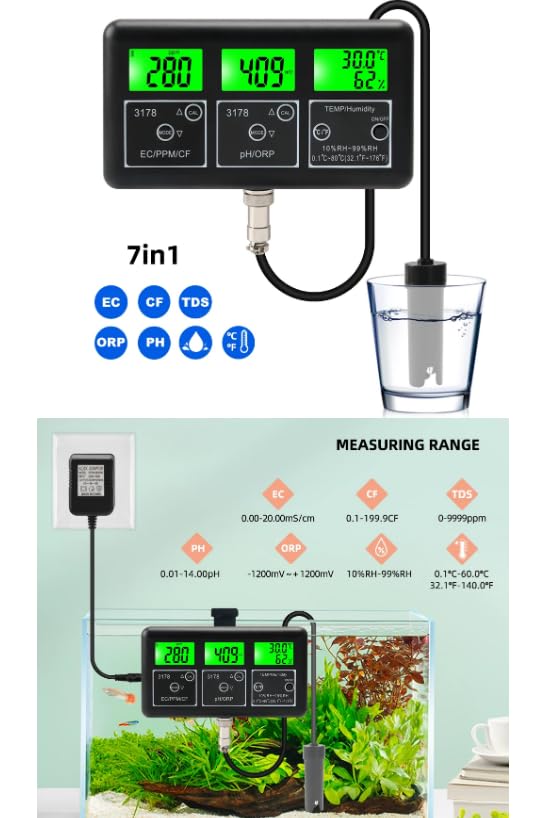
Figure 8.1: Comprehensive specifications for the RS485-3178 meter.
| Parameter | Range | Resolution | Accuracy |
|---|---|---|---|
| pH | 0.01 - 14.00 pH | 0.01 pH | ±0.05 pH |
| ORP | -1200 mV to +1200 mV | 1 mV | ±5 mV |
| EC | 0.00 - 20.00 mS/cm | 0.01 mS/cm | ±2% F.S. |
| TDS | 0 - 9990 ppm | 1 ppm | ±2% F.S. |
| CF | 0.1 - 199.9 CF | 0.1 CF | ±2% F.S. |
| Temperature | 0.1°C - 60.0°C (32.1°F - 140.0°F) | 0.1°C / 0.1°F | ±0.5 |
| Humidity (Air) | 10% - 99% RH | 1% RH | N/A |
- Automatic Temperature Compensation (ATC): 0.1°C - 60.0°C
- Electrode: Replaceable, with low battery indicator
- Backlight: Yes
- Power Supply: 4 x 1.2V NI-MH rechargeable batteries, or via adapter (220V/110V optional)
- Dimensions: Approximately 150mm (Length) x 80mm (Width)
- Cable Length (Power Adapter): Approximately 95cm
- Cable Length (Electrode): Approximately 120cm
9. Warranty Information
For detailed warranty information regarding your VIHELM RS485-3178 meter, please refer to the warranty card included in your product packaging or visit the official VIHELM website. Keep your purchase receipt as proof of purchase for any warranty claims.
10. Customer Support
If you require technical assistance, have questions about the product, or need to report an issue, please contact VIHELM customer service. Contact details can typically be found on the product packaging, the official VIHELM website, or in the included instruction manual.


