
GDFStudio 335102
GDFStudio 54" Two-Tone Storage Shed User Manual
Model: 335102
Introduction
This manual provides essential information for the assembly, operation, and maintenance of your GDFStudio 54" Two-Tone Storage Shed. Please read this manual thoroughly before beginning assembly or use to ensure proper installation and safe operation. Keep this manual for future reference.
The GDFStudio 54" Two-Tone Storage Shed is designed to provide a compact and efficient outdoor storage solution for garden essentials, tools, and seasonal items. Its durable wood construction and weather-resistant features ensure longevity and protection for your belongings.
Safety Information
- Read all instructions: Before assembly and use, carefully read and understand all instructions provided in this manual.
- Adult assembly required: This product requires adult assembly. Keep children and pets away during assembly.
- Use appropriate tools: Ensure you have all necessary tools as listed in the "Package Contents" or "Setup" section.
- Level surface: Assemble the shed on a firm, level surface to ensure stability and proper door alignment.
- Secure installation: For added stability and safety, consider anchoring the shed to the ground, especially in windy conditions. Anchoring hardware is not typically included and may need to be purchased separately.
- Weight capacity: Do not overload shelves or the shed. Distribute weight evenly.
- Ventilation: Ensure adequate ventilation if storing items that may emit fumes.
- Maintenance: Regularly inspect the shed for any signs of wear, damage, or loose fasteners. Address issues promptly.
- Weather protection: While designed to be weather-resistant, extreme weather conditions may require additional precautions to protect contents.
Package Contents
Before beginning assembly, verify that all parts listed below are present and undamaged. If any parts are missing or damaged, do not proceed with assembly. Contact customer support for assistance.
| Part | Description | Quantity |
|---|---|---|
| Side Panels | Left and Right side panels of the shed. | 2 |
| Back Panel | Rear panel of the shed. | 1 |
| Door Assembly | Pre-assembled door with hinges and handle. | 1 |
| Roof Panel | Sloped roof panel. | 1 |
| Shelves | Interior shelves for customizable compartments. | 3 |
| Hardware Pack | Screws, bolts, and other fasteners. | 1 |
| Instruction Manual | This document. | 1 |
Setup and Assembly
Follow these steps carefully to assemble your GDFStudio 54" Two-Tone Storage Shed. It is recommended to have at least two adults for assembly.
Tools Required (Not Included):
- Phillips Head Screwdriver
- Hammer (optional, for securing some components)
- Level
Assembly Steps:
- Prepare the Area: Choose a flat, level, and stable outdoor surface for the shed. Clear any debris or obstacles.
- Unpack Components: Carefully unpack all parts and lay them out on a soft, clean surface to prevent scratches. Refer to the "Package Contents" list to ensure all parts are present.
- Assemble Side Panels: Attach the side panels to the back panel using the provided hardware. Ensure all connections are secure but do not overtighten.

Image: Side view of the assembled shed, illustrating the panel structure.
- Install Shelves: Insert the three interior shelves into the designated slots or attach them using the provided shelf supports. The shelves can be customized to create five distinct storage zones, including a tall compartment for longer tools.

Image: Interior view of the shed with shelves, demonstrating the customizable storage layout.
- Attach Door Assembly: Carefully align the pre-assembled door with the front opening and secure it using the pre-attached hinges and provided screws. Ensure the door swings freely and closes properly.

Image: Front view of the shed, highlighting the door and handle.
- Install Roof Panel: Place the sloped roof panel on top of the assembled shed structure. Secure it using the appropriate fasteners, ensuring a tight seal to prevent water entry.

Image: Detail of the sloped roof, designed for water runoff.
- Final Check: Once assembled, check all connections to ensure they are tight and secure. Verify that the door opens and closes smoothly and latches properly.

Image: The fully assembled GDFStudio storage shed in an outdoor environment.
Operating Instructions
The GDFStudio 54" Two-Tone Storage Shed is designed for straightforward use.
- Opening the Door: Grasp the handle and pull to open the shed door. The reinforced hinges allow for smooth operation.
- Storing Items: Utilize the three interior shelves to organize your items. The design creates five distinct storage zones, including an extra-tall 47" compartment suitable for long-handled tools like shovels, rakes, or brooms.
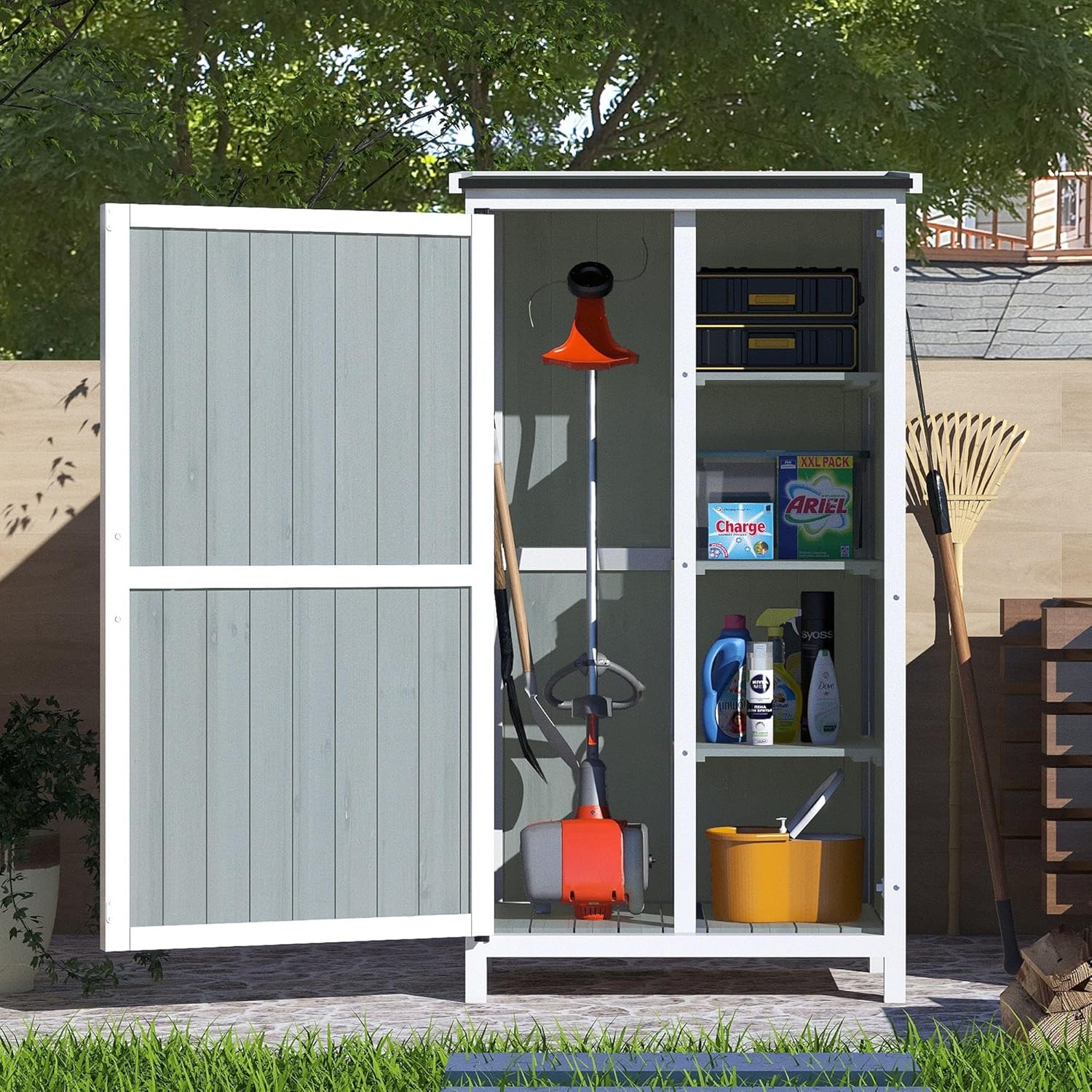
Image: Shed interior with example items, showing practical storage.
- Closing the Door: Push the door firmly until it latches securely. This helps protect contents from weather and pests.
- Security (Optional): For enhanced security, a padlock (not included) can be added to the door latch mechanism.
Maintenance
Regular maintenance will help prolong the life and appearance of your storage shed.
- Cleaning: Clean the exterior surfaces with a soft cloth and mild soap and water. Avoid abrasive cleaners or harsh chemicals that could damage the wood finish.
- Inspect for Damage: Periodically check the shed for any signs of wear, cracks, or loose fasteners. Tighten any loose screws.
- Wood Protection: As the shed is made of wood, consider applying a wood sealant or paint periodically to protect it from UV rays and moisture, especially if exposed to harsh weather conditions.
- Roof Inspection: Ensure the sloped roof remains free of debris (leaves, branches) to allow for proper water runoff. Inspect the roof material for any tears or damage.
- Door Alignment: If the door becomes misaligned over time, check the hinge screws and adjust as necessary.
Troubleshooting
Here are some common issues and their potential solutions:
| Problem | Possible Cause | Solution |
|---|---|---|
| Door does not close properly or is misaligned. | Uneven ground; loose hinges; warped wood. | Ensure the shed is on a level surface. Tighten hinge screws. If wood is warped, consider applying a wood conditioner or contacting support. |
| Water accumulation inside the shed. | Roof not properly sealed; damaged roof material; door not closing tightly. | Check roof panel for proper installation and sealing. Inspect roof for damage. Ensure door latches securely. |
| Shed feels unstable or wobbly. | Not on a level surface; loose assembly fasteners. | Relocate to a level surface. Re-tighten all assembly screws and bolts. Consider anchoring the shed to the ground. |
Specifications
| Attribute | Detail |
|---|---|
| Brand | GDFStudio |
| Model Number | 335102 |
| Color | Gray & White (Two-Tone) |
| Material | Wood |
| Product Dimensions (L x W x H) | 27.5" D x 20.5" W x 54" H |
| Item Weight | 38.36 lbs (approx. 38.4 pounds) |
| Interior Storage Zones | 5 (with 3 adjustable shelves) |
| Tall Compartment Height | Approx. 47" |
| Assembly Required | Yes |
| UPC | 637162293188 |
| ASIN | B0F9PD16WG |

Image: Detailed dimensions of the GDFStudio 54" Two-Tone Storage Shed.
Warranty and Support
GDFStudio stands behind the quality of its products. For specific warranty details, please refer to the warranty card included with your purchase or visit the official GDFStudio website.
If you encounter any issues during assembly or operation, or if you have questions about your product, please contact GDFStudio customer support:
- Website: www.gdfstudio.com (Note: This is a placeholder URL, please refer to actual product documentation for correct contact information.)
- Email: support@gdfstudio.com (Note: This is a placeholder email, please refer to actual product documentation for correct contact information.)
- Phone: 1-800-XXX-XXXX (Note: This is a placeholder number, please refer to actual product documentation for correct contact information.)
When contacting support, please have your model number (335102) and proof of purchase readily available.
Related documents335102


Ask a question about this manual
Ask about setup, troubleshooting, compatibility, parts, safety, or missing instructions. Manuals+ will review the question and use this page’s manual context to help answer it.