1. Safety Information
Before operating your TODIMART T3 Electric Scooter, please read this manual carefully and retain it for future reference. Failure to follow the instructions can lead to serious injury or property damage.
General Safety Guidelines:
- Always wear a helmet and appropriate protective gear (knee pads, elbow pads) when riding.
- Adhere to all local traffic laws and regulations regarding electric scooters.
- Do not ride under the influence of alcohol or drugs.
- Ensure the scooter is in good working condition before each ride. Check brakes, tires, and battery level.
- Do not exceed the maximum load capacity of 120 kg.
- Avoid riding in adverse weather conditions (heavy rain, snow, ice) or on slippery surfaces.
- Maintain a safe distance from other vehicles and pedestrians.
- Children aged 12-15 should be supervised by an adult.
- Do not perform stunts or dangerous maneuvers.
2. Package Contents
Carefully unpack your TODIMART T3 Electric Scooter and check that all items are present and in good condition.
- TODIMART T3 Electric Scooter
- Charger
- Tools (Hexagonal screws and wrench)
- User Manual
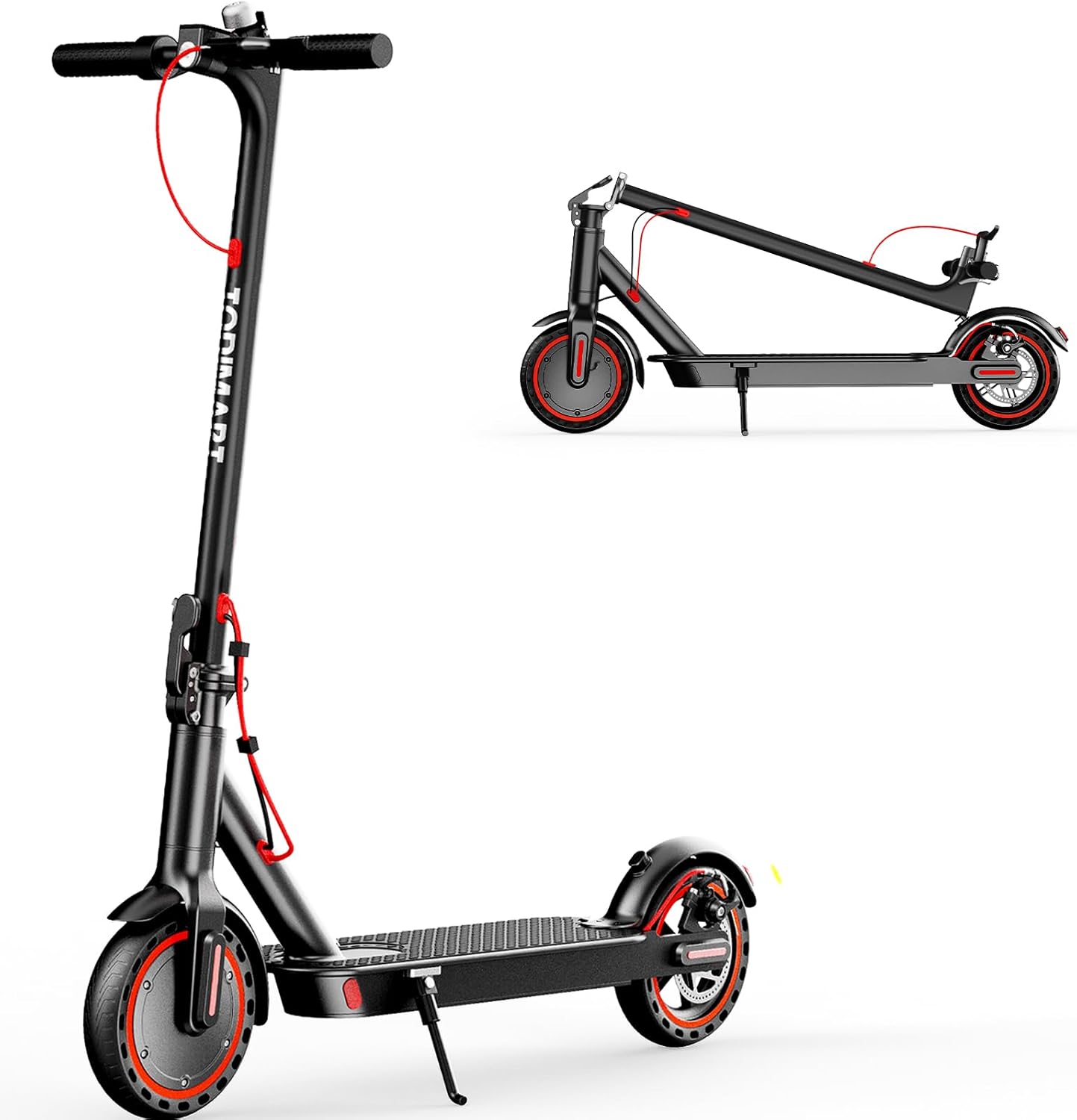
Image: The TODIMART T3 Electric Scooter, shown both unfolded and folded for transport.
3. Assembly Instructions
Follow these steps to assemble your TODIMART T3 Electric Scooter:
- Remove the Scooter from the Box: Carefully lift the electric scooter out of its packaging.
- Connect the Wires: Ensure the wires from the handlebar are correctly connected to the main pole.
- Insert Wires into the Pole: Carefully insert the connected wires into the scooter's pole.
- Attach the Handlebar: Align the handlebar with the pole and slide it into place.
- Secure the Handlebar: Use the provided hexagonal screws and wrench from the tool kit to firmly secure the handlebar to the pole. Ensure all screws are tightened to prevent wobbling.
Video: Demonstrates unboxing the scooter and removing protective foam.
Video: Shows the process of connecting wires and securing the handlebar with screws.
4. Operating Instructions
4.1. Power On/Off
- To power on, press and hold the power button on the display for a few seconds.
- To power off, press and hold the power button again until the display turns off.

Image: Close-up of the scooter's display, showing speed, battery level, and Bluetooth icon, with a smartphone displaying the companion app.
4.2. Speed Modes
The scooter features three speed modes: ECO, D (Drive), and S (Sport). Press the power button briefly to cycle through the modes:
- ECO Mode: Energy-saving mode for longer range, typically around 10 km/h.
- D Mode: Standard mode for balanced speed and range, typically around 20 km/h.
- S Mode: Sport mode for maximum speed and power, up to 25 km/h.
Video: Demonstrates the scooter's three driving modes and display features.
4.3. Lights and Braking
- Headlight: Press the power button twice quickly to turn the headlight on or off.
- Brake Light: The rear brake light illuminates automatically when the brake lever is engaged.
- Braking System: The scooter is equipped with an electronic front brake and a mechanical disc brake on the rear wheel for effective stopping power.

Image: A rider on the scooter, with insets highlighting the LED headlight, rear brake light, and diagrams of the dual braking system (disc and electronic).
4.4. Folding and Unfolding
The TODIMART T3 is designed for quick folding in approximately 3 seconds for easy transport and storage.
- Folding: Locate the folding mechanism near the base of the handlebar stem. Release the latch and fold the stem downwards until it clicks into place.
- Unfolding: Release the latch, lift the handlebar stem until it locks upright, and ensure it is securely fastened before riding.
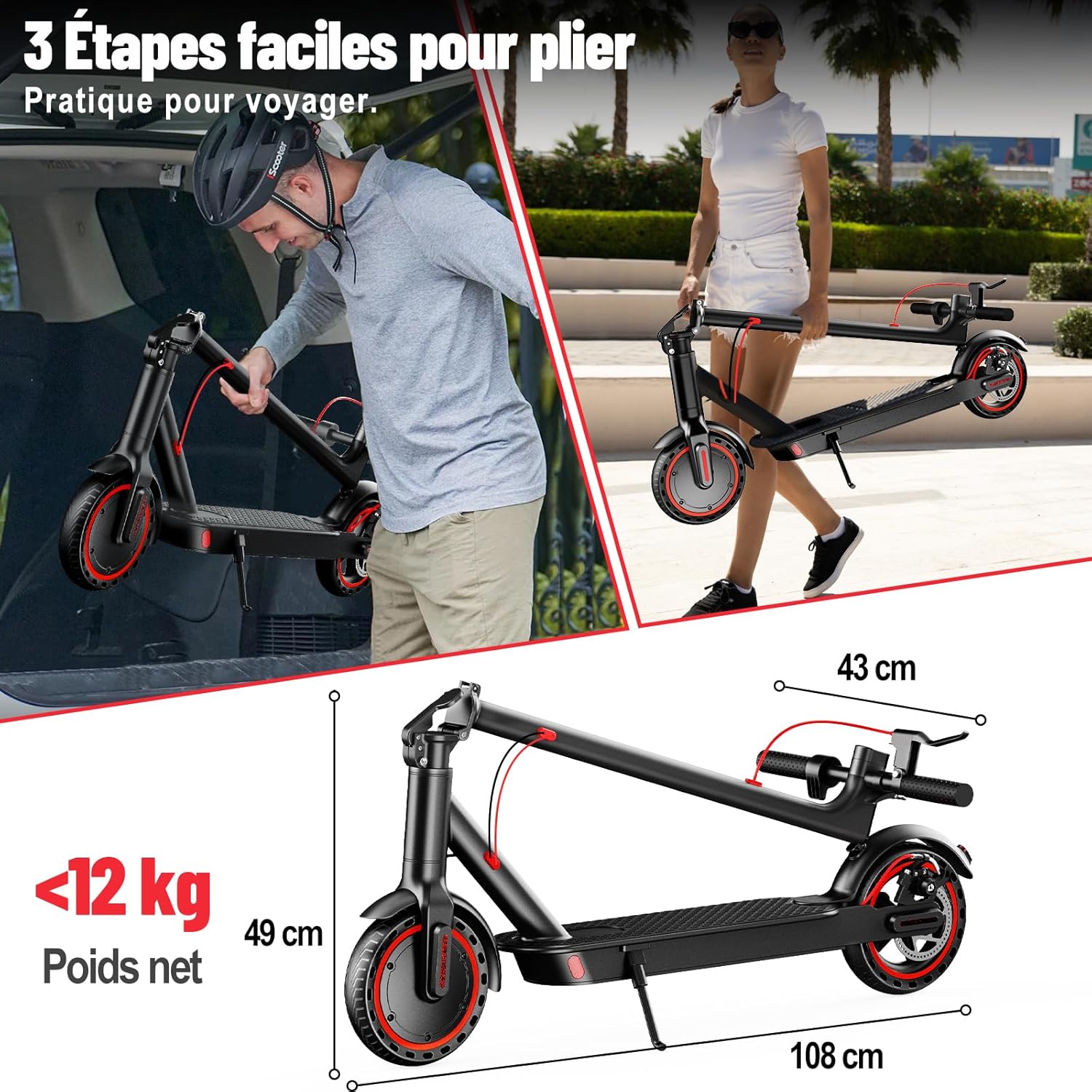
Image: A person demonstrating the folding process of the scooter, showing its compact dimensions when folded.
5. App Connectivity
Enhance your riding experience by connecting your TODIMART T3 Electric Scooter to the companion mobile application via Bluetooth.
5.1. Pairing Your Device:
- Ensure your scooter is powered on and Bluetooth is enabled on your smartphone.
- Open the TODIMART app and follow the on-screen instructions to add a new device.
- The app will search for nearby scooters. Select your T3 model to pair.
- Once paired, the Bluetooth icon on the scooter's display will illuminate.
Video: Demonstrates connecting the TODIMART T3 Electric Scooter to a smartphone app via Bluetooth.
5.2. App Features:
Through the app, you can access various functions including:
- Lock/Unlock: Secure your scooter remotely.
- Custom Max Speed: Adjust the maximum speed limit to suit your preferences or local regulations.
- Cruise Control: Activate and manage cruise control for consistent speed on longer rides.
- Real-time Data: View current speed, battery level, mileage, and other riding statistics.
- Fault Detection: Receive alerts and diagnostic information for potential issues.
6. Maintenance
Regular maintenance ensures the longevity and safe operation of your scooter.
6.1. Battery Care:
- Charge the battery fully before first use.
- Do not allow the battery to completely drain. Recharge after each use.
- Store the scooter in a cool, dry place when not in use, and ensure the battery is partially charged (around 50-70%) if storing for extended periods.
- Use only the original charger provided.
6.2. Tire Maintenance:
- The TODIMART T3 uses 8.5-inch solid (honeycomb) tires, which are puncture-proof and require no inflation.
- Regularly inspect tires for wear and tear. Replace if significant damage is observed.
6.3. Brake System:
- Periodically check the brake levers and cables for proper tension and responsiveness.
- Ensure the disc brake pads are not excessively worn. Consult a professional for brake adjustments or replacements if needed.
6.4. Cleaning and Storage:
- Clean the scooter with a damp cloth. Do not use high-pressure water jets or corrosive cleaners.
- Avoid exposing the scooter to direct sunlight or extreme temperatures for prolonged periods.
- Store the scooter in a dry, secure location.
7. Troubleshooting
If you encounter issues with your TODIMART T3 Electric Scooter, refer to the following common problems and solutions:
| Problem | Possible Cause | Solution |
|---|---|---|
| Scooter does not power on. | Low battery; loose power connection. | Charge the battery; check all power connections. |
| Motor not engaging or weak power. | Low battery; incorrect speed mode; motor issue. | Charge battery; switch to a higher speed mode (D or S); contact support if issue persists. |
| Bluetooth app not connecting. | Bluetooth off; scooter not in pairing mode; app issue. | Ensure scooter is on and Bluetooth is active on phone; restart app and scooter; try re-pairing. |
| Brakes feel loose or ineffective. | Brake cable tension; worn brake pads. | Adjust brake cable tension; inspect and replace brake pads if necessary. Seek professional assistance. |
For further assistance, please refer to the contact information in the Warranty and Support section.
8. Specifications
| Feature | Detail |
|---|---|
| Model | T3 |
| Motor Power | 350W (Brushless, 650W Peak) |
| Max Speed | 25 km/h |
| Battery | 36V 7.8Ah (280.8Wh) Lithium |
| Max Range | 30-35 km (depending on conditions) |
| Tires | 8.5-inch Solid (Honeycomb) |
| Braking System | Electronic Front Brake, Mechanical Rear Disc Brake |
| Max Load Capacity | 120 kg |
| Net Weight | 11.8 kg |
| Folded Dimensions (L x W x H) | 108 x 43 x 49 cm |
| Material | Aluminum |
| Special Features | Digital Display, Speedometer, Lightweight, Foldable, Anti-slip Surface, App Control, Anti-theft |
9. Warranty and Support
TODIMART offers a comprehensive after-sales service. For any issues or inquiries, please contact our support team. The product includes a warranty as per local regulations. Please retain your proof of purchase.
Spare Parts Availability: 3 Years
For detailed warranty information and support, please visit the official TODIMART website or contact your retailer.
Contact Information: Refer to your purchase documentation or the TODIMART official website for the most up-to-date contact details.


